Танилцуулга
This manual provides comprehensive instructions for the ShiftCam Camera Case with Built-in Lens, designed specifically for the iPhone 15 Pro Max. This product combines robust protection with enhanced photographic capabilities, featuring a built-in lens mount and MagSafe compatibility. Please read this manual thoroughly to ensure proper use and care of your new camera case.
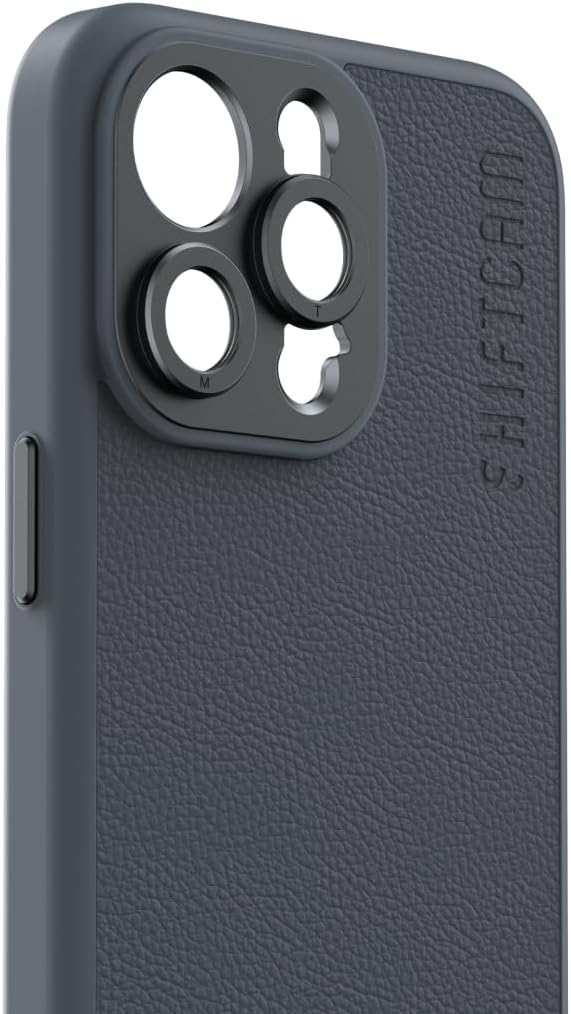
Зураг: Урд view of the ShiftCam Camera Case, highlighting the integrated lens mount.
Тохиргоо
Follow these steps to properly install your ShiftCam Camera Case and prepare it for use with ShiftCam LensUltra lenses.
- Кейс суурилуулах: Gently align your iPhone 15 Pro Max with the case, ensuring all buttons and ports are correctly positioned. Press firmly around the edges until the phone is securely seated within the case.
- Линзний хавсралт: The case features a built-in aluminum lens mount. To attach a ShiftCam LensUltra lens, align the lens threads with the mount on the case and gently twist clockwise until secure. Ensure the lens is firmly attached but do not overtighten.
- MagSafe нийцтэй байдал: The case is designed with integrated MagSafe magnets. This allows for strong and stable connection with MagSafe accessories, including chargers and mounts. Simply align your MagSafe accessory with the back of the case for a secure magnetic connection.

Image: Demonstrating the installation of the iPhone into the case.

Image: The case with a ShiftCam LensUltra lens attached.

Image: Multiple cases showcasing MagSafe compatibility.
Ашиглалтын заавар
The ShiftCam Camera Case is designed for seamless integration with your iPhone's camera system and ShiftCam accessories.
- Ерөнхий хэрэглээ: The case provides heavy-duty protection for your iPhone 15 Pro Max against scratches, stains, and water. Its slim design ensures comfortable handling while maintaining access to all phone functions.
- Using with LensUltra Lenses: The precision-engineered aluminum mount ensures perfect alignment for all ShiftCam LensUltra lenses, preventing lens obstruction and maximizing image quality. Simply attach the desired lens as described in the Setup section before capturing photos or videos.
- Дагалдах хэрэгслийн нэгдэл: Utilize the MagSafe compatibility to attach various ShiftCam accessories such as the SnapGrip for enhanced handling or the SnapStand Mini for stable tabletop photography.

Image: iPhone in case with SnapGrip accessory attached.

Image: iPhone in case with SnapStand Mini accessory attached.
Засвар үйлчилгээ
Proper care will extend the life and maintain the appearance of your ShiftCam Camera Case.
- Цэвэрлэгээ: To clean the vegan leather material, wipe gently with a soft, damp cloth. Avoid using harsh chemicals, abrasive cleaners, or excessive water, as these can damage the material.
- Хадгалах: Ашиглаагүй үед хайрцгийг нарны шууд тусгал, хэт температураас хол, сэрүүн, хуурай газар хадгална.
- Линзний бэхэлгээний арчилгаа: Keep the aluminum lens mount free of dust and debris. Use a soft brush or compressed air to clean the threads if necessary.

Image: Detail of the vegan leather material on the ShiftCam Camera Case.
Алдааг олж засварлах
If you encounter issues with your ShiftCam Camera Case, refer to the following common problems and solutions.
| Асуудал | Боломжит шалтгаан | Шийдэл |
|---|---|---|
| Lens not attaching securely. | Misalignment or debris in threads. | Ensure lens is aligned correctly before twisting. Check for and remove any debris from the lens and case threads. |
| MagSafe accessories not sticking firmly. | Foreign objects between accessory and case, or incorrect alignment. | Ensure the back of the case and the accessory are clean. Realign the accessory to ensure proper magnetic connection. |
| Case feels loose on phone. | Буруу суурилуулалт. | Remove the phone from the case and re-install, ensuring it clicks securely into place around all edges. |
Үзүүлэлтүүд
Key technical specifications for the ShiftCam Camera Case.
| Онцлог | Дэлгэрэнгүй |
|---|---|
| Загварын дугаар | Celuler |
| Тохиромжтой утасны загварууд | iPhone 15 Pro Max |
| Материал | Арьс |
| Зүйлийн жин | 3.52 унц |
| Багцын хэмжээ | 8.98 x 4.41 x 0.79 инч |
| Онцлог шинж чанарууд | Хүнд даацын хамгаалалт |
| Өнгө | Нүүрс |
Баталгаат болон дэмжлэг
Баталгаат хугацааны мэдээлэл болон хэрэглэгчийн дэмжлэг авахыг хүсвэл албан ёсны ShiftCam-аас лавлана уу webсайт эсвэл харилцагчийн үйлчилгээтэй шууд холбогдоно уу. Аливаа баталгаат нэхэмжлэлийн хувьд худалдан авалтаа нотлох баримтаа хадгалаарай.
Онлайн нөөцүүд: -д зочилно уу Амазон дээрх ShiftCam дэлгүүр Бүтээгдэхүүний нэмэлт мэдээлэл, дагалдах хэрэгсэл.


