Танилцуулга
This manual provides essential instructions for the installation, operation, and maintenance of your Fermax Sup Milo Digital Intercom System. Please read this manual thoroughly before installation and use to ensure proper function and safety. Keep this manual for future reference.
The Fermax Sup Milo Digital Intercom System is designed to provide clear communication and enhanced security for residential and commercial premises. It integrates advanced technology with a robust design to offer reliable access control and communication solutions.
Аюулгүй байдлын мэдээлэл
Always follow basic safety precautions to reduce the risk of fire, electric shock, and injury to persons. This product should only be installed and serviced by qualified personnel.
- Суулгах, засвар үйлчилгээ хийхээс өмнө цахилгааныг салга.
- Төхөөрөмжийг бороо, чийгэнд бүү тавь.
- Бүх утас холболтууд найдвартай, орон нутгийн цахилгааны кодуудтай нийцэж байгаа эсэхийг шалгаарай.
- Төхөөрөмжийг өөрөө засах гэж бүү оролдоорой. Бүх засвар үйлчилгээг мэргэшсэн үйлчилгээний ажилтнуудад даатга.
Багцын агуулга
Verify that all components are present before beginning installation. The package typically includes:
- Fermax Sup Milo Digital Intercom Unit (Aluminum Plate)
- Суурилуулах тоног төхөөрөмж
- Connection cables (may vary by kit)
- Хэрэглэгчийн гарын авлага (энэ баримт бичиг)
Note: Specific components may vary based on the purchased kit.
Тохиргоо ба суурилуулалт
This section outlines the general steps for installing the Fermax Sup Milo Digital Intercom System. Professional installation is recommended.
1. Талбайн бэлтгэл
- Choose a suitable mounting location, typically near an entrance, at an accessible height.
- Гадаргуу нь тэгш, тогтвортой байгаа эсэхийг шалгаарай.
- Verify access to necessary power and communication wiring.
2. Төхөөрөмжийг суурилуулах
- Carefully remove the front panel of the intercom unit to access mounting holes.
- Position the unit and mark the drilling points on the wall.
- Шаардлагатай бол нүх өрөмдөж, тохирох ханын зангууг оруулна уу.
- Secure the intercom unit to the wall using the provided mounting screws.
3. Утасны холболт
Refer to the wiring diagram specific to your system configuration. General connections include:
- Эрчим хүчний хангамж: Connect to a stable 100V power source. Ensure correct polarity.
- Communication Bus: Connect the digital bus lines to the indoor units and central control unit.
- Хаалга суллах: Connect the door release mechanism (e.g., electric strike) to the designated terminals.
- Туслах оролт/гаралт: Connect any additional devices such as external cameras or sensors as required.
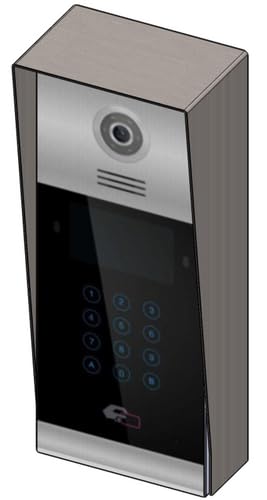 Зураг 1: Урд view of the Fermax Sup Milo Digital Intercom System, showing the aluminum plate and digital keypad. This image illustrates the exterior design of the main unit.
4. Анхны асаалт ба тохиргоо
- Once all wiring is complete and secure, restore power to the system.
- The unit will perform a self-test. Observe any indicator lights or sounds.
- Follow the system's programming guide (usually provided separately or accessible via a master unit) to configure apartment numbers, access codes, and other settings.
Ашиглалтын заавар
Making a Call from the Outdoor Panel
- To call an apartment: Enter the apartment number using the digital keypad.
- Press the "Call" button (often represented by a bell icon or similar).
- The indoor unit will ring. Once answered, communication can begin.
Receiving a Call and Opening the Door (Indoor Unit)
- When the indoor unit rings, press the "Answer" button to establish communication with the visitor.
- To open the door, press the "Door Release" button on your indoor unit.
- The door will unlock for a short period.
Using Access Codes
If configured, authorized users can enter a pre-programmed access code on the outdoor digital keypad to unlock the door without needing to call an indoor unit.
- Enter your personal access code using the digital keypad.
- Press the "Enter" or "Door Release" button.
- Хаалга онгойх болно.
Засвар үйлчилгээ
Regular maintenance ensures the longevity and optimal performance of your Fermax intercom system.
Цэвэрлэгээ
- Төхөөрөмжийн гадна талыг зөөлөн, damp даавуу.
- Зүлгүүрийн цэвэрлэгч, уусгагч, химийн шүршигч хэрэглэж болохгүй, учир нь эдгээр нь өнгөлгөө болон электрон эд ангиудыг гэмтээж болно.
- Төхөөрөмжийн нүхэнд шингэн орохгүй байхыг баталгаажуул.
Хяналт шалгалт
- Periodically check for any visible damage to the unit or wiring.
- Бүх бэхэлгээний боолтыг чангалсан эсэхийг шалгаарай.
- Test the communication and door release functions regularly.
Програм хангамжийн шинэчлэлтүүд
If applicable, consult your installer or Fermax support for information on firmware updates that may improve performance or add new features.
Алдааг олж засварлах
Энэ хэсэгт танд тулгарч болох нийтлэг асуудлуудыг авч үзнэ. Илүү төвөгтэй асуудлуудын талаар техникийн дэмжлэгтэй холбогдоно уу.
| Асуудал | Боломжит шалтгаан | Шийдэл |
|---|---|---|
| No communication with indoor unit. |
|
|
| Хаалганы түгжээ ажиллахгүй байна. |
|
|
| Товчлуур хариу өгөхгүй байна. |
|
|
Үзүүлэлтүүд
Technical specifications for the Fermax Sup Milo Digital Intercom System (Model: 8424299951713).
- Загвар: Fermax Sup Milo Digital Intercom System
- Хэсгийн дугаар: 8424299951713
- Үйлдвэрлэгч: Фермакс
- Хэмжээ (багц): Ойролцоогоор 0.1 x 0.1 x 0.1 см
- Weight (Unit): 108 грамм
- Материал: Metal, Plastic, Polycarbonate (Aluminum Plate)
- Эрчим хүчний эх үүсвэр: External Power Supply (100V)
- Ботьtage: 100 В
- Ватtage: 100 Вт
- Шаардлагатай батерей: Үгүй
- Өнгө: Multicolored (referring to internal components or subtle design elements, main plate is aluminum)
Баталгаат хугацааны мэдээлэл
Fermax products are manufactured to high-quality standards. For specific warranty terms and conditions, please refer to the warranty card included with your product or visit the official Fermax webсайт. Баталгаат нэхэмжлэл гаргахын тулд худалдан авалтаа нотлох баримтаа хадгалаарай.
Typically, warranty covers manufacturing defects for a specified period from the date of purchase. Damage due to improper installation, misuse, or unauthorized repairs is generally not covered.
Хэрэглэгчийн дэмжлэг
If you require technical assistance, have questions about your product, or need to report a problem, please contact your local Fermax distributor or visit the official Fermax webтуслах нөөцийн сайт.
Webсайт: www.fermax.com
Дэмжлэгтэй холбогдохдоо загварын дугаар (8424299951713) болон худалдан авалтын дэлгэрэнгүй мэдээллийг бэлэн байлгана уу.


