1. Танилцуулга
The Qolsys IQ Lock-PG Push Button Deadbolt provides enhanced security and convenient access to your property. This smart motorized deadbolt integrates PowerG wireless communication for reliable and stable connectivity, compatible with IQ Panel 4, IQ4 Hub, and IQ4 NS systems. It offers multiple access methods, including a pushbutton keypad, traditional key, thumb-turn, and remote control via the Alarm.com app.
Designed for durability, the IQ Lock-PG meets ANSI Grade 2 certifications and features an attractive oil-rubbed bronze finish to complement various door styles.
2. Үндсэн шинж чанарууд
- Motorized Deadbolt: Push button operation with an attractive finish.
- Олон хандалтын аргууд: Lock/unlock via PowerG wireless communication (App and Panel), user code, thumb-turn, or physical key.
- Хэрэглэгчийн кодын багтаамж: Supports up to 250 user codes (4 to 8 digits) for family, friends, or temporary guests.
- Алсын удирдлага: Create or remove individual codes remotely via the Alarm.com app.
- Хялбар суурилуулалт: Battery-powered (AA batteries, not included), requiring no complex wiring.
- Удаан эдэлгээтэй барилга: ANSI/BHMA Grade 2 certified for strong, reliable security.
3. Багцын агуулга
Суулгаж эхлэхээс өмнө бүх зүйл багцад байгаа эсэхийг шалгаарай:
- Qolsys IQ Lock-PG Deadbolt Assembly
- (2) Turnkeys
- Суурилуулах тоног төхөөрөмж
- Хэрэглэх заавар (энэ баримт бичиг)
4. Тохиргоо ба суурилуулалт
The Qolsys IQ Lock-PG motorized deadbolt is designed for straightforward installation. All necessary hardware and detailed instructions are included. Please read these instructions carefully before proceeding.
4.1 Compatibility and Requirements
- Хаалганы зузаан: Installs on standard doors measuring 1-3/8 inches to 2-1/4 inches (35-58mm) thick.
- Нуруу: Adjustable latch fits existing backsets of either 2-3/8 inches or 2-3/4 inches (60/70mm).
- Хаалга өгөх: Suitable for both right-handed and left-handed door operations.
- Системийн интеграци: Requires an IQ Panel 4, IQ4 Hub, or IQ4 NS (sold separately) and an active Internet connection for smart features.
- Эрчим хүч: Requires four (4) AA alkaline batteries (not included).
4.2 Суулгах үе шатууд (Дээрхview)
While detailed steps are provided in the included physical manual, here is a general overview:
- Prepare the door: Ensure the door bore holes and backset are compatible with the lock.
- Түгжээ болон цохиурын хавтанг суурилуулна уу.
- Гадна талын товчлуурын угсралтыг суулгана уу.
- Дотор бэхэлгээний хавтанг суулгана.
- Гадна угсралтаас кабелийг дотоод угсралт руу холбоно.
- Дотоод угсралтыг суурилуулах.
- Insert four (4) AA alkaline batteries into the battery compartment.
- Perform the door handing process (automatic adjustment).
- Test the lock's functionality with the keypad and thumb-turn.
- Pair the lock with your IQ Panel system and Alarm.com app for smart features.

Зураг 4.1: Урд view of the Qolsys IQ Lock-PG Deadbolt, showcasing the keypad and keyhole.
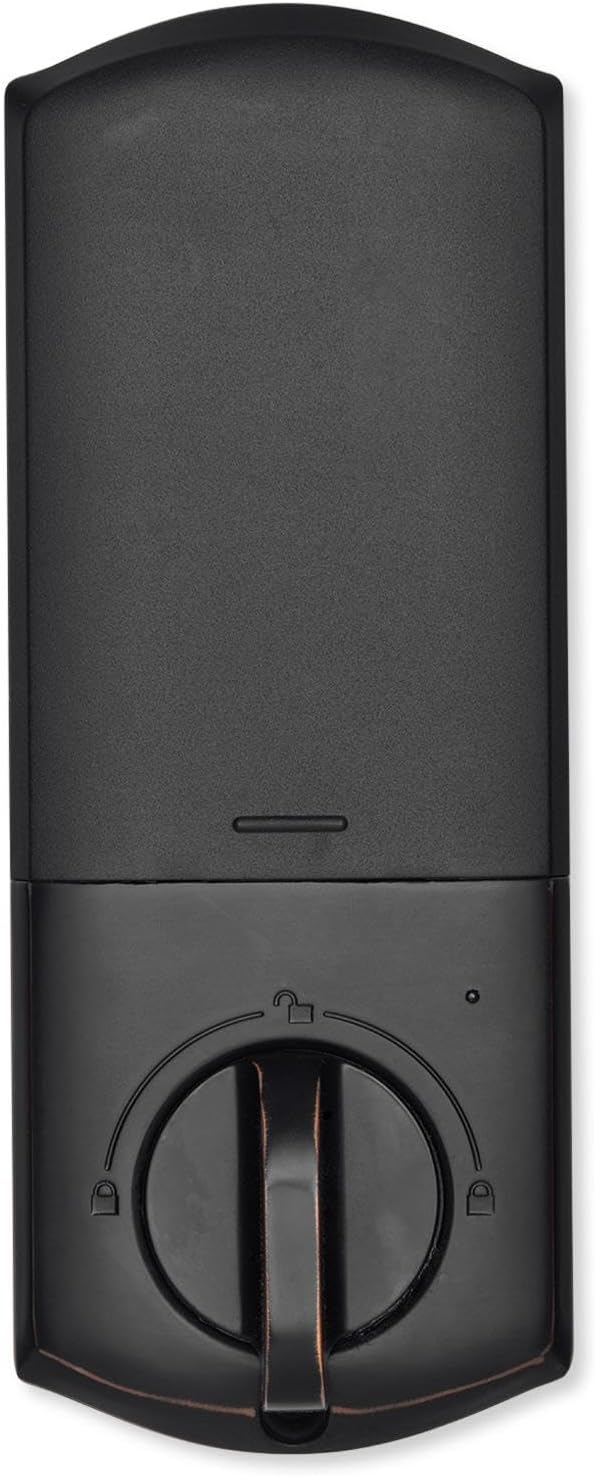
Зураг 4.2: Дотоод засал view of the Qolsys IQ Lock-PG Deadbolt, highlighting the thumb-turn and battery cover.

Figure 4.3: Qolsys IQ Lock-PG Deadbolt installed on a door, illustrating its appearance in a real-world setting.
5. Ашиглалтын заавар
The Qolsys IQ Lock-PG offers multiple convenient ways to lock and unlock your door.
5.1 Хандалтын аргууд
- Pushbutton Keypad: Enter a valid 4-to-8 digit user code on the exterior keypad to unlock the deadbolt. The lock will automatically engage when closed.
- Физик түлхүүр: Use one of the provided turnkeys in the exterior key cylinder for manual unlocking and locking.
- Thumb-Turn: From the interior, rotate the thumb-turn to manually lock or unlock the deadbolt.
- PowerG Wireless Communication (Alarm.com App/Panel):
The Alarm.com mobile app allows for remote monitoring and control of your Qolsys devices. Once paired with your IQ Panel, you can:
- Lock or unlock your smart doors from anywhere.
- Create, modify, or delete up to 250 individual user codes. User codes are managed through the Alarm.com app and sent to the lock.
- Receive notifications regarding lock status and activity.
The Alarm.com app is available for Android, iOS, Windows, and Blackberry devices.
6. Засвар үйлчилгээ
Regular maintenance ensures the longevity and optimal performance of your Qolsys IQ Lock-PG deadbolt.
6.1 Батерейг солих
The deadbolt is powered by four (4) AA alkaline batteries. Battery life is approximately 12 months, based on typical usage (6 user code unlock events and 10 locking/unlocking cycles per day). The lock features a low battery alarm to notify you when replacement is needed.
- When the low battery alarm sounds or is indicated, replace all four AA batteries simultaneously.
- Remove the interior cover to access the battery compartment.
- Remove old batteries and dispose of them according to local regulations.
- Зөв туйлшралыг хангаж, шинэ АА шүлтлэг батерейг оруулна уу.
- Дотоод тагийг солино уу.
6.2 Цэвэрлэгээ
Түгжээний гадна болон дотор гадаргууг зөөлөн, damp даавуу. Зүлгүүрийн цэвэрлэгч эсвэл уусгагч хэрэглэхээс зайлсхий, учир нь эдгээр нь өнгөлгөөг гэмтээж болзошгүй.
7. Алдаа засах
This section addresses common issues you might encounter with your Qolsys IQ Lock-PG deadbolt.
7.1 Товчлуурын түгжээ
If 10 consecutive invalid user codes are entered, the keypad will enter a lockout mode for 3 minutes. During this time, no codes can be entered. Wait for the lockout period to expire before attempting to enter a valid code again.
7.2 Түгжээ хариу өгөхгүй байна
- Check the batteries: Ensure they are correctly installed and not depleted. Replace all four AA batteries if necessary.
- Verify connection to IQ Panel: Ensure the lock is properly paired with your IQ Panel 4, IQ4 Hub, or IQ4 NS. Check the panel's status for the lock.
- Check door alignment: Ensure the door and frame are properly aligned and there is no obstruction preventing the deadbolt from extending or retracting smoothly.
7.3 Issues with Alarm.com App Control
- Ensure your IQ Panel has an active Internet connection.
- Verify your smartphone or tablet has a stable internet connection.
- Log out and log back into the Alarm.com app.
- Ensure the lock is properly enrolled in your Alarm.com account.
8. Техникийн үзүүлэлтүүд
| Онцлог | Тодорхойлолт |
|---|---|
| Үйлдвэрлэгчийн хэсэг # | IQ Lock-PGK-ORB |
| UPC | 7290109986104 |
| Дуусга | Тосон түрхсэн хүрэл |
| Self-Handing | Дэмжигдсэн |
| Боолт төрөл | Motorized/Standard deadbolt |
| Бэккет | 2-3/8" / 2-3/4" Adjustable (60/70mm) |
| Хаалганы бэлтгэл | 1-1/2" / 2-1/8" (38/54mm) |
| Хаалганы зузаан | 1-3/8" to 2-1/4" (35-58mm) automatic adjustment |
| Түгжээг тайлах арга | PowerG wireless communication (App and Panel), Button keypad, key, thumb-turn |
| Кодын багтаамж | User code x 250 |
| Кодын урт | 4-8 оронтой |
| Override Key Cylinder | Тиймээ |
| Цилиндр | KW1 keyway |
| Ажлын ботьtage | DC 6V |
| Зай (ороогүй) | AA x 4 |
| Working Temperature Exterior | -31°F - 150°F (-35°C - 65°C) |
| Working Temperature Interior | 32°F - 140°F (0°C - 60°C) |
| IP Rating Exterior assembly | IP54 |
| Lockout Mode (Wrong entry limit) | Keypad lockout for 3 minutes after 10 entries of invalid user code |
| Батарей багатай дохиолол | Тиймээ |
| Зайны ашиглалт | Min. 12 months (6 user code unlock events, and 10 unlocking and locking cycles for each day) |
| Гэрчилгээ | FCC, IC, ANSI BHMA A156.36 Grade 2, UL10C (20min Fire Rating) |
| IoT холболт | PowerG |
| Бүтээгдэхүүний жин | 1.6KG (3.6 LB) |
| Operating Humidity Exterior | 100% конденсац |
| Operating Humidity Interior | 20% ~ 95% конденсацгүй |
9. Баталгаат хугацаа ба дэмжлэг
9.1 Баталгаат хугацааны мэдээлэл
The Qolsys IQ Lock-PG Push Button Deadbolt comes with a warranty of Twelve months from the date of purchase. Баталгаат заргад зориулж худалдан авалтаа нотлох баримтаа үлдээнэ үү.
9.2 Хэрэглэгчийн дэмжлэг
For technical assistance, troubleshooting beyond this manual, or warranty inquiries, please contact Qolsys customer support. Refer to the Qolsys official webхамгийн сүүлийн үеийн холбоо барих мэдээллийг сайт эсвэл таны бүтээгдэхүүний сав баглаа боодолоос авна уу.


