1. Аюулгүй байдлын мэдээлэл
Please read all instructions carefully before using the iZEEKER Projector. Keep this manual for future reference.
- Эрчим хүчний хангамж: Зөвхөн заасан тэжээлийн адаптерийг ашиглана уу. Боть байгаа эсэхийг баталгаажуулна ууtage нь танай бүс нутагт тохиромжтой.
- Агааржуулалт: Агааржуулалтын нүхийг хааж болохгүй. Хэт халалтаас урьдчилан сэргийлэхийн тулд проекторын эргэн тойронд зохих агаарын урсгалыг хангах хангалттай зайг ханга.
- Байгаль орчин: Avoid exposing the projector to rain, moisture, direct sunlight, or extreme temperatures. Do not place it near heat sources.
- Цэвэрлэгээ: Цэвэрлэхийн өмнө проекторыг салга. Зөөлөн, хуурай даавуу хэрэглээрэй. Шингэн болон аэрозол цэвэрлэгч хэрэглэж болохгүй.
- Нүд хамгаалах: l байх үед проекторын линз рүү шууд харж болохгүйamp is on. The iZEEKER projector utilizes diffuse reflection technology to reduce blue light exposure and eye fatigue.
- Хүүхдүүд: Keep the projector out of reach of small children. Supervise children when the projector is in use.
- Салгах: Проекторыг өөрөө задлах, засах гэж бүү оролдоорой. Бүх үйлчилгээг мэргэшсэн боловсон хүчинд шилжүүлээрэй.

2. Багцын агуулга
Доор жагсаасан бүх зүйл таны багцад байгаа эсэхийг шалгаарай.
- iZEEKER Projector (Model: iPL320)
- Эрчим хүчний адаптер
- Алсын удирдлага
- HDMI кабель
- АВ кабель
- Хэрэглэгчийн гарын авлага
- Customized Tripod

3. Бүтээгдэхүүн дууссанview
3.1 Гол онцлогууд
- Bluetooth 5.2: For enhanced audio experience with external Bluetooth speakers or headphones. Note: Bluetooth is for audio output only, not for screen mirroring.
- Өндөр тод байдал ба нягтрал: 12000 Lux brightness and native 1080P resolution with 100% NTSC color reproduction and 10000:1 contrast ratio for clear, realistic images.
- Олон төхөөрөмжийн холболт: Equipped with HDMI, AV, USB, and Aux ports for stable connections to smartphones, laptops, PS5, TV boxes, and DVD players.
- Том дэлгэцийн төсөөлөл: Supports up to a 250-inch screen size with 75% zoom function for flexible screen adjustment without moving the projector.
- Нүд хамгаалах: High-refraction lenses and diffuse reflection technology reduce blue light and eye fatigue.


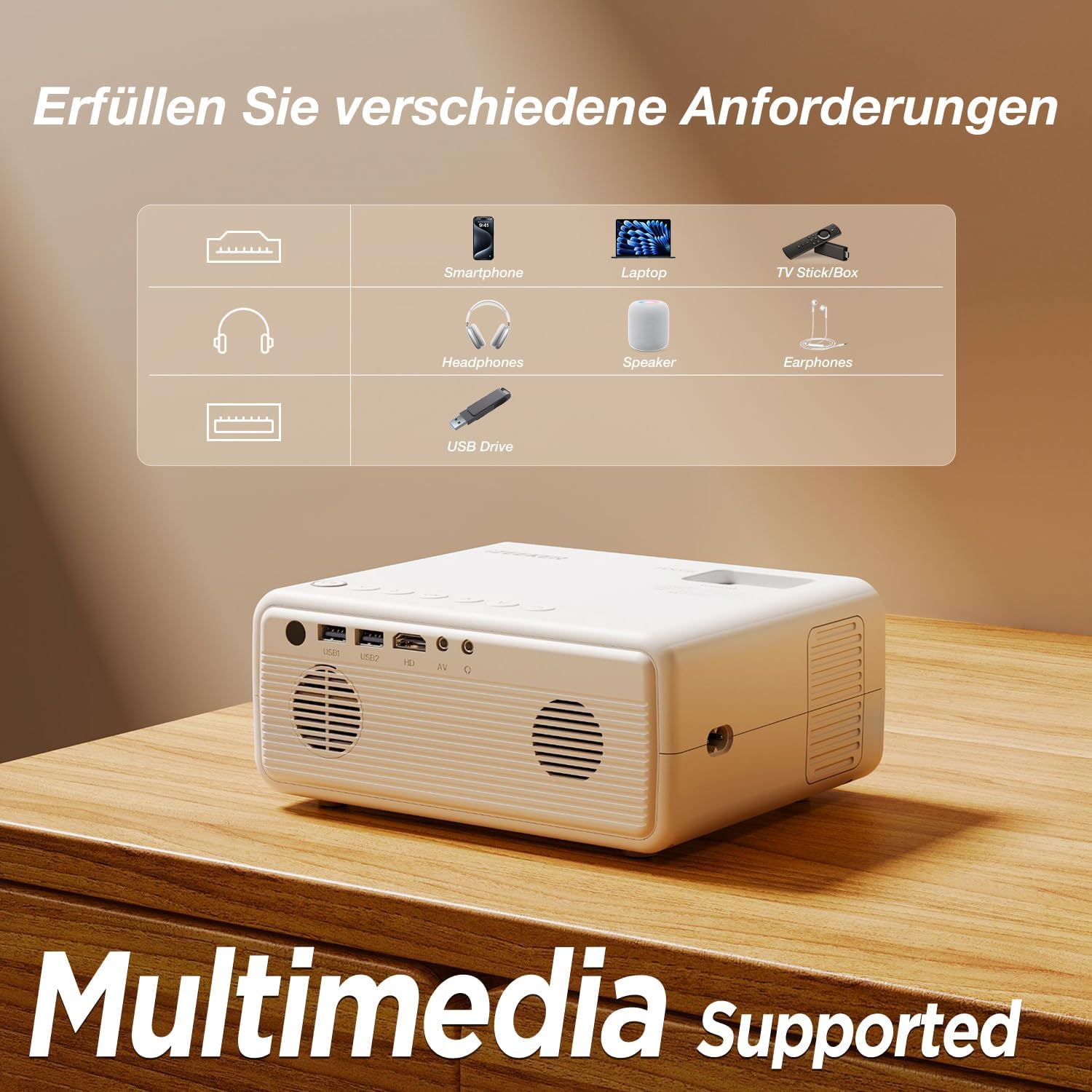
4. Тохиргоо
4.1 Байршил
Choose a flat, stable surface for the projector. The projection distance affects the screen size. For optimal viewпроектор нь проекцийн гадаргуутай перпендикуляр байгаа эсэхийг шалгаарай.
- The projector can be placed on a table, mounted on the included tripod, or ceiling-mounted.
- Хүссэн дэлгэцийн хэмжээ буюу 250 инч хүртэл зайг тохируулна уу.

4.2 Эрчим хүчний холболт
Цахилгаан адаптерийг проекторын тэжээлийн оролтын порт руу холбож, дараа нь адаптерийг цахилгааны залгуурт залгана уу.
4.3 Фокус ба гол чулууны тохируулга
After powering on, adjust the focus ring on the projector lens until the image is clear. Use the keystone correction dial to adjust the image shape if it appears trapezoidal.

4.4 Төхөөрөмжүүдийг холбох
The projector supports various wired connections for stable performance:
- HDMI: Connect laptops, gaming consoles (PS5), TV boxes, or DVD players using an HDMI cable.
- USB: Медиа тоглуулахын тулд USB драйв оруулна уу fileшууд.
- OF: Хуучин төхөөрөмжүүдийн хувьд AV портыг ашиглана уу.
- Smartphones (Wired):
- iOS төхөөрөмжүүд: Requires an Apple Lightning to HDMI adapter cable (not included).
- Android төхөөрөмжүүд: Requires a Micro USB/Type-C to HDMI cable (not included).


4.5 Bluetooth аудио холболт
Гадаад Bluetooth чанга яригч эсвэл чихэвчийг холбохын тулд:
- Bluetooth аудио төхөөрөмжөө хослуулах горимд байгаа эсэхийг шалгаарай.
- Проектор дээр Bluetooth тохиргооны цэс рүү очно уу.
- Хослуулах боломжтой төхөөрөмжүүдийн жагсаалтаас төхөөрөмжөө сонгоно уу.
ЖИЧ: The Bluetooth function is for audio output only and does not support screen mirroring from mobile devices.

5. Ашиглалтын заавар
5.1 Асаах/унтраах
- Асаах: Проектор эсвэл алсын удирдлага дээрх цахилгаан товчийг дарна уу.
- Унтраах: Асаах товчийг дахин дарна уу. Асуувал унтраахыг баталгаажуулна уу.
5.2 Цэсийн навигаци
Use the navigation buttons on the projector or remote control to browse the on-screen menu. The "OK" button confirms selections, and the "Back" button returns to the previous screen.
5.3 Оролтын эх үүсвэрийн сонголт
Press the "Source" button on the remote control or projector to select the desired input (e.g., HDMI1, USB, AV).
5.4 Томруулах функц
The projector features a 75% zoom function. Access this setting in the projector's menu to adjust the screen size without physically moving the projector.


6. Засвар үйлчилгээ
6.1 Линзийг цэвэрлэх
Use a professional lens cleaning cloth or air blower to clean the projector lens. Do not touch the lens directly with your hands or use abrasive cleaners.
6.2 Проекторын их биеийг цэвэрлэх
Wipe the projector's exterior with a soft, dry cloth. Do not use liquid, abrasive, or corrosive cleaners.
6.3 Хадгалалт
When not in use for extended periods, store the projector in a cool, dry, dust-free environment. Use the original packaging or a protective case to prevent damage.
7. Алдаа засах
| Асуудал | Боломжит шалтгаан | Шийдэл |
|---|---|---|
| No image/No signal | Incorrect input source selected; Cable not connected properly; Device not powered on. | Select the correct input source (HDMI, USB, AV). Check all cable connections. Ensure the connected device is powered on. |
| Бүдгэрсэн зураг | Фокус тохируулагдаагүй; Проектор хэт хол/ойр; Линз бохир байна. | Adjust the focus ring. Adjust projection distance. Clean the projector lens. |
| Trapezoidal image | Проектор дэлгэцтэй перпендикуляр биш. | Adjust the keystone correction dial. Reposition the projector. |
| Дуу алга | Дууны хэмжээ хэт бага; Дууг нь хаасан; Гадаад аудио төхөөрөмж холбогдоогүй/хослогдоогүй. | Increase volume. Unmute. Check Bluetooth connection for external speakers/headphones. |
| Cannot play Netflix/Prime Video | Copyright restrictions. | These services can only be played via a TV Stick (e.g., Amazon Fire Stick) connected to the projector's HDMI port. |
8. Техникийн үзүүлэлтүүд
| Брэнд | iZEEKER |
| Загварын дугаар | iPL320 |
| Бүтээгдэхүүний төрөл | Зөөврийн проектор |
| Гэрэлтүүлэг | 12000 Люкс |
| Дэлгэцийн нягтрал | 1920 x 1080 (1080P Native) |
| Дэлгэцийн хамгийн дээд нарийвчлал | 1920 x 1080 |
| Ялгаатай харьцаа | 10000:1 хүртэл |
| Холболтын технологи | Bluetooth 5.2, HDMI, USB, AV, Aux |
| Screen Size (Max) | 250 инч |
| Томруулах функц | 75% |
| Бүтээгдэхүүний хэмжээс | 19L x 15.8W x 8.6H сантиметр |
| Суурилуулах төрөл | Tripod бэхэлгээ |
| Зөвлөмж болгож буй хэрэглээ | Гэрийн кино театр |
9. Баталгаат хугацаа ба дэмжлэг
iZEEKER is committed to providing excellent customer service.
- Үйлдвэрлэгчийн баталгаа: The iZEEKER Projector comes with a free 2-year after-sales warranty.
- Техникийн дэмжлэг: Professional lifetime technical support is available.
- Бидэнтэй холбоо барина уу: If you have any questions, issues, or require assistance, please do not hesitate to contact iZEEKER customer support. Refer to the contact information provided in your product packaging or on the official iZEEKER webсайт.


