1. Танилцуулга
Худалдан авалт хийсэнд баярлалааasing the Goldair GRPF-1632 Rechargeable Pedestal Fan. This manual provides essential information for the safe and efficient operation, assembly, maintenance, and troubleshooting of your fan. Please read these instructions thoroughly before use and retain them for future reference.
2. Аюулгүй ажиллагааны чухал заавар
- Сэнсийг хазайхаас сэргийлж тогтвортой, тэгш гадаргуу дээр байрлуулсан эсэхийг үргэлж шалгаарай.
- Сэнс ажиллаж байх үед сэнсний сараалжаар хуруу эсвэл бусад зүйлийг хийж болохгүй.
- Сэнсийг ус болон бусад шингэнээс хол байлга. Нойтон орчинд бүү хэрэглэ.
- Unplug the fan from the power source before cleaning, maintenance, or when not in use.
- Гэмтсэн утас эсвэл залгууртай сэнсийг ажиллуулж болохгүй. Засварын талаар мэргэшсэн үйлчилгээний ажилтантай холбоо барина уу.
- Энэхүү төхөөрөмжийг бие бялдар, мэдрэхүйн болон сэтгэцийн хомсдолтой, эсвэл туршлага, мэдлэг дутмаг хүмүүс (хүүхдүүдийг оролцуулан) ашиглахад зориулагдаагүй бөгөөд хэрэв тэдэнд аюулгүй байдлыг нь хариуцдаг хүнээс тухайн төхөөрөмжийг ашиглах зааварчилгаа өгөөгүй л бол.
- Хүүхдийг төхөөрөмжөөр тоглуулахгүйн тулд тэднийг хянах хэрэгтэй.
- Use only the charging adapter supplied with the fan.
- Агаарын нүхийг хааж болохгүй.
3. Бүтээгдэхүүн дууссанview
The Goldair GRPF-1632 is a 16-inch rechargeable pedestal fan designed for versatile cooling. It features a robust construction, multiple speed settings, and an adjustable head for directional airflow. Its rechargeable battery provides cordless operation, enhancing portability.
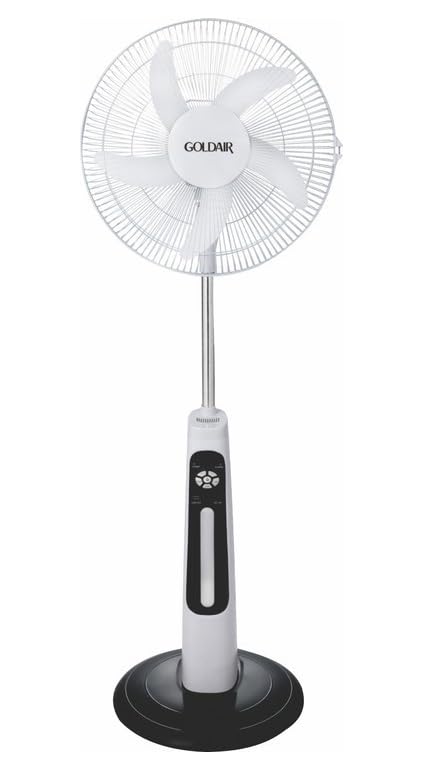
This image displays the complete Goldair Rechargeable Pedestal Fan. It features a white fan head with a protective grille and five blades, an adjustable silver-colored pole, a white and black control panel housing the fan's functions, and a stable black round base.
4. Багцын агуулга
- Fan Head Assembly (including blades and grilles)
- Тохируулах боломжтой тулгуур багана
- Дугуй суурь
- Суурийн бэхэлгээний шураг
- Цахилгаан адаптер/цэнэглэгч
- Хэрэглэгчийн гарын авлага
5. Тохиргоо ба угсралт
Follow these steps to assemble your Goldair Pedestal Fan:
- Суурийг хавсаргана уу: Place the pedestal pole onto the round base. Align the holes and secure the pole to the base using the provided fixing screw from underneath the base. Tighten securely.
- Сэнсний толгойг суурилуулах: Carefully slide the fan head assembly onto the top of the pedestal pole. Ensure it clicks into place or is secured according to the specific design (some models may have a screw or locking mechanism).
- Тогтвортой байдлыг шалгах: Once assembled, gently test the fan's stability on a flat surface.
6. Ашиглалтын заавар
Familiarize yourself with the control panel on the fan body:
- Цахилгаан товч: Сэнсийг асаах эсвэл унтраахын тулд дарна уу.
- Хурдны тохиргоо: Press the speed button repeatedly to cycle through different fan speeds (e.g., Low, Medium, High). Indicator lights will show the current speed.
- Чичиргээний товчлуур: Press to activate or deactivate the oscillation function, which allows the fan head to sweep from side to side.
- Цаг хэмжигч товчлуур: If available, press to set a timer for automatic shutdown (e.g., 1 hour, 2 hours, 4 hours).
- Налалтын тохируулга: Manually adjust the angle of the fan head up or down to direct airflow as desired. Hold the fan head firmly and tilt it to the desired position.
7. Батерейг цэнэглэж байна
The Goldair GRPF-1632 fan is equipped with a rechargeable battery for cordless operation. To charge the fan:
- Ensure the fan is turned OFF.
- Connect the power adapter to the charging port on the fan body.
- Адаптерийг ердийн цахилгаан залгуурт холбоно уу.
- The charging indicator light will illuminate (e.g., red for charging, green for fully charged).
- Allow the fan to charge completely before its first cordless use. Charging time may vary.
The fan can also operate while connected to the power adapter.
8. Засвар үйлчилгээ, цэвэрлэгээ
Regular cleaning ensures optimal performance and extends the life of your fan.
- Цэвэрлэхийн өмнө: Always unplug the fan from the power outlet and ensure it is turned off.
- Гадна цэвэрлэгээ: Сэнсний гаднах гадаргууг зөөлөн, damp даавуу. Зүлгүүрийн цэвэрлэгч, уусгагч эсвэл хүчтэй химийн бодис бүү хэрэглэ, учир нь эдгээр нь өнгөлгөөг гэмтээж болзошгүй.
- Сараалж ба ир: To clean dust from the fan blades and inside the grilles, you may need to carefully remove the front grille. Refer to the assembly instructions in reverse for safe removal. Use a soft brush or vacuum cleaner with a brush attachment to remove accumulated dust. Ensure all parts are dry before reassembling.
- Хадгалах: Удаан хугацаагаар ашиглаагүй бол сэнсийг тоос шороо, гэмтлээс хамгаалахын тулд хуурай, сэрүүн газар, анхны савлагаанд нь хадгал.
9. Алдаа засах
Хэрэв та сэнстэй холбоотой асуудалтай тулгарвал нийтлэг асуудал болон шийдлүүдийн талаар дараах хүснэгтээс үзнэ үү.
| Асуудал | Боломжит шалтгаан | Шийдэл |
|---|---|---|
| Сэнс асахгүй байна. | No power supply or low battery. | Ensure the power adapter is securely plugged in and the outlet is functional. Charge the fan battery if operating wirelessly. |
| Агаарын урсгал сул. | Fan speed is too low or grilles are obstructed. | Increase the fan speed setting. Clean any dust or debris from the front and rear grilles and blades. |
| Сэнс чимээ шуугиантай байна. | Loose parts or dust accumulation. | Ensure all assembly screws are tightened. Clean the fan blades and grilles to remove any dust buildup. |
| Хэлбэлзэл ажиллахгүй байна. | Осцилляцийн функц идэвхжээгүй байна. | Press the oscillation button to activate the function. |
10. Техникийн үзүүлэлтүүд
- Брэнд: Голдейр
- Загварын дугаар: GRPF-1632
- Цахилгаан сэнсний дизайн: Шалны сэнс
- Хутганы урт: 16 инч
- Хутганы тоо: 3
- Материал: Хөнгөн цагаан
- Хянагчийн төрөл: Товчлуурын удирдлага
- Барааны жин: 4 кг
- Бүтээгдэхүүний хэмжээ: 62.8D x 13W x 56.5H сантиметр
- Өнгө: Multicolor (as per product specifications)
11. Баталгаат хугацаа ба хэрэглэгчийн дэмжлэг
Goldair products are manufactured to high standards and are warranted against defects in materials and workmanship. For specific warranty terms and conditions, please refer to the warranty card included with your purchase or visit the official Goldair website. For technical support, spare parts, or service inquiries, please contact Goldair customer support through their official channels.