1. Аюулгүй ажиллагааны чухал заавар
Please read these instructions carefully before using the Goldair Remote Wall Fan. Failure to follow these safety guidelines may result in electric shock, fire, or injury.
- Эрчим хүчний хангамж: Ensure the fan is connected to a power supply that matches the voltagүнэлгээний шошгон дээр заасан e.
- Байршил: Do not place the fan near curtains, drapes, or any objects that may be drawn into the fan blades.
- Хүүхдүүд: Энэхүү төхөөрөмжийг бие бялдар, мэдрэхүйн болон сэтгэцийн хомсдолтой, эсвэл туршлага, мэдлэг дутмаг хүмүүс (хүүхдүүдийг оролцуулан) ашиглахад зориулагдаагүй бөгөөд хэрэв тэдэнд аюулгүй байдлыг нь хариуцдаг хүнээс тухайн төхөөрөмжийг ашиглах зааварчилгаа өгөөгүй л бол. Хүүхдийг төхөөрөмжөөр тоглуулахгүйн тулд тэднийг хянах хэрэгтэй.
- Цэвэрлэгээ: Цэвэрлэх, засвар үйлчилгээ хийхээсээ өмнө сэнсээ үргэлж цахилгааны залгуураас салга.
- Хохирол: Do not operate the fan with a damaged cord or plug. If the supply cord is damaged, it must be replaced by the manufacturer, its service agent, or similarly qualified persons to avoid a hazard.
- Ус: Do not immerse the fan in water or other liquids. Do not use the fan in wet or damp орчин.
- Агааржуулалт: Ensure adequate ventilation around the fan during operation.
- Салгах: Do not attempt to repair or disassemble the fan yourself. Contact qualified service personnel for repairs.
2. Бүтээгдэхүүн дууссанview
The Goldair Remote Wall Fan (GWFR-160) is designed to provide efficient cooling with convenient remote control operation. It features a modern design and 90-degree oscillation.
2.1 Бүрэлдэхүүн хэсэг
- Fan Head (with blades and grille)
- Ханын бэхэлгээ
- Алсын удирдлага
- Цахилгааны утас
- Холбох төхөөрөмж (эрэг, ханын залгуур)
2.2 Онцлогууд
- 40 cm fan size
- Remote controlled operation
- Full 90-degree oscillation
- Олон тооны хурдны тохиргоо
- Таймер функц
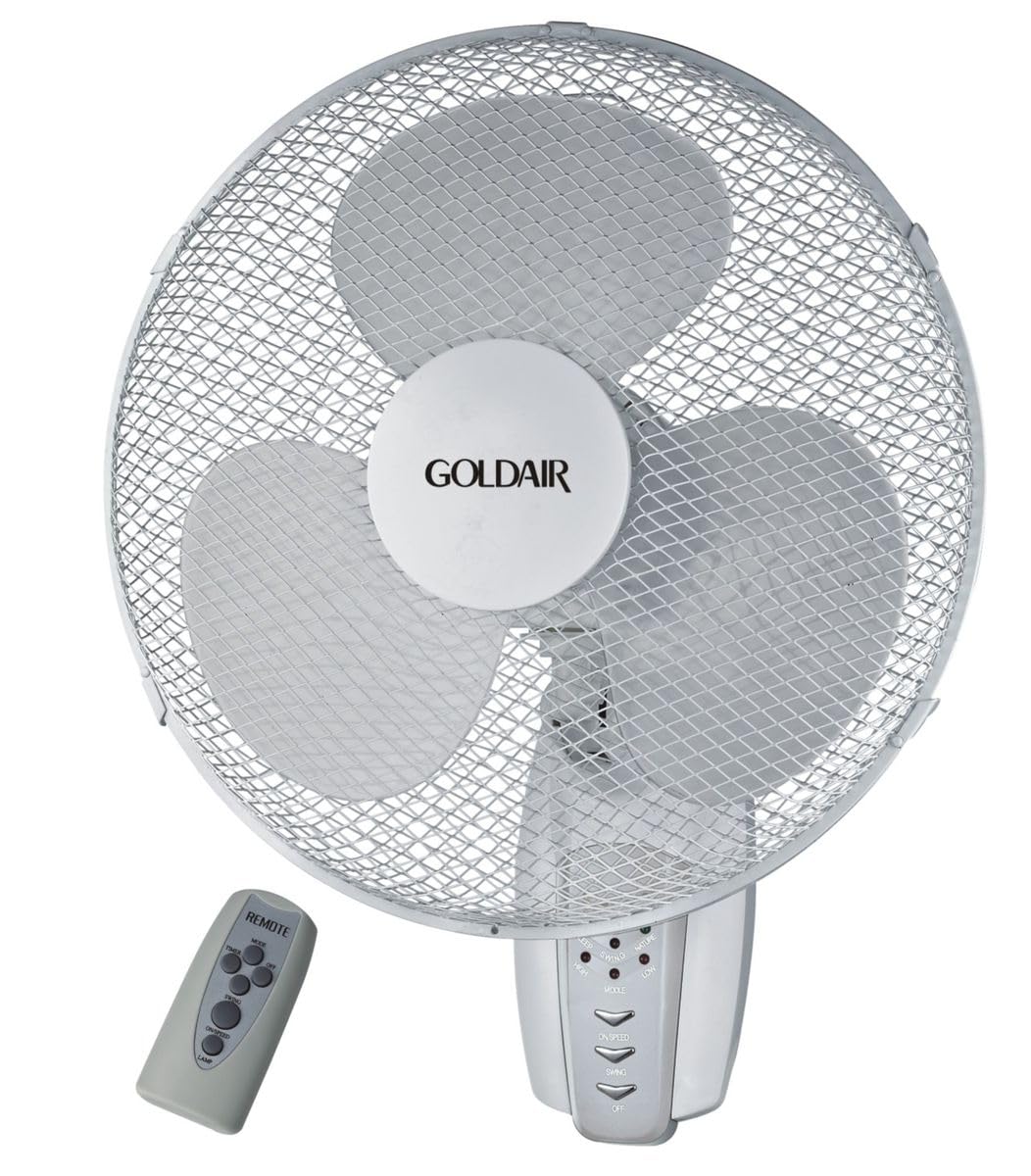
Зураг 1: Урд view of the Goldair Remote Wall Fan GWFR-160. This image shows the fan head, grille, and the central control panel.
3. Тохиргоо ба суурилуулалт
Before installation, ensure you have the necessary tools: drill, screwdriver, and a pencil.
3.1 Байршил сонгох
- Select a sturdy wall surface capable of supporting the fan's weight (approximately 5 kg).
- Ensure the location is within reach of a power outlet and allows for optimal airflow distribution.
- Avoid areas with excessive moisture or direct sunlight.
3.2 Хананд суурилуулах
- Hold the wall mounting bracket against the desired wall location and mark the drill holes with a pencil.
- Drill pilot holes into the marked positions. Use an appropriate drill bit size for the provided wall plugs.
- Хананы залгуурыг өрөмдсөн нүхэнд оруулна.
- Align the mounting bracket with the holes and secure it to the wall using the provided screws. Ensure the bracket is firmly attached.
- Carefully lift the fan unit and align the mounting slots on the back of the fan with the hooks or slots on the wall bracket.
- Slide the fan down onto the bracket until it locks securely into place.
3.3 Эрчим хүчний холболт
Once the fan is securely mounted, plug the power cord into a standard electrical outlet. Ensure the outlet is easily accessible.
4. Ашиглалтын заавар
The Goldair Remote Wall Fan can be operated using either the control panel on the fan unit or the supplied remote control.
4.1 Алсын удирдлагатай ажиллагаа
Before first use, insert 2x AAA batteries (not included) into the remote control, observing polarity.
- ON/OFF товч: Сэнсийг асаах эсвэл унтраахын тулд дарна уу.
- SPEED товч: Press repeatedly to cycle through fan speeds (e.g., Low, Medium, High).
- MODE товчлуур: Select different fan modes (e.g., Normal, Natural, Sleep).
- OSC товчлуур: Press to activate or deactivate the oscillation function (90-degree swing).
- TIMER товчлуур: Set the fan to operate for a specific duration (e.g., 1 hour, 2 hours, up to 7.5 hours).
4.2 Гарын авлагын хяналтын самбар
The control panel on the fan unit typically mirrors the functions of the remote control. Refer to the icons on the panel for specific button functions.
5. Засвар үйлчилгээ, цэвэрлэгээ
Regular cleaning will help maintain the fan's performance and extend its lifespan. Always unplug the fan before cleaning.
5.1 Сэнс цэвэрлэх
- Салгах: Сэнсийг тэжээлийн эх үүсвэрээс салга.
- Гадна: Сэнсний гаднах гадаргууг зөөлөн, damp даавуу. Зүлгүүрийн цэвэрлэгч, уусгагчийг бүү ашигла.
- Сараалж ба ир: To clean the fan blades, you may need to carefully remove the front grille. Consult the diagram in the packaging for grille removal instructions. Use a soft brush or vacuum cleaner to remove dust from the blades and grilles.
- Дахин угсрах: Reattach the front grille securely before plugging the fan back in.
5.2 Хадгалалт
When not in use for extended periods, store the fan in its original packaging or cover it to protect it from dust. Store in a cool, dry place.
6. Алдаа засах
If you encounter issues with your Goldair Remote Wall Fan, refer to the following common problems and solutions:
| Асуудал | Боломжит шалтгаан | Шийдэл |
|---|---|---|
| Сэнс асахгүй байна. | Цахилгаан хангамж байхгүй. Алсын удирдлагын батерей дуусчээ. | Цахилгааны утсыг ажлын залгуурт найдвартай залгасан эсэхийг шалгана уу. Алсын удирдлагын батерейг солих. |
| Агаарын урсгал сул. | Сэнсний хурд хэт бага байна. Grille or blades are dusty. | Increase fan speed setting. Clean the fan grille and blades as per maintenance instructions. |
| Сэнс чимээ шуугиантай байна. | Сул хэсгүүд. Сэнс найдвартай суурилуулаагүй байна. | Check for any loose components. Ensure the fan is securely mounted to the wall bracket. |
| Алсын удирдлага ажиллахгүй байна. | Батерей дууссан эсвэл буруу оруулсан байна. Алсын удирдлага болон сэнсний хоорондох саад тотгор. | Батерейг солих, зөв туйлшралыг хангах. Remove any obstacles blocking the signal. Ensure you are within range. |
If the problem persists after trying these solutions, please contact Goldair customer support.
7. Техникийн үзүүлэлтүүд
| Брэнд | Голдейр |
| Загварын дугаар | GWFR-160 |
| Өнгө | Цагаан |
| Сэнсний хэмжээ | 40 см |
| Материал | Металл |
| Онцлог шинж чанарууд | Remote Controlled, 90-degree Oscillation |
| Зүйлийн жин | 5 кг |
| Бүтээгдэхүүний хэмжээс | 42D x 15W x 43H сантиметр |
| Эрчим хүчний эх үүсвэр | Утастай цахилгаан |
| Суурилуулах төрөл | Ханын бэхэлгээ |
8. Баталгаат хугацаа ба дэмжлэг
For warranty information and customer support, please refer to the warranty card included with your product or visit the official Goldair webсайт. Худалдан авалтын баримтаа худалдан авалтын баталгаа болгон хадгалаарай.
Goldair Official Webсайт: www.goldair.co.za (Жич: Энэ бол орлуулагч юм URL, please refer to your product documentation for the correct regional webсайт.)
Дэмжлэгтэй холбоо барина уу: For technical assistance or service inquiries, please contact Goldair customer service through their official channels.