1. Танилцуулга
This manual provides detailed instructions for the safe and efficient operation of your Telefunken THP-2535 Solar Powered Portable Bluetooth FM Radio. Please read this manual thoroughly before using the device and retain it for future reference.
The Telefunken THP-2535 is a versatile portable radio featuring Bluetooth connectivity, FM radio tuning, USB and TF card playback, and an AUX input. It is designed for portability with a built-in speaker, headphone jack, carrying handle, and a solar panel for convenient battery charging.
2. Аюулгүй байдлын мэдээлэл
- Do not expose the device to extreme temperatures, direct sunlight for prolonged periods (beyond charging), or high humidity.
- Төхөөрөмжийг унагах эсвэл хүчтэй нөлөөнд оруулахаас зайлсхий.
- Төхөөрөмжийг өөрөө задлах, засварлах, өөрчлөхийг хориглоно. Бүх үйлчилгээг мэргэшсэн боловсон хүчинд шилжүүлээрэй.
- Төхөөрөмжийг ус болон бусад шингэнээс хол байлга.
- Хэт халалтаас урьдчилан сэргийлэхийн тулд цэнэглэх үед агааржуулалтыг сайтар ханга.
- Зөвхөн заасан цэнэглэгч кабель болон тэжээлийн эх үүсвэрийг ашиглана уу.
- Батерей болон электрон эд ангиудыг орон нутгийн дүрэм журмын дагуу хариуцлагатайгаар устгана уу.
- Do not operate the radio at excessively high volumes for extended periods to prevent hearing damage.
3. Багцын агуулга
Бүх зүйл багцад байгаа эсэхийг шалгана уу:
- 1 x Telefunken Solar Powered Portable Bluetooth FM Radio (THP-2535)
- 1 x цэнэглэх кабель (USB)
- 1 х хэрэглэгчийн гарын авлага (энэ баримт бичиг)
4. Бүтээгдэхүүн дууссанview
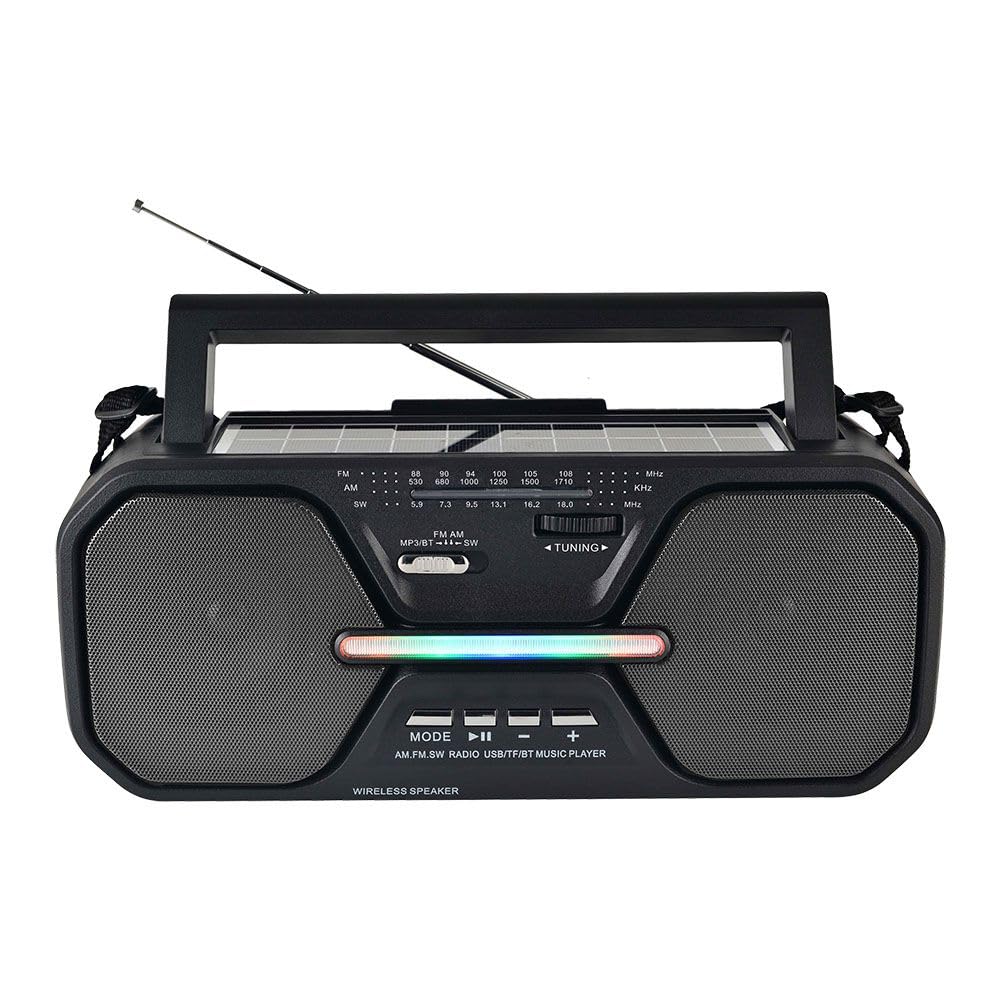
Зураг 4.1: Урд view of the Telefunken THP-2535 radio, showing speakers, control panel, antenna, and carrying handle.

Зураг 4.2: Дээд тал view highlighting the solar panel and control buttons.
Хяналт ба портууд:
- Эрчим хүч солих: Радиог асаах эсвэл унтраана.
- Горимын товчлуур: Bluetooth, FM, USB, TF, AUX горимуудын хооронд шилжинэ.
- Тоглуулах/түр зогсоох товчлуур: Controls playback in Bluetooth, USB, and TF modes.
- Өмнөх/Дуу бууруулах товч: Өмнөх дуу руу шилжих эсвэл дууны хэмжээг багасгах.
- Дараах/Дууг нэмэгдүүлэх товч: Дараагийн дуу руу шилжих эсвэл дууны хэмжээг нэмэгдүүлэх.
- Залгах тохируулга: For manual FM station selection.
- USB порт: For playing music from USB flash drives.
- TF картын оролт: For playing music from TF (MicroSD) cards.
- AUX оролт: Гадны аудио төхөөрөмжийг 3.5 мм-ийн кабелиар холбоход зориулагдсан.
- Чихэвчний Жак: Хувийн сонсох зориулалттай.
- Нарны хавтан: Charges the internal battery when exposed to sunlight.
- Цэнэглэх порт: For charging the internal battery using the provided USB cable.
- Антен: FM радио хүлээн авалтыг сайжруулахын тулд өргөтгөл хийх.
5. Тохиргоо
5.1 Анхны цэнэглэлт
- Before first use, fully charge the radio's internal battery.
- Connect the provided USB charging cable to the radio's charging port.
- USB кабелийн нөгөө үзүүрийг стандарт USB тэжээлийн адаптер (дагаагүй) эсвэл компьютерийн USB порт руу холбоно уу.
- The charging indicator light will illuminate. Once fully charged, the light may change color or turn off (refer to specific indicator behavior if detailed in product).
- Charging via the solar panel: Place the radio with the solar panel facing direct sunlight. Ensure the panel is clean and unobstructed. Solar charging is slower than USB charging and is best for maintaining charge or extending playtime.
5.2 Асаах/унтраах
- To power on the radio, slide the Power Switch to the "ON" position.
- To power off the radio, slide the Power Switch to the "OFF" position.
6. Ашиглалтын заавар
6.1 горимын сонголт
дээр дарна уу Горим button repeatedly to cycle through the available modes: Bluetooth, FM Radio, USB, TF Card, and AUX Input.
6.2 Bluetooth горим
- Switch the radio to Bluetooth mode. The radio will indicate it is ready for pairing (e.g., a voice prompt or flashing indicator light).
- Bluetooth идэвхжүүлсэн төхөөрөмж дээрээ (ухаалаг утас, таблет гэх мэт) Bluetooth-г асаагаад боломжтой төхөөрөмжүүдийг хайгаарай.
- Select "THP-2535" (or similar name) from the list of devices.
- Once paired, the radio will confirm the connection. You can now stream audio from your device to the radio.
- Use the Play/Pause, Previous/Volume Down, and Next/Volume Up buttons on the radio to control playback and volume.
6.3 FM радио горим
- Радиог FM горимд шилжүүл.
- Хамгийн оновчтой хүлээн авахын тулд дурангийн антенныг бүрэн сунгана уу.
- -г эргүүл Тааруулах залгах to scan for FM radio stations (frequency range: 87.5-108 MHz).
- Adjust the volume using the Volume Up/Down buttons.
6.4 USB/TF карт тоглуулах
- Insert a USB flash drive into the USB port or a TF (MicroSD) card into the TF card slot.
- Switch the radio to USB or TF mode. The radio will automatically detect and begin playing audio files (e.g., MP3 format).
- Use the Play/Pause, Previous/Volume Down, and Next/Volume Up buttons to control playback and volume.
6.5 AUX оролтын горим
- Connect one end of a 3.5mm audio cable (not included) to the AUX input port on the radio.
- Connect the other end of the audio cable to the headphone jack or audio output of your external device (e.g., MP3 player, laptop).
- Switch the radio to AUX mode.
- Control playback and volume primarily from your external device. The radio's volume controls will also adjust the output.
6.6 Чихэвчний хэрэглээ
Insert 3.5mm headphones (not included) into the headphone jack for private listening. The internal speakers will automatically mute.
7. Засвар үйлчилгээ
- Цэвэрлэгээ: Радиог зөөлөн, хуурай даавуугаар арчина. Зүлгүүрийн цэвэрлэгч, лав эсвэл уусгагч хэрэглэж болохгүй.
- Хадгалах: Радиог удаан хугацаагаар ашиглахгүй бол сэрүүн, хуурай газар хадгална уу.
- Батерейны арчилгаа: Батерейны ашиглалтын хугацааг уртасгахын тулд батерейг байнга бүрэн цэнэггүй болгохоос зайлсхий. Радио идэвхтэй ашиглагдаагүй байсан ч батерейг тогтмол цэнэглээрэй.
- Нарны хавтан: Keep the solar panel clean and free of dust or debris to ensure efficient charging.
8. Алдаа засах
| Асуудал | Боломжит шалтгаан | Шийдэл |
|---|---|---|
| Радио асахгүй байна. | Батерей дууссан байна. Цахилгаан унтраалга унтарсан байна. | Charge the battery using the USB cable or solar panel. Ensure the power switch is in the "ON" position. |
| Дуу алга. | Volume is too low. Mute function active. Incorrect mode selected. Headphones connected. | Increase the volume. Check if headphones are plugged in. Ensure the correct mode (Bluetooth, FM, USB, TF, AUX) is selected. |
| FM хүлээн авалт муу. | Antenna not extended. Weak signal. Interference. | Fully extend the telescopic antenna. Reposition the radio for better signal. Avoid sources of electronic interference. |
| Bluetooth хослохгүй байна. | Radio not in Bluetooth mode. Device's Bluetooth is off. Radio is already paired with another device. | Ensure the radio is in Bluetooth mode. Turn on Bluetooth on your device. Disconnect from other devices or restart the radio and your device. |
| USB/TF карт тоглохгүй байна. | Incorrect mode. Unsupported file формат. Гэмтсэн files. Card/drive not inserted correctly. | Ensure the correct mode is selected. Check if audio files are in a supported format (e.g., MP3). Reinsert the USB drive/TF card. Try another drive/card. |
9. Техникийн үзүүлэлтүүд
| Загварын дугаар | THP-2535 |
| Брэнд | ТЕЛЕФУНКЕН |
| Эрчим хүчний эх үүсвэр | Solar Powered, USB Rechargeable (Lithium Ion Battery) |
| Холболт | Bluetooth, USB, TF карт, AUX оролт |
| Тохируулагч технологи | FM |
| Радио хамтлагуудыг дэмждэг | FM (87.5-108 МГц) |
| Бүтээгдэхүүний хэмжээс | 38.7L x 13.3W x 16.5H сантиметр |
| Онцлог шинж чанарууд | Portable, Built-in Speaker, Headphone Jack, Carrying Handle |
10. Баталгаат хугацаа ба дэмжлэг
10.1 Үйлдвэрлэгчийн баталгаа
This Telefunken THP-2535 radio comes with a 1 жилийн үйлдвэрлэгчийн баталгаа худалдан авсан өдрөөс эхлэн. Энэхүү баталгаа нь хэвийн ашиглалтын үеийн үйлдвэрлэлийн согог болон хийцийг хамарна. Энэ нь буруу ашиглалт, осол, зөвшөөрөлгүй өөрчлөлт, эсвэл хэвийн элэгдэл, урагдалтаас үүдэлтэй хохирлыг хамрахгүй.
Баталгаат заргад зориулж худалдан авалтаа нотлох баримтаа үлдээнэ үү.
10.2 Хэрэглэгчийн дэмжлэг
For technical assistance, warranty claims, or further inquiries, please contact your retailer or the Telefunken customer support service. Refer to the product packaging or the official Telefunken webхолбоо барих мэдээллийг авах сайт.