1. Танилцуулга
This manual provides instructions for the safe and effective use of your AquilaPro KL02060 Laser Measuring Tool. This compact device is designed for accurate distance measurements up to 197 feet (60 meters) with an accuracy of ±0.078 inches (2mm). It features multiple measurement modes, unit switching, and a USB rechargeable battery.
2. Аюулгүй байдлын мэдээлэл
АНХААРУУЛГА: Энэ бүтээгдэхүүнийг хэрэглэхээсээ өмнө аюулгүй байдлын бүх анхааруулга, зааврыг уншина уу.
- This device is a Class II laser product with a power output of less than 1mW.
- Лазер туяа руу шууд ширтэж болохгүй.
- Лазер туяаг хүн, амьтан руу чиглүүлж болохгүй.
- Төхөөрөмжийг задлах, өөрчлөхийг хориглоно. Засварыг зөвхөн эрх бүхий үйлчилгээний ажилтнууд хийх ёстой.
- Төхөөрөмжийг хүүхдэд хүрэхгүй газар хадгална уу.
- Use only the specified charging method (USB).
- Avoid using the device in explosive atmospheres or near flammable materials.
3. Бүтээгдэхүүн дууссанview
Familiarize yourself with the components and controls of your AquilaPro KL02060 Laser Measuring Tool.

Зураг 3.1: Урд view of the AquilaPro KL02060 Laser Measuring Tool with key components labeled. Labels include: screen, single measurement/unit switch button, addition/subtraction measurement button, function/front/rear reference button, history/preset value setting button, and power/backlight button.
- Дэлгэц: Displays measurements, modes, battery status, and other information.
- Single Measurement / Unit Switch Button: Initiates a single measurement or cycles through measurement units (m/in/ft).
- Addition / Subtraction Measurement Button: Activates addition or subtraction functions for measurements.
- Function / Front/Rear Reference Button (FUNC): Cycles through measurement modes (e.g., length, area, volume, Pythagorean) and switches the measurement reference point (front or rear of the device).
- History / Preset Value Setting Button (PRESET): Accesses measurement history or sets preset values.
- Power / Backlight Button: Turns the device on/off and controls the screen backlight.
4. Тохиргоо
4.1 Зайг цэнэглэх
The AquilaPro KL02060 is equipped with a rechargeable Lithium-ion battery. Before first use, fully charge the device.
- Төхөөрөмж дээрх USB цэнэглэгч портыг олоорой.
- Connect the device to a standard USB power source (e.g., computer, wall adapter) using the provided USB cable.
- Дэлгэц дээрх батерейны индикатор нь цэнэглэлтийн төлөвийг харуулах болно.
- Бүрэн цэнэглэгдсэний дараа USB кабелийг салга.
5. Ашиглалтын заавар
5.1 Асаах/унтраах
- Асаахын тулд: товчийг удаан дар Power / Backlight Button () ойролцоогоор 2 секундын турш.
- Унтраахын тулд: товчийг удаан дар Power / Backlight Button for approximately 3 seconds. The device will also automatically power off after a period of inactivity to conserve battery.
5.2 Нэгж солих
The device supports measurements in meters (m), inches (in), and feet (ft).
- Төхөөрөмж асаалттай байх үед товчин дээр дарна уу Single Measurement / Unit Switch Button to cycle through the available units. The current unit will be displayed on the screen.
5.3 Benchmark Switching (Front/Rear Reference)
The measurement can be taken from the front edge or the rear edge of the device. The default setting is typically the rear edge.

Зураг 5.1: Illustration of switching between front and rear measurement reference points. The icon on the screen indicates the active reference point.
- товчийг дарна уу Function / Front/Rear Reference Button (FUNC) to toggle between front and rear reference points.
- An icon on the display will indicate whether the measurement is taken from the front or rear of the device.
- Урд талын лавлагаа: Хэмжилт нь төхөөрөмжийн урд ирмэгээс эхэлдэг.
- Rear Reference: Measurement starts from the rear edge of the device (includes the length of the device itself).
5.4 Хэмжилтийн горимууд
The AquilaPro KL02060 offers various measurement functions. Press the Function / Front/Rear Reference Button (FUNC) repeatedly to cycle through the modes.

Зураг 5.2: Visual representation of the different measurement modes available on the device.
- Нэг хэмжилт: дээр дарна уу Single Measurement / Unit Switch Button once to emit the laser, then press again to take a single distance measurement.
- Тасралтгүй хэмжилт (хяналт): In this mode, the device continuously measures and displays the distance as you move it. This is useful for finding minimum/maximum distances or for real-time positioning.
- Талбайн хэмжилт:
- Бүсийн горимыг сонгоно уу.
- Уртыг хэмжинэ.
- Өргөнийг хэмжинэ.
- Төхөөрөмж нь тухайн талбайг автоматаар тооцоолж, харуулах болно.
- Эзлэхүүний хэмжилт:
- Дууны түвшний горимыг сонгоно уу.
- Уртыг хэмжинэ.
- Өргөнийг хэмжинэ.
- Өндөрийг хэмжинэ.
- Төхөөрөмж автоматаар дууны хэмжээг тооцоолж харуулах болно.
- Пифагорын хэмжилт (Шууд бус хэмжилт): Used to calculate inaccessible distances using the Pythagorean theorem.
- Select Pythagorean mode (e.g., two-point or three-point).
- Follow the on-screen prompts to measure the required sides (hypotenuse and one leg).
- The device will calculate the unknown leg or height.
5.5 Нэмэх, хасах үйлдэл
You can add or subtract measurements directly on the device.
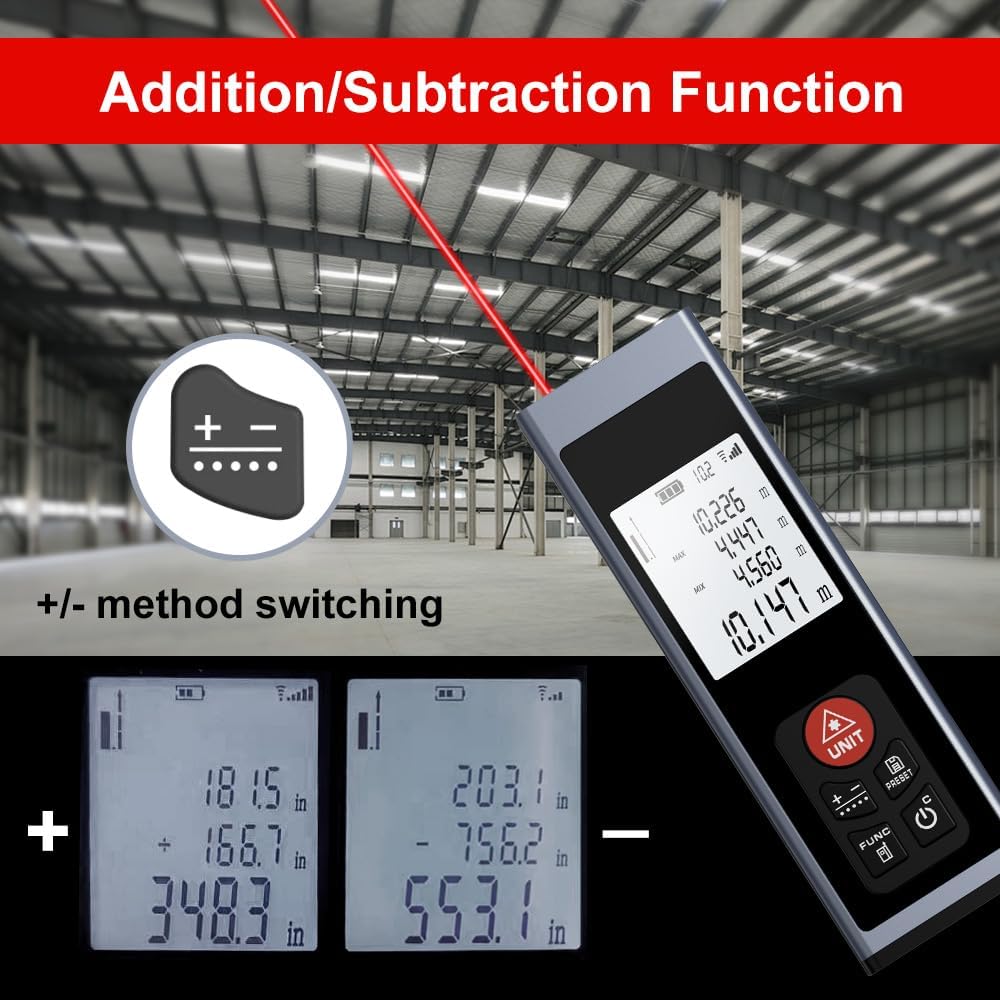
Зураг 5.3: Examples of addition and subtraction operations displayed on the device screen.
- Take your first measurement.
- дээр дарна уу Addition / Subtraction Measurement Button () to select either addition (+) or subtraction (-).
- Take your second measurement.
- The device will display the calculated sum or difference.
5.6 Measurement History and Preset Values
- дээр дарна уу History / Preset Value Setting Button (PRESET) дахинview previous measurements or to set specific preset values for quick recall. Refer to the on-screen prompts for detailed usage.
6. Засвар үйлчилгээ
- Цэвэрлэгээ: Зөөлөн ашиглах, damp cloth to clean the device. Do not use abrasive cleaners or solvents. Ensure the laser lens and display are kept clean for optimal performance.
- Хадгалах: Store the device in a cool, dry place, away from direct sunlight and extreme temperatures. If storing for an extended period, ensure the battery is partially charged (around 50%) to prolong its lifespan.
- Батерейны арчилгаа: Батерейны эрүүл мэндийг хадгалахын тулд төхөөрөмжийг байнга ашигладаггүй байсан ч батерейг тогтмол цэнэглэ.
7. Алдаа засах
If you encounter issues with your AquilaPro KL02060, refer to the following common solutions:
| Асуудал | Боломжит шалтгаан | Шийдэл |
|---|---|---|
| Төхөөрөмж асахгүй байна. | Батарей бага эсвэл цэнэггүй болсон. | USB кабель ашиглан төхөөрөмжийг цэнэглэ. |
| Буруу хэмжилт. | Dirty laser lens; incorrect reference point; unstable surface. | Clean the laser lens; verify the front/rear reference setting; ensure a stable measurement surface. |
| Лазер туяа харагдахгүй байна. | Хүрээлэн буй орчны хурц гэрэл; төхөөрөмжийн эвдрэл. | Use in lower light conditions; contact customer support if problem persists. |
| Дэлгэц хоосон эсвэл царцсан байна. | Software error; low battery. | Try restarting the device. Ensure battery is charged. |
If the problem persists after attempting these solutions, please contact AquilaPro customer support.
8. Техникийн үзүүлэлтүүд
| Онцлог | Дэлгэрэнгүй |
|---|---|
| Загварын дугаар | KL02060 |
| Хэмжих хүрээ | 197 фут (60 м) |
| Нарийвчлал | ±0.078 inch (±2 mm) |
| Хэмжих нэгж | Meters (m), Inches (in), Feet (ft) |
| Лазер анги | II ангилал, <1мВт |
| Зайны төрөл | Rechargeable Lithium-ion (included) |
| Цэнэглэх порт | USB |
| Бүтээгдэхүүний хэмжээс | 2.79 x 1.52 x 8.64 cm (approx. 28L x 15W x 86H mm) |
| Зүйлийн жин | 50 гр |
| Материал | Хөнгөн цагаан |
| Усны эсэргүүцлийн түвшин | Waterproof (IP54 International Protection Rating) |
| Оруулсан бүрэлдэхүүн хэсгүүд | оосор |
9. Баталгаат хугацаа ба дэмжлэг
AquilaPro products are designed for reliability and performance. For warranty information or technical support, please refer to the contact details provided with your purchase or visit the official AquilaPro webсайт.