Танилцуулга
This manual provides detailed instructions for the setup, operation, and maintenance of your Zenwire USB-C Hub 10-in-1 Adapter. Please read this manual thoroughly before using the device to ensure optimal performance and longevity.

Image: The Zenwire USB-C Hub, a compact gray device, is shown connected to various cables and accessories, including HDMI, USB, Ethernet, and SD cards, illustrating its multi-functionality.
Бүтээгдэхүүн дууссанview
The Zenwire USB-C Hub is a versatile 10-in-1 adapter designed to expand the connectivity of your USB-C enabled devices. It features a durable aluminum alloy shell for efficient heat dissipation.
Гол онцлогууд ба портууд:
- HDMI 2.1 порт: Supports resolutions up to 8K@30Hz or 4K@120Hz, with backward compatibility for lower resolutions.
- DisplayPort 1.4: Supports resolutions up to 8K@30Hz or 4K@120Hz, with backward compatibility for lower resolutions.
- USB-C Power Delivery (PD) 100W Port: Allows fast charging of your host device while using the hub, providing up to 100W power.
- 2 USB 3.0 портууд: Offers data transfer speeds up to 5 Gbps, 10 times faster than USB 2.0.
- SD карт уншигч: Supports SD cards up to 2TB.
- MicroSD карт уншигч: 2 ТБ хүртэлх MicroSD картуудыг дэмждэг.
- RJ-45 Gigabit Ethernet Port: Provides a stable wired internet connection with speeds up to 1000 Mbps.
- 3.5 мм аудио залгуур: Чихэвч, микрофон эсвэл гадаад чанга яригч холбох зориулалттай.
- USB-C 3.1 / Thunderbolt 3.0 Host Connection: Connects the hub to your laptop or compatible device.

Зураг: Нарийвчилсан view of the Zenwire USB-C Hub, highlighting its 10 ports including 3.5mm audio, Type-C PD100W, DP1.6, HDMI2.1, Gigabit Ethernet, USB3.0 5Gbps, SD, and MicroSD slots.

Image: A close-up of the Zenwire USB-C Hub, emphasizing its aluminum alloy shell designed for effective heat dissipation, ensuring the device remains cool during operation.
Тохиргоо
- Хост төхөөрөмжид холбогдох: Plug the integrated USB-C cable of the Zenwire Hub into a compatible USB-C or Thunderbolt 3.0/4.0 port on your laptop, tablet, or smartphone. The hub is Plug & Play and typically requires no driver installation.
- Эрчим хүчний хангамж (заавал биш): If your host device requires charging or if you are connecting power-intensive peripherals, connect your original USB-C power adapter to the USB-C PD 100W port on the hub.
- Дагалдах төхөөрөмжүүдийг холбох: Connect your desired devices (monitors, USB drives, Ethernet cable, SD/MicroSD cards, audio devices) to the corresponding ports on the hub.
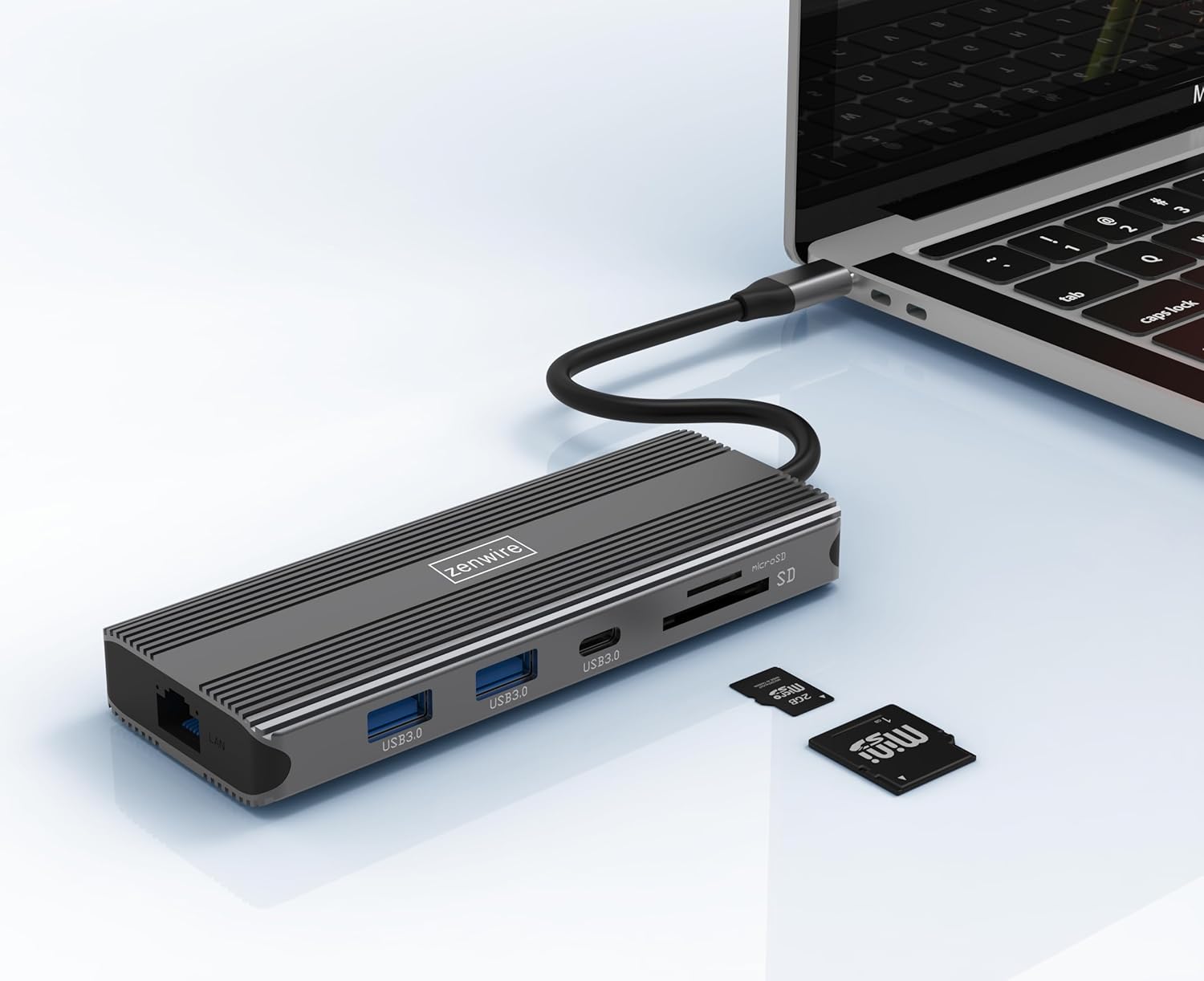
Image: The Zenwire USB-C Hub is shown connected to a laptop via its integrated USB-C cable, with SD and MicroSD cards placed nearby, illustrating a typical setup scenario.
Ашиглалтын заавар
Дэлгэцийн холболт:
The hub supports connecting up to two external monitors simultaneously via its HDMI 2.1 and DisplayPort 1.4 interfaces. Both can display video in 4K@60Hz concurrently.
- Нэг монитор: Connect your monitor to either the HDMI or DisplayPort.
- Хос мониторууд: Connect one monitor to the HDMI port and another to the DisplayPort.

Image: A laptop is displayed connected to two larger external monitors, demonstrating the multi-display capability of the Zenwire USB-C Hub.
Multi-Display Modes (MacOS vs. Windows):
The behavior of multiple external displays can vary between operating systems.
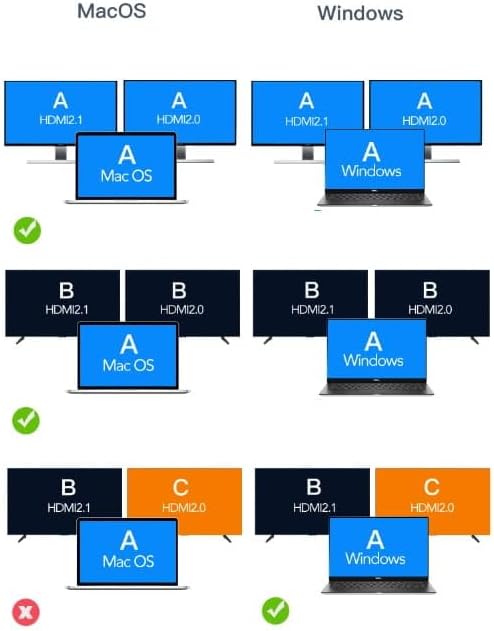
Image: A diagram illustrating different multi-display configurations for MacOS and Windows. It shows that MacOS typically supports extended desktop across two external monitors (A, B) and the laptop screen (A), while Windows can support extended desktop across three screens (A, B, C) or mirrored displays.
- MacOS: Typically supports extended desktop across two external monitors (A, B) and the laptop screen (A). Mirroring is also supported.
- Windows: Supports extended desktop across three screens (A, B, C) or mirrored displays, offering more flexibility for multi-monitor setups.
HDMI 2.1 and DisplayPort 1.4 Advanced Features:
These ports offer higher refresh rates and advanced features for an enhanced visual experience:
- High Transfer Speeds: Up to 48 Gbps for HDMI 2.1, ensuring high data throughput.
- eARC (Сайжруулсан дууг буцаах суваг): For higher audio quality and support for object-based audio formats like Dolby Atmos and DTS-X.
- VRR (Хувьсах сэргээх хурд): Useful for gaming, where refresh rates are not constant.
- ALLM (Автоматаар бага хоцролттой горим): Automatically detects content like games and switches the device to a low-latency mode.
- QMS (Хурдан медиа шилжүүлэлт): The image on the screen changes immediately when switching between content.
- QFT (Хурдан Хүрээний Тээвэрлэлт): Reduces input lag further.
- Динамик HDR: Adjusts the image parameters during content transmission for higher quality visuals. Supports HDR 10 and 10+.
Аудио холболт:
The 3.5mm audio jack allows connection of various audio devices:
- Микрофонууд
- Чихэвч
- Headphones with integrated microphone
- Гадаад чанга яригч
Засвар үйлчилгээ
- Цэвэрлэгээ: Төвийг цэвэрлэхдээ зөөлөн, хуурай даавуу ашиглаарай. Шингэн цэвэрлэгч эсвэл зүлгүүрийн материалаас зайлсхий.
- Хадгалах: Хабыг нарны шууд тусгал, хэт температураас хол, сэрүүн, хуурай газар хадгална.
- Харьцуулах: Төхөөрөмжийг унагах эсвэл хүчтэй цохилтод оруулахаас зайлсхий.
- Дулаан ялгаруулалт: The aluminum alloy shell is designed for effective heat dissipation. Ensure the hub is placed in a well-ventilated area during prolonged use.
Алдааг олж засварлах
- Дэлгэцийн гаралт байхгүй:
- Хабаас гарсан USB-C кабель нь таны хост төхөөрөмжтэй найдвартай холбогдсон эсэхийг шалгана уу.
- Verify that the HDMI/DisplayPort cable is firmly connected to both the hub and the monitor.
- Check your host device's display settings to ensure the external monitor is detected and configured correctly (e.g., extended, mirrored).
- Try a different HDMI/DisplayPort cable or monitor to rule out cable/monitor issues.
- Цахилгаан дамжуулах шаардлагагүй:
- Таны USB-C тэжээлийн адаптер төвийн PD порттой холбогдсон бөгөөд зөв ажиллаж байгаа эсэхийг шалгаарай.
- Таны хост төхөөрөмж USB-C Power Delivery-г дэмждэг эсэхийг шалгана уу.
- Танигдаагүй USB төхөөрөмжүүд:
- Reconnect the USB device to a different USB 3.0 port on the hub.
- Ensure the USB device is functioning correctly by connecting it directly to your host device.
- Some high-power USB devices may require external power if the hub's PD port is not utilized.
- Ethernet холболтын асуудал:
- Ethernet кабель нь төв болон чиглүүлэгч/модем хоёуланд нь аюулгүй холбогдсон эсэхийг шалгана уу.
- Өөрийн хост төхөөрөмж дээрх сүлжээний тохиргоог шалгана уу.
- Ensure your router/modem is working correctly.
- SD/MicroSD карт илрээгүй байна:
- Картыг зөв үүрэнд бүрэн оруулсан эсэхээ шалгаарай.
- Check if the card is formatted correctly and readable by your operating system.
- Try a different card to rule out card issues.
Үзүүлэлтүүд
| Брэнд | Zenwire |
| Загвар | Zenwire USB-C Hub |
| Холболт | USB-C 3.1 / Thunderbolt 3.0 (Host) |
| Портууд |
|
| Өгөгдөл дамжуулах хурд | USB 3.0: 5 Gbps; Ethernet: 1000 Mbps |
| Эрчим хүчний нийлүүлэлт | 100 Вт хүртэл |
| Материал | Хөнгөн цагаан хайлшны бүрхүүл |
| Хэмжээ (L x W x H) | 118 x 48 x 15 мм |
| Жин | 109 гр |
| Кабелийн урт | Ойролцоогоор 15 см |
| Үйлдлийн системийн нийцтэй байдал | Windows 11/10/8/7, Apple macOS, Linux, Android, iPad Pro iOS (USB-C models) |

Зураг: өнцөгт view of the Zenwire USB-C Hub, showcasing its compact design and the integrated USB-C host cable.
Баталгаат болон дэмжлэг
Zenwire products are designed for reliability and performance. For warranty information and technical support, please refer to the official Zenwire webсайт эсвэл худалдагчтайгаа холбогдоно уу. Баталгаат зарга авахын тулд худалдан авалтын баримтаа хадгална уу.
For the latest software updates or driver information (if applicable), please visit the Zenwire support page. This device is designed to be Plug & Play, generally not requiring additional drivers.


