Танилцуулга
Thank you for choosing the R-MUSIC KARADUO Complete Karaoke Pack. This manual provides detailed instructions for the safe and efficient use of your new karaoke system, which includes a portable RGB speaker and two wireless microphones. Please read this manual thoroughly before operation and retain it for future reference.
Багцын агуулга
Савлахдаа бүх эд зүйлс байгаа, сайн нөхцөлд байгаа эсэхийг шалгаарай:
- 1 x R-MUSIC KARADUO Portable RGB Speaker
- 2 x утасгүй микрофон
- 1 х USB-C цэнэглэх кабель
- 1 х хэрэглэгчийн гарын авлага (энэ баримт бичиг)

Image: The R-MUSIC KARADUO portable RGB speaker and two wireless microphones, as included in the package.
Бүтээгдэхүүн дууссанview
Чанга яригчийн бүрэлдэхүүн хэсэг ба удирдлага

Зураг: дээд view of the R-MUSIC KARADUO speaker, showing the control buttons.
- LED Animation Button: Press to cycle through 5 different LED light animations.
- Дууны түвшин + / Дараагийн дууны товчлуур: Дууг нэмэгдүүлэхийн тулд богино дарна уу. Дараагийн дуу руу алгасахын тулд удаан дарна уу.
- ON / OFF / Pause / Play Button: Long press to power the speaker on or off. Short press to play or pause music.
- Дууны түвшин - / Өмнөх дууны товчлуур: Дууг багасгахын тулд богино дарна уу. Өмнөх дуу руу очихын тулд удаан дарна уу.
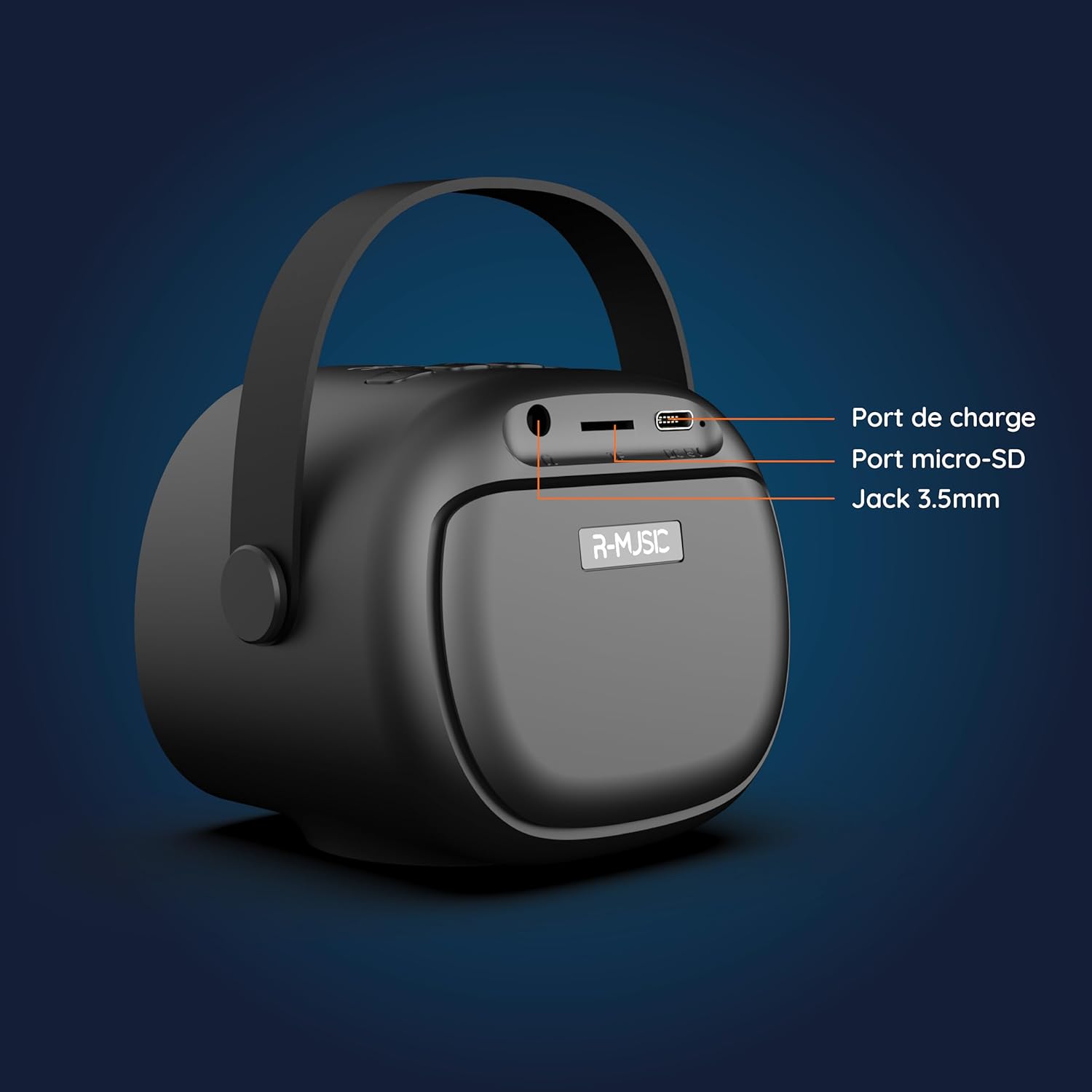
Зураг: Буцах view of the R-MUSIC KARADUO speaker, highlighting the charging port, Micro-SD card slot, and 3.5mm Jack port.
- Цэнэглэх порт (USB-C): Connect the provided USB-C cable for charging.
- Micro-SD картны үүр: Insert a Micro-SD card for direct music playback.
- 3.5 мм-ийн AUX порт: 3.5 мм-ийн аудио кабель (дагалдахгүй) ашиглан гадаад аудио төхөөрөмжүүдийг холбоно уу.
Микрофоны хяналт

Image: Close-up of the R-MUSIC wireless microphones, illustrating the power, volume, and mode buttons.
- Цахилгаан товч: Long press to power the microphone on or off.
- Эзлэхүүн + товчлуур: Микрофоны дууг нэмэгдүүлэх.
- Дууны түвшин - Товчлуур: Микрофоны дууг багасгах.
- Горимын товчлуур (M): Short press to cycle through 5 voice deformation effects and 3 karaoke modes.
Тохиргоо
1. Charging the Speaker and Microphones
Анх ашиглахаасаа өмнө чанга яригч болон хоёр микрофоныг бүрэн цэнэглэ.
- Илтгэгч: Connect the provided USB-C charging cable to the speaker's charging port and a compatible USB power adapter (not included). The charging indicator will show the charging status.
- Микрофонууд: Each microphone has its own charging port (usually Micro-USB, check the microphone itself). Connect them to a USB power source using appropriate cables (not included, or check if included with microphones).
A full charge provides approximately 14 hours of speaker playback without LED lights, or 7 hours with LED lights activated.
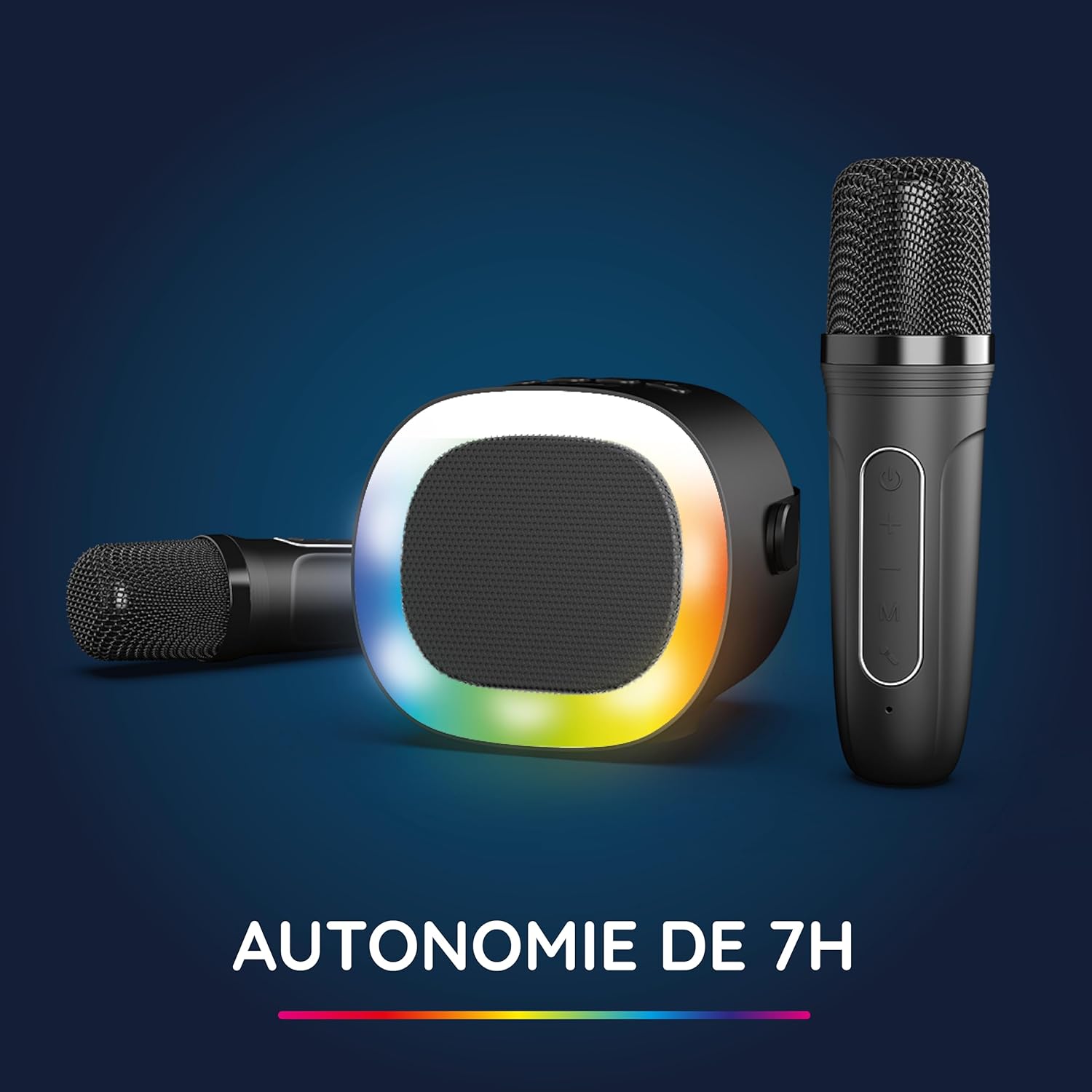
Image: The R-MUSIC speaker and microphones, illustrating the battery life with LED lights active.
2. Powering On and Pairing Microphones
- Асаалттай чанга яригч: Long press the ON/OFF button on the speaker until it powers on.
- Асаалттай микрофонууд: Long press the Power button on each microphone until they power on.
- The microphones should automatically pair with the speaker. If not, ensure they are within close proximity and try powering them off and on again.
Ашиглалтын заавар
1. Аудио эх үүсвэрүүдтэй холбогдох
The KARADUO speaker offers multiple connectivity options:
- Bluetooth 5.0:
- Чанга яригч асаалттай байгаа эсэхийг шалгаарай.
- Activate Bluetooth on your smartphone, tablet, PC, or other compatible device.
- хайх "KARADUO" in your device's Bluetooth settings and select it to pair. A confirmation sound will indicate a successful connection.
- The Bluetooth 5.0 technology ensures optimal sound quality and a stable connection up to 10 meters.
- AUX оролт:
- Connect a 3.5mm audio cable (not included) from your audio device's headphone jack to the speaker's 3.5mm AUX port.
- Чанга яригч автоматаар AUX горимд шилжинэ.
- Micro-SD Card Playback:
- Insert a Micro-SD card containing MP3 audio files into the Micro-SD card slot on the back of the speaker.
- Чанга яригч нь картыг автоматаар илрүүлж, хөгжим тоглуулж эхэлнэ.
2. Speaker Operation
- Тоглуулах/түр зогсоох: Short press the ON/OFF/Pause/Play button.
- Дууны тохируулга: Short press the Volume + or Volume - buttons.
- Дараагийн / Өмнөх бичлэг: Long press the Volume + (next) or Volume - (previous) buttons.
- LED гэрлийн горимууд: Press the LED Animation button to cycle through 5 different LED light animations.

Image: The R-MUSIC speaker showcasing its dynamic LED light animations.
3. Microphone Operation
- Микрофоны дууны хэмжээ: Use the Volume + and Volume - buttons on the microphone to adjust your vocal volume.
- Voice Deformation Effects: Short press the 'M' (Mode) button on the microphone to cycle through 5 different voice deformation effects.
- Караоке горимууд: Continue pressing the 'M' button to cycle through 3 distinct karaoke modes.
Засвар үйлчилгээ
To ensure the longevity and optimal performance of your R-MUSIC KARADUO system, follow these maintenance guidelines:
- Цэвэрлэгээ: Use a soft, dry cloth to clean the speaker and microphones. Do not use abrasive cleaners, solvents, or harsh chemicals.
- Хадгалах: Төхөөрөмжийг ашиглаагүй үед нарны шууд тусгал, хэт температураас хол, сэрүүн, хуурай газар хадгална.
- Усанд өртөх: Энэ бүтээгдэхүүн нь ус нэвтэрдэггүй. Ус эсвэл хэт их чийгэнд өртөхөөс зайлсхий.
- Цэнэглэж байна: Only use the provided charging cable and a compatible USB power adapter. Do not overcharge the device.
Алдааг олж засварлах
If you encounter issues with your KARADUO system, please refer to the following common problems and solutions:
| Асуудал | Боломжит шалтгаан | Шийдэл |
|---|---|---|
| Хүч чадалгүй | Батарей бага эсвэл төхөөрөмж унтарсан байна. | Charge the speaker/microphones. Long press the power button to turn on. |
| Чанга яригчаас дуу гарахгүй | Дууны түвшин хэт бага, оролтын горим буруу эсвэл төхөөрөмж холбогдоогүй байна. | Increase speaker volume. Ensure correct input (Bluetooth, AUX, Micro-SD). Reconnect Bluetooth or check AUX cable. |
| Микрофонууд ажиллахгүй байна | Микрофон унтарсан, цэнэг багатай эсвэл хослоогүй байна. | Ensure microphones are charged and powered on. They should automatically pair with the speaker. If not, power cycle them. |
| Bluetooth-г салгах | Device out of range, interference, or low battery. | Move the connected device closer to the speaker (within 10m). Ensure no major obstacles. Recharge the speaker. |
If the problem persists after trying these solutions, please contact R-MUSIC customer support.
Үзүүлэлтүүд
| Онцлог | Дэлгэрэнгүй |
|---|---|
| Брэнд | R-MUSIC |
| Загварын дугаар | 484437 RM |
| Өнгө | Хар |
| Холболтын технологи | Bluetooth 5.0 |
| Холболтын портууд | 3.5mm Jack, USB Type-C (charging), Micro-SD Card Slot |
| Онцлог шинж чанарууд | 2 Wireless Microphones, Universal Connectivity, 5 Voice Deformation Effects, LED Lights |
| Тохиромжтой төхөөрөмжүүд | PC, Smartphone, Tablet, TV (via AUX) |
| Эрчим хүчний эх үүсвэр | Батерейгаар ажилладаг |
| Speaker Battery Life | Up to 14 hours (without LED), 7 hours (with LED) |
| Bluetooth хүрээ | 10 метр хүртэл |

Image: Technical dimensions of the R-MUSIC KARADUO speaker, showing its height, width, and depth.
Баталгаат болон дэмжлэг
Information regarding specific warranty terms and conditions for the R-MUSIC KARADUO Complete Karaoke Pack is not available in this document. Please refer to the product packaging or the retailer's webбаталгаат мэдээллийг сайтаас авна уу.
For technical support or further assistance, please contact R-MUSIC customer service through their official webсайт эсвэл таны худалдан авалтад өгсөн холбоо барих мэдээлэл.


