1. Бүтээгдэхүүн дууссанview
The Zyxel USGFLEX100HP ZyWALL Firewall is a high-performance network security appliance designed for small to medium-sized businesses. It offers robust cyber security features, flexible port configurations, and integrated Power over Ethernet (PoE+) capabilities. This device supports up to 50 users and internet speeds of up to 500 Mbps, providing comprehensive protection and efficient network management.
Видео 1: Дууслааview of the Zyxel USG FLEX H Firewall Series. This video highlights the key features and benefits of the firewall series, including network protection, integrated PoE+ ports, and Nebula App management.
2. Багцын агуулга
Verify that all items are present in the package. If any item is missing or damaged, contact your vendor immediately.
- Zyxel USGFLEX100HP ZyWALL Firewall Unit
- Цахилгаан адаптер ба цахилгааны утас
- Ethernet кабель
- Консолын кабель (RJ45-аас DB9 хүртэл)
- Mounting Brackets (for rack or wall mounting)
- Резинэн хөл
- Түргэн эхлүүлэх гарын авлага

Зураг 1: Contents of the Zyxel USGFLEX100HP package. This image displays the firewall unit, power supply, console cable, and other accessories included in the box.
Видео 2: Unboxing of a Zyxel USGFLEX H Series Firewall. This video demonstrates the unboxing process and shows the various components included in the product package.
3. Биеийн тодорхойлолт
3.1 Урд самбар
The front panel of the USGFLEX100HP features status LEDs and a USB 3.0 port.
- Статус LED: Indicate power, system status, PoE activity, and individual port activity (P1-P8).
- USB 3.0 порт: Гадаад хадгалах сан эсвэл бусад нийцтэй USB төхөөрөмжүүдийг холбох зориулалттай.
- REBOOT/RESET Buttons: Used for restarting the device or performing a factory reset.

Зураг 2: Урд view of the Zyxel USGFLEX100HP, highlighting the status LEDs and the USB 3.0 port.
3.2 Арын самбар
The rear panel provides various connectivity options, including Gigabit Ethernet ports, a console port, and the power input.
- 7 x 1G Ethernet портууд: Configurable Gigabit Ethernet ports for flexible WAN/LAN connectivity.
- 1 x 1G PoE+ Port: A Gigabit Ethernet port with Power over Ethernet Plus (30W) capability, ideal for powering access points, IP cameras, or IP phones.
- 1 x Console Port (RJ45): For direct command-line interface (CLI) access and initial configuration.
- Цахилгаан хангамжийн оролт: Өгөгдсөн тэжээлийн адаптерт холбогдоно.

Зураг 3: Арын view of the Zyxel USGFLEX100HP, detailing the Ethernet ports, PoE+ port, console port, and power input.
4. Тохиргоо
Follow these general steps for initial setup:
- Физик байрлал: Place the firewall on a stable, flat surface or mount it using the provided brackets. Ensure adequate ventilation.
- Сүлжээний кабель холбох: Connect your internet modem to a designated WAN port (refer to the Quick Start Guide for specific port assignments). Connect your internal network devices (switches, computers) to the LAN ports.
- Эрчим хүчийг холбох: Connect the power adapter to the firewall's power input and then to a power outlet. The device will power on automatically.
- Анхны тохиргоо: Төхөөрөмжид хандах web-based management interface via a connected computer or use the Zyxel Nebula Cloud Management solution for simplified setup.
5. Ашиглалтын заавар
The Zyxel USGFLEX100HP operates as a central security gateway for your network. Once configured, it will automatically enforce security policies and manage network traffic. Key operational aspects include:
- Замын хөдөлгөөний удирдлага: The firewall inspects incoming and outgoing network traffic based on configured rules.
- VPN холболт: Supports Virtual Private Network (VPN) connections for secure remote access.
- PoE+ Functionality: The dedicated PoE+ port provides power and data to compatible devices, simplifying deployment.
- Хяналт: Monitor network status, traffic logs, and security events through the web интерфэйс эсвэл Nebula Cloud.
6. Мананцар Үүлний Удирдлага
The Zyxel USGFLEX100HP can be managed through Zyxel's Nebula Cloud Management platform, offering a centralized and simplified approach to network operations.
- Unified Security: Synchronizes security policies across multiple devices.
- Бодит цагийн хяналт: Provides live insights into network performance and security events.
- Cloud-based Control: Configure and manage your firewall remotely from anywhere.
- Гар утасны програм: Get up and running in minutes via the Nebula mobile app for quick setup and monitoring.
Видео 3: Zyxel USGFLEX H Series Firewalls. This video showcases the Nebula Cloud integration for easy management and monitoring of the firewall.

Зураг 4: Illustration of Cloud & On-Premise Sync with Zyxel Nebula, simplifying network operations.
7. Хамгаалалтын онцлогууд
The USGFLEX100HP provides robust security to protect your network from various cyber threats. Many advanced features require a security license.
- Сүлжээний хаягийн орчуулга (NAT): Hides internal IP addresses from the internet.
- Төрийн багцын шалгалт (SPI): Checks packets against active connections and blocks non-matching traffic.
- Distributed Denial of Service (DDoS) Protection: Blocks malicious traffic aimed at overwhelming the network.
- VPN: Securely encrypts data sent between locations.
- Anti-Malware/Anti-Virus (Licensed): Сканнерууд files at the gateway for viruses and other threats.
- Web Filtering/Content Filtering (Licensed): Хортой эсвэл зохисгүй контент руу нэвтрэхийг хаадаг webсайтууд.
- Sandboxing/Zero Day Threats (Licensed): Cloud-based sandbox technology for unknown threats.
- Intrusion Prevention System/Intrusion Detection System (IPS/IDP) (Licensed): Deep-packet inspection for known attacks.
- Application Patrol (Licensed): Categorizes and manages network application usage.
- Reputation Filter (Licensed): Blocks botnet infection and drive-by downloads.
- Email Security/Anti-Spam (Licensed): Fast detection to block spam and phishing mail.
- SecuReporter (Licensed): Cloud-based security analytics and reporting.
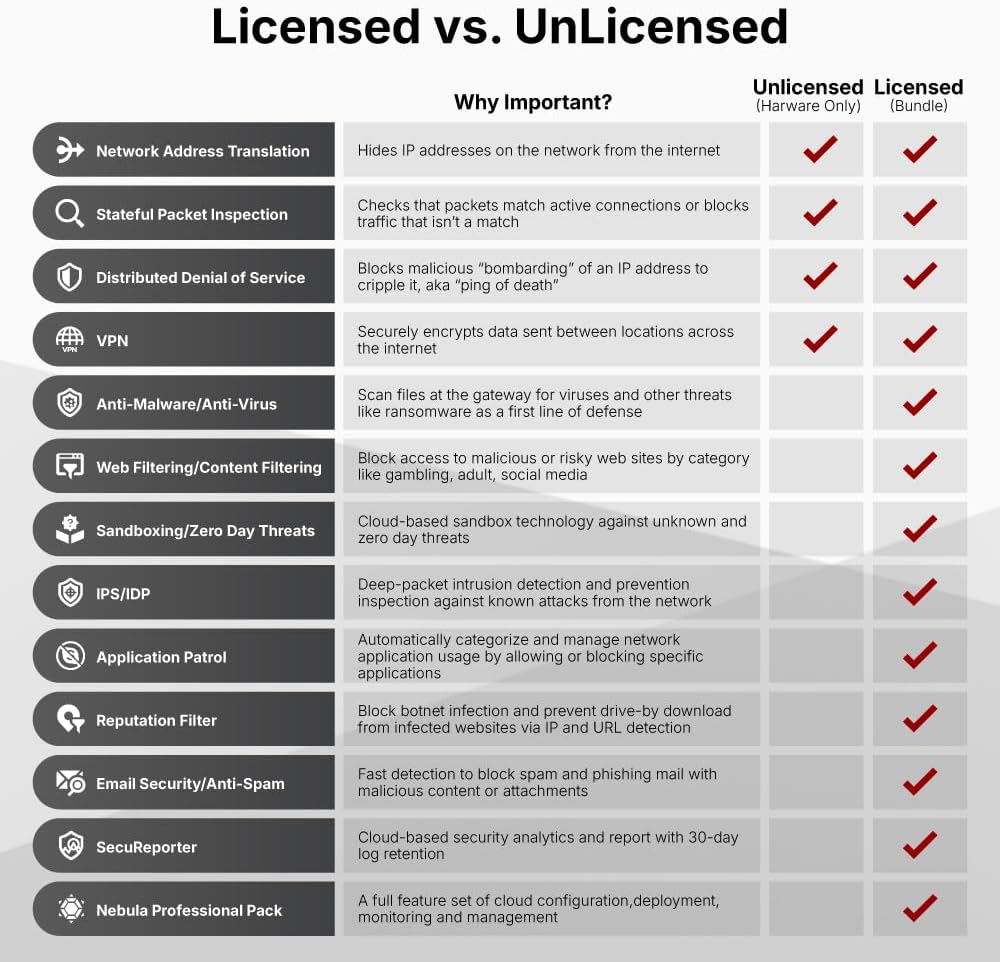
Зураг 5: Detailed comparison of security features available with and without a license for Zyxel firewalls.
Видео 4: "Work smarter, not harder" - This video illustrates the importance of robust network security and how Zyxel solutions protect businesses from cyber threats.
8. Гүйцэтгэлийн үзүүлэлтүүд
The Zyxel USGFLEX100HP is engineered for high performance in business environments.
| Онцлог | Тодорхойлолт |
|---|---|
| SPI галт ханын нэвтрүүлэх чадвар | 3000 Mbps |
| UTM нэвтрүүлэх чадвар (AV+IDP) | 750 Mbps |
| VPN нэвтрүүлэх чадвар | 750 Mbps |
| Зэрэгцсэн хуралдаанууд | 300,000 |
| VPN хонгилууд | 50 |
| Дэмжигдсэн VLAN-ууд | 16 |
| Санал болгож буй хэрэглэгчид | 50 хүртэл |
| Санал болгож буй интернетийн хурд | 500 Mbps хүртэл |
| Физик портууд | 7x GbE, 1x GbE PoE+ |
| Зүйлийн жин | 4.31 фунт |
| Бүтээгдэхүүний хэмжээс | 1 x 11.7 x 8 инч |
| Дээд температурын үнэлгээ | Цельсийн 40 градус |
Note: Throughput speeds are based on industry-standard max testing with large packet sizes and multiple sessions. Actual speed test results may vary based on application and network conditions.

Зураг 6: USG FLEX H Product Matrix, providing a detailed comparison of specifications across various models in the series.

Зураг 7: Comparison between the prior generation USG FLEX 100 and the new generation USG FLEX 100 H/HP, highlighting performance improvements and new features.
9. Алдаа засах
If you encounter issues with your Zyxel USGFLEX100HP, consider the following troubleshooting steps:
- Эрчим хүчгүй: Цахилгаан адаптер нь төхөөрөмж болон ажиллаж байгаа цахилгаан залгуурт найдвартай холбогдсон эсэхийг шалгаарай. Урд самбар дээрх цахилгаан LED-г шалгана уу.
- Интернет холболт байхгүй: Verify that your modem is working correctly and connected to the designated WAN port. Check the WAN port's LED indicator. Confirm your internet service provider (ISP) connection is active.
- Сүлжээний холболтын асуудлууд: Check Ethernet cable connections to LAN ports. Ensure devices are receiving IP addresses from the firewall (if acting as a DHCP server).
- Удаан гүйцэтгэл: Review your security policy configurations. High-level security features can impact throughput. Check for excessive network traffic or potential malware.
- Нэвтэрч байна Web Интерфэйс: Ensure your computer is on the same network segment as the firewall and that you are using the correct IP address for the management interface.
- Үйлдвэрийн анхны байдал: If all else fails, a factory reset can restore the device to its default settings. Refer to the Quick Start Guide for instructions on performing a reset.
10. Засвар үйлчилгээ
Regular maintenance ensures optimal performance and security for your Zyxel USGFLEX100HP firewall:
- Програм хангамжийн шинэчлэлтүүд: Regularly check for and apply the latest firmware updates from the Zyxel website or through Nebula Cloud. Firmware updates often include security patches and performance enhancements.
- Тохиргооны нөөцлөлтүүд: Periodically back up your device configuration. This allows for quick restoration in case of unexpected issues or misconfigurations.
- Аюулгүй байдлын бодлогын талаарview: Тогтмол дахинview and update your security policies to adapt to evolving threat landscapes and changing network requirements.
- Биеийн үзлэг: Ensure the device is free from dust and debris, especially around ventilation areas, to prevent overheating.
- Log Monitoring: Monitor system and security logs for unusual activity or potential threats.
11. Баталгаат хугацаа ба дэмжлэг
Your Zyxel USGFLEX100HP ZyWALL Firewall comes with a standard manufacturer's warranty. For detailed warranty information, please refer to the warranty card included in your package or visit the official Zyxel webсайт.
For technical support, product documentation, and software downloads, please visit the Zyxel support portal:
- Zyxel Support Portal: www.zyxel.com/support
- Zyxel Nebula Cloud: nebula.zyxel.com
Additional protection plans may be available for extended coverage. Contact your reseller for more information.