1. Танилцуулга
Thank you for choosing the COCOCAM 2PCS Solar Camera Outdoor Wireless. This manual provides detailed instructions for the installation, operation, and maintenance of your new security cameras. Please read this manual thoroughly before use to ensure proper functionality and safety.

Image: Two COCOCAM ZY-C2 solar cameras, showcasing тэдний дизайн болон нэгдсэн нарны хавтангууд.
2. Хайрцагт юу байна
Бүх зүйл байгаа эсэхийг шалгахын тулд багцынхаа агуулгыг шалгана уу:
- 2 x COCOCAM ZY-C2 Solar Security Cameras
- 2 x Нарны хавтан (загвараас хамааран нэгдсэн эсвэл тусдаа)
- 2 х угсрах хаалт
- Суурилуулах эрэг ба ханын залгуур
- USB цэнэглэгч кабель
- Хэрэглэгчийн гарын авлага (энэ баримт бичиг)
3. Бүтээгдэхүүн дууссанview
The COCOCAM ZY-C2 is a high-performance outdoor security camera designed for comprehensive surveillance. Key features include:
- 2K QHD нягтрал: Delivers crisp 3MP image quality for clear video monitoring.
- Flexible 360° Coverage: Features 355° pan and 120° tilt rotation, controllable via the Cloudage/Cococam app, ensuring no blind spots.
- Solar Powered & 100% Wireless: Equipped with a solar panel and 5200mAh rechargeable batteries for continuous power, eliminating the need for frequent charging.
- AI хөдөлгөөн илрүүлэх: Optimized algorithms enhance human-like recognition, reducing false alarms. Supports optional paid features for pet, car, and package recognition.
- Өнгөт шөнийн хараа: Provides clear, full-color video even in low-light conditions, alongside traditional infrared night vision.
- 2 талын аудио: Суурилуулсан микрофон болон чанга яригч нь бодит цаг хугацаанд харилцах боломжийг олгодог.
- IP66 цаг агаарт тэсвэртэй: Designed to withstand various weather conditions, operating reliably from -25°C to 60°C (-13°F to 140°F).
- Хос антен: 4DBi dual antennas ensure stronger and more stable 2.4GHz Wi-Fi reception.

Image: The camera's dual solar panel design, illustrating 365-day power capability.

Image: Comparison of color night vision and infrared night vision, highlighting the camera's low-light capabilities.
4. Тохируулах гарын авлага
4.1 Зайг цэнэглэх
Although solar-powered, it is recommended to fully charge the camera's internal battery via the USB port before the first use. Connect the camera to a 5V/2A USB power adapter (not included) using the provided USB cable. The charging indicator light will show the charging status.
4.2 Апп суулгах болон бүртгэл үүсгэх
- Download the 'Cloudage' or 'Cococam' app from your smartphone's app store (iOS or Android).
- Аппликейшнийг нээгээд имэйл хаягаа ашиглан шинэ бүртгэл үүсгэнэ үү.
- Бүртгэлийн үйл явцыг дуусгахын тулд дэлгэцэн дээрх зааврыг дагана уу.
4.3 Камерыг Wi-Fi-тай хослуулах
- Таны Wi-Fi сүлжээ 2.4GHz байгаа эсэхийг шалгаарай. Камер нь 5GHz Wi-Fi-г дэмждэггүй.
- In the app, tap '+' or 'Add Device' to add a new camera.
- Select the appropriate camera model or scan the QR code on the camera.
- Follow the in-app instructions to connect the camera to your Wi-Fi network. This typically involves generating a QR code on your phone screen for the camera to scan.
- Once connected, you will hear a confirmation sound from the camera, and it will appear in your app's device list.
4.4 Физик суурилуулалт
Choose a suitable outdoor location for installation, ensuring the solar panel receives adequate direct sunlight throughout the day. The camera can be mounted on a wall or ceiling.
- Загвар болгон бэхэлгээний бэхэлгээг ашиглан өрөмдлөгийн цэгүүдийг тэмдэглэ.
- Шаардлагатай бол цооног өрөмдөж, ханын залгуурыг оруулна.
- Суурилуулах хаалтыг гадаргуу дээр боолтоор бэхлэнэ.
- Камерыг бэхэлгээний бэхэлгээнд холбож, хамгийн оновчтой өнцгийг тохируулна уу viewing.
- Ensure the solar panel is positioned to maximize sun exposure.

Image: An outdoor mounted camera illustrating its pan and tilt range for comprehensive monitoring.
5. Ашиглалтын заавар
5.1 Амьд View болон PTZ хяналт
Open the Cloudage/Cococam app and select your camera from the device list to access the live view. From here, you can:
- Товчлуур/Найлгах: Drag your finger across the screen to remotely adjust the camera's horizontal (355°) and vertical (120°) viewөнцөг.
- Дижитал томруулах: Pinch to zoom in or out on the live feed for more detail.
- Snapshot/Record: Утсан дээрээ шууд зураг авах эсвэл видео клип бичих.
5.2 Хиймэл оюун ухааны хөдөлгөөн илрүүлэлт ба дохиолол
The camera uses advanced AI to detect motion and send instant alerts to your smartphone.
- Идэвхжүүлэх/Идэвхгүй болгох: Navigate to camera settings in the app to enable or disable motion detection.
- Мэдрэмжийн тохируулга: Adjust the detection sensitivity to minimize false alarms.
- Хүний илрүүлэлт: Enable AI human detection for more accurate alerts.
- Paid Features: Optional paid features allow for recognition of pets, cars, and packages.
- Alert Methods: Configure push notifications, light warnings, sound warnings, or audible/light warnings via the app.

Image: AI motion detection in action, highlighting its ability to identify various objects like people, vehicles, and packages.
5.3 Шөнийн харааны горимууд
Камер нь шөнийн харааны хоёр горимыг дэмждэг:
- Өнгөт шөнийн хараа: Utilizes built-in spotlights to provide full-color video in dark environments.
- Хэт улаан туяаны шөнийн хараа: Uses infrared LEDs for black-and-white video in complete darkness.
- You can switch between these modes or set them to automatic in the app settings.
5.4 Хоёр талын аудио
Хоёр чиглэлийн аудио функцийг ашиглахын тулд:
- Амьдаар view, камерын чанга яригчаар ярихын тулд микрофоны дүрс дээр товшино уу.
- Камерын микрофоноос аудио сонсохын тулд чанга яригчийн дүрс дээр товшино уу.
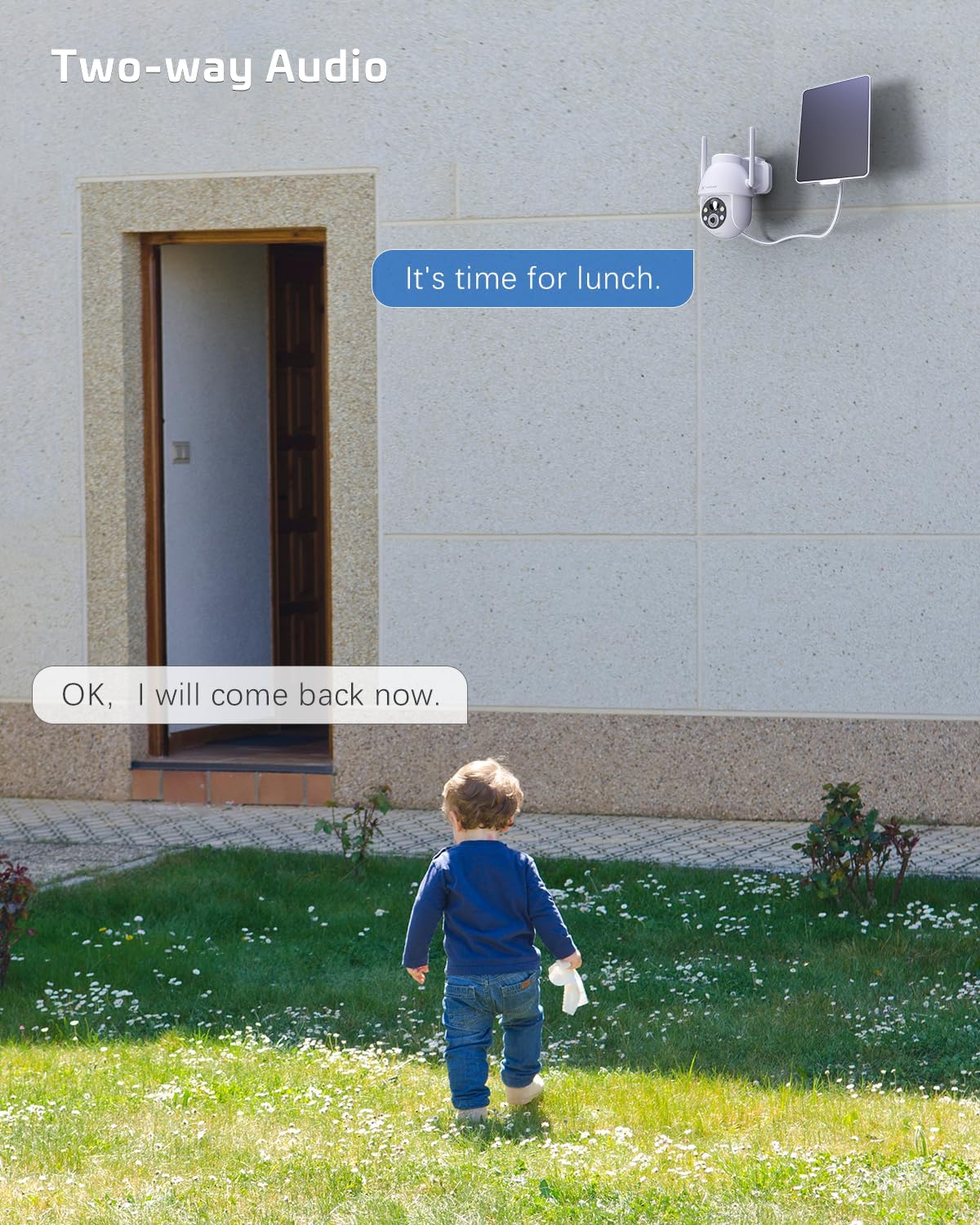
Image: A visual representation of the two-way audio feature, showing communication between a person and the camera.
5.5 Хадгалах сонголтууд
The camera offers flexible storage solutions for recorded footage:
- TF картыг хадгалах: Supports up to 128GB TF (microSD) card (not included) for local storage. Insert the card into the designated slot on the camera.
- Үүл хадгалах сан: A cloud storage service is available (paid feature) for secure, off-site storage of your video recordings. All cloud video is encrypted.
5.6 Олон хэрэглэгчтэй хуваалцах
You can easily share camera access with family members or friends:
- In the app, go to the camera settings and find the 'Share Device' option.
- Generate a QR code or invite link for others to scan or click, granting them access to the camera feed.
6. Засвар үйлчилгээ
To ensure optimal performance and longevity of your COCOCAM security camera:
- Тогтмол цэвэрлэгээ: Камерын линз болон нарны зайг үе үе зөөлөн арчиж, damp Тоос шороо, хог хаягдлыг арилгахын тулд даавуугаар арчина. Хүчтэй химийн бодис бүү хэрэглээрэй.
- Програм хангамжийн шинэчлэлтүүд: Check the app regularly for firmware updates. Keeping your camera's firmware up-to-date ensures the latest features and security patches.
- Батерейны эрүүл мэнд: While solar-powered, ensure the solar panel is free from obstructions to maintain optimal battery charge. In prolonged periods of low sunlight, consider manually charging the camera via USB.
- Байгаль орчны нөхцөл: The camera is IP66 weatherproof, but extreme conditions outside its operating temperature range (-25°C to 60°C / -13°F to 140°F) may affect performance.

Image: The camera operating effectively in rainy conditions, highlighting its IP66 weatherproof design.
7. Алдаа засах
7.1 Camera Offline / Disconnected
- Wi-Fi дохио: Ensure the camera is within range of your 2.4GHz Wi-Fi router and the signal strength is adequate.
- Чиглүүлэгчийн тохиргоо: Verify that your router's settings are not blocking the camera. Restarting the router may help.
- Эрчим хүчний хангамж: Check if the camera has sufficient battery charge. Ensure the solar panel is clean and receiving sunlight.
- Дахин холбох: If issues persist, try re-pairing the camera with the app.
7.2 Motion Detection Issues (Too Many/Few Alerts)
- Мэдрэмж: Adjust the motion detection sensitivity in the app settings. Lower sensitivity for fewer false alarms, higher for more detections.
- Илрүүлэх бүс: If available, configure specific detection zones to focus on critical areas and ignore irrelevant motion.
- AI хүний илрүүлэлт: Хүний бус хөдөлгөөнийг шүүхийн тулд хиймэл оюун ухааныг хүний илрүүлэлтийг идэвхжүүлсэн эсэхийг шалгаарай.
7.3 Зургийн чанар муу
- Линзний цэвэр байдал: Камерын линзийг цэвэрлэж, толбо, шороог арилгана.
- Сүлжээний хурд: Ensure your internet connection is stable and fast enough for 2K video streaming.
- Шөнийн хараа: If image quality is poor at night, check if the night vision mode is set correctly (color or infrared) and if the spotlights/IR LEDs are unobstructed.
7.4 Батерейг цэнэглэхгүй байна
- Нарны хавтан: Ensure the solar panel is clean and positioned to receive direct sunlight for several hours a day.
- Кабелийн холболт: Нарны хавтан болон камерын хоорондох холболтыг шалгана уу.
- Manual Charge: Try charging the camera directly via the USB port to confirm the battery is functional.
8. Техникийн үзүүлэлтүүд
| Онцлог | Тодорхойлолт |
|---|---|
| Загвар | ZY-C2 |
| Видео бичлэгийн нягтрал | 1440p (2K QHD) |
| Холболтын технологи | Утасгүй (2.4GHz Wi-Fi, Bluetooth) |
| Эрчим хүчний эх үүсвэр | Батерейгаар ажилладаг, Нарны эрчим хүчээр ажилладаг |
| Зайны багтаамж | 5200mAh (цэнэглэдэг) |
| Санах ойн хадгалах багтаамж | 128 GB (TF card, not included) |
| Тойрог/назайлтын өнцөг | 355° Пан, 120° Налуу |
| Цаг агаарын хамгаалалттай үнэлгээ | IP66 |
| Ашиглалтын температур | -25°C - 60°C (-13°F - 140°F) |
| Суурилуулах төрөл | Таазны бэхэлгээ, хананд бэхэлгээ |
| Тохиромжтой үйлдлийн систем | iOS, Android |
| Хэмжээ (L x W x H) | 18 x 17 x 14 см |
| Зүйлийн жин | 1.3 кг |
9. Баталгаат хугацаа ба дэмжлэг
COCOCAM provides a 2 жилийн баталгаат хугацаа for its cameras. If you encounter any problems using our products or require technical assistance, please do not hesitate to contact our customer support team. Refer to the contact information provided on the product packaging or the official COCOCAM website for support channels.
We are committed to providing high-quality service and ensuring your satisfaction with our products.


