1. Танилцуулга
Thank you for choosing the Verbatim 500GB USB 3.2 Gen 1 Portable External Hard Drive. This device provides a high-speed, high-capacity storage solution, ideal for expanding your computer's storage or backing up important files. Its compact 2.5-inch form factor makes it highly portable, allowing you to carry your data wherever you go. This manual will guide you through the setup, operation, and maintenance of your new hard drive.
2. Аюулгүй байдлын мэдээлэл
- Төхөөрөмжийг чийг, хэт өндөр температур, нарны шууд тусгалд бүү тавь.
- Төхөөрөмжийг унагах эсвэл хүчтэй нөлөөнд оруулахаас зайлсхий.
- Төхөөрөмжийг өөрөө задлах, засах гэж бүү оролдоорой. Мэргэшсэн үйлчилгээний ажилтанд хандаарай.
- Ашиглалтын явцад төхөөрөмжийн эргэн тойронд агааржуулалт сайтай байх ёстой.
- Always safely eject the hard drive from your computer before disconnecting the USB cable to prevent data loss or corruption.
3. Багцын агуулга
Таны багц дараах зүйлсийг агуулж байгаа эсэхийг шалгана уу.
- Verbatim 500GB Portable External Hard Drive
- USB кабель

Зураг 3.1: Урд view of the Verbatim Portable Hard Drive packaging. The packaging displays the product name, capacity (500GB), USB 3.2 Gen 1 interface, and an image of the black hard drive with a green accent band. It also highlights 'Eco Friendly Packaging' and 'Nero Backup Software'.
4. Бүтээгдэхүүн дууссанview
The Verbatim Portable Hard Drive is a sleek, compact device designed for easy data storage and transfer. It features a durable casing and a standard USB port for connectivity.

Зураг 4.1: Дээд талд view of the Verbatim Portable Hard Drive. The drive is black with a textured surface and features a distinctive green band across its width.
5. Системийн шаардлага
To use your Verbatim Portable Hard Drive, your computer must meet the following minimum requirements:
- Үйлдлийн систем: Windows (Windows 10, 8, 7) or Mac OS (Mac OS X 10.6 or higher)
- USB порт: USB 3.2 Gen 1 (also compatible with USB 2.0 ports, but at reduced speeds)
6. Тохиргоо ба суурилуулалт
The Verbatim Portable Hard Drive is designed for plug-and-play operation, requiring no additional drivers for most modern operating systems.
- Locate an available USB port on your computer. For optimal performance, use a USB 3.2 Gen 1 (or USB 3.0) port.
- Connect the small end of the provided USB cable to the USB port on the Verbatim Portable Hard Drive.
- USB кабелийн том үзүүрийг компьютер дээрх USB порт руу холбоно уу.
- Your operating system should automatically detect and install the necessary drivers. The drive will appear as a new storage device in 'My Computer' (Windows) or 'Finder' (Mac OS).
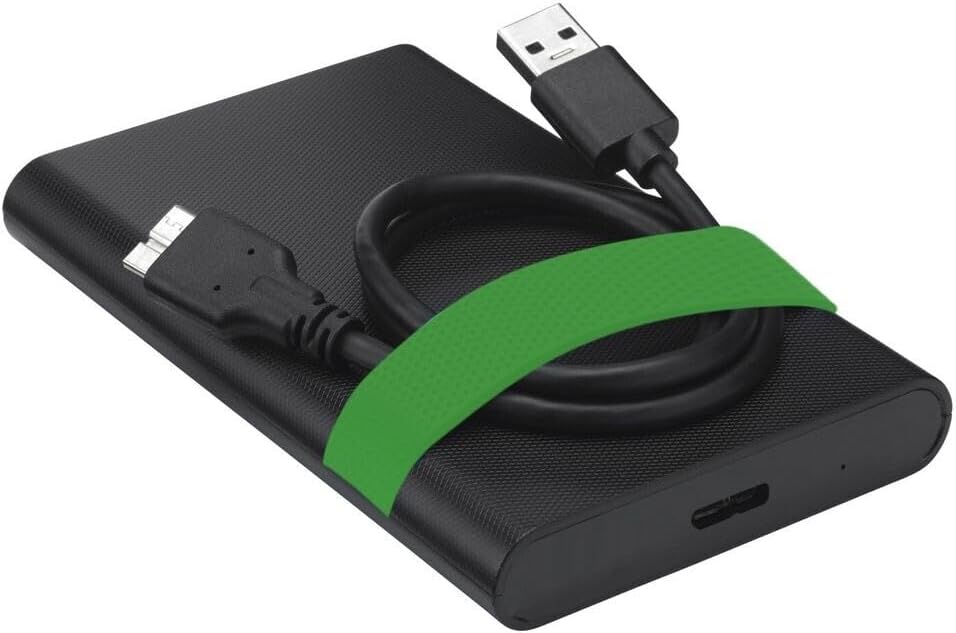
Image 6.1: The Verbatim Portable Hard Drive with its USB cable connected, illustrating the connection point on the drive.
7. Ашиглалтын заавар
7.1 Мэдээлэл дамжуулах
Холбогдсоны дараа та шилжүүлж болно files to and from the hard drive just like any other storage device:
- Чирэх, буулгах: Товшоод чирнэ үү files or folders from your computer to the hard drive's icon, or vice versa.
- Хуулбарлах болон буулгах: Хулганы баруун товчийг дарна уу files/folders, select 'Copy', then navigate to the desired location on the hard drive, right-click, and select 'Paste'.
7.2 Ejecting the Drive Safely
To prevent data corruption, always safely eject the hard drive before disconnecting it.
- Windows: Click the 'Safely Remove Hardware and Eject Media' icon in the system tray, then select your Verbatim drive. Wait for the 'Safe to Remove Hardware' message.
- MacOS: Drag the hard drive icon from your desktop to the Trash, or right-click the icon and select 'Eject'.
8. Засвар үйлчилгээ, арчилгаа
- Keep the hard drive clean by wiping it with a soft, dry cloth. Avoid liquid cleaners.
- Store the drive in a cool, dry place away from magnetic fields.
- Regularly back up important data from the portable drive to another storage medium.
- Periodically check the drive's health using your operating system's disk utility tools.
9. Алдаа засах
| Асуудал | Боломжит шийдэл |
|---|---|
| Компьютер дискийг илрүүлээгүй. |
|
| Өгөгдөл дамжуулах хурд удаан. |
|
| Алдааны мессеж file шилжүүлэх. |
|
10. Техникийн үзүүлэлтүүд
| Онцлог | Дэлгэрэнгүй |
|---|---|
| Брэнд | Үгчлэн |
| Загварын дугаар | 53111 |
| Дижитал хадгалах багтаамж | 500 ГБ |
| Хатуу дискний хэлбэр хүчин зүйл | 2.5 инч |
| Хатуу дискний төрөл | Mechanical Hard Disk Drive (HDD) |
| Интерфэйс | USB 3.2 Gen 1 (compatible with USB 2.0) |
| Эргэлтийн хурд | 5400 эргэлт |
| Max Data Transfer Speed | 5000 Mbit/s (5 Gbit/s) |
| Холболтын технологи | USB |
| Тохиромжтой төхөөрөмжүүд | Computers with Windows OS, Computers with Mac OS |
| Зүйлийн жин | 220 гр |
11. Баталгаат хугацаа ба дэмжлэг
Verbatim products are designed and manufactured to the highest quality standards. For information regarding warranty coverage, technical support, or service, please refer to the official Verbatim webсайт эсвэл хэрэглэгчийн дэмжлэгтэй шууд холбогдоно уу. Худалдан авалтын баримтаа баталгаат нэхэмжлэлд зориулж худалдан авалтын баталгаа болгон хадгална уу.
Онлайн дэмжлэг: зочилно уу www.verbatim.com for FAQs, driver downloads, and contact information.