1. Танилцуулга
Худалдан авалт хийсэнд баярлалааasing the Zenwire A10 Mini Portable Projector. This device is designed to provide a versatile and convenient projection experience, allowing you to display content from various sources, including smartphones, tablets, and computers. Please read this manual carefully before using the projector to ensure proper operation and to maximize its lifespan.
2. Аюулгүй ажиллагааны чухал заавар
- l байх үед проекторын линз рүү шууд харж болохгүйamp асаалттай байна.
- Хэт халалтаас сэргийлж проекторын эргэн тойронд агааржуулалтыг зөв хийж байгаарай. Агааржуулалтын нүхийг бүү бөглөөрэй.
- Зөвхөн проектортой хавсаргасан тэжээлийн адаптерийг ашиглана уу.
- Проекторыг ус, чийг болон шатамхай материалаас хол байлга.
- Проекторыг өөрөө задлах эсвэл засах гэж бүү оролдоорой. Тусламж авахын тулд мэргэшсэн үйлчилгээний ажилтантай холбогдоно уу.
- Проекторыг тогтвортой, тэгш гадаргуу дээр байрлуул.
- Аянга шуургатай үед эсвэл удаан хугацаагаар ашиглаагүй үед проекторыг салга.
3. Багцын агуулга
Хайрцагнаас задлахдаа багцын агуулгыг шалгана уу. Хэрэв ямар нэг зүйл дутуу эсвэл гэмтсэн бол жижиглэн худалдаалагчтайгаа холбоо барина уу.
- Zenwire A10 Mini Portable Projector
- Алсын удирдлага
- Эрчим хүчний адаптер
- Хэрэглэгчийн гарын авлага
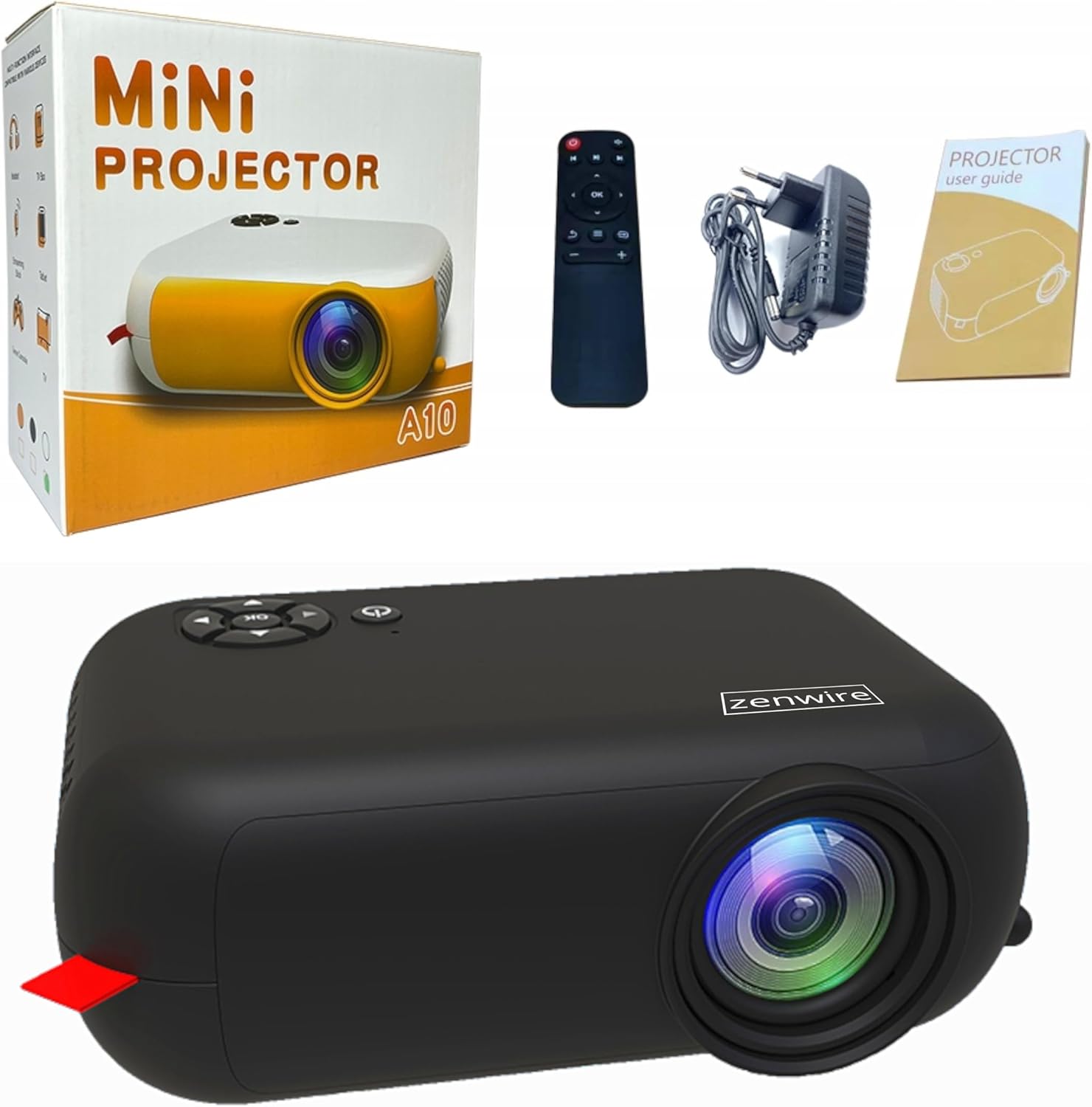
Image: Contents of the Zenwire A10 Mini Projector package, including the projector, remote control, power adapter, and user manual.
4. Бүтээгдэхүүн дууссанview
4.1 Projector Dimensions and Design
The Zenwire A10 is designed for portability, featuring a compact and lightweight form factor. Its dimensions are approximately 14cm x 10cm x 5.5cm, making it easy to carry and set up in various locations.

Image: The Zenwire A10 Mini Projector held in a hand, illustrating its compact size and portability.
4.2 Портууд болон удирдлага
The projector features a range of input and output ports for versatile connectivity, along with intuitive controls.

Image: Rear panel of the Zenwire A10 Mini Projector, showing the 5V-IN DC power input, IR receiver, USB port, 3.5mm audio jack, HDMI port, and SD card slot.
- 5V-IN DC: Проекторын тэжээлийн оролт.
- IR: Алсын удирдлагад зориулсан хэт улаан туяаны хүлээн авагч.
- USB: Медиа тоглуулахын тулд USB санах ойн төхөөрөмжүүдийг холбоно уу.
- Чихэвчний залгуур (3.5 мм): Гадаад чанга яригч эсвэл чихэвчийг холбоно уу.
- HDMI: Connect devices such as laptops, gaming consoles, or streaming sticks.
- SD: Медиа тоглуулахын тулд Micro SD картуудыг оруулна уу.
- Фокус дугуй: Adjust image sharpness (located on the side).
- Хяналтын самбар: Buttons on top for navigation and selection.
5. Тохиргоо
5.1 Эрчим хүчний холболт
- Өгөгдсөн цахилгаан адаптерийг холбоно уу 5V-IN DC проектор дээрх порт.
- Цахилгаан адаптерийг ханын залгуурт холбоно уу.
- Проектор эсвэл алсын удирдлага дээрх цахилгаан товчийг дарж асаана уу.
5.2 Placement and Focus Adjustment
- Place the projector on a stable surface or mount it according to your preference. Ensure the projector lens is facing the projection surface (wall or screen).
- Adjust the distance between the projector and the screen to achieve your desired image size. The projector supports screen sizes up to 100 inches.
- Rotate the focus wheel (typically located near the lens) until the projected image appears clear and sharp.

Image: Diagram illustrating the Zenwire A10 Mini Projector's capability to project various screen sizes, from 13 inches up to 100 inches, depending on the projection distance.
6. Проекторыг ажиллуулах
6.1 Wireless Connection (Miracast & Airplay)
The Zenwire A10 supports wireless screen mirroring via 2.4/5GHz WiFi, compatible with Android (Miracast) and iOS (Airplay) devices.
- Ensure your projector and mobile device are connected to the same Wi-Fi network.
- On the projector's main menu, select the 'Screen Mirroring' or 'Wireless Display' option.
- Android-д зориулсан: On your Android phone/tablet, enable 'Wireless Display', 'Screen Mirroring', 'Smart View', or similar function (names may vary by device). Select the projector from the list of available devices.
- iOS-д зориулсан: On your iPhone/iPad, open Control Center and tap 'Screen Mirroring'. Select the projector from the list of available devices.
- The content from your mobile device should now be mirrored on the projector screen.
6.2 Утастай холболтууд
Проектор нь янз бүрийн төхөөрөмжүүдэд зориулсан олон тооны утастай оролтын сонголтыг санал болгодог.

Image: The Zenwire A10 Mini Projector connected to various devices such as smartphones, tablets, laptops, desktop computers, gaming consoles, and media players, highlighting its versatile connectivity.
- HDMI: Connect a laptop, PC, gaming console (e.g., Xbox, PlayStation), or streaming device (e.g., Amazon Fire TV Stick, Google Chromecast) using an HDMI cable. Select the HDMI input source on the projector.
- USB: Insert a USB flash drive or external hard drive into the USB port. The projector's media player will allow you to browse and play supported video, audio, and image files.
- Микро SD: Insert a Micro SD card into the SD card slot. Similar to USB, you can access media files through the projector's interface.
- Аудио гаралт (3.5 мм үүр): Connect external speakers or headphones to enhance the audio experience.
6.3 Цэсийн навигаци
Use the remote control or the buttons on the projector to navigate through the on-screen menu. Select input sources, adjust picture settings (brightness, contrast, color), sound settings, and other system preferences.
7. Засвар үйлчилгээ
- Линз цэвэрлэх: Проекторын линзийг зөөлөн арчихын тулд оптик линзэнд тусгайлан зориулсан зөөлөн, хөвөнгүй даавууг ашиглана уу. Зүлгүүрийн цэвэрлэгч эсвэл хэт их хүч хэрэглэхээс зайлсхий.
- Тоос арилгах: Regularly clean the projector's exterior with a soft, dry cloth. Use a small brush or compressed air to clear dust from the ventilation openings to ensure proper airflow.
- Хадгалах: Ашиглаагүй үедээ проекторыг сэрүүн, хуурай газар, нарны шууд тусгал болон хэт өндөр температураас хол хадгална уу. Тоос хуримтлагдах, гэмтэхээс сэргийлж анхны сав баглаа боодол эсвэл хамгаалалтын гэрийг ашиглаарай.
8. Алдаа засах
If you encounter issues with your Zenwire A10 projector, refer to the following common problems and solutions:
| Асуудал | Боломжит шалтгаан | Шийдэл |
|---|---|---|
| Дэлгэц дээр зураг алга | Power not connected; Incorrect input source; Device not connected properly. | Check power cable; Select correct input source (HDMI, USB, etc.); Reconnect source device. |
| Зураг бүдэг байна | Фокус тохируулаагүй; Проектор дэлгэцээс хэт ойр/хол. | Adjust the focus wheel; Adjust projection distance. |
| Дуу алга | Дууны түвшин хэт бага; Дууг нь хаасан; Гадаад аудио төхөөрөмж холбогдоогүй/сонгогдоогүй байна. | Increase volume; Unmute; Check external speaker connection or select internal speaker. |
| Утасгүй холболтын асуудал | Not on same Wi-Fi network; Device not compatible; Interference. | Ensure both devices are on the same Wi-Fi; Verify device compatibility; Try moving closer to Wi-Fi router. |
9. Техникийн үзүүлэлтүүд
| Онцлог | Дэлгэрэнгүй |
|---|---|
| Брэнд | Zenwire |
| Загварын дугаар | A10 |
| Бүтээгдэхүүний төрөл | Compact and Portable Projector |
| Төрөлхийн тогтоол | 480 x 360p |
| Дэлгэцийн хамгийн дээд нарийвчлал | 1920 x 1080 (Full HD) |
| Гэрэлтүүлэг | 1800lm / 60 ANSI |
| Ялгаатай харьцаа | 2000:1 |
| Дэлгэцийн төрөл | LED |
| Холболтын технологи | Wi-Fi (2.4/5GHz), HDMI, USB, Micro SD, 3.5mm Audio Jack |
| Утасгүй холболтын онцлог | Miracast, Airplay |
| Тохиромжтой төхөөрөмжүүд | Smartphones (Android, iOS), Tablets, Laptops, PCs, Gaming Consoles |
| Зөвлөмж болгож буй хэрэглээ | Гэрийн кино театр |
| Хэмжээ (ойролцоогоор) | 14см х 10см х 5.5см |
10. Баталгаат хугацаа ба дэмжлэг
The Zenwire A10 Mini Portable Projector comes with a standard manufacturer's warranty. For specific warranty terms and conditions, please refer to the documentation provided at the time of purchase or contact your retailer. For technical support or service inquiries, please reach out to Zenwire customer service through their official webсайт эсвэл таны бүтээгдэхүүнд өгсөн холбоо барих мэдээлэл.


