Танилцуулга
This manual provides instructions for the Vinabty AKB37026853 replacement remote control, designed for various LG Home Cinema Systems. This remote functions as a direct replacement for your original unit, requiring no complex programming or setup. Simply install batteries, and it is ready for use.

Тохиргоо
To begin using your Vinabty AKB37026853 remote control, follow these simple steps:
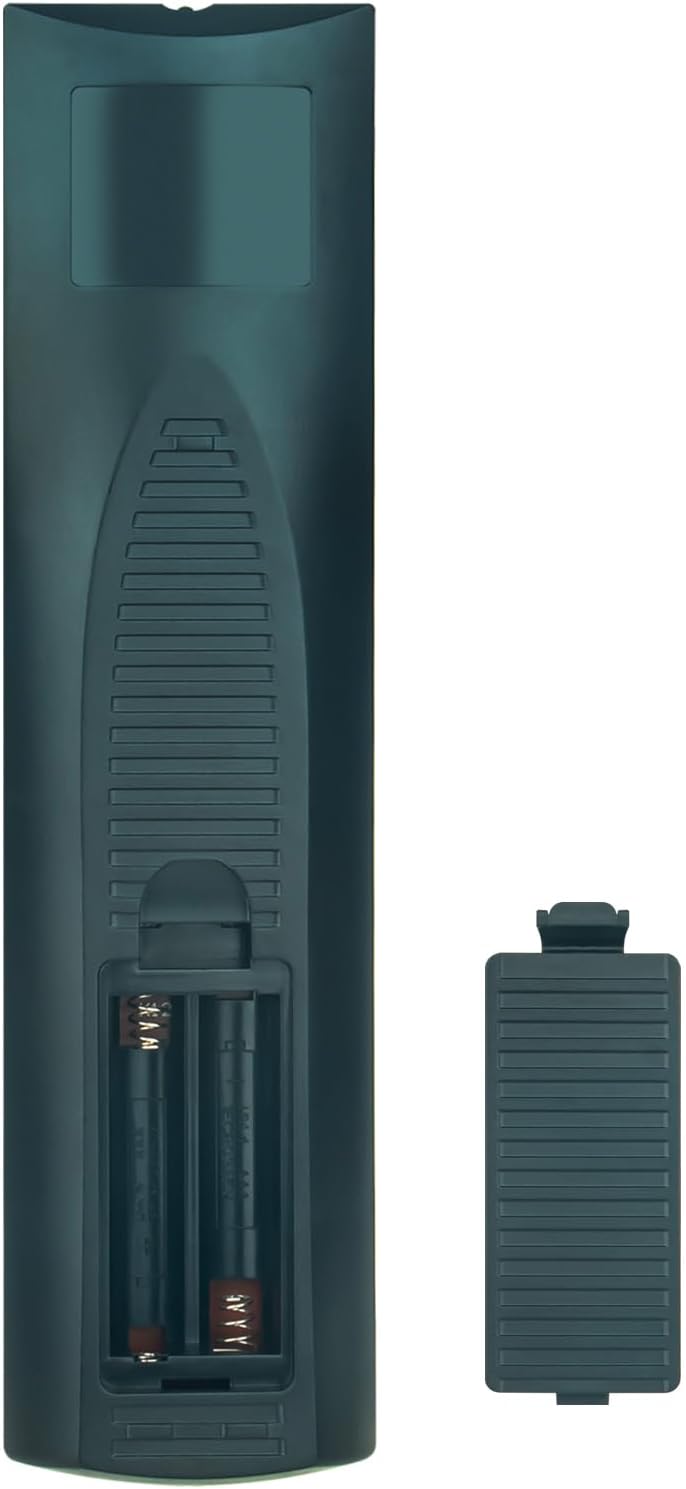
- Зайны тасалгааг нээнэ үү: Locate the battery compartment cover on the back of the remote control. Slide the cover downwards or press the latch to open it.
- Батерейг оруулах: Insert two (2) AAA 1.5V batteries into the compartment. Ensure the positive (+) and negative (-) terminals of the batteries match the polarity indicators inside the compartment.
- Зайны тасалгааг хаах: Батерейны тасалгааны тагийг найдвартай товших чимээ гартал буцааж гулсуулж буцааж байрлуулна уу.
- Анхны хэрэглээ: The remote control is pre-programmed and does not require any additional setup. It is ready for immediate use with compatible LG Home Cinema Systems.
Ашиглалтын заавар
The Vinabty AKB37026853 remote control provides full functionality for your compatible LG Home Cinema System. Point the remote directly at your LG device for optimal performance.

Гол функцууд:
- POWER (Улаан товчлуур): Turns the LG Home Cinema System on or off.
- НЭЭХ/ХААХ: Дискний тавиурыг нээж эсвэл хаадаг.
- Тоон товчлуурууд (0-9): Selects tracks, chapters, or input numerical values.
- RADIO/INPUT: Switches between radio and other input sources.
- MARKER / SLEEP: Accesses marker functions or sets the sleep timer.
- REPEAT / CLEAR / TITLE: Controls repeat playback, clears entries, or accesses disc title menu.
- SCAN / SKIP: Scans forward/backward or skips tracks/chapters.
- PAUSE/STEP / PLAY / STOP: Controls media playback (pause, play, stop, step-by-step).
- INFO/DISPLAY / MONO/STEREO / DISC MENU: Displays information, switches audio modes, or accesses disc menu.
- Навигацийн товчлуурууд (Дээш, Доош, Зүүн, Баруун, ОРУУЛАХ): Цэс рүү шилжиж, сонголтыг баталгаажуулна.
- TUNING +/-: Adjusts radio tuning.
- HOME / RETURN: Accesses the home menu or returns to the previous screen.
- SPEAKER LEVEL / PRESET +/- / OPTICAL: Adjusts speaker levels, navigates radio presets, or selects optical input.
- SOUND EFFECT / VOL +/- / MUTE / REC: Controls sound effects, adjusts volume, mutes audio, or initiates recording.
- AV/INPUT / PR/CH +/- / TV: Selects AV input, changes program/channel, or controls TV functions (if programmed).
- RDS / PTY: Accesses Radio Data System functions or Program Type.
Тохиромжтой загварууд:
This remote control is compatible with the following LG Home Cinema System models:
- DH6420P, DH6520T, HT805PH, HT805SH, HT44S, HT805TH, HT44M, HT906TA, HT806TH, DH6220S, DH6430P, DH6530D, DH6530T, DH6630T, DH7620T, HT44C, HT806PH, HT805DM, DH6230S, HT304, HT532, HT805, HT805HT, HT805ST, HT805THW, HT806, HT806ST, HT906, AKB37026853
Засвар үйлчилгээ
Proper maintenance ensures the longevity and reliable performance of your remote control.
- Зай солих: Replace batteries when the remote's response becomes sluggish or stops working. Always replace both batteries simultaneously with new AAA 1.5V batteries. Do not mix old and new batteries or different types of batteries.
- Цэвэрлэгээ: Clean the remote control periodically with a soft, dry cloth. For stubborn dirt, lightly dampдаавууг усаар эсвэл зөөлөн, зүлгүүргүй цэвэрлэгчээр угаана. Химийн хатуу бодис, зүлгүүрийн материал ашиглахаас зайлсхий.
- Хадгалах: Алсын удирдлагыг нарны шууд тусгал, хэт температур, өндөр чийгшилээс хол, сэрүүн, хуурай газар хадгална. Хэрэв алсын удирдлагыг удаан хугацаагаар ашиглахгүй бол гоожихоос сэргийлж батерейг нь салга.
- Уналт, нөлөөллөөс зайлсхийх: Protect the remote from physical damage by avoiding drops and impacts.
Алдааг олж засварлах
If you encounter issues with your remote control, refer to the following troubleshooting tips:
- Алсын удирдлага хариу өгөхгүй байна:
- Батерейг зөв туйлшралтайгаар зөв оруулсан эсэхийг шалгана уу.
- Replace the batteries with new AAA 1.5V batteries.
- Ensure there are no obstructions between the remote control and the LG Home Cinema System.
- Make sure you are pointing the remote directly at the infrared receiver on your LG device.
- Хязгаарлагдмал хүрээ:
- Ensure batteries are fresh. Weak batteries can reduce the remote's effective range.
- Verify that there are no strong light sources (like direct sunlight or fluorescent lights) interfering with the infrared signal.
- Тусгай товчлуурууд ажиллахгүй байна:
- Clean the remote control, especially around the buttons, to ensure no dirt or debris is preventing contact.
- If only certain buttons fail, and others work, it might indicate a fault with the remote. Consider replacing it.
Үзүүлэлтүүд
| Брэнд | VINABTY |
| Загварын дугаар | AKB37026853 (SYJ-AKB37026853-SYJ) |
| Өнгө | Хар |
| Холболтын технологи | Хэт улаан туяа |
| Тохиромжтой төхөөрөмжүүд | Home Cinema Systems |
| Хамгийн их хүрээ | 10 метр |
| Зайны төрөл | 2 x AAA 1.5V (оруулаагүй) |
| Хянагчийн төрөл | Товчлуурын удирдлага |
Баталгаат хугацаа
Warranty information for this replacement remote control is typically provided by the seller at the time of purchase. Please refer to your purchase documentation or contact the seller directly for details regarding warranty coverage and terms.
Дэмжлэг
For further assistance or if you have questions not covered in this manual, please contact the seller or manufacturer through the platform where the product was purchased. Provide your order details and a clear description of the issue for efficient support.
