1. Бүтээгдэхүүн дууссанview
The LFF Weather Station (Model LWS163) is a comprehensive device designed to provide accurate indoor and outdoor environmental data, timekeeping, and weather forecasting. It features a large 7.5-inch color LCD touchscreen display, offering clear visibility of various metrics including temperature, humidity, barometric pressure, moon phase, and dynamic weather icons. The integrated atomic clock ensures precise time synchronization, and the system supports up to three wireless remote sensors for monitoring multiple locations.

Figure 1.1: LFF Weather Station Main Unit and Remote Sensor
2. Тохиргоо
2.1 Цахилгаан хангамж
The main weather station unit can be powered by either the included AC power cord or by 2 AAA batteries (not included). The remote sensor requires 2 AAA batteries (not included).
- Main Unit (Indoor Receiver): Use the provided power adapter for continuous backlight display. When powered by batteries only, the screen will automatically turn off after 10 seconds to conserve power.
- Алсын мэдрэгч: Insert 2 AAA batteries into the remote sensor. Ensure correct polarity.

Figure 2.1: Power Supply Connections

Figure 2.2: Backlight Behavior with Different Power Modes
2.2 Алсын зайн мэдрэгчийн байршил
Place the wireless remote sensor outdoors in a shaded, dry location, away from direct sunlight and precipitation, to ensure accurate temperature and humidity readings. The transmission range is up to 100 meters (328 feet) in an open area. The main unit supports up to 3 remote sensors (one included).

Figure 2.3: Wireless Transmission Range and Sensor Placement
2.3 Initial Setup and Synchronization
After powering on both the main unit and the remote sensor, the main unit will automatically attempt to synchronize with the remote sensor and the atomic clock signal (WWVB). This process may take 10-15 minutes. Ensure the main unit is placed in an area where it can receive a clear signal for atomic time synchronization.

Figure 2.4: WWVB Signal Function
3. Ашиглалтын заавар
3.1 Дээд дэлгэцview
The 7.5-inch color display provides a clear layout of all information. Key areas include:
- Гадна температур ба чийгшил: Located on the left side.
- Өрөөн доторх температур ба чийгшил: Баруун талд байрладаг.
- Weather & Pressure: Central top section, showing current weather forecast and barometric pressure trend.
- Time, Moon Phase, & Date: Lower central and right sections.
- Хяналтын товчлуурууд: Touch-sensitive buttons at the bottom for Mode, Set, Alarm, Channel, Down, and Up.
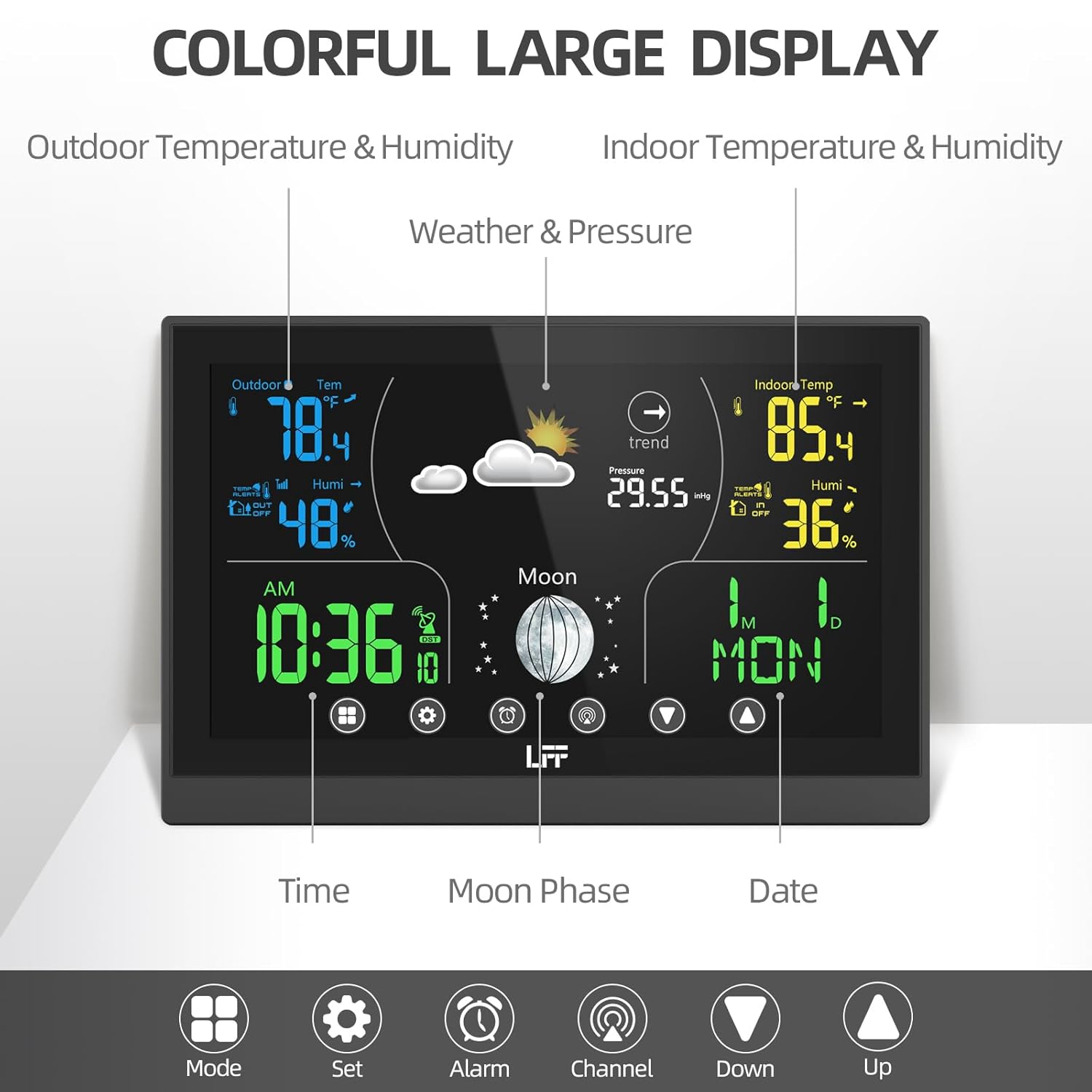
Figure 3.1: Detailed Display Layout
3.2 Цаг болон огнооны тохиргоо
The atomic clock feature automatically synchronizes the time and date. If manual adjustment is needed or preferred, use the "Set" button to enter time/date setting mode. You can adjust the 12H/24H format and select from 8 available time zones (AST, NST, EST, CST, MST, PST, AKT, HAT).
3.3 Сэрүүлгийн тохиргоо
The weather station includes two independent alarm clocks with a snooze function. Press the "Alarm" button to set or activate alarms. Follow the on-screen prompts to adjust alarm times and enable/disable them.

Figure 3.2: Dual Alarm Feature
3.4 Сувгийн сонголт
If you have multiple remote sensors, press the "Channel" button to cycle through the readings from each connected sensor (CH1, CH2, CH3). The display will show the data for the selected channel.
3.5 Арын гэрлийн тохируулга
When the main unit is powered by the AC cord, there are 3 adjustable backlight modes. Use the appropriate control button (refer to the specific icon on the unit) to cycle through the brightness levels.
3.6 Цаг агаарын урьдчилсан мэдээний тайлбар
The weather station provides a dynamic weather forecast for the next 8 hours, based on barometric pressure changes. The forecast is calibrated over 10 to 14 days for accuracy specific to your location. Interpret the weather icons as follows:
 Sunny, Partly Sunny, Cloudy, Light Rain, Heavy Rain, Light Snow, Heavy Snow

Зураг 3.3: Цаг агаарын урьдчилсан мэдээний дүрс тэмдэг
4. Засвар үйлчилгээ
- Зай солих: Replace batteries in both the main unit (if used) and remote sensor when the low battery indicator appears on the display. Use fresh AAA batteries.
- Цэвэрлэгээ: Дэлгэц болон төхөөрөмжийн гадаргууг зөөлөн, d-ээр арчинаamp даавуу. Зүлгүүрийн цэвэрлэгч, уусгагчийг бүү ашигла.
- Мэдрэгчийн арчилгаа: Periodically check the outdoor sensor for debris or obstructions that might affect readings.
5. Алдаа засах
If you encounter issues with your LFF Weather Station, please refer to the following common problems and solutions:
| Асуудал | Боломжит шалтгаан / шийдэл |
|---|---|
| Үндсэн төхөөрөмж дээр дэлгэц байхгүй | Check power adapter connection or replace AAA batteries. |
| Outdoor temperature/humidity not displayed or inaccurate |
|
| Atomic clock not synchronizing |
|
| Цаг агаарын урьдчилсан мэдээ буруу | The weather forecast is based on barometric pressure changes and requires 10-14 days of calibration for optimal local accuracy. Ensure the unit has been operating continuously for this period. |
For more detailed troubleshooting or specific issues, please refer to the Албан ёсны хэрэглэгчийн гарын авлага (PDF).
6. Техникийн үзүүлэлтүүд
| Онцлог | Дэлгэрэнгүй |
|---|---|
| Бүтээгдэхүүний хэмжээс | 7.4 x 0.55 x 4.95 инч |
| Жин | 1.21 фунт |
| Загварын дугаар | LWS163 |
| Эрчим хүчний эх үүсвэр (Үндсэн хэсэг) | AC/DC Adapter (included) or 2 AAA Batteries (not included) |
| Цахилгаан эх үүсвэр (Алсын мэдрэгч) | 2 AAA батерей (оруулаагүй) |
| Дэлгэцийн төрөл | 7.5 инчийн өнгөт LCD мэдрэгчтэй дэлгэц |
| Холболтын технологи | Утасгүй |
| Утасгүй дамжуулах хүрээ | Ил задгай талбайд 100 метр (328 фут) хүртэл |
| Дэмжигдсэн мэдрэгч | Up to 3 wireless remote sensors (one included) |
| Температурын нарийвчлал | 1 хэм байна |
| Онцлог шинж чанарууд | Adjustable Brightness, Hygrometer, Thermometer, Atomic Clock, Dual Alarms, Moon Phase, Weather Forecast |
| Материал | Хуванцар |
| Оруулсан бүрэлдэхүүн хэсгүүд | Main Weather Station Unit, 1 Wireless Remote Sensor, Power Cord |
7. Баталгаат хугацаа ба дэмжлэг
LFF stands behind the quality of its products. For warranty information, technical support, or service inquiries, please contact LFF customer service. Keep your purchase receipt for warranty claims.
For comprehensive details and additional assistance, please download the Official LFF Weather Station User Manual (PDF).


