1. Танилцуулга
The Trevi DAB 7F80 R is a portable digital radio offering DAB, DAB+, and FM reception, along with Bluetooth connectivity. It features a high-readability Dot Matrix display, a programmable alarm clock, and a headphone jack. This manual provides instructions for the proper setup, operation, and maintenance of your device.
2. Аюулгүй байдлын мэдээлэл
- Төхөөрөмжийг ашиглахаасаа өмнө бүх зааврыг анхааралтай уншина уу.
- Төхөөрөмжийг ус, чийг, хэт өндөр температурт бүү тавь.
- Use only the specified power source (4 x AAA batteries or a compatible 5V DC adapter, not included).
- Do not attempt to disassemble, repair, or modify the device. Refer all servicing to qualified personnel.
- Орон нутгийн дүрэм журмын дагуу зайгаа хариуцлагатайгаар устгана уу.
- Төхөөрөмжийг хүчтэй соронзон орноос хол байлга.
3. Багцын агуулга
Таны багцад дараах зүйлс байгаа эсэхийг шалгана уу.
- Trevi DAB 7F80 R Main Unit
- Хэрэглэгчийн гарын авлага (энэ баримт бичиг)
- Баталгаат гэрчилгээ
4. Бүтээгдэхүүн дууссанview
Familiarize yourself with the components and controls of your Trevi DAB 7F80 R radio.
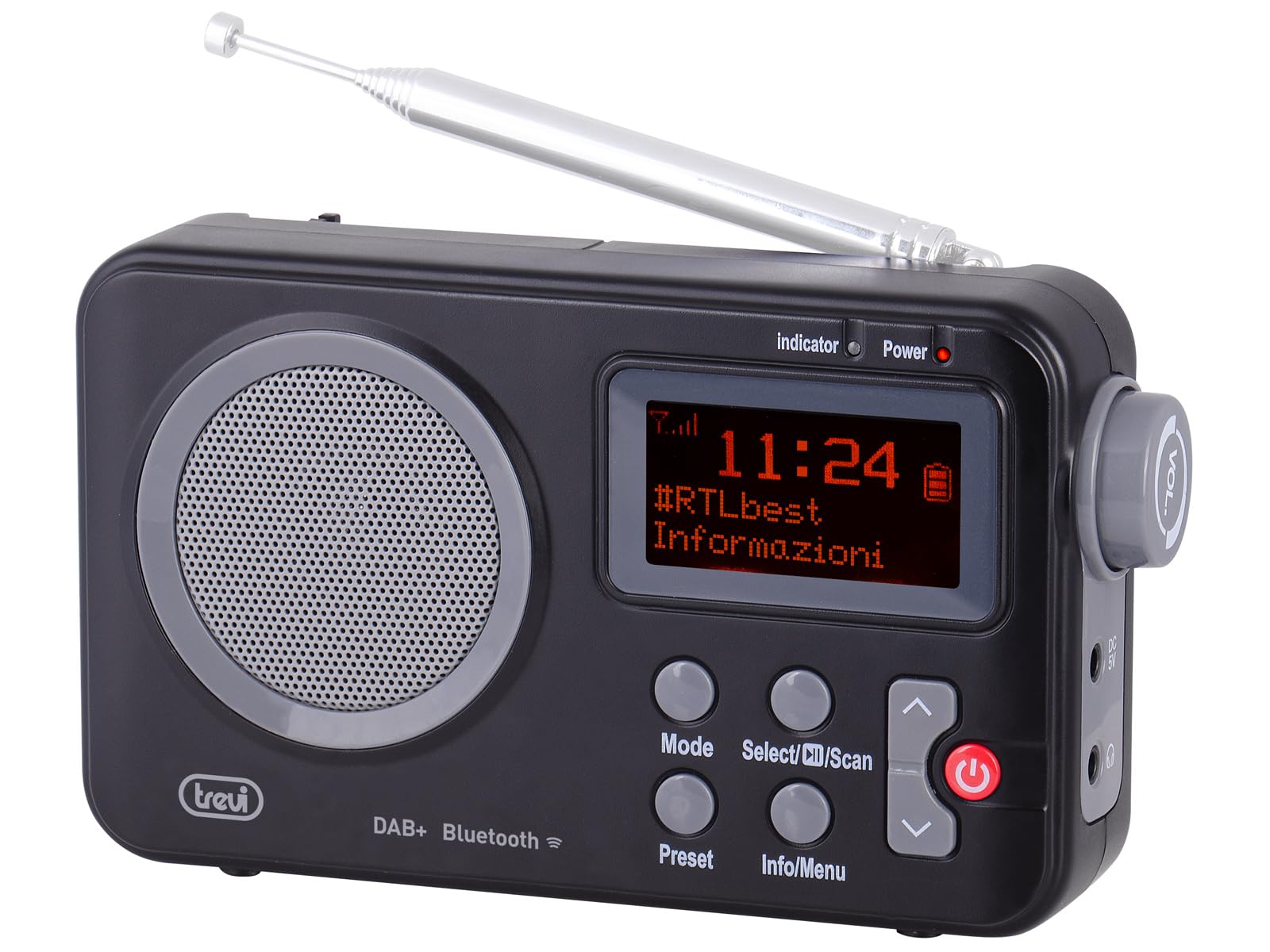
Зураг 1: Урд view of the Trevi DAB 7F80 R radio. This image displays the Dot Matrix screen, the main speaker grille, and the primary control buttons including Mode, Select/Scan, Preset, Info/Menu, and Power. The extendable telescopic antenna is visible at the top.
Хяналт ба онцлогууд:
- Дэлгэц: High-readability Dot Matrix screen for station information, time, and menu navigation.
- Илтгэгч: Аудио гаралтын зориулалттай нэгдсэн чанга яригч.
- Цахилгаан товч: Радиог асаах/унтраах.
- Горимын товчлуур: Switches between DAB/DAB+, FM, and Bluetooth modes.
- Select/Scan Button: Confirms selections in menus, initiates station scans.
- Урьдчилан тохируулах товчлуур: Accesses and stores favorite radio stations.
- Мэдээлэл/Цэс товч: Displays station information and accesses system settings.
- Дээш/Доош сумны товчлуурууд: Navigates through menus, adjusts volume, changes stations.
- Чихэвчний Жак: Хувийн сонсоход зориулсан 3.5 мм гаралт.
- Антен: Extendable telescopic antenna for improved radio reception.
5. Тохиргоо
5.1 Төхөөрөмжийг тэжээх
The Trevi DAB 7F80 R can be powered by batteries or an external AC adapter.
- Батерей суурилуулах: Open the battery compartment cover on the back of the unit. Insert 4 x AAA batteries (not included), ensuring correct polarity (+/-). Close the cover securely.
- AC адаптер (заавал биш): For continuous power, connect a compatible 5V DC, 1A AC adapter (not included) to the DC IN port on the side of the radio.
Чухал анхааруулга: Do not use batteries in the device when it is connected to an AC adapter for extended periods. This may lead to battery leakage or damage to the unit. If using the AC adapter, remove the batteries. If using batteries, disconnect the AC adapter.
5.2 Initial Power On and Station Scan
- Хамгийн оновчтой хүлээн авахын тулд дурангийн антенныг бүрэн сунгана уу.
- дээр дарна уу Хүч товчийг дарж радио асаана.
- Upon first use, the radio may prompt you to select a language. Use the Up / Down Arrow удирдах товчлуурууд болон Select/Scan баталгаажуулах.
- The radio will automatically perform a full scan for DAB/DAB+ stations. This process may take a few minutes. Once complete, the first available station will begin playing.
6. Ашиглалтын заавар
6.1 Radio Mode (DAB/DAB+, FM)
- Солих горимууд: дээр дарна уу Горим button repeatedly to cycle between DAB, FM, and Bluetooth modes.
- Станцуудыг хайж байна:
- In DAB mode, a full scan is usually performed on first use. To perform a new scan, press and hold Select/Scan.
- FM горимд дарна уу Select/Scan дараагийн боломжтой станцыг автоматаар хайх.
- Станцуудыг сонгох нь: -г ашиглана уу Up / Down Arrow боломжтой станцуудыг үзэх товчлуурууд.
- Урьдчилан хадгалахыг хадгалах: The radio can store up to 20 DAB/DAB+ and 20 FM stations.
- Хүссэн станцдаа тааруулна уу.
- -г удаан дар Урьдчилан тохируулсан дэлгэц дээр "Preset Store" гарч ирэх хүртэл товчийг дарна уу.
- -г ашиглана уу Up / Down Arrow товчийг дарж урьдчилан тохируулсан дугаарыг (1-20) сонгоно.
- дарна уу Select/Scan станцыг баталгаажуулж хадгалах.
- Урьдчилан тохируулсан зүйлийг эргэн санах: дээр дарна уу Урьдчилан тохируулсан button briefly. Use the Up / Down Arrow buttons to select the desired preset number, then press Select/Scan.
- RDS/DLS Information: In FM or DAB mode, press the Мэдээлэл/Цэс button repeatedly to cycle through available information such as station name, program type, time, and song title (if broadcast).
6.2 Bluetooth горим
- дээр дарна уу Горим button until 'Bluetooth' appears on the display. The radio will enter pairing mode, indicated by a flashing Bluetooth icon.
- Ухаалаг утас, таблет эсвэл зөөврийн компьютер дээрээ Bluetooth-г идэвхжүүлж, боломжтой төхөөрөмжүүдийг хайж олоорой.
- Select 'Trevi DAB 7F80 R' from the list of devices to pair. Once connected, the Bluetooth icon will stop flashing.
- You can now play audio from your connected device through the radio. Use your device's controls for playback and the radio's volume controls for audio level.
6.3 Цаг болон сэрүүлгийн функцууд
The radio features an integrated clock and two programmable alarms.
- Цагийг тохируулах:
- -г удаан дар Мэдээлэл/Цэс товчийг дарж үндсэн цэс рүү орно.
- Ашиглах Up / Down Arrow buttons to navigate to 'Time/Date' and press Select/Scan.
- Select 'Set Time/Date' and adjust the hour, minute, day, month, and year using the Up / Down Arrow товчлуурууд болон алхам бүрийг баталгаажуулна Select/Scan.
- Setting Alarms (Alarm 1 / Alarm 2):
- From the main menu, navigate to 'Alarm' and press Select/Scan.
- Select 'Alarm 1 Setup' or 'Alarm 2 Setup'.
- Configure the alarm settings: 'On Time' (hour/minute), 'Duration', 'Source' (Buzzer or last used radio station), 'Volume', and 'Frequency' (Daily, Weekdays, Weekends, Once). Use Up / Down Arrow утгыг тохируулах товчлуурууд болон Select/Scan тохиргоо бүрийг баталгаажуулах.
- Ensure the alarm is set to 'On' in the alarm setup menu.
- Deactivating a sounding alarm: дээр дарна уу Хүч Сэрүүлгийг унтраах товчлуур.
6.4 Чихэвчний хэрэглээ
To listen privately, insert standard 3.5mm headphones into the headphone jack located on the side of the radio. The internal speaker will automatically mute.
7. Засвар үйлчилгээ
- Цэвэрлэгээ: Радиог зөөлөн, хуурай, хөвөнгүй даавуугаар арчина. Зүлгүүрийн цэвэрлэгч, лав, уусгагч хэрэглэж болохгүй.
- Зай солих: When the low battery indicator appears on the display, replace all four AAA batteries with new ones.
- Хадгалах: If the radio will not be used for an extended period, remove the batteries to prevent leakage and potential damage. Store the device in a cool, dry place.
8. Алдаа засах
If you encounter issues with your Trevi DAB 7F80 R, please refer to the following common problems and solutions:
- Радио асаалттай биш байна:
- Батерейг зөв оруулсан, цэнэггүй болсон эсэхийг шалгана уу. Шаардлагатай бол солино уу.
- If using an AC adapter, ensure it is properly connected and the power outlet is functional.
- Дуу байхгүй эсвэл дууны чанар муу:
- Дууны хэмжээг тохируулна уу.
- Ensure headphones are not connected if you want sound from the speaker.
- Check radio reception. Extend and adjust the antenna. Try moving the radio to a different location.
- For Bluetooth, ensure the device is paired and audio is playing from the source.
- Clock resets after power loss or battery change:
- This model does not feature a backup battery for the clock. It is normal for the time to reset when power is completely removed (e.g., batteries removed or AC adapter unplugged). You will need to re-set the time manually as described in section 6.3.
- Батерейны богино хугацаа:
- Battery life can vary depending on usage and battery quality. Use high-quality alkaline batteries for best performance.
- For prolonged use, consider using a compatible 5V DC AC adapter (not included).
- Difficulty with setup or navigation (e.g., station search, alarm setup):
- The radio uses a limited number of buttons for various functions. Refer to the specific operating instructions in section 6 for detailed, step-by-step guidance. Some functions may require pressing buttons multiple times or holding them down.
- Radio turns off when switching between battery and AC power:
- This is expected behavior. The radio will power cycle when changing its primary power source. Ensure you have saved any settings or presets before switching.
9. Техникийн үзүүлэлтүүд
| Брэнд | Треви |
| Загвар | DAB 7F80 R |
| Өнгө | Хар |
| Тааруулах технологи | DAB/DAB+, FM |
| Дэмжигдсэн радио хамтлагууд | DAB, DAB+, FM (3 bands) |
| Bluetooth | Тиймээ |
| Дэлгэц | High-readability Dot Matrix |
| Сэрүүлэг | 2 програмчлагдсан дохиолол |
| Урьдчилсан тохируулгууд | 20 DAB/DAB+, 20 FM |
| Эрчим хүчний эх үүсвэр | 4 x AAA batteries (not included) or 5V DC adapter (not included) |
| Тохиромжтой төхөөрөмжүүд | Smartphone, tablet, laptop |
| Бүтээгдэхүүний хэмжээ (L x W x H) | 14 x 3.5 x 8.5 см |
| Оруулсан бүрэлдэхүүн хэсгүүд | Main unit, user manual, warranty certificate |
10. Баталгаат хугацаа ба дэмжлэг
This product is supplied with a warranty certificate. For detailed information regarding warranty terms and conditions, please refer to the certificate included in your package.
For technical support, troubleshooting beyond this manual, or warranty claims, please contact your retailer or the manufacturer's customer service using the contact information provided with your purchase.