1. Танилцуулга
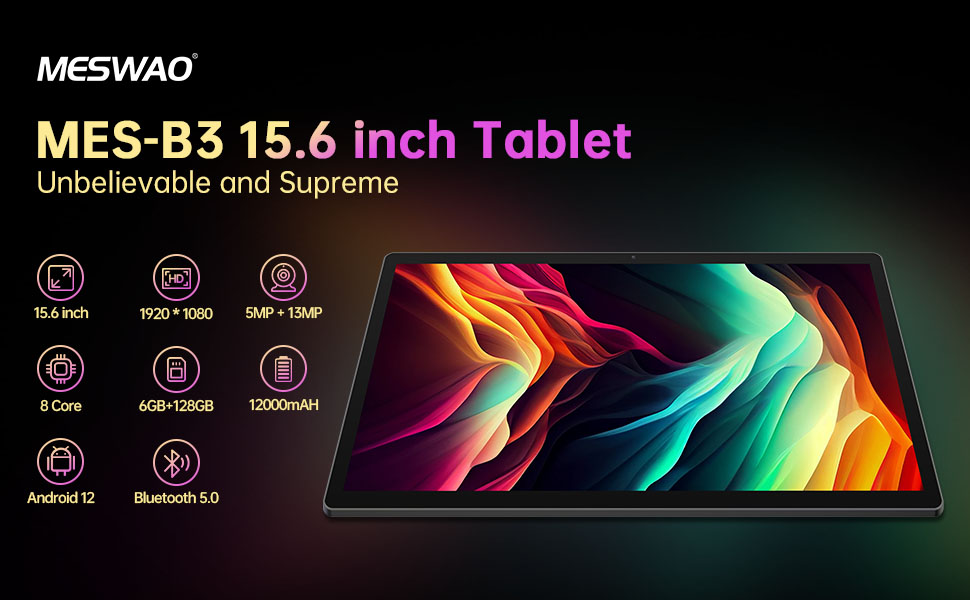
Welcome to the user manual for your MESWAO MES-B3 15.6-inch Android 13 Tablet. This document provides essential information for setting up, operating, maintaining, and troubleshooting your device. The MES-B3 tablet features a large 15.6-inch IPS HD display, an Octa-Core processor, 6GB RAM, 128GB internal storage (expandable), and a 12000mAh battery, designed for a versatile user experience.

Figure 1: MESWAO MES-B3 Tablet Overview
2. Аюулгүй байдлын мэдээлэл
Please read all safety instructions carefully before using your tablet to prevent injury or damage to the device. Keep this manual for future reference.
- Батерейны аюулгүй байдал: Do not attempt to replace the battery yourself. Do not expose the tablet to extreme temperatures, direct sunlight, or fire. Do not puncture, drop, or disassemble the battery.
- Ус ба чийг: This tablet is not waterproof. Avoid exposing it to water, rain, or high humidity.
- Цэвэрлэгээ: Use a soft, dry cloth to clean the tablet. Do not use liquid cleaners or aerosols.
- Харьцуулах: Таблетыг унагаах эсвэл хүчтэй цохилтод өртөхөөс зайлсхий.
- Сонсголын хамгаалалт: When using headphones, set the volume to a moderate level to avoid hearing damage.
3. Багцын агуулга
Бүх зүйл багцад байгаа эсэхийг шалгана уу:
- MESWAO MES-B3 15.6-inch Android 13 Tablet
- Эрчим хүчний адаптер
- USB-C кабель
- Хэрэглэгчийн гарын авлага (энэ баримт бичиг)
4. Төхөөрөмж дууссанview
Familiarize yourself with the physical components of your MESWAO MES-B3 tablet.

Figure 2: Buttons and Connectors
- Цахилгаан товч: Press and hold to turn the tablet on or off. Press briefly to turn the screen on or off.
- Дууны товчлуурууд: Аудио дууны хэмжээг тохируулна уу.
- Урд камер: For video calls and selfies (5MP).
- Rear Camera with Flashlight: For taking photos and videos (13MP).
- Төрөл-C порт: For charging the tablet and connecting to a computer.
- TF картын оролт: Insert a MicroSD card to expand storage.
- Стерео чанга яригч: Аудио гаралтыг хангах.
5. Тохиргоо
5.1 Таблетыг цэнэглэх
Before first use, fully charge your tablet. Connect the USB-C cable to the tablet's Type-C port and the other end to the power adapter. Plug the adapter into a wall outlet. The battery indicator on the screen will show charging status.
5.2 Асаах/унтраах
- Асаахын тулд: Press and hold the Power Button until the MESWAO logo appears.
- Унтраахын тулд: Press and hold the Power Button until the power options appear, then select 'Power off'.
- Дахин эхлүүлэхийн тулд: Press and hold the Power Button until the power options appear, then select 'Restart'.
5.3 Анхны тохиргооны шидтэн
Анх асаахад таблет анхны тохиргооны процессоор танд туслах болно:
- Өөрийн дуртай хэлээ сонгоно уу.
- Wi-Fi сүлжээнд холбогдоно уу.
- Google бүртгэлээрээ нэвтэрч эсвэл шинээр үүсгэнэ үү.
- Review мөн нөхцөл, болзлыг хүлээн зөвшөөр.
- Дэлгэцийн түгжээг тохируулах (ПИН код, хээ, нууц үг).
5.4 MicroSD карт оруулах
To expand the tablet's storage, you can insert a MicroSD card (up to 256GB, as per some product information, though 1TB is also mentioned in images, please verify with product packaging for exact maximum). Locate the TF card slot on the side of the tablet. Gently insert the MicroSD card with the gold contacts facing down until it clicks into place.

Figure 3: Storage Expansion with MicroSD Card
6. Таблетаа ажиллуулах
6.1 Үндсэн навигаци
The MESWAO MES-B3 runs on Android 13, offering an intuitive touch interface.
- Товш: Нэг зүйлийг сонгох эсвэл програмыг нээнэ үү.
- Шудрах: Дэлгэцүүдээр гүйлгэх, жагсаалтуудыг гүйлгэх эсвэл мэдэгдлүүдийг хаах.
- Томруулахын тулд чимхэх: Дэлгэц дээрх агуулгыг томруулж эсвэл багасгах.
- Үндсэн дэлгэц: Access your apps and widgets. Swipe down from the top for notifications and quick settings.
Зураг 4: Android 13 интерфэйс
6.2 Wi-Fi холболт
- руу оч Тохиргоо > Сүлжээ ба интернет > Интернет.
- Wi-Fi-г асаана уу.
- Жагсаалтаас хүссэн сүлжээгээ сонгоод нууц үгээ оруулна уу.
6.3 Bluetooth холболт
The tablet supports Bluetooth 5.0 for connecting wireless accessories.
- руу оч Тохиргоо > Холбогдсон төхөөрөмжүүд > Холболтын тохиргоо > Bluetooth.
- Bluetooth-г асаана уу.
- Таны Bluetooth төхөөрөмж хослох горимд байгаа эсэхийг шалгаарай.
- Select your device from the 'Available devices' list and follow on-screen prompts to pair.
6.4 Програмын удирдлага
- Програм суулгах: Google Play Store аппликейшнийг нээгээд, хүссэн аппликейшнаа хайж олоод 'Суулгах' дээр дарна уу.
- Програмыг устгах: Press and hold an app icon on the home screen or app drawer, then drag it to 'Uninstall' or select 'App info' and choose 'Uninstall'.
- Програмыг удирдах: руу оч Тохиргоо > Програмууд руу view, force stop, or clear data for installed applications.
6.5 Дэлгэцийн тохиргоо
Өөртөө тохируулаарай viewтуршлага:
- руу оч Тохиргоо > Дэлгэц.
- Тохируулах Гэрэлтүүлгийн түвшин.
- Тохируулах Дэлгэцийн завсарлага (sleep duration).
- Өөрчлөх Фонтын хэмжээ болон Дэлгэцийн хэмжээ.
- Идэвхжүүлэх Харанхуй сэдэв for reduced eye strain.
6.6 Батерейны удирдлага
The MES-B3 features a 12000mAh battery for extended use.

Зураг 5: Батерейны ашиглалтын хугацааг уртасгасан
- руу оч Тохиргоо > Батерей руу view usage and optimize settings.
- Идэвхжүүлэх Батарей хэмнэгч mode to extend battery life when needed.
- Цаана ажиллаж байгаа ашиглагдаагүй програмуудыг хаа.
- Дэлгэцийн тод байдлыг багасгах.
7. Засвар үйлчилгээ
7.1 Цэвэрлэгээ
- Дэлгэц болон их биеийг зөөлөн, хөвөнгүй даавуугаар арчина.
- Зөрүүд толбоны хувьд бага зэрэг dampустай даавуу эсвэл цахилгаан хэрэгсэлд тусгайлан зориулсан дэлгэц цэвэрлэгч.
- Avoid using abrasive materials, alcohol, or chemical solvents.
7.2 Хадгалалт
- Таблетыг нарны шууд тусгал, хэт температураас хол, сэрүүн, хуурай газар хадгална.
- If storing for an extended period, ensure the battery is charged to about 50% to prolong its lifespan.
7.3 Програм хангамжийн шинэчлэлтүүд
Хамгийн сайн гүйцэтгэл болон аюулгүй байдлыг хангахын тулд програм хангамжийн шинэчлэлтүүдийг тогтмол шалгаж байгаарай.
- руу оч Тохиргоо > Систем > Системийн шинэчлэл.
- The tablet will check for available updates. Follow the on-screen instructions to download and install any updates.
8. Алдаа засах
Танд тулгарч болох нийтлэг асуудлуудын шийдлүүд энд байна:
| Асуудал | Шийдэл |
|---|---|
| Таблет асахгүй | Таблет цэнэглэгдсэн эсэхийг шалгаарай. Цэнэглэгчдээ дор хаяж 30 минут залгаад дахин асааж үзнэ үү. |
| Wi-Fi холболтын асуудал | Restart your Wi-Fi router and the tablet. Go to Settings > Network & internet > Internet, forget the network, and reconnect. |
| Удаан гүйцэтгэл | Close unused apps. Clear cache for frequently used apps (Settings > Apps > [App Name] > Storage & cache > Clear cache). Restart the tablet. |
| Батерей хурдан дуусдаг | Reduce screen brightness. Disable Wi-Fi/Bluetooth when not in use. Close background apps. Check battery usage in Settings > Battery to identify power-hungry apps. |
| Аппликешнууд гацаж эсвэл хөлддөг | Force stop the app (Settings > Apps > [App Name] > Force stop). Clear the app's cache. If the problem persists, uninstall and reinstall the app. |
9. Техникийн үзүүлэлтүүд
Detailed technical specifications for the MESWAO MES-B3 tablet:

Зураг 6: Гол онцлог болон техникийн үзүүлэлтүүд
| Онцлог | Тодорхойлолт |
|---|---|
| Брэнд | МЭСВАО |
| Загварын дугаар | MES-B3 |
| Үйлдлийн систем | Android 13 |
| Процессор | MediaTek Octa-Core (MTK6789) |
| RAM | 6 ГБ |
| Дотоод санах ой | 128 ГБ |
| Өргөтгөх боломжтой хадгалах сан | Up to 256 GB (via TF/MicroSD card) |
| Дэлгэцийн хэмжээ | 15.6 инч |
| Дэлгэцийн нягтрал | 1920 x 1080 пиксел (IPS HD) |
| Урд камер | 5 МП |
| Арын камер | 13 МП |
| Зайны багтаамж | 12000 мАч |
| Зайны ашиглалт | Ойролцоогоор 10 цаг (хэрэглээнээс хамаарна) |
| Холболт | Bluetooth 5.0, Wi-Fi (802.11ac, 2.4G/5G) |
| Портууд | USB Type-C, TF Card Slot |
| Өнгө | Саарал |
| Хэмжээ (L x W x H) | 36.85 x 22.25 x 0.93 см |
| Жин | 1.1 кг |
10. Баталгаат хугацаа ба дэмжлэг
Your MESWAO MES-B3 tablet is covered by a standard manufacturer's warranty. Please refer to the warranty card included in your package for specific terms and conditions, including warranty duration and coverage details.
For technical support, troubleshooting assistance beyond this manual, or warranty claims, please contact MESWAO customer service through the retailer where you purchased the product or visit the official MESWAO webхолбоо барих мэдээлэл авах сайт.