1. Бүтээгдэхүүн дууссанview
The VTech ES2050 is a DECT cordless phone designed for home and office use, featuring an integrated digital answering machine, call blocking capabilities, and enhanced audio functions. This manual provides detailed instructions for setting up, operating, and maintaining your phone.

The VTech ES2050 DECT Cordless Phone with its base unit, showcasing the handset's backlit display and keypad, and the base unit's answering machine controls.

The VTech ES2050 DECT Cordless Phone positioned in a contemporary living space, highlighting its sleek design and integration into a home environment.

Illustration of the VTech ES2050's Nuisance Call Blocker feature, showing how it helps prevent unwanted calls from ringing through. Up to 100 numbers can be blacklisted.

The VTech ES2050's Digital Answering System, capable of recording up to 30 minutes of messages, with a digital message counter on the base unit.

Depiction of the VTech ES2050's easy one-touch features, including Mute/Alarm, adjustable ring volume and melodies, and a high-quality handsfree speakerphone.

Visual representation of the VTech ES2050's Volume Booster function, which amplifies incoming sounds for enhanced clarity and loudness, beneficial for hearing-impaired users.

The VTech ES2050 handset with its backlit display and keypad illuminated, demonstrating improved visibility in low-light conditions.

A composite image illustrating key features: 100 name and number phonebook, calling numbers displayed with 20 call list records, 10 last number redial, and up to 18 hours talk time / 250 hours standby time.
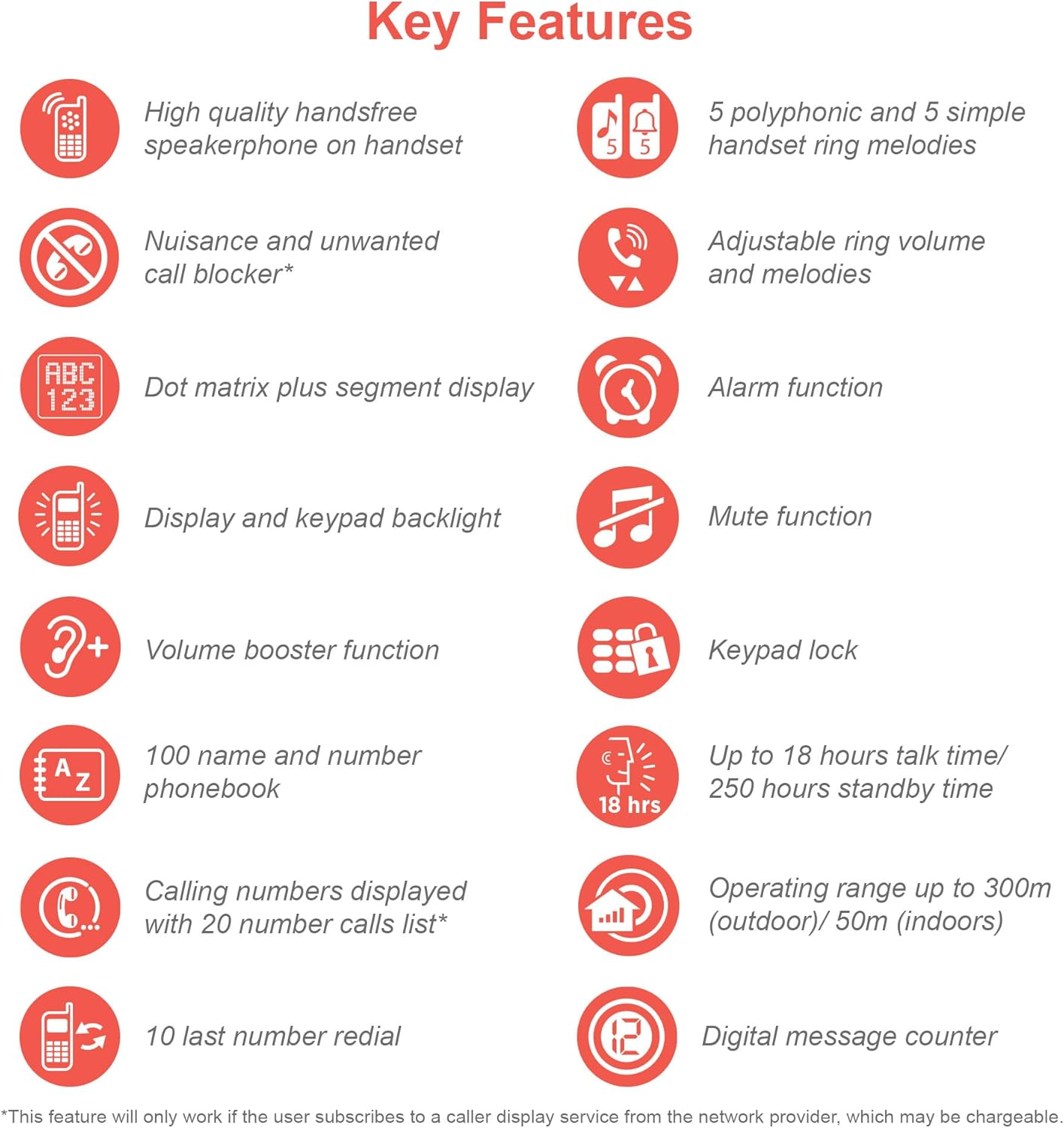
An infographic summarizing the VTech ES2050's key features, including speakerphone, call blocker, polyphonic ringtones, alarm, mute, keypad lock, volume booster, phonebook, call list, redial, talk time, operating range, and digital message counter.
Гол онцлогууд:
- Дижитал автомат хариулагч: 30 minutes recording time.
- Nuisance Call Blocker: Block up to 100 blacklisted numbers.
- Дууны хэмжээг нэмэгдүүлэгч: Amplifies incoming sounds for enhanced clarity.
- Батерейны урт наслалт: Up to 18 hours talk time / 250 hours standby time.
- Арын гэрэлтүүлэгтэй дэлгэц ба товчлуур: Хялбар viewбүдэг гэрэлд байна.
- Handsfree Speakerphone: High-quality speakerphone on handset.
- Утасны дэвтэр: 100 name and number capacity.
- Хурдан залгах: 3 speed dial numbers.
- ЭКО горим: For reduced power consumption.
- Дуудлага хийгчийн дугаар / Дуудлага хүлээлт: Stores 20 records.
- Дахин залгах: 10 last number redial.
- Сэрүүлгийн функц: Integrated alarm.
- Дууг хаах функц: For privacy during calls.
- Товчлуурын түгжээ: Prevents accidental dialing.
2. Хайрцагт юу байна
Эхлэхээсээ өмнө бүх бүрэлдэхүүн хэсгүүд байгаа эсэхийг шалгаарай:
- 1 үндсэн нэгж
- 1 утасгүй гар утас
- 1 Charger (for handset)
- 1 Battery Pack (2 AAA batteries included)
- Утасны шугамын утас
- Хурдан эхлүүлэх гарын авлага (дэлгэрэнгүй мэдээллийг энэ гарын авлагаас үзнэ үү)
3. Тохируулах гарын авлага
3.1. Батерей суурилуулах, цэнэглэх
- Locate the battery compartment cover on the back of the handset. Slide it open.
- Connect the battery pack plug securely into the jack inside the compartment.
- Place the 2 AAA batteries (included) into the compartment, ensuring correct polarity (+ and -).
- Зайны тасалгааны тагийг солих.
- Place the handset on the base unit or charger. The charging indicator light on the handset should illuminate.
- Allow the handset to charge for at least 16 hours before initial use to ensure full battery capacity.
3.2. Үндсэн нэгжийг холбох
- Утасны шугамын нэг үзүүрийг үндсэн нэгжийн арын хэсэгт байрлах TEL LINE залгуурт холбоно.
- Утасны утасны нөгөө үзүүрийг утасныхаа залгуурт холбоно уу.
- Plug the small end of the power adapter into the POWER jack on the back of the base unit.
- Цахилгаан адаптерийн том үзүүрийг ердийн цахилгаан залгуурт холбоно уу.
- Ensure all cables are securely connected and routed to prevent tripping hazards.
3.3. Анхны тохиргоо (Огноо ба цаг)
After the handset is charged, you will need to set the date and time. Follow the on-screen prompts on the handset display. If prompted multiple times, ensure each step is confirmed before proceeding.
- дээр дарна уу ЦЭВЭР / ЗА товч.
- руу шилжих Огноо ба цаг сум товчийг ашиглан.
- дарна уу ЦЭВЭР / ЗА сонгох.
- Enter the current date and time using the keypad.
- дарна уу ЦЭВЭР / ЗА хэмнэх.
4. Ашиглалтын заавар
4.1. Дуудлага хийх, хүлээн авах
- Дуудлага хийхийн тулд: Гар утсаа аваад эсвэл дар ЯРИА button. Dial the number.
- Дуудлага хүлээн авахын тулд: Утас дуугарах үед утсаа авах эсвэл товчлуурыг дар ЯРИА товч.
- Дуудлага дуусгахын тулд: Place the handset back on the base unit/charger or press the Төгсгөл товч.
4.2. Чанга яригч ашиглах
Дуудлагын үеэр ИЛТГЭГЧ button to activate the handsfree speakerphone. Press it again to switch back to the handset earpiece.
4.3. Digital Answering Machine
- Мессежүүдийг тоглуулах: Үндсэн нэгж дээр дарна уу ТОГЛОХ/ЗОГСООХ.
- Мессежүүдийг устгаж байна: Мессежийг тоглуулах үед дарна уу УСТГАХ үндсэн нэгж дээр.
- Гарах мессежийг бичих (OGM): Refer to the handset menu for OGM recording options.
4.4. Nuisance Call Blocker
This feature allows you to block unwanted calls. You can add numbers to a blacklist.
- To Block a Number from Call History: Access the Call History, select the number, and choose the "Block" option.
- To Manually Add a Number to Blacklist: Navigate to the Call Blocker menu in the handset settings and add the number.
- The phone can store up to 100 blacklisted numbers.
4.5. Volume Booster
руу amplify the incoming sound during a call, press the ӨСГӨХ button (often marked with a speaker icon or "+") on the handset. Press it again to deactivate.
4.6. Утасны дэвтэр болон хурдан залгах
- Харилцагч нэмэх: Access the Phonebook menu, select "Add New Entry", and enter the name and number.
- Утасны дэвтэрээс залгах: дээр дарна уу УТАС НОМ button, scroll to the desired contact, and press ЯРИА.
- Хурдан залгах: Assign frequently called numbers to speed dial keys (e.g., 1, 2, 3). Refer to the handset menu for speed dial setup.
4.7. ЭКО горим
The phone automatically enters ECO mode when the handset is close to the base unit, reducing power consumption and transmission power. This mode is indicated by an ECO icon on the display.
5. Засвар үйлчилгээ
- Цэвэрлэгээ: Утас болон үндсэн хэсгийг зөөлөн арчиж, damp даавуу. Зүлгүүрийн цэвэрлэгч, уусгагчийг бүү ашигла.
- Батерейны арчилгаа: For optimal battery life, avoid overcharging by leaving the handset off the charger for extended periods once fully charged. If the phone will not be used for a long time, remove the batteries.
- Байршил: Place the base unit in a central location away from other electronic devices that may cause interference.
6. Алдаа засах
If you experience issues with your VTech ES2050 phone, try the following solutions:
| Асуудал | Боломжит шийдэл |
|---|---|
| Залгах аялгуу байхгүй / Дуудлага хийх эсвэл хүлээн авах боломжгүй. |
|
| Дууны чанар муу / Статик. |
|
| Хариулагч машин мессеж бичихгүй байна. |
|
| Handset display is blank or unresponsive. |
|
| Difficulty with menu navigation or settings. |
|
7. Техникийн үзүүлэлтүүд
| Онцлог | Дэлгэрэнгүй |
|---|---|
| Загварын дугаар | ES2050 |
| Утасны төрөл | Cordless DECT |
| Хариулах системийн төрөл | Дижитал |
| Бичлэг хийх чадвар | 30 минут |
| Утсаар ярих цаг | 18 цаг хүртэл |
| Утасны хүлээлгийн хугацаа | 250 цаг хүртэл |
| Батерей | 2 AAA батерей (дагсан) |
| Эрчим хүчний эх үүсвэр | Батерейгаар ажилладаг |
| Залгагчийн төрөл | Ганц товчлуур |
| Тохиромжтой төхөөрөмжүүд | Standard Landline Telephone Networks |
| Өнгө | Хар |
| Үйлдвэрлэгч | VTech |
| Гарал үүслийн улс | Хятад |
8. Баталгаат хугацаа ба дэмжлэг
For warranty information and technical support, please refer to the official VTech website or contact VTech customer service. Keep your purchase receipt as proof of purchase.
Үйлдвэрлэгч: VTech
For the most up-to-date support resources, visit the VTech support page or refer to the contact information provided with your product packaging.