1. Танилцуулга
This manual provides instructions for the Goobay 41074 USB-C Sync & Charge Cable. This cable is designed for high-speed data transfer, fast charging, and video/audio transmission between compatible USB-C enabled devices.

Image 1.1: The Goobay 41074 USB-C Sync & Charge Cable, featuring a USB-A connector on one end and a USB-C connector on the other. The image also highlights key specifications such as USB-C compatibility, 1-meter length, 60W power delivery, and 20x faster speed than USB 2.0.
2. Бүтээгдэхүүний онцлог
- Хурдан цэнэглэх: Supports power delivery up to 60 W (20 V / 3 A) for rapid charging of compatible USB-C devices.
- SuperSpeed+ Data Transfer: Achieves data transfer rates up to 10 Gbit/s, which is 20 times faster than USB 2.0.
- USB 3.2 Gen 2 Standard: Utilizes the latest USB 3.2 Gen 2x2 standard for efficient data handling.
- Reversible USB-C Connector: The USB-C plug can be inserted in either orientation.
- Video & Audio Transmission: Capable of transmitting video and audio content to external displays with a USB-C input.
- Олон талын хэрэглээ: Suitable for transferring movies, music, videos, and various files.

Зураг 2.1: Нарийвчилсан view of the Goobay USB-C cable, highlighting its USB-A and USB-C connectors and indicating its 1-meter length, 60W power delivery, and 10 Gbps data transfer speed.
3. Багцын агуулга
Багц нь дараахь зүйлийг агуулна.
- 1x Goobay 41074 USB-C Sync & Charge Cable (1 meter)
4. Тохиргоо
To set up your Goobay 41074 USB-C cable, follow these general steps:
- Портуудыг тодорхойлох: Locate the appropriate USB-A and USB-C ports on your devices (e.g., computer, charger, smartphone, monitor).
- Төхөөрөмжүүдийг холбох: Insert the USB-A end of the cable into a compatible USB-A port on your host device (e.g., computer, wall charger).
- Connect USB-C Device: Insert the USB-C end of the cable into the USB-C port of your target device (e.g., smartphone, tablet, laptop, monitor). The USB-C connector is reversible, allowing for easy connection in either direction.
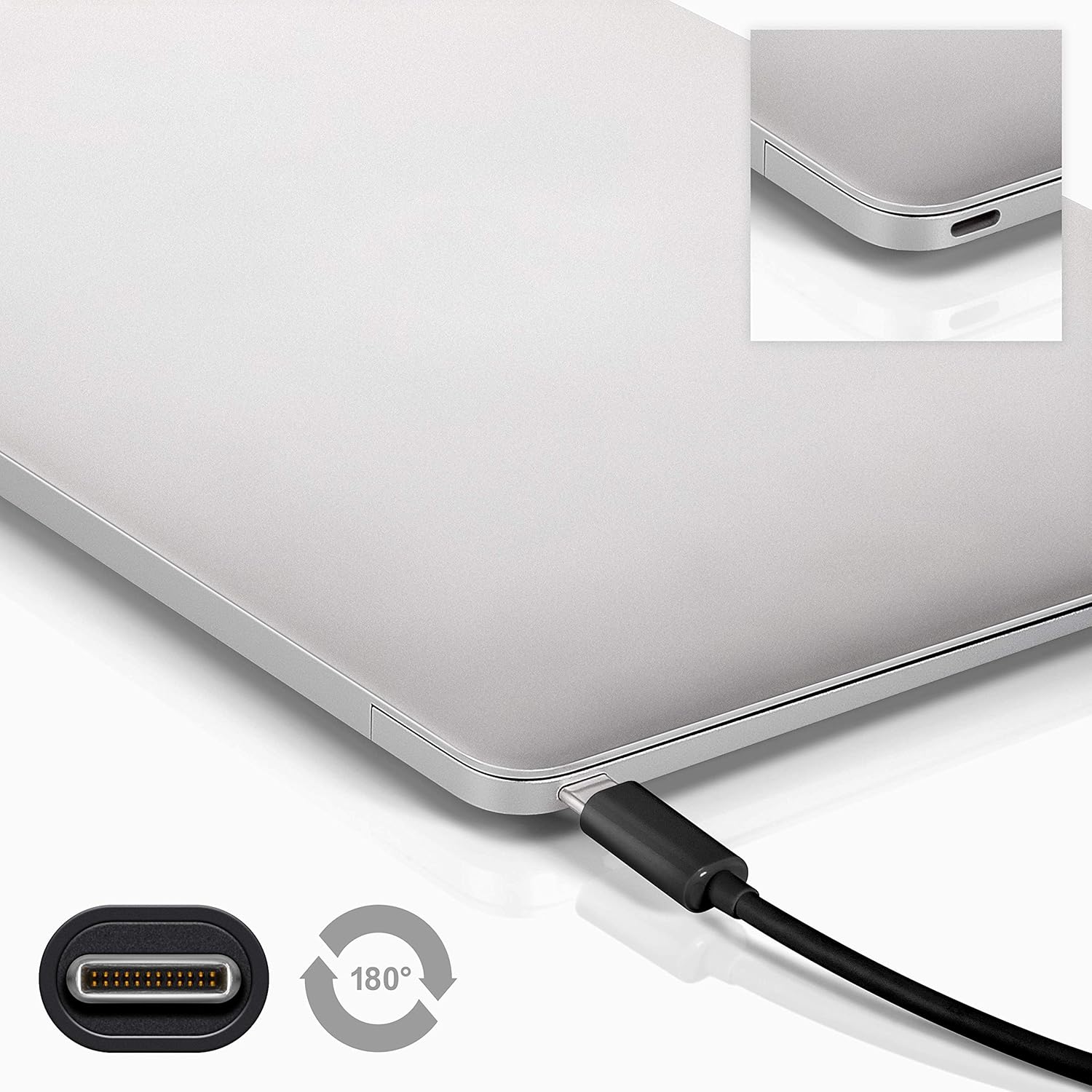
Image 4.1: A Goobay USB-C cable connected to a laptop, demonstrating the reversible nature of the USB-C connector and its ease of use. A close-up of the USB-C port is also shown.
5. Ашиглалтын заавар
5.1. Цэнэглэх төхөөрөмжүүд
To charge a USB-C enabled device:
- Connect the USB-A end of the cable to a compatible USB wall charger or power adapter.
- Connect the USB-C end of the cable to your USB-C device (e.g., smartphone, tablet, laptop).
- Ensure the power adapter is plugged into a working power outlet. Your device should begin charging.
5.2. Өгөгдөл дамжуулах
To transfer data between a computer and a USB-C device:
- Кабелийн USB-A үзүүрийг компьютер дээрх боломжтой USB-A порт руу холбоно уу.
- Кабелийн USB-C төгсгөлийг USB-C төхөөрөмждөө холбоно уу.
- Your computer should recognize the connected device. Follow the on-screen prompts on your computer and device to manage data transfer (e.g., select 'File Transfer' mode on your smartphone).

Image 5.1: A Goobay USB-C cable connecting a smartphone to a laptop, illustrating its use for data transfer between devices.
5.3. Video and Audio Output
To transmit video and audio to an external display:
- Connect the USB-A end of the cable to your source device (e.g., laptop with a USB-A port that supports video output via an adapter, or a docking station).
- Connect the USB-C end of the cable to a compatible monitor or television with a USB-C input that supports video.
- Ensure your source device and display are configured correctly for video output.
6. Засвар үйлчилгээ
- Хадгалах: Кабелийг сэрүүн, хуурай газар, нарны шууд тусгал болон хэт өндөр температураас хол хадгална уу. Дотор талын гэмтэлээс сэргийлж, кабелийг хурц өнцгөөр чанга ороох эсвэл нугалахаас зайлсхий.
- Цэвэрлэгээ: Disconnect the cable from all devices and power sources before cleaning. Use a soft, dry, lint-free cloth to gently wipe the cable and connectors. Avoid using liquid cleaners or abrasive materials.
- Харьцуулах: Always grasp the connector head when plugging or unplugging the cable. Avoid pulling on the cable itself, as this can damage the internal wires or the connector.
- Шалгалт: Periodically inspect the cable and connectors for any signs of wear, fraying, or damage. If damage is observed, discontinue use and replace the cable.
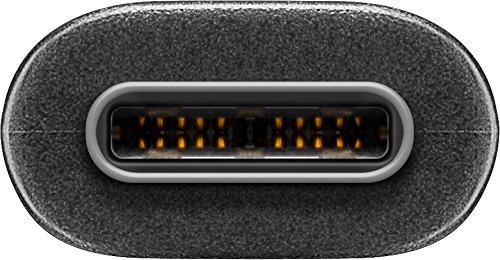
Зураг 6.1: Ойрын зураг view of the USB-C connector, showing its internal pins. Regular inspection of connectors helps ensure proper function and longevity.
7. Алдаа засах
7.1. Төхөөрөмж цэнэглэхгүй байна
- Холболтуудыг шалгах: Ensure both ends of the cable are securely plugged into the device and the power source.
- Эрчим хүчний эх үүсвэрийг баталгаажуулах: Confirm that the wall outlet or power adapter is functioning correctly. Try another power source if available.
- Төхөөрөмжийн нийцтэй байдал: Ensure your device supports charging via USB-C and that the power adapter provides sufficient wattage.
- Try Another Cable/Port: If possible, test with a different USB-C cable or a different port on your power source/device to isolate the issue.
7.2. Өгөгдөл дамжуулахгүй
- Холболтуудыг шалгах: Ensure the cable is firmly connected to both the computer and the USB-C device.
- Төхөөрөмжийн тохиргоо: On your USB-C device (e.g., smartphone), check if it's set to 'File Transfer' or 'MTP' mode after connecting to the computer.
- Компьютер таних: Verify that your computer's operating system recognizes the connected device. You may need to install specific drivers for your device.
- Порт функциональ байдал: Test the USB-A port on your computer with another known working device/cable.
7.3. No Video/Audio Output
- Тохиромжтой байдал: Ensure both your source device (e.g., laptop) and the external display support video output over USB-C. Not all USB-C ports support this feature.
- Дэлгэцийн оролт: Select the correct input source on your monitor or television.
- Системийн тохиргоо: Check your computer's display settings to ensure the external monitor is detected and configured correctly (e.g., extended display, duplicate display).
8. Техникийн үзүүлэлтүүд
| Онцлог | Тодорхойлолт |
|---|---|
| Брэнд | Губай |
| Загварын дугаар | 41074 |
| Холбогчийн төрөл 1 | USB Type-A (Male) |
| Холбогчийн төрөл 2 | USB Type-C (эрэгтэй) |
| Кабелийн төрөл | USB |
| USB стандарт | USB 3.2 Gen 2 (SuperSpeed+) |
| Өгөгдөл дамжуулах хурд | 10 Гбит/с хүртэл |
| Эрчим хүчний нийлүүлэлт | Up to 60 W (20 V / 3 A) |
| Кабелийн урт | 1 метр |
| Өнгө | Хар |
| Тохиромжтой төхөөрөмжүүд | Monitors, Televisions, USB-C enabled devices |
| Онцлог шинж чанар | Fast Charging, Video & Audio Transmission |
9. Баталгаат хугацаа ба дэмжлэг
Баталгаат хугацаа болон техникийн дэмжлэг авахыг хүсвэл худалдан авалттайгаа хамт ирсэн баримт бичгийг үзэх эсвэл албан ёсны Goobay вэбсайтад зочилно уу. webсайт. Баталгаат нэхэмжлэл гаргахын тулд худалдан авалтаа нотлох баримтаа хадгалаарай.


