Танилцуулга
This manual provides comprehensive instructions for the installation, operation, and maintenance of the Zapco HB-410-ADSP 10-Channel DSP / 8-Channel Class D Amplifier. The HB-410-ADSP is designed to integrate advanced digital sound processing with efficient amplification, offering a versatile solution for car audio systems. Please read this manual thoroughly before using the device to ensure proper functionality and longevity.

Зураг: Урд view of the Zapco HB-410-ADSP ampөргөгч, үзүүлэнasing түүний авсаархан дизайн, брэнд.
Онцлогууд ба техникийн үзүүлэлтүүд
Гол онцлогууд:
- 10-Channel Digital Sound Processor (DSP): Equipped with a 31-band equalizer for precise audio tuning.
- 8 суваг D анги Ampамь нас: Delivers 70 Watts (Max) per channel.
- Оруулах сонголтууд: Includes 4-channel high-level inputs and 2-channel RCA inputs for versatile source connectivity.
- Гаралтын сонголтууд: Features 10-channel RCA outputs for system expansion.
- Plug & Play нийцтэй байдал: Designed for straightforward integration into existing audio systems.
- Bluetooth 5.1 Streaming: Enables wireless audio playback from compatible devices.
- Integrated Music Player: Supports various audio formats including MP2, MP3, MP4, WMA, APE, FLAC, AAC, M4A, WAV, AIF, and AIFC.
- DSP Control Tools: Accessible via PC software and a dedicated mobile application.
Техникийн үзүүлэлтүүд:
| Загварын дугаар | HB-410-ADSP |
| AmpАмьдралын хүч | 8 x 70 Watt (Max) |
| Сувгийн тоо | 10 (DSP), 8 (Ampилүү амьд) |
| Бүтээгдэхүүний хэмжээ (L x W x H) | 160 мм x 115 мм x 45 мм (6.3 x 4.53 x 1.77 инч) |
| Жин | Ойролцоогоор 6 фунт |
| Суурилуулах төрөл | Гадаргуугийн бэхэлгээ |
| Bluetooth хувилбар | 5.1 |
| Дэмжигдсэн аудио форматууд | MP2, MP3, MP4, WMA, APE, FLAC, AAC, M4A, WAV, AIF, AIFC |
Тохиргоо ба суурилуулалт
Proper installation is crucial for optimal performance. It is recommended that installation be performed by a qualified professional. Ensure the vehicle's battery is disconnected before beginning any wiring.
Холболт дууссанview:
- Эрчим хүчний холболтууд: Connect the +12V, GND, and REM (Remote Turn-On) wires to the appropriate terminals.
- Өндөр түвшний оролтууд: Use the 4-channel high-level inputs for direct connection to factory head unit speaker outputs.
- RCA оролтууд: Utilize the 2-channel RCA inputs for aftermarket head units or other audio sources.
- RCA гаралт: The 10-channel RCA outputs allow for connection to additional amplifiers or external audio processors.
- Илтгэгчийн гаралт: Connect your speakers to the designated speaker output terminals.
- PC USB: Connect to a computer for DSP software control and configuration.

Зураг: Нарийвчилсан view of the Zapco HB-410-ADSP's input and output terminals, including RCA, high-level, power, and USB connections.
Ашиглалтын заавар
The HB-410-ADSP offers extensive control over your audio system through its Digital Sound Processor and integrated features.
Digital Sound Processor (DSP) Control:
The DSP can be configured using either a PC application or a mobile application. Both interfaces provide access to the 31-band equalizer and other DSP tools for fine-tuning your audio.
- Компьютерийн програм хангамж: -г холбоно уу amplifier to your computer via the PC USB port. Install the Zapco DSP software to access the full graphical user interface (GUI) for detailed adjustments.
- Гар утасны програм: Download the Zapco Harmony DSP mobile application from your device's app store. Connect via Bluetooth to control basic DSP functions and the integrated music player.
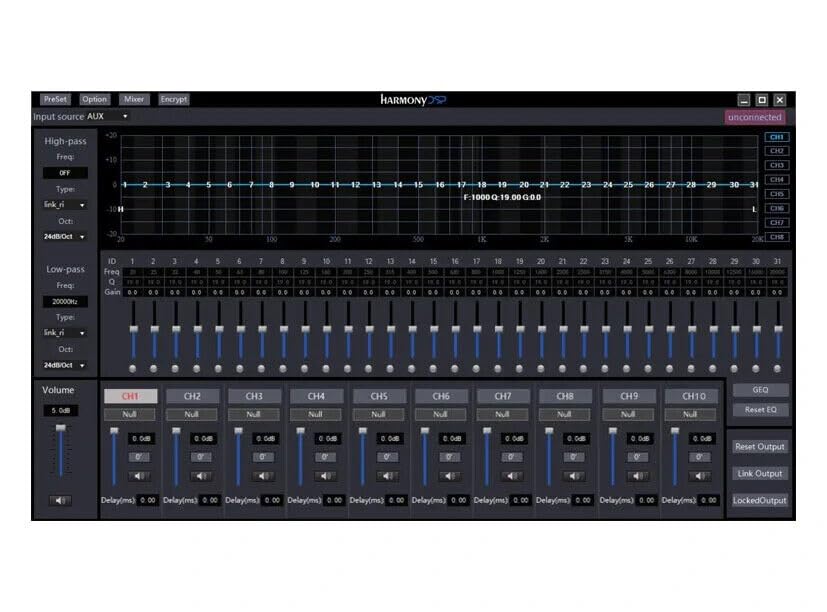
Зураг: Screenshot of the Zapco Harmony DSP PC software, showing the 31-band equalizer and channel controls for precise audio tuning.
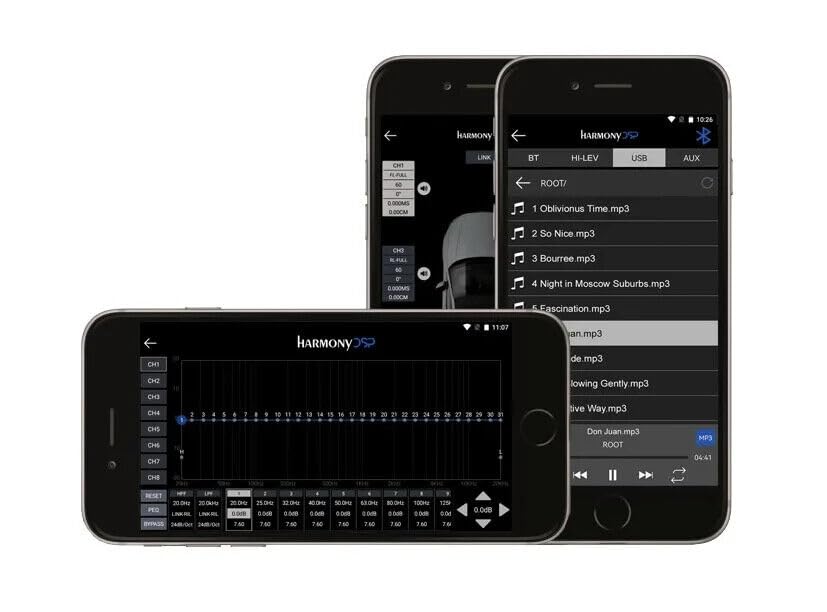
Зураг: Screenshots of the Zapco Harmony DSP mobile application on a smartphone, illustrating the interface for Bluetooth streaming and DSP adjustments.
Bluetooth дамжуулалт:
To stream audio wirelessly, enable Bluetooth on your mobile device and pair it with the HB-410-ADSP. The device name will typically appear as "Zapco HB-410-ADSP" or similar. Once paired, you can play audio from your device through the ampнастан.
Integrated Music Player:
The amplifier includes a built-in music player that supports various file formats. You can manage and play music files directly through the mobile application.
Засвар үйлчилгээ
The Zapco HB-410-ADSP is designed for durability and requires minimal maintenance. Follow these guidelines to ensure its continued performance:
- Цэвэрлэгээ: Гаднах хэсгийг цэвэрлэхийн тулд зөөлөн, хуурай даавуу ашиглана уу ampөргөгч. Хүчтэй химийн бодис эсвэл зүлгүүрийн цэвэрлэгч хэрэглэхээс зайлсхий.
- Агааржуулалт: гэдгийг баталгаажуулах amplifier's ventilation openings are not obstructed to prevent overheating.
- Холболтууд: Бүх утас холболтыг найдвартай, зэврэлтээс ангид байлгахын тулд үе үе шалгана уу.
- Байгаль орчин: -ийг суулгана уу amplifier in a location that is protected from excessive moisture, dust, and extreme temperatures.
Алдааг олж засварлах
If you encounter issues with your Zapco HB-410-ADSP, refer to the following common problems and solutions:
- Эрчим хүчгүй:
- Check all power connections (+12V, GND, REM) for proper contact and voltage.
- Verify that the vehicle's battery is charged.
- Inspect any inline fuses for continuity.
- Аудио гаралт байхгүй:
- Ensure all input and output cables are securely connected.
- Check the source device (head unit, phone) for audio output.
- Verify DSP settings; ensure channels are not muted or gain is not set too low.
- Confirm speaker connections are correct and speakers are functional.
- Гажуудсан аудио:
- Reduce input gain if the signal is clipping.
- Чанга яригчийн импедансын нийцтэй байдлыг шалгах ampнастан.
- Review DSP equalizer and crossover settings for anomalies.
- Mobile App Issues (Input/Output Mapping):
- Some users have reported inconsistencies with input channel mapping to outputs when using the mobile application. If precise mapping is required, it is recommended to use the PC software for configuration.
- Ensure the mobile app is updated to the latest version.
- Bluetooth холболтын асуудал:
- -ийг баталгаажуулах amplifier is in pairing mode or discoverable.
- Delete previous pairings on your mobile device and re-attempt pairing.
- Move the mobile device closer to the ampтусгалын хүрээний асуудлыг арилгахын тулд өргөгч.
Баталгаат болон дэмжлэг
For warranty information, please refer to the documentation provided with your purchase or visit the official Zapco website. If you require technical assistance or have questions not covered in this manual, please contact Zapco customer support through their official channels.
Онлайн нөөцүүд: For additional support and software downloads, visit the Zapco Store on Amazon or the official Zapco webсайт.


