1. Аюулгүй байдлын мэдээлэл
Please read all instructions and warnings carefully before using this product. Failure to follow these safety guidelines may result in fire, electric shock, property damage, or injury.
- Do not shine the flashlight directly into eyes. The powerful beam can cause temporary vision impairment or permanent eye damage.
- Гар чийдэнг хүүхдүүдээс хол байлга.
- Do not disassemble the flashlight head as this may damage the reflector or LED.
- The flashlight may generate significant heat during prolonged use at high output levels. Handle with care to avoid burns.
- Use only recommended AA batteries. Do not mix old and new batteries, or different types of batteries.
- Хэрэв гар чийдэнг удаан хугацаагаар ашиглахгүй бол гоожихоос сэргийлж зайгаа салга.
2. Багцын агуулга
Доор жагсаасан бүх зүйл таны багцад байгаа эсэхийг шалгаарай.
- ThruNite Archer 2A V3 LED Flashlight x 1
- Халаасны хавчаар x 1
- Зайны O-цагираг x 2
- Оосор x 1
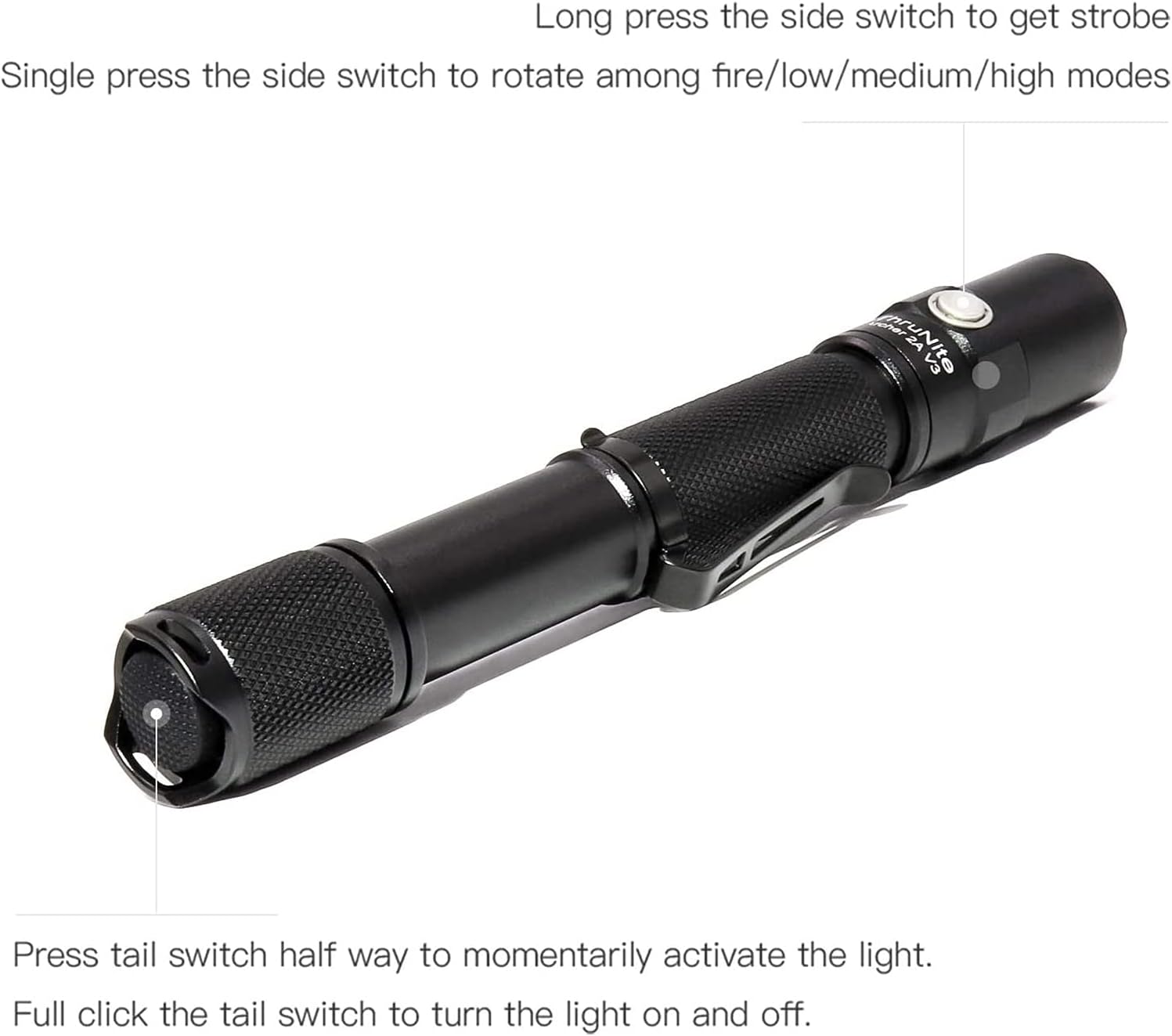
Image: All components included in the ThruNite Archer 2A V3 package, neatly laid out. This includes the flashlight body, a removable pocket clip, two spare O-rings for sealing, and a lanyard for secure carrying.
3. Тохиргоо
3.1 Батерей суурилуулах
The ThruNite Archer 2A V3 operates on two AA batteries (not included). Ensure correct polarity during installation.
- Гар чийдэнгийн сүүлний тагийг цагийн зүүний эсрэг эргүүлж тайл.
- Insert two AA batteries into the battery compartment with the positive (+) end facing towards the flashlight head.
- Сүүлний тагийг сайтар чангатал нь цагийн зүүний дагуу эргүүлээрэй.
3.2 Attaching the Pocket Clip
The removable pocket clip can be attached to the flashlight body for convenient carrying.
- Slide the pocket clip onto the flashlight body, positioning it as desired.
- Ensure the clip is firmly seated in the groove to prevent accidental detachment.

Зураг: Нарийвчилсан view of the ThruNite Archer 2A V3 flashlight, highlighting the textured grip and the securely attached removable pocket clip. This clip allows for easy attachment to clothing or gear.
4. Ашиглалтын заавар
The Archer 2A V3 features both a tail switch and a side switch for versatile operation.
4.1 Үндсэн ажиллагаа (Сүүлийн унтраалга)
- Momentary Activation: Press the tail switch halfway to momentarily activate the light. Release to turn off.
- Байнгын асаалттай/унтраалттай: Fully click the tail switch to turn the light on or off.
4.2 Mode Switching (Side Switch)
When the flashlight is on (via tail switch):
- Циклийн горимууд: Single press the side switch to cycle through the general modes: Low → Medium → High.
- Strobe горим: Long press the side switch to activate Strobe mode. Single press again to return to the previously used general mode.

Image: An illustrative diagram demonstrating the operational controls of the ThruNite Archer 2A V3. It shows how to use the tail switch for momentary and constant on/off functions, and the side switch for cycling through brightness modes (Low, Medium, High) and activating the Strobe function with a long press.
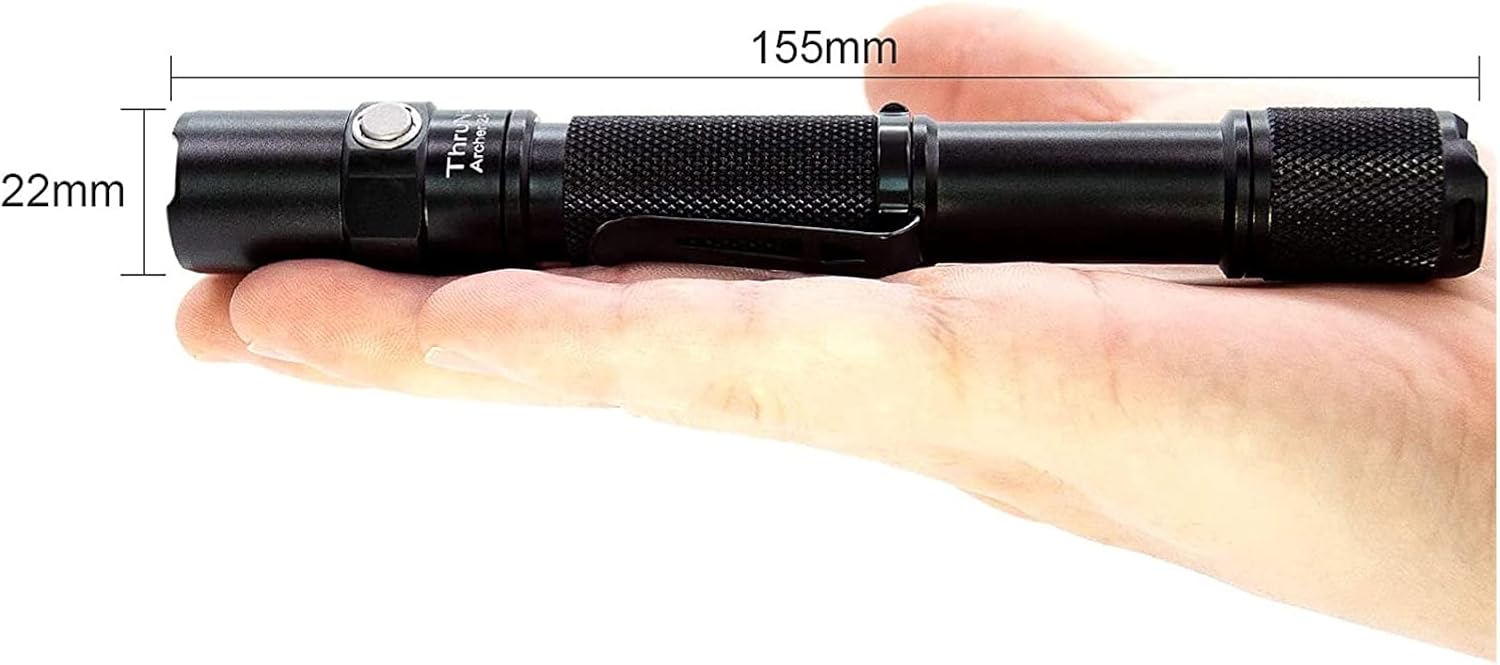
Image: A person is shown walking on a dark, unpaved path, illuminated by the powerful beam of the ThruNite Archer 2A V3 flashlight. The flashlight provides ample light to navigate the surroundings, demonstrating its effectiveness in low-light conditions.
5. Засвар үйлчилгээ
Зөв арчилгаа нь таны гар чийдэнгийн урт наслалт, оновчтой ажиллагааг баталгаажуулдаг.
- Цэвэрлэгээ: Гар чийдэнгийн их биеийг зөөлөн, d-ээр цэвэрлэнэ үүamp даавуу. Зүлгүүрийн цэвэрлэгч, уусгагчийг бүү ашигла.
- Утас ба O-цагираг: Periodically lubricate the threads and O-rings with silicone grease to maintain water resistance and smooth operation. Replace worn O-rings with the provided spares.
- Батерейны арчилгаа: Remove batteries if the flashlight is not used for extended periods to prevent corrosion. Store batteries in a cool, dry place.
- Линзний арчилгаа: Keep the lens clean. If it gets dirty, gently wipe it with a lens cleaning cloth.
6. Алдаа засах
If you encounter issues with your ThruNite Archer 2A V3, try the following steps:
- Гар чийдэн асахгүй байна:
- Батерейг эерэг (+) үзүүрийг толгой руу чиглүүлж зөв оруулсан эсэхийг шалгана уу.
- Ensure the batteries are not depleted. Replace with fresh AA batteries.
- Confirm the tail cap is fully tightened. A loose tail cap can prevent electrical contact.
- Батерейны контакт болон утаснуудыг цэвэр даавуугаар цэвэрлээрэй.
- Гэрэл бүдэгхэн эсвэл анивчих:
- Батерей дуусаж магадгүй. Батерейг солино уу.
- Ensure the tail cap and head are securely tightened.
- Батерейны контактууд болон утаснуудыг цэвэрлэ.
- Ус орох:
- Check if O-rings are properly seated and not damaged. Replace if necessary.
- Ensure all parts are tightly screwed together.
Хэрэв эдгээр алхмууд нь асуудлыг шийдэж чадахгүй бол хэрэглэгчийн дэмжлэгтэй холбогдоно уу.
7. Техникийн үзүүлэлтүүд
Detailed specifications for the ThruNite Archer 2A V3 LED Flashlight:
| Онцлог | Дэлгэрэнгүй |
|---|---|
| Гэрлийн эх үүсвэр | XP-L V6 LED |
| Хамгийн их гаралт | 500 люмен |
| Цацрагийн зай | 108 метр (354 фут) |
| Эрчим хүчний эх үүсвэр | 2 х АА батерей (оруулаагүй) |
| Материал | Aerospace Grade Aluminum with Type III Hard-Anodized Finish |
| Онцлог шинж чанар | Lightweight, Removable Clip |
| Хэмжээ | Length: 155mm (6.1 inches), Diameter: 22mm (0.87 inches) |
| Зүйлийн жин | Approximately 500 Grams (1.1 pounds) |
| Горимууд | Low, Medium, High, Strobe |

Image: The ThruNite Archer 2A V3 flashlight displayed with its key dimensions: a length of 155mm and a diameter of 22mm, illustrating its compact and portable design.
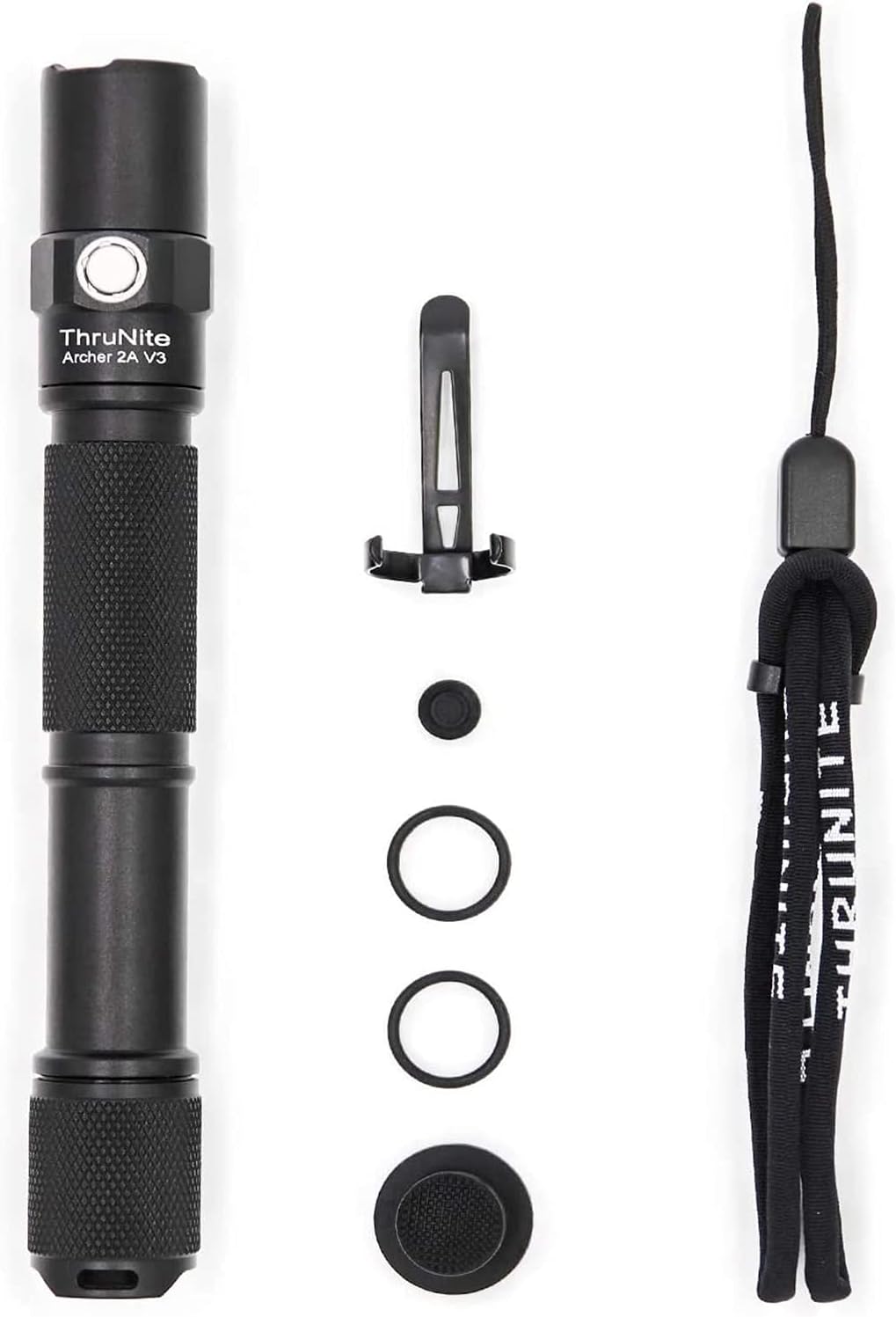
Image: A hand holding the ThruNite Archer 2A V3 flashlight, providing a clear perspective on its ergonomic design and compact size. The image also reiterates its dimensions, 6.1 inches (155mm) in length and 0.87 inches (22mm) in diameter, and highlights its lightweight nature at 48g (without batteries).
8. Баталгаат хугацаа ба дэмжлэг
ThruNite is committed to providing quality products and excellent customer service.
8.1 Баталгаат хугацааны мэдээлэл
Specific warranty details may vary. Please refer to the product packaging or the official ThruNite webхамгийн сүүлийн үеийн баталгаат бодлогын сайт.
8.2 Хэрэглэгчийн дэмжлэг
If you have any questions, require assistance with setup, operation, or troubleshooting, or need to inquire about warranty service, please contact our customer service team. Contact information can typically be found on the product packaging or the official ThruNite webсайт.


