1. Танилцуулга
This manual provides essential instructions for the safe and effective use of your Sony Cyber-Shot RX100 VII Digital Camera (DSC-RX100M7). Please read this manual thoroughly before operating the camera and retain it for future reference. This camera combines a 20.1MP 1-inch stacked CMOS sensor with a versatile ZEISS 24–200 mm zoom lens, offering high-quality imaging in a compact form factor.
2. Тохиргоо
2.1. Unboxing and Checking Contents
Үргэлжлүүлэхийн өмнө багцад бүх зүйл байгаа эсэхийг шалгаарай:
- Sony Cyber-Shot DSC-RX100 VII Digital Camera (DSC-RX100M7)
- Цэнэглэдэг батерейны багц NP-BX1
- Хувьсах гүйдлийн адаптер
- Микро USB кабель
- Бугуйн оосор
- Хэрэглэх заавар (энэ баримт бичиг)
Note: Additional accessories like memory cards, cases, and extra batteries may be included depending on your specific bundle.
2.2. Батерейг цэнэглэж байна
The supplied NP-BX1 battery pack is not fully charged. Charge it before first use.
- Зайны багцыг камерт оруулна уу.
- Connect the camera to the AC Adaptor using the Micro USB cable.
- Plug the AC Adaptor into a wall outlet. The CHARGE lamp гэрэлтэх болно.
- When charging is complete, the CHARGE lamp унтрах болно.
Бүрэн цэнэглэхэд ихэвчлэн 150 минут зарцуулдаг.
2.3. Зай болон санах ойн картыг оруулах
Камерын доод талд байгаа зай/санах ойн картны тагийг нээнэ үү.
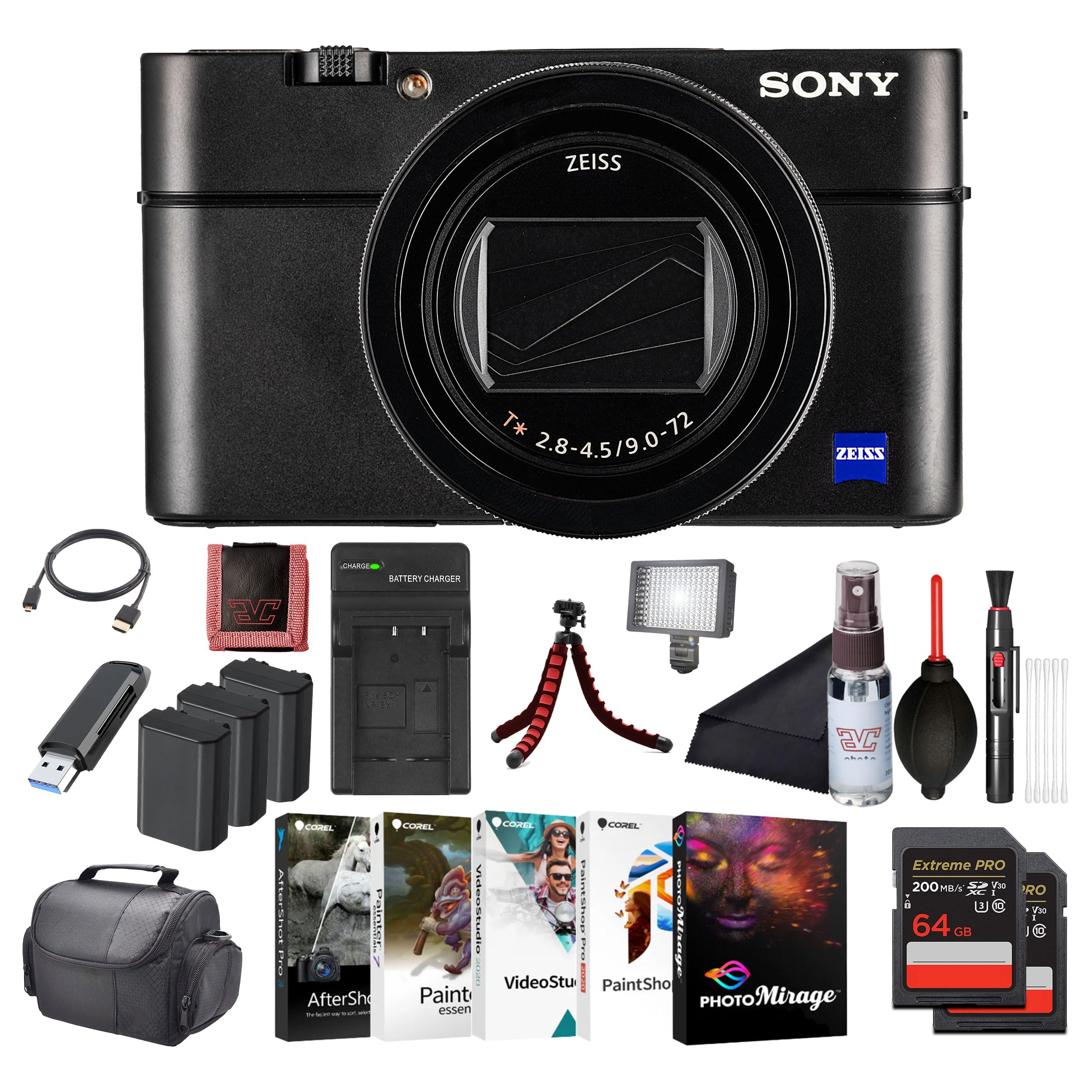
Зураг: Урд view of the Sony Cyber-Shot RX100 VII camera, showcasing the ZEISS lens and compact body.
- Insert the battery pack with the arrow pointing into the camera until it clicks into place.
- Insert a compatible memory card (SDXC recommended) with the notched corner facing as shown in the diagram (refer to camera body for specific orientation) until it clicks.
- Бүрхүүлийг сайтар хаа.
2.4. Анхны тохиргоо
When you turn on the camera for the first time, the initial setup screen will appear.
- Огноо ба цаг: Одоогийн огноо, цагийг тохируулна уу.
- Area Setting: Select your geographical area.
- Хэл: Өөрийн дуртай дэлгэцийн хэлийг сонгоно уу.
Follow the on-screen prompts to complete these settings.
3. Камерыг ажиллуулах
3.1. Камерын эд анги ба удирдлага
Familiarize yourself with the main components and controls of your camera.

Зураг: Ар талд view of the Sony Cyber-Shot RX100 VII, showing the LCD screen, control wheel, and various buttons like MENU, Fn, DISP, and MOVIE.
- Цахилгаан товч: Located on the top panel, used to turn the camera on/off.
- Хөшигний товчлуур: Half-press to focus, full-press to take a picture.
- Залгах горим: Select shooting modes (P, A, S, M, Auto, Movie, HFR, etc.).
- Хяналтын дугуй: Цэс рүү шилжиж, тохиргоог тохируулна уу.
- LCD дэлгэц: Display images, videos, and menu options. Can be tilted for various shooting angles.
- Viewологч: Pop-up electronic viewfinder for eye-level shooting.

Зураг: дээд view of the Sony Cyber-Shot RX100 VII with its ZEISS Vario-Sonnar T* lens fully extended, showing the mode dial, power button, and shutter button.
3.2. Үндсэн буудлага
- Камераа асаана уу: дээр дарна уу ON/OFF товч.
- Select a shooting mode: -г эргүүл Горим залгах to your desired mode (e.g., Ухаалаг авто for simple point-and-shoot).
- Frame your shot: Use the LCD monitor or pop-up viewологч.
- Фокус: Хагас дар Хөшигний товчлуур to focus. The focus frame will turn green when focus is achieved.
- Зураг авах: Бүрэн дарна уу Хөшигний товчлуур зураг авах.

Зураг: Урд view of the Sony Cyber-Shot RX100 VII with its LCD screen tilted upwards, demonstrating its flexible viewянз бүрийн буудлагын байрлалд зориулсан өнцөг.
3.3. Буудлагын дэвшилтэт горимууд
- Автомат програм (P): Камер нь диафрагм болон Хөшигний хурдыг тохируулдаг бөгөөд та бусад тохиргоог удирддаг.
- Апертурын тэргүүлэх чиглэл (A): Та диафрагмыг тохируулж, камер нь хаалтын хурдыг тохируулна. Талбайн гүнийг хянах тохиромжтой.
- Хөшигний тэргүүлэх чиглэл (S): You set shutter speed, camera sets aperture. Ideal for controlling motion blur.
- Гараар өртөх (M): Та диафрагм болон Хөшигний хурдыг хоёуланг нь хянадаг.
- Киноны горим: Dedicated mode for video recording. Press the КИНО Бичлэг эхлүүлэх/ зогсоох товчлуур.
- High Frame Rate (HFR): For capturing super slow-motion video.
3.4. Focusing and Autofocus Features
The RX100 VII features advanced autofocus capabilities:
- Real-Time Eye AF: Automatically detects and tracks human and animal eyes for precise focus.
- Бодит цагийн хяналт: Uses AI-based subject recognition to track moving subjects accurately.
- Фокусын талбай: Selectable focus areas (Wide, Zone, Center, Flexible Spot, Expanded Flexible Spot, Tracking).
-ээр дамжуулан эдгээр тохиргоонд нэвтэрнэ үү Цэс товч.
3.5. Видео бичлэг хийх
The camera supports high-quality video recording:
- 4K HDR видео: Record oversampled 4K video with full pixel readout.
- S-Log3/HLG: For advanced color grading and high dynamic range footage.
- Гадаад микрофоны оролт: Use an external microphone for improved audio quality (via multi-interface shoe).

Зураг: хажуу тал view of the Sony Cyber-Shot RX100 VII, showing the pop-up electronic viewfinder in its extended position, and the NFC logo.
4. Засвар үйлчилгээ
4.1. Камерыг цэвэрлэх
- Камерын их бие: Зөөлөн, хуурай даавуугаар зөөлөн арчина. Зөрүүд шороонд даавууг хөнгөн хэрэглээрэй dampусаар дүүргээд дараа нь хатаана.
- Линз: Тоосыг арилгахын тулд линзний сойз, дараа нь бага хэмжээний линз цэвэрлэх шингэн бүхий линз цэвэрлэх даавууг ашиглана. Линзний гадаргуу дээр шууд хүрэхээс зайлсхий.
- LCD дэлгэц: Use a soft cloth specifically designed for LCD screens.
Caution: Do not use organic solvents such as alcohol, benzene, or thinner, as these may damage the camera's finish or lens coatings.
4.2. Зайны арчилгаа
- Ашиглаагүй үед батерейг сэрүүн, хуурай газар хадгална.
- Батерейг хэт халуунд эсвэл нарны шууд тусгалд бүү тавь.
- If the battery will not be used for an extended period, charge it once every six months to maintain its performance.
4.3. Санах ойн картын арчилгаа
- Анх ашиглахаасаа өмнө камертаа шинэ санах ойн картуудыг үргэлж форматлаарай.
- Do not remove the memory card while the camera is writing data (e.g., during shooting or playback).
- Back up important data regularly to prevent loss.
5. Алдаа засах
Хэрэв танд камертай холбоотой асуудал тулгарвал дараах нийтлэг асуудал, шийдлүүдийг үзнэ үү.
| Асуудал | Боломжит шалтгаан / шийдэл |
|---|---|
| Камер асахгүй байна. | Батерей дуусч байна. Зайг цэнэглэ. Батерейг буруу оруулсан байна. Батерейг зөв буцааж оруулна уу. |
| Зураг авах боломжгүй. | Санах ойн карт дүүрсэн байна. Шаардлагагүй зургуудыг устгах эсвэл шинэ карт хийнэ үү. Санах ойн картыг оруулаагүй байна. Санах ойн карт оруулна уу. Lens cap is on. Remove the lens cap. |
| Зургууд бүдэг байна. | Camera shake. Use a faster shutter speed or image stabilization. Объект фокусаас гарсан байна. Камер зөв фокуслагдсан эсэхийг шалгана уу. Линз бохир байна. Линзийг цэвэрлэ. |
| Батерей хурдан дуусдаг. | Frequent use of LCD/viewfinder. Reduce screen brightness or use power-saving modes. Battery life naturally degrades over time. Consider replacing the battery. |
For more detailed troubleshooting, please refer to the comprehensive help guide available on the Sony support webсайт.
6. Техникийн үзүүлэлтүүд
Key technical specifications for the Sony Cyber-Shot RX100 VII (DSC-RX100M7):
- Загварын нэр: DSC-RX100M7
- Брэнд: Sony
- Хамгийн их Webcam зургийн нягтрал: 20.1 МП
- Фото мэдрэгчийн технологи: CMOS (1-inch stacked)
- Линз: ZEISS Vario-Sonnar T* 24–200 mm F2.8-4.5
- Хамгийн их фокусын урт: 200 миллиметр
- Хамгийн их диафрагм: 2.8 миллиметр
- Зураг тогтворжуулах: Digital, Hybrid (Optical SteadyShot)
- Дэмжигдсэн File Формат: JPEG, RAW
- Харьцаа: 4:3

Зураг: Side profile of the Sony Cyber-Shot RX100 VII with its ZEISS lens fully extended, highlighting the compact design even with the zoom engaged.
7. Баталгаат хугацаа ба дэмжлэг
This Sony product is covered by a limited warranty. For specific warranty terms and conditions, please refer to the warranty card included in your product packaging or visit the official Sony support webсайт.
Техникийн дэмжлэг, бүтээгдэхүүний бүртгэл эсвэл үйлчилгээний талаар лавлагаа авахыг хүсвэл Sony-ийн дэмжлэг үзүүлэх хэсэгт зочилно уу webсайтаас авах эсвэл орон нутгийн Sony хэрэглэгчийн үйлчилгээний төвтэй холбогдоно уу. Баталгаат хугацааны нэхэмжлэл гаргахын тулд худалдан авалтын баримтаа хадгална уу.
Онлайн дэмжлэг: www.sony.com/electronics/support


