AquilaPro Laser Measuring Tool
Хэрэглэгчийн гарын авлага
Загвар: KL02060
1. Танилцуулга
This manual provides comprehensive instructions for the safe and effective use of your AquilaPro Laser Measuring Tool. Designed for precision and ease of use, this compact device offers various measurement modes for both professional and home applications. Please read this manual thoroughly before operation and retain it for future reference.

Figure 1: AquilaPro Laser Measuring Tool
2. Аюулгүй байдлын мэдээлэл
АНХААРУУЛГА: Лазерын цацраг
- Лазер туяа руу шууд ширтэж болохгүй.
- Нүдний лазер туяанд шууд өртөхөөс зайлсхий.
- Лазерыг хүн, амьтан руу чиглүүлж болохгүй.
- Зөвхөн энэ гарын авлагад заасны дагуу хэрэглээрэй.
- Хүүхдийн гар хүрэхгүй газар хадгална.
- Төхөөрөмжийг задлах, өөрчлөхийг бүү оролд.
This device emits Class 2 laser radiation. Maximum output power is less than 1mW at 635nm.
3. Бүтээгдэхүүн дууссанview
The AquilaPro Laser Measuring Tool features a compact metal fuselage with an HD display for clear readings. Familiarize yourself with the device's components and controls:

Figure 2: Device Components and Controls
- Дэлгэц: Displays measurements, modes, and battery status.
- UNIT/Laser Button: Activates laser for measurement, short press for single measurement, long press to switch units.
- +/- товч: For addition and subtraction measurements.
- PRESET/History Button: Accesses measurement history and preset values.
- FUNC/Reference Button: Cycles through measurement functions (Area, Volume, Pythagorean, etc.) and switches front/rear reference point.
- Асаах/Арын гэрэлтүүлгийн товчлуур: Long press to power on/off, short press to toggle backlight.
4. Тохиргоо
4.1 Төхөөрөмжийг цэнэглэх
The device is equipped with a rechargeable lithium-ion battery. Before first use, fully charge the device using the provided USB-C cable.
- Connect the USB-C cable to the charging port at the bottom of the device.
- Кабелийн нөгөө үзүүрийг USB цахилгаан адаптер (багцад ороогүй болно) эсвэл компьютерийн USB порт руу холбоно уу.
- Дэлгэц дээрх батерейны индикатор нь цэнэглэлтийн төлөвийг харуулах болно.
- A full charge provides approximately 10,000 single measurements.

Зураг 3: USB-C цэнэглэх порт
4.2 Асаах/унтраах
- Асаах: дээр удаан дар Хүч товч () 2 секундын турш.
- Унтраах: дээр удаан дар Хүч button for 2 seconds. The device will also automatically power off after 45 seconds of inactivity to conserve battery.
5. Үндсэн үйл ажиллагаа
5.1 Нэг хэмжилт
- Төхөөрөмжийг асаана уу.
- Лазер туяаг зорилтот гадаргуу руу чиглүүл.
- товчийг дарна уу UNIT/Laser button. The measurement will be displayed on the screen.

Figure 4: Taking a Field Measurement
5.2 Нэгж солих
The device supports switching between meters (m), inches (in), and feet (ft).
- дээр удаан дар UNIT/Laser button to cycle through the units.
- Release the button when your desired unit is displayed.

Figure 5: Unit Conversion Display
5.3 Reference Point Switching (Datum)
You can set the measurement reference point to either the front or rear of the device.
- товчийг дарна уу FUNC/Reference button to toggle between front and rear datum.
- The display will indicate the active reference point.

Figure 6: Front or Rear Measuring Reference
6. Дэвшилтэт хэмжилтийн горимууд
The AquilaPro Laser Measuring Tool offers several advanced modes for complex measurements:

Figure 7: Multiple Measurement Modes
- Тасралтгүй хэмжилт: Provides real-time distance updates as you move the device. Useful for scanning and finding minimum/maximum distances.
- Талбайн хэмжилт: Measures length and width to calculate the area of a surface.
- Эзлэхүүний хэмжилт: Measures length, width, and height to calculate the volume of a space.
- Пифагорын хэмжилт: Calculates indirect distances using the Pythagorean theorem (e.g., height of a building).
- Нэмэх/хасах: Allows you to add or subtract measurements.
To select an advanced mode, short press the FUNC/Reference button repeatedly until the desired mode icon appears on the display. Follow the on-screen prompts to perform the measurements for each mode.
6.1 Addition/Subtraction Function
This function allows you to add or subtract consecutive measurements.
- Хэмжилт хийсний дараа товчийг дарна уу +/- button to enter addition or subtraction mode.
- Дараагийн хэмжилтийг хийнэ үү. Төхөөрөмж өмнөх утгаас автоматаар нэмэх эсвэл хасах болно.
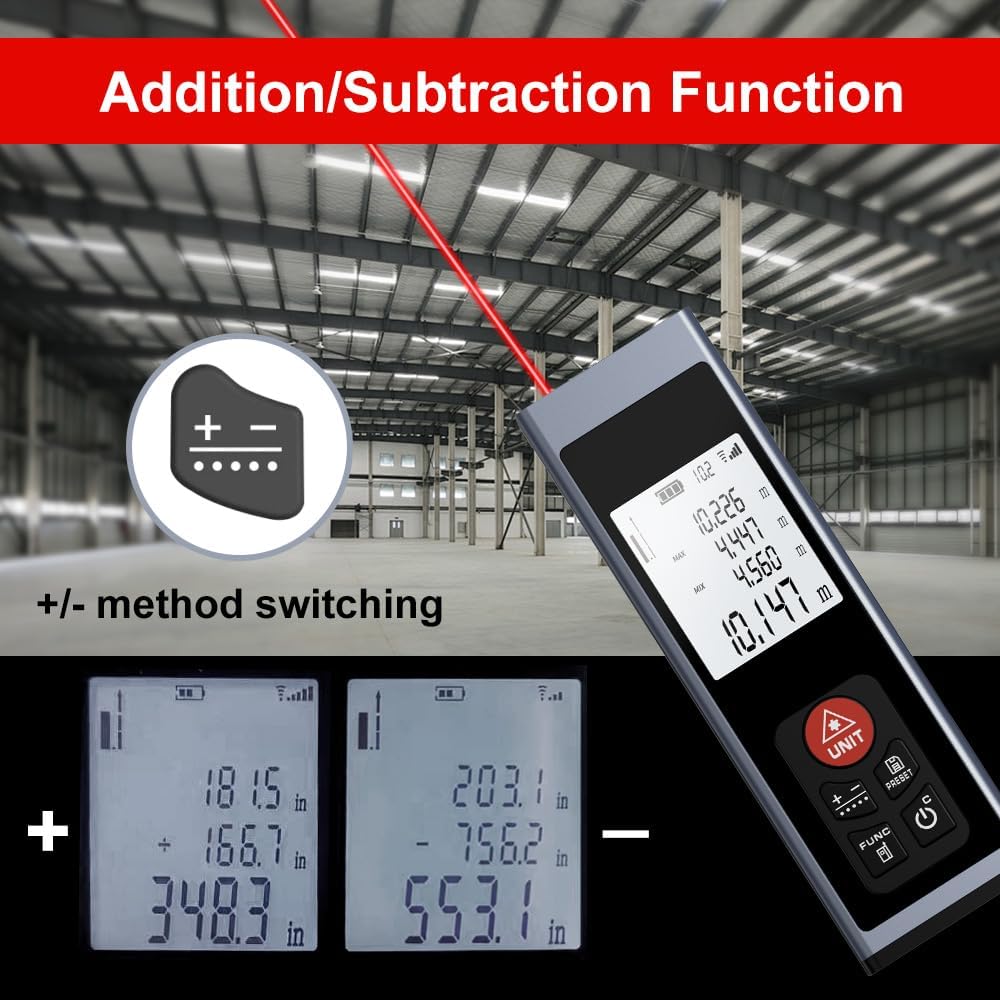
Figure 8: Addition/Subtraction Function
6.2 Memory Storage Function
Төхөөрөмж нь 28 хүртэлх хэмжилтийн өгөгдлийг хадгалах боломжтой.
- руу view stored data, short press the PRESET/History товч.
- Use the arrow buttons (if available, or cycle through with PRESET) to navigate through the stored measurements.

Figure 9: Memory Storage Display
7. Бүтээгдэхүүний албан ёсны видео
Watch this official video from the seller for a quick introduction to the AquilaPro Laser Measuring Tool.
Video 1: AquilaPro Laser Measuring Tool Introduction (Source: AQUILA OPTICS)
8. Засвар үйлчилгээ
- Цэвэрлэгээ: Зөөлөн ашиглах, damp төхөөрөмжийг цэвэрлэх даавуу. Зүлгүүрийн цэвэрлэгч, уусгагчийг бүү ашигла.
- Хадгалах: Төхөөрөмжийг нарны шууд тусгал, хэт температураас хол, сэрүүн, хуурай газар хадгална.
- Батерейны арчилгаа: If storing for extended periods, charge the battery every 3 months to prolong its lifespan.
- Усны эсэргүүцэл: The device is rated IP54, meaning it is protected against dust and splashing water. Do not immerse in water.
9. Алдаа засах
| Асуудал | Боломжит шалтгаан | Шийдэл |
|---|---|---|
| Төхөөрөмж асахгүй байна. | Батерей бага байна; Төхөөрөмж унтарсан байна. | Charge the battery; Long press the Power button. |
| Буруу уншилтууд. | Unstable surface; Obstruction in laser path; Incorrect reference point. | Ensure stable surface; Clear laser path; Check and adjust reference point (front/rear datum). |
| Дэлгэц бүдэг эсвэл унших боломжгүй. | Backlight off; Low battery. | Short press Power button to toggle backlight; Charge the battery. |
| Лазер харагдахгүй байна. | Bright ambient light; Laser not activated. | Use in lower light conditions; Short press UNIT/Laser button. |
10. Техникийн үзүүлэлтүүд
| Онцлог | Дэлгэрэнгүй |
|---|---|
| Брэнд | AquilaPro |
| Загварын нэр | KL02060 |
| Хэмжих хүрээ | 197 фут (60 м) |
| Нарийвчлал | ±0.078 inch (2mm) |
| Материал | Хөнгөн цагаан |
| Өнгө | Хар |
| Бүтээгдэхүүний хэмжээ (LxWxH) | 1.1"L x 0.6"W x 3.4"H |
| Зайны төрөл | Цэнэглэдэг лити-ион |
| Олон улсын хамгаалалтын зэрэглэл | IP54 (тоос, ус цацахад тэсвэртэй) |
| Оруулсан бүрэлдэхүүн хэсгүүд | оосор |
11. Баталгаат хугацаа ба дэмжлэг
This AquilaPro Laser Measuring Tool comes with a 1 жилийн үйлдвэрлэгчийн баталгаа худалдан авсан өдрөөс. Баталгаат заргад зориулж худалдан авалтаа нотлох баримтаа үлдээнэ үү.
For technical support or warranty inquiries, please contact AquilaPro customer service through the retailer's platform or visit the official AquilaPro store on Amazon: AquilaPro Amazon Store.