Бүтээгдэхүүн дууссанview
The DYNAVIN D9-DMI Ultra Flex is an advanced Android car radio navigator designed to upgrade your in-car entertainment and navigation experience. It features a 6.5-inch high-resolution anti-glare touchscreen, integrated GPS navigation, wireless CarPlay, and Android Auto compatibility. This unit seamlessly integrates with your vehicle's existing systems, including steering wheel controls, climate control, and parking sensors, for a cohesive user experience.
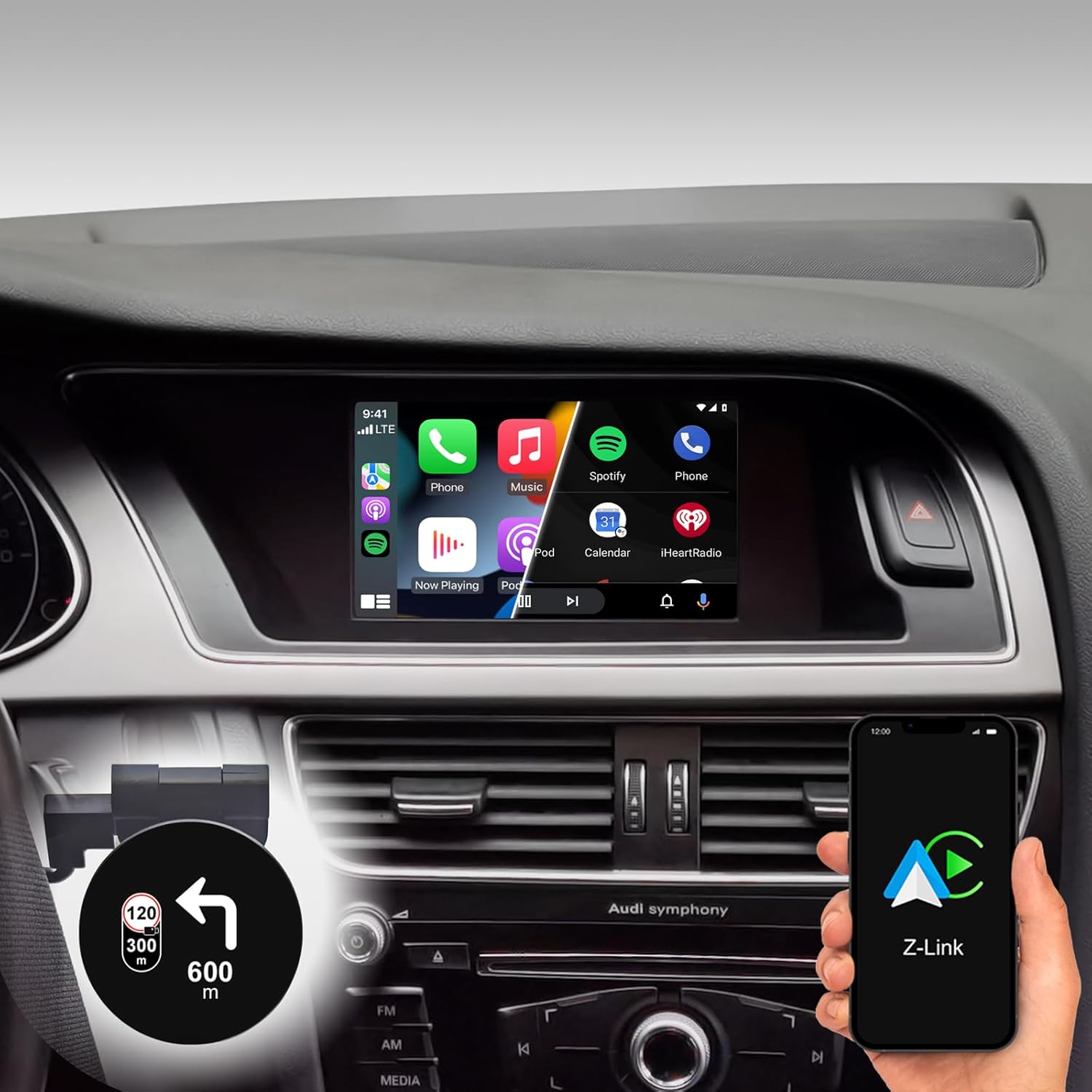
Figure 1: DYNAVIN D9-DMI Ultra Flex Car Radio Navigator installed in an Audi dashboard, showcasing its CarPlay interface and integration with navigation features.
Тохиромжтой байдал
This Android Navi Radio is specifically designed for Audi vehicles equipped with a Concert or Symphony radio. Please verify your vehicle's radio type before installation to ensure compatibility.
- Audi A4: 2007-2015
- Audi A5: 2007-2016
- Audi Q5: 2008-2017
- Audi S4: 2009-2016
- Audi S5: 2009-2016
The unit is compatible with the original AUDI sound system and can receive the AUDI vehicle menu.

Figure 2: Compatible Audi Concert and Symphony radio units.

Figure 3: How to check your car's system version for compatibility.
Гол онцлогууд
- Дэлгэц: 6.5-inch high-resolution (1024 x 600 pixels) anti-glare touchscreen.
- Үйлдлийн систем: Android 11 OS with quad-core CPU and 4 GB RAM.
- Холболт: Wireless CarPlay, Android Auto, and Smartphone Mirroring.
- Навигац: Integrated GPS navigation with Dynaway app (31-day trial, activation code required), including speed camera information.
- Аудио: Highly sensitive FM-RDS tuner with 15 presets for clear, noise-free playback. Supports audio streaming via smartphone/USB.
- Микрофон: Compact digital dual microphone with noise reduction for excellent call quality.
- Интеграци: Integrated CANBUS solution for seamless control via steering wheel, air conditioning display, and parking sensor information.
- Head-up Display (HUD): Included HUD shows navigation directions, vehicle speed, and speed camera alerts.
- Dynapp Pack: Access to Google Playstore, third-party app installation, and display of speed limits (31-day trial, activation code required).

Figure 4: DYNAVIN's commitment to quality and experience.

Figure 5: The innovative Dynavin Digital Dual-Microphone.

Figure 6: Upgrade your Audi system with the DYNAVIN DMI Ultra Flex.
Тохиргоо ба суурилуулалт
Installation of the DYNAVIN D9-DMI Ultra Flex requires careful attention to detail. It is recommended to have the installation performed by a qualified professional. The unit integrates with your vehicle's existing wiring and CAN-BUS system.
Оруулсан бүрэлдэхүүн хэсгүүд:
Ensure all components listed below are present in your package before beginning installation.

Figure 7: Complete list of accessories included in the package.
- Dynavin Radio Unit
- Холболтын кабель
- DAB антен
- DAB / CAN Interface
- Арын камерын кабель
- GPS антен
- USB өргөтгөл кабель
- Антен адаптер
- Микрофон
- Climate Control Cable
- HUD 150 (Толгой дээгүүр харагддаг дэлгэц)
- BT/Wi-Fi антен
- Буулгах хэрэгсэл
- Түргэн гарын авлага
Суулгах алхамууд (ерөнхий):
Refer to the included Quick Guide for detailed, step-by-step installation instructions specific to your Audi model. Professional installation is highly recommended.
- Бэлтгэл: Disconnect the vehicle's battery. Use the provided disassembly tools to carefully remove the original radio unit and trim.
- Утас: Connect the Dynavin radio unit using the supplied connection cables, ensuring all connections are secure. Integrate the DAB/CAN interface and connect the GPS antenna, DAB antenna, and BT/Wi-Fi antenna.
- Микрофон суурилуулах: Install the compact digital dual microphone in a suitable location, typically near the rearview mirror or steering column, for optimal call quality.
- Head-up Display Installation: Mount the HUD 150 unit on your dashboard or windshield as per the instructions, ensuring it does not obstruct your view.
- CAN-BUS Integration: Ensure the CAN-BUS connections are correctly made to enable steering wheel control, climate display, and parking sensor integration.
- Туршилт: Reconnect the vehicle's battery. Power on the unit and perform initial function tests for radio, navigation, CarPlay/Android Auto, and vehicle system integration.
- Дахин угсрах: Хяналтын самбарын эд ангиудыг сайтар дахин угсарна уу.
Ашиглалтын заавар
Үндсэн үйл ажиллагаа:
- Асаах/унтраах: The unit typically powers on and off with the vehicle's ignition.
- Мэдрэгчтэй дэлгэцийн удирдлага: Navigate menus and select functions using the responsive 6.5-inch touchscreen.
- Жолооны хүрдний удирдлага: Utilize your vehicle's existing steering wheel controls for volume, track skipping, and call management, thanks to CAN-BUS integration.
Навигацийн систем:
The integrated GPS navigation system uses the Dynaway app. A 31-day trial is included, after which an activation code must be purchased.
- Очих газрын оролт: Enter destinations via the touchscreen.
- Дуут заавар: Follow clear voice instructions for turn-by-turn navigation.
- Маршрутын заавар: Select preferred route options (e.g., fastest, shortest).
- Хурдны камерын анхааруулга: The navigation software includes alerts for speed cameras.
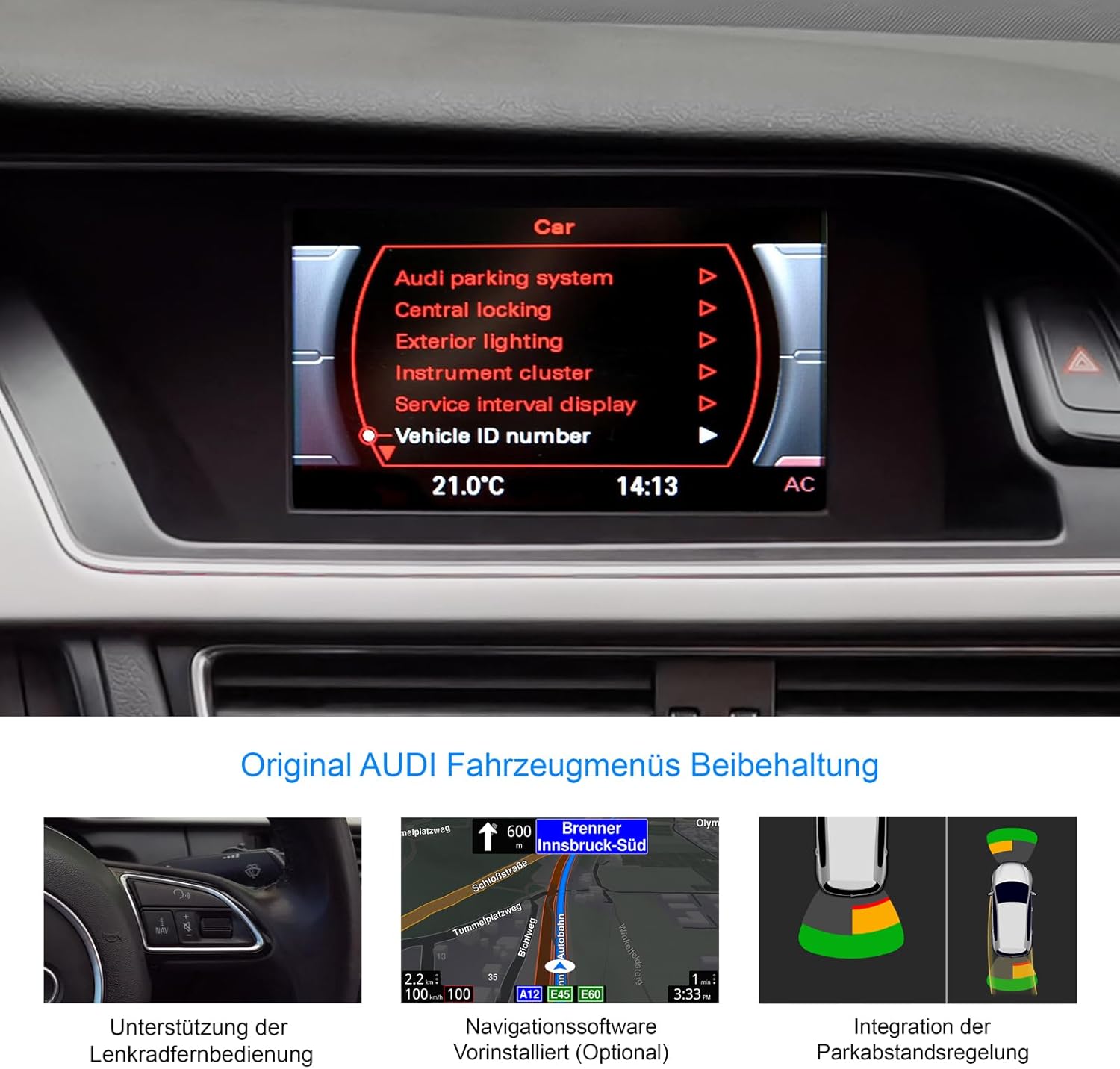
Figure 8: Retention of original Audi vehicle menus and integrated features.
CarPlay болон Android Auto:
Connect your smartphone wirelessly to access CarPlay (for iOS devices) or Android Auto (for Android devices). A 31-day trial is included, after which an activation code must be purchased.
- Утасгүй холболт: Pair your phone via Bluetooth and follow the on-screen prompts to establish a wireless CarPlay or Android Auto connection.
- Апп хандалт: Use compatible apps for navigation (Apple Maps, Google Maps), music streaming (Spotify, Apple Music), messaging, and calls directly from the unit's display.
Head-up Display (HUD):
The included HUD 150 projects key information onto your windshield, allowing you to keep your eyes on the road.
- Харуулсан мэдээлэл: Navigation directions (from Dynaway, Apple Maps, Google Maps), vehicle speed, and Blitzer.de speed camera information.
- Байршил: Position the HUD unit to ensure clear visibility without obstructing your driving view.

Figure 9: Head-up Display in action, showing navigation and time.
Засвар үйлчилгээ
To ensure the longevity and optimal performance of your DYNAVIN D9-DMI Ultra Flex, follow these maintenance guidelines:
- Дэлгэц цэвэрлэх: Цахим дэлгэцэнд тусгайлан зориулсан зөөлөн, хөвөнгүй даавуу хэрэглээрэй. Зүлгүүрийн цэвэрлэгч эсвэл уусгагч бүү хэрэглэ. Тоос шороо болон хурууны хээг арилгахын тулд дэлгэцийг зөөлөн арчина уу.
- Програм хангамжийн шинэчлэлтүүд: Periodically check for software updates from DYNAVIN to ensure the system runs efficiently and has the latest features and bug fixes. Updates can typically be performed via Wi-Fi or USB.
- Ерөнхий арчилгаа: Төхөөрөмжийг хэт өндөр температурт, нарны шууд тусгалд удаан хугацаагаар өртөхөөс зайлсхий.
- Кабелийн холболтууд: Ensure all cables remain securely connected. Avoid pulling on cables forcefully.
Алдааг олж засварлах
This section addresses common issues you might encounter with your DYNAVIN D9-DMI Ultra Flex. For more complex problems, contact customer support.
| Асуудал | Боломжит шалтгаан | Шийдэл |
|---|---|---|
| Төхөөрөмж асахгүй байна. | Цахилгааны холболт тасарсан, гал хамгаалагч шатсан, машины аккумляторын асуудал. | Check all power cables and connections. Inspect vehicle fuses. Ensure vehicle battery is charged. |
| Аудио гаралт байхгүй. | Volume too low, mute activated, incorrect audio source selected, wiring issue. | Increase volume. Check if mute is active. Select correct audio source. Verify speaker wiring connections. |
| CarPlay/Android Auto холбогдохгүй байна. | Bluetooth not paired, Wi-Fi disabled, trial period expired, activation code not entered. | Ensure Bluetooth and Wi-Fi are enabled on both devices. Re-pair the phone. Check trial status and enter activation code if necessary. |
| GPS дохио алдагдсан эсвэл буруу. | GPS antenna obstructed or disconnected, poor satellite reception. | GPS антенн зөв суурилуулсан, тунгалаг эсэхийг шалгаарай view of the sky. Check antenna connection. Move to an open area. |
| Жолооны хүрдний удирдлага ажиллахгүй байна. | CAN-BUS connection issue, incorrect vehicle configuration. | Verify CAN-BUS wiring. Check unit settings for correct vehicle model configuration. |
Үзүүлэлтүүд
| Онцлог | Дэлгэрэнгүй |
|---|---|
| Брэнд | ДИНАВИН |
| Загвар | D9-DMI Ultra Flex |
| Тохиромжтой тээврийн хэрэгсэл | Audi A4 (2007-2015), A5 (2007-2016), Q5 (2008-2017), S4 (2009-2016), S5 (2009-2016) with Concert/Symphony radio |
| Дэлгэцийн хэмжээ | 6.5 инч |
| Дэлгэцийн төрөл | LCD, Anti-glare |
| Шийдвэр | 1024 x 600 пиксел |
| Үйлдлийн систем | Android 11 |
| CPU | Дөрвөн цөмт |
| RAM | 4 ГБ |
| Холболт | Wireless CarPlay, Android Auto, Bluetooth, USB |
| Аудио гаралтын горим | Stereo (2.0 channel) |
| Радио тааруулагч | FM-RDS with 15 presets |
| Онцлог шинж чанарууд | Integrated GPS Navigation, Head-up Display (HUD), CAN-BUS Integration (steering wheel, climate, parking sensors), Digital Dual Microphone |
| Багцын хэмжээ | 28 x 23 x 10 см |
| Зүйлийн жин | 2 кг |
| ASIN | B0CS67GQKN |
Баталгаат болон дэмжлэг
For warranty information, please refer to the documentation provided with your purchase or contact DYNAVIN customer service directly. DYNAVIN offers customer support for product inquiries, technical assistance, and troubleshooting.
For the Dynapp package, CarPlay, and Android Auto features, a 31-day trial phase is included. An activation code must be purchased online to continue using these features after the trial period.
Please visit the official DYNAVIN website or contact your retailer for the most up-to-date support information and contact details.


