1. Танилцуулга
Thank you for choosing the Gigaset Pure 100 Cordless Phone. This manual provides essential information for setting up, operating, and maintaining your new phone. Please read these instructions carefully to ensure optimal performance and longevity of your device.
The Gigaset Pure 100 is designed for ease of use, featuring a call blocking button, a 50-contact address book, hearing aid compatibility, and programmable function keys to enhance your communication experience.

Image: The Gigaset Pure 100 cordless phone positioned in a home environment, showcasing түүний гоёмсог дизайн.
2. Хайрцагт юу байна
Before you begin, please check the contents of your package. Ensure all items listed below are present:
- 1 гар утас
- 1 бааз станц
- 2 AAA Rechargeable Batteries
- 1 Зайны таг
- 1 цахилгаан адаптер
- 1 Telephone Connection Cable
- 1 Түргэн гарын авлага
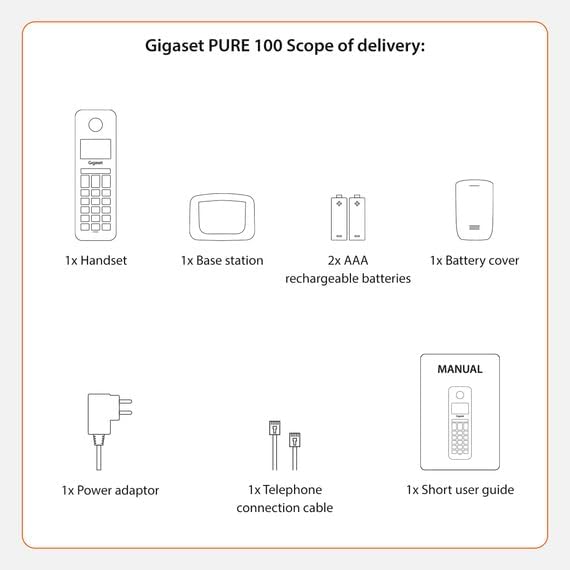
Image: A visual representation of the Gigaset Pure 100's scope of delivery, including handset, base, batteries, and cables.
3. Тохиргоо
3.1. Зай суурилуулах
- Remove the battery cover from the back of the handset.
- Insert the two supplied AAA rechargeable batteries, observing the correct polarity (+/-).
- Зайны тагийг товших хүртэл нь солино.

Image: The rear side of the Gigaset Pure 100 handset, illustrating where the battery cover is located for installation.
3.2. Суурь станцын холболт
- Connect the power adapter to the base station and plug it into a wall outlet.
- Connect the telephone connection cable to the base station and plug the other end into your telephone wall socket.
- Суурь станцыг хавтгай, тогтвортой гадаргуу дээр байрлуул.
3.3. Гар утасны бүртгэл
The handset is usually pre-registered to the base station. If not, or if you are registering an additional handset:
- Гар утсаа үндсэн станцад байрлуул.
- Press and hold the registration/paging button on the base station for approximately 3 seconds. The base station will enter registration mode.
- Follow the on-screen prompts on the handset to complete the registration process. You may need to enter a PIN (default is 0000).

Image: The Gigaset Pure 100 handset securely placed in its charging and communication base station.
4. Ашиглалтын заавар
4.1. Дуудлага хийх
- Гар утсаа өргөж эсвэл дар Ногоон дуудлагын товчлуур.
- Хүссэн утасны дугаараа залгаарай.
- дээр дарна уу Ногоон дуудлагын товчлуур дуудлагыг эхлүүлэхийн тулд дахин дарна уу.
- Дуудлага дуусгахын тулд товчийг дарна уу Улаан төгсгөлийн дуудлагын товчлуур or place the handset back in the base station.
4.2. Дуудлага хүлээн авах
Утас дуугарах үед товчийг дарна уу Ногоон дуудлагын товчлуур дуудлагад хариулах.
4.3. Address Book
The Gigaset Pure 100 can store up to 50 contacts in its address book.
- To access the address book, press the Лавлах түлхүүр (usually an icon resembling an open book or person).
- Use the navigation keys to scroll through your contacts.
- To dial a contact, select their entry and press the Ногоон дуудлагын товчлуур.
- To add a new contact, navigate to an empty entry or select the 'New Entry' option and follow the on-screen instructions to enter the name and number.
4.4. Дуудлага хаах
The Gigaset Pure 100 features a dedicated call blocking button to help manage unwanted calls.
- During an incoming call from an unwanted number, press the Call Blocking Button (often marked with a shield or 'Block' icon).
- The number will be added to your block list, and subsequent calls from this number will be rejected.
- Refer to the quick guide for detailed instructions on managing your block list.

Image: The Gigaset Pure 100 handset screen showing a 'Blocked Number' notification, highlighting its call blocking feature.
4.5. Програмчлагдах функцийн товчлуурууд
The phone includes programmable function keys that can be assigned to frequently used numbers or features. Consult your quick guide for instructions on how to program these keys to suit your needs.

Image: An illustration demonstrating the Gigaset Pure 100's effective range, allowing calls from various locations within a property.
5. Засвар үйлчилгээ
5.1. Цэвэрлэгээ
Wipe the handset and base station with a soft, damp cloth. Do not use abrasive cleaners or solvents. Ensure no liquid enters the device openings.
5.2. Зайны арчилгаа
Use only the recommended rechargeable AAA batteries. If the phone will not be used for an extended period, remove the batteries to prevent leakage. Replace batteries when their performance significantly degrades.
6. Алдаа засах
- Дууны ая байхгүй:
Check if the power adapter and telephone connection cable are securely plugged into the base station and wall outlets. Ensure the handset is registered to the base. - Дуудлага хийх/хүлээн авах боломжгүй байна:
Verify that the telephone line is active. Check if the handset batteries are charged. Ensure the handset is within range of the base station. - Дууны чанар муу:
Суурь станц руу ойрт. Бусад электрон төхөөрөмжүүдийн хөндлөнгийн оролцоог шалгана уу. - Гар утасны дэлгэц хоосон байна:
Place the handset in the base station to charge the batteries. If the issue persists, replace the batteries.
7. Техникийн үзүүлэлтүүд
| Онцлог | Тодорхойлолт |
|---|---|
| Брэнд | Гигасет |
| Загварын дугаар | ЦЭВЭР 100 |
| Өнгө | Хар |
| Дэлгэц | 1.5 инч |
| Эрчим хүчний төрөл | Батерей |
| Төрөл залгах | Ганц товчлуур |
| Дуудагчийг таних | Тиймээ |
| Материал | Хуванцар |
| Системийн төрөл | Дижитал |
8. Баталгаат хугацаа ба дэмжлэг
For warranty information and technical support, please refer to the quick guide included in your package or visit the official Gigaset webсайт. Баталгаат нэхэмжлэл гаргахын тулд худалдан авалтаа нотлох баримтаа хадгалаарай.


