1. Танилцуулга
This manual provides essential instructions for the safe operation, setup, and maintenance of your SwellPro FD3 Fisherman Waterproof Fishing Drone. The FD3 is designed for marine environments, featuring IP67 waterproofing, a 4K camera, and a dual bait release mechanism for fishing applications. Please read this manual thoroughly before operating the drone to ensure proper use and to prevent damage or injury.
Аюулгүй байдлын удирдамж
- Дроныг үргэлж нээлттэй газар, хүн, амьтан, саад бэрхшээлээс хол ажиллуул.
- Ашиглалтын явцад дроноос аюулгүй зайг барина.
- Do not operate the drone in strong winds, heavy rain, or lightning.
- Нислэг бүрийн өмнө бүх батерей бүрэн цэнэглэгдсэн эсэхийг шалгаарай.
- Ашиглахын өмнө болон дараа дроныг эвдрэл гэмтэл байгаа эсэхийг тогтмол шалгаж байгаарай.
- Дрон ажиллуулахтай холбоотой бүх орон нутгийн дүрэм журам, хуулийг дагаж мөрдөнө үү.
2. Багцын агуулга
Verify that all items listed below are present in your package. If any items are missing or damaged, please contact SwellPro support.
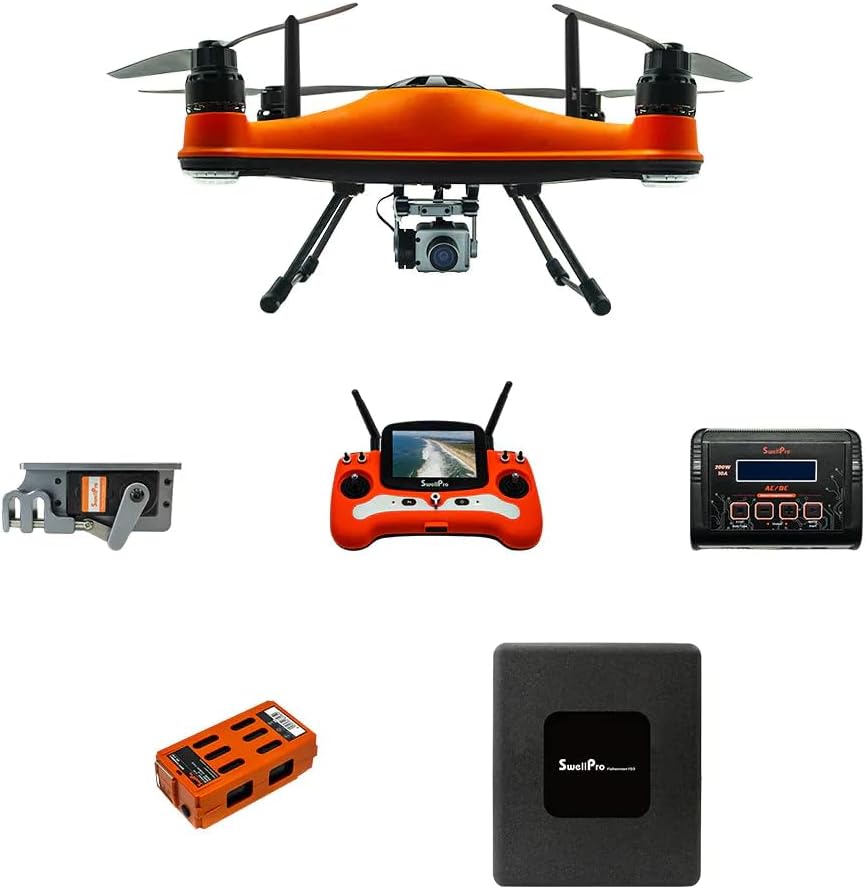
Зураг 2.1: The SwellPro FD3 Fisherman drone shown with its primary accessories, including the remote control, flight battery, charger, and bait release mechanism.
- SwellPro FD3 Fisherman Drone (x1)
- Алсын удирдлага (x1)
- Intelligent Flight Battery (x1)
- Зай цэнэглэгч (x1)
- Propellers (sets)
- Dual Bait Release Mechanism (x1)
- Хэрэглэгчийн гарын авлага (энэ баримт бичиг)
- Other accessories (e.g., cables, tools)
3. Тохиргоо
3.1 Дрон угсралт
- Attach Propellers: Carefully attach the propellers to the motor shafts. Ensure correct propeller type (CW/CCW) matches the corresponding motor. Tighten securely.
- Нислэгийн батерейг суурилуулах: Insert the intelligent flight battery into the drone's battery compartment until it clicks into place.
- Attach Bait Release Mechanism: Secure the dual bait release mechanism to the drone's underside according to the provided diagrams. Ensure it is firmly attached and cables are connected.
- Камер суурилуулах: Mount the 4K camera onto its designated gimbal or mounting point, ensuring all connections are secure.

Зураг 3.1: Дээрээс доош view of the SwellPro FD3 drone, illustrating the propeller and motor configuration. Ensure propellers are correctly installed for safe flight.
3.2 Батерейг цэнэглэх
Charge both the intelligent flight battery and the remote controller battery before first use and after each flight.
- Зайны цэнэглэгчийг цахилгаан залгуурт холбоно уу.
- Connect the flight battery to the charger. The indicator light will show charging status.
- Connect the remote controller to its charger (usually via USB).
- Charge until all indicator lights show a full charge.
3.3 Алсын удирдлагатай тохиргоо
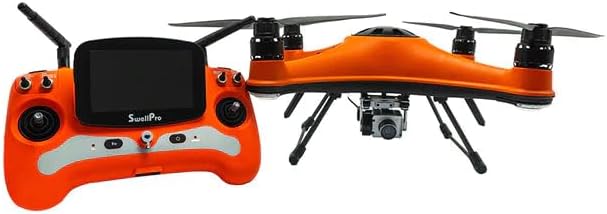
Зураг 3.2: The SwellPro FD3 drone positioned next to its remote control, which features a built-in display for real-time flight data and camera feed.
Power on the remote controller. If it does not automatically connect to the drone, follow the binding procedure outlined in the quick start guide or the full manual (if available separately) to establish a connection.
3.4 App Installation (Optional)
For advanced features and real-time telemetry, download the official SwellPro app from your device's app store. Follow the in-app instructions to connect your drone and remote controller.
4. Дроныг ажиллуулах
4.1 Нислэгийн өмнөх хяналтын хуудас
- Ensure all batteries (drone and remote) are fully charged.
- Сэнсийг гэмтсэн эсэхийг шалгаж, найдвартай бэхэлсэн эсэхийг шалгана уу.
- Verify the bait release mechanism and camera are properly installed.
- Check the weather conditions (wind speed, rain).
- Ensure sufficient GPS signal (if operating in GPS mode).
- Clear the flight area of any obstacles, people, or animals.

Зураг 4.1: The SwellPro FD3 drone in flight over water, demonstrating its waterproof capabilities. Always perform a pre-flight check before launching.
4.2 Нислэгийн үндсэн удирдлага
Refer to the remote controller diagram (usually found in the quick start guide) for specific stick and button functions. Common controls include:
- Зүүн саваа: Throttle (up/down), Yaw (rotate left/right)
- Баруун зөөгч: Pitch (forward/backward), Roll (left/right)
- Гэр лүү буцах (RTH) товч: Хөөрөх цэг рүү автоматаар буцах үйлдлийг эхлүүлнэ.
- Bait Release Button: Activates the bait release mechanism.
- Камерын удирдлага: Buttons for photo capture and video recording.
4.3 Bait Release Operation
- Securely attach your fishing line with bait to the dual bait release mechanism. Ensure the weight does not exceed the drone's maximum payload capacity (4.4 lbs).
- Fly the drone to your desired casting location.
- Once in position, press the dedicated bait release button on the remote controller. The mechanism will open, dropping the bait.
- Confirm the bait has been released via the camera feed or visual observation.
4.4 4K Camera Operation
- Ensure a compatible microSD card is inserted into the camera.
- Use the dedicated buttons on the remote controller to start/stop video recording or take photos.
- The live video feed will be displayed on the remote controller's screen or connected mobile device.
4.5 Auto Drop & Return
The FD3 features intelligent flight functions:
- Auto Drop: This refers to the automated bait release function, triggered by the remote controller.
- Гэртээ буцах (RTH): When activated, the drone will automatically fly back to its recorded takeoff point and land. This feature is also triggered automatically if the battery level is critically low or if the control signal is lost.
5. Засвар үйлчилгээ
5.1 Цэвэрлэгээ
- After use, especially in saltwater environments, rinse the drone thoroughly with fresh water.
- Wipe the drone dry with a soft cloth. Ensure all ports and connectors are free of moisture before charging or storing.
- Камерын линзийг микрофибер даавуугаар цэвэрлээрэй.
5.2 Хадгалалт
- Store the drone and batteries in a cool, dry place, away from direct sunlight and extreme temperatures.
- For long-term storage, discharge batteries to approximately 50-60% capacity.
- Remove propellers if storing in a compact case.
5.3 Батерейны арчилгаа
- Батерейг хэт цэнэглэж, цэнэггүй болгож болохгүй.
- Хэрэв батерей хавдсан эсвэл гэмтсэн бол ашиглахаа даруй зогсоож, зохих ёсоор устгана уу.
- Avoid puncturing or exposing batteries to extreme heat.
6. Алдаа засах
| Асуудал | Боломжит шалтгаан | Шийдэл |
|---|---|---|
| Дрон асахгүй байна | Low battery; Battery not properly inserted; Power button not pressed correctly. | Charge battery; Reinsert battery; Press and hold power button for 2 seconds. |
| GPS дохио байхгүй | Operating indoors; Obstructions (buildings, trees); Magnetic interference. | Move to an open outdoor area; Avoid areas with strong magnetic fields. |
| Remote controller loses connection | Out of range; Interference; Low remote battery. | Fly drone closer; Avoid areas with strong radio interference; Charge remote battery. |
| Camera not recording/taking photos | No microSD card; Full microSD card; Card error. | Insert microSD card; Format or replace microSD card. |
| Bait release not working | Mechanism jammed; Cable disconnected; Overloaded payload. | Inspect mechanism for obstructions; Check cable connections; Reduce payload weight. |
7. Техникийн үзүүлэлтүүд
| Онцлог | Дэлгэрэнгүй |
|---|---|
| Брэнд | SwellPRO |
| Загварын нэр | FD3 |
| Усны хамгаалалттай үнэлгээ | IP67 |
| Видео бичлэгийн нягтрал | 4K |
| Оптик мэдрэгчийн технологи | CMOS |
| Max Bait Release Payload | 4.4 фунт (2 кг) |
| Зайны багтаамж | 4200 мАч |
| Зайны төрөл | Лити полимер |
| Item Weight (Drone) | (Specific drone weight not provided, package weight is 30 lbs) |
| Алсын удирдлага | Included, with display |
| Үйлдвэрлэгчийн хэсгийн дугаар | SWP-FD3-ADV_1 |
| UPC | 880591956814 |
8. Баталгаат хугацаа ба дэмжлэг
For warranty information, please refer to the warranty card included with your product or visit the official SwellPro website. For technical support, troubleshooting assistance, or spare parts, please contact SwellPro customer service.
SwellPro Official Webсайт: www.swellpro.com
Amazon дэлгүүр: Visit the SwellPRO Store on Amazon


