1. Танилцуулга
The Donner DMK25 Pro is a portable 25-mini-key MIDI keyboard controller designed for music production. It features 8 velocity-sensitive drum pads, an OLED display, a personalized touch bar, and innovative wheels for enhanced control. This manual provides comprehensive instructions for setting up, operating, and maintaining your DMK25 Pro.
Чухал тэмдэглэл:
The DMK25 Pro MIDI keyboard does not produce sound on its own. It requires connection to a mobile phone or computer running Digital Audio Workstation (DAW) software to function.
2. Хайрцагт юу байна
- Donner DMK25 Pro MIDI Keyboard Controller
- USB-A-аас USB-C кабель
- USB-C Adapter (for mobile device connection)
- Хэрэглэгчийн гарын авлага
Additional software (4 types of DAW software and 40 teaching courses) are provided via download. Please refer to the included documentation for download instructions.
3. Бүтээгдэхүүн дууссанview
Familiarize yourself with the various components of your DMK25 Pro MIDI Keyboard Controller.

Зураг 1: Урд view of the Donner DMK25 Pro MIDI Keyboard Controller with USB cables.
Гол онцлогууд:
- 25 Mini Keys: Velocity-sensitive keys for expressive playing.
- 8 Drum Pads: Velocity-sensitive and backlit for beat production.
- OLED дэлгэц: High-definition screen showing real-time parameters like arpeggio, velocity, and speed.
- Personalized Touch Bar: For Pitch and Modulation control.
- 4 Innovative Wheels: For visual control and custom mapping.
- 6 Transport Controllers: To improve arrangement efficiency within your DAW.

Figure 2: High-definition OLED screen display showing real-time information.
Арын самбарын холболтууд:
- MIDI гаралт: Гадаад MIDI төхөөрөмжтэй холбогдоно уу.
- Төрөл-C порт: For USB connection to computer or mobile devices.
- Тогтвортой оролт: Connect an external sustain pedal.
- DC5V-IN: Power input (if external power is required).

Figure 3: Connection guide for the DMK25 Pro.
4. Тохиргоо
Follow these steps to set up your Donner DMK25 Pro MIDI Keyboard Controller:
- Компьютерт холбогдох: Use the provided USB-A to USB-C cable to connect the DMK25 Pro to an available USB port on your computer (PC or Mac). The device is class-compliant and should be recognized automatically.
- Мобайл төхөөрөмжид холбогдох: If connecting to a mobile phone or iPad, use the provided USB-C adapter with the USB-A to USB-C cable. For devices with Micro USB or Lightning ports, you will need to purchase a compatible OTG adapter separately.
- Програм хангамж суулгах: Install your preferred Digital Audio Workstation (DAW) software on your computer or mobile device. The DMK25 Pro is compatible with various DAWs such as Cubase LE, Live, Logic Pro, Protools, and Studio One. Refer to the included documentation for information on accessing bundled software and teaching courses.
- Тогтвортой дөрөөг холбох (заавал биш): If desired, connect a sustain pedal to the 'Sustain' input on the rear panel of the controller.

Figure 4: Three simple steps to start using your DMK25 Pro.
5. Ашиглалтын заавар
The DMK25 Pro offers a range of features to enhance your music production workflow.
5.1. Intelligent Dynamic Scale Mode
Utilize the intelligent dynamic scale mode with 16-scale tones to easily create bass lines, melodies, and leads across various musical genres.
5.2. Real-time Multi-Mode Control
Unleash creativity with dedicated arpeggio, note repeat, and chord functions. These allow for on-the-fly music clip creation and performance enhancement.
5.3. Personalized Touch Bar
The Pitch/Mod touch bar provides intuitive control over pitch bending and modulation, offering expressive possibilities during composition and performance.
5.4. Innovative Wheels and Transport Controls
The 4 innovative wheels offer visual control and comfort. They can be custom-mapped to control various parameters within your DAW. The 6 transport controllers (Play, Stop, Record, etc.) improve arrangement efficiency.

Figure 5: Innovative wheels for enhanced control.
5.5. Velocity-Sensitive Keys and Pads
The 25 velocity-sensitive keys and 8 velocity-sensitive pads offer responsive control. You can select from 4 exquisite velocity-sensitive curves (Normal, Hard, Light, Fixed) to customize the touch response to your playing style.
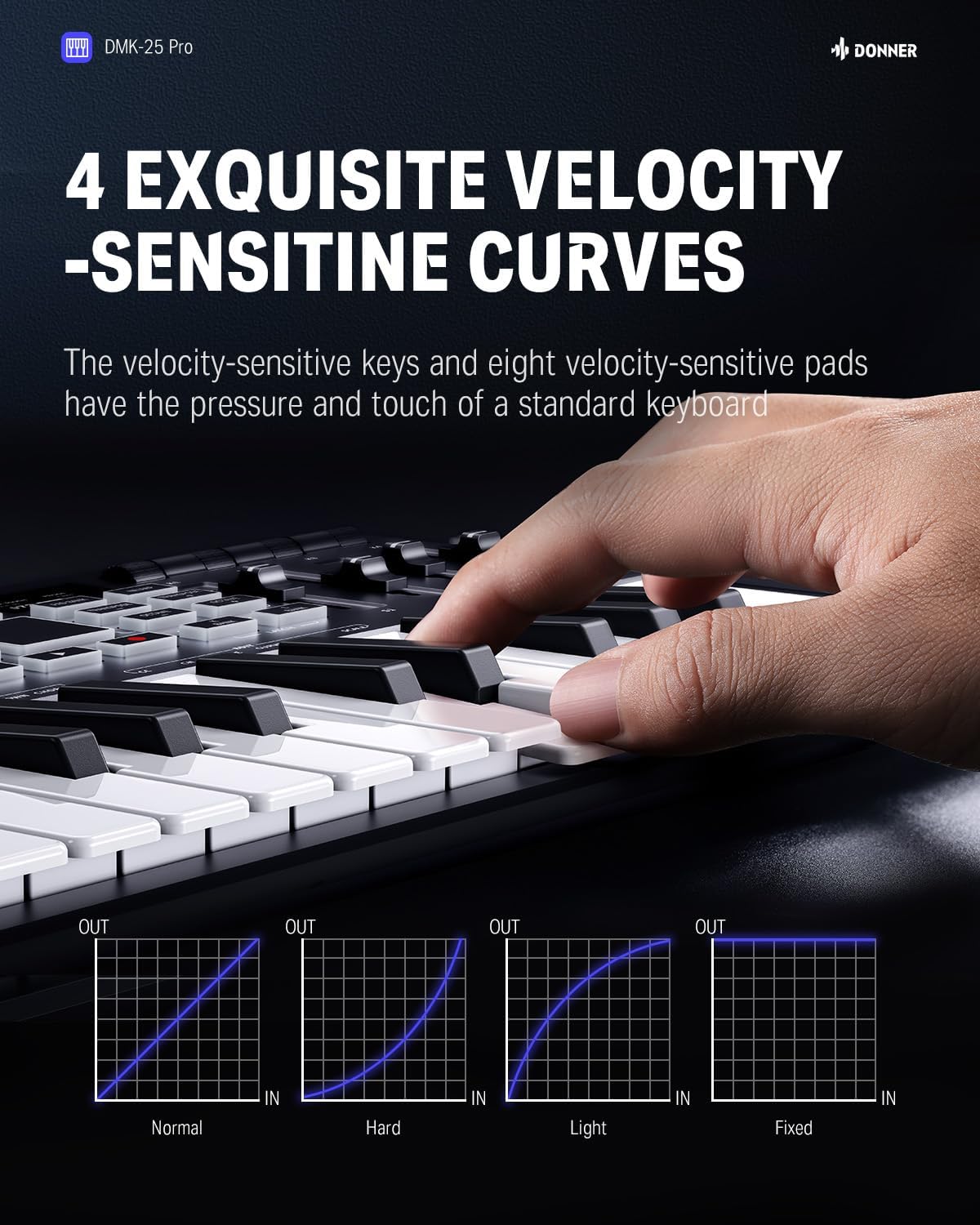
Figure 6: Four exquisite velocity-sensitive curves.
5.6. High-Definition OLED Screen
The OLED display provides real-time feedback on arpeggio settings, velocity, speed, and other parameters, simplifying arrangement and timbre creation.
6. Програм хангамжийн интеграцчлал
The DMK25 Pro is designed for seamless integration with various music production software.
6.1. DAW нийцтэй байдал
The controller is compatible with popular DAWs including Cubase LE, Live, Logic Pro, Protools, and Studio One. This ensures a full music production experience for your creative endeavors.
6.2. Teaching Courses
Access 40 engaging keyboard-teaching courses, ranging from beginner to advanced levels, perfect for learning music arrangement essentials. These courses are provided through Melodics software.
Video 1: Tutorial on how to download and install Melodics software for the Donner DMK25 Pro.
Video 2: Detailed features and tutorials for the Donner DMK-25 Pro.
7. Засвар үйлчилгээ
To ensure the longevity and optimal performance of your DMK25 Pro, follow these maintenance guidelines:
- Цэвэрлэгээ: Use a soft, dry, lint-free cloth to clean the surface of the controller. Avoid using abrasive cleaners, solvents, or waxes, as these can damage the finish.
- Хадгалах: Store the device in a cool, dry place away from direct sunlight, extreme temperatures, and high humidity. When transporting, use appropriate protective casing.
- Харьцуулах: Handle the controller with care. Avoid dropping it or subjecting it to strong impacts, which can damage internal components or the keys/pads.
- Тоос хамгаалах: Keep the device covered when not in use to prevent dust accumulation, which can affect performance and lifespan.
8. Алдаа засах
If you encounter issues with your DMK25 Pro, refer to the following common solutions:
- Дууны гаралт байхгүй: Ensure the DMK25 Pro is correctly connected to your computer or mobile device and that your DAW software is running and configured to receive MIDI input from the controller. Verify that an instrument track is armed and a sound is loaded.
- Төхөөрөмжийг танихгүй байна: Check all USB cable connections. Try a different USB port or cable. Ensure your computer's operating system and DAW software are up to date. Restart your computer and DAW.
- Pads/Keys Not Responding: Check the velocity curve settings on the device. Ensure the correct MIDI channel is selected in your DAW. Verify that the device is not in a locked or unresponsive mode.
- Програм хангамж суулгах асуудал: Refer to the specific software's installation guide or support resources. Ensure you have a stable internet connection for downloads and activations.
For further assistance, please contact Donner customer support.
9. Техникийн үзүүлэлтүүд
| Онцлог | Дэлгэрэнгүй |
|---|---|
| Загварын дугаар | DMK 25 Pro |
| Түлхүүрүүдийн тоо | 25 мини түлхүүр |
| дэвсгэр | 8 Velocity-Sensitive, Backlit Drum Pads |
| Дэлгэц | Өндөр нарийвчлалтай OLED дэлгэц |
| Хяналтууд | Pitch/Mod Touch Bar, 4 Innovative Wheels, 6 Transport Controllers |
| Холболт | USB Type C, MIDI Out, Sustain Input |
| Хүч | USB Bus-Powered, DC5V-IN |
| Тохиромжтой төхөөрөмжүүд | PC/Mac, Various DAW software, Mobile Devices (with OTG adapter) |
| Зүйлийн жин | 2.48 фунт |
| Хэмжээ | 15.35 x 8.66 x 2.68 инч |
10. Баталгаат хугацаа ба дэмжлэг
For detailed warranty information, product registration, and technical support, please visit the official Donner webсайт эсвэл харилцагчийн үйлчилгээний хэлтэстэй холбогдоно уу. Баталгаат зарга авахын тулд худалдан авалтын баримтаа хадгална уу.


