1. Танилцуулга ба нийцтэй байдал
This manual provides detailed instructions for the installation, operation, and maintenance of your autoabc Wireless CarPlay/Android Auto 8.9-inch Linux Touchscreen Multimedia Radio Receiver. This device is designed to upgrade your vehicle's infotainment system while retaining original car functionalities.
1.1. Тээврийн хэрэгслийн нийцтэй байдал
This product is specifically designed for the following BMW models with a CCC-System:
- BMW 3 Series: E90, E91, E92, E93 (2005-2010)
- BMW 5 Series: E60, E63, E64 (2005-2010)
Чухал: Please verify your vehicle's system is a CCC-System before purchase and installation. If you are unsure, consult a professional or contact autoabc customer support.

Image 1.1: Compatibility chart for BMW E-series models and CCC system.
2. Үндсэн шинж чанарууд
The autoabc Multimedia Radio Receiver offers a range of advanced features to enhance your driving experience:
- Утасгүй болон утастай CarPlay/Android Auto: Seamlessly integrate your smartphone for navigation, music, calls, and more using intelligent voice assistants.
- High-Definition 8.9-inch Touchscreen: A 1920 x 720 resolution LED display provides a clear and vibrant visual experience.
- Анхны онцлогийг хадгалах: Радио зэрэг машины бүх анхны функцийг хадгалдаг, ampөргөгч, joystick удирдлага, арын хэсэгview camera, and vehicle information display (speed, fuel, oil pressure, safety warnings).
- Олон хяналтын аргууд: Supports control via the original car knob, steering wheel buttons, and the new touchscreen interface.
- Дэлгэц толин тусгал: Features Airplay and Autolink for mirroring your phone's screen, and supports USB media playback.
- Камерын дэмжлэг: Compatible with factory original reverse cameras, parking radar, and aftermarket front view DVR (AHD/CVBS).

Image 2.1: Control methods supported by the system, including original car knob, steering wheel buttons, and the new touchscreen. Also highlights camera support.

Image 2.2: Visual representation of screen mirroring capabilities (Airplay, Autolink) and USB media playback.
3. Тохиргоо ба суурилуулалт
3.1. Pre-Installation Notice: AUX Function Activation
Due to the age of some compatible car models, the AUX function may not be active by default. It is crucial to activate the AUX function in your car before using this product to ensure audio output. You can activate the AUX function using a dedicated activator tool or by seeking assistance from a car dealership or a qualified car repair shop.
3.2. Суурилуулалт дууссанview
Installation involves replacing the original display screen and connecting the new unit with the provided cables. While the installation is designed to be straightforward, professional installation is recommended if you are not familiar with car electronics. An installation video may be available; please check the product page or contact customer support for guidance.
Оруулсан бүрэлдэхүүн хэсгүүд:
- Үндсэн дэлгэцийн нэгж
- Цахилгаан кабель
- USB кабель
- AUX кабель
- Хэрэглэгчийн гарын авлага
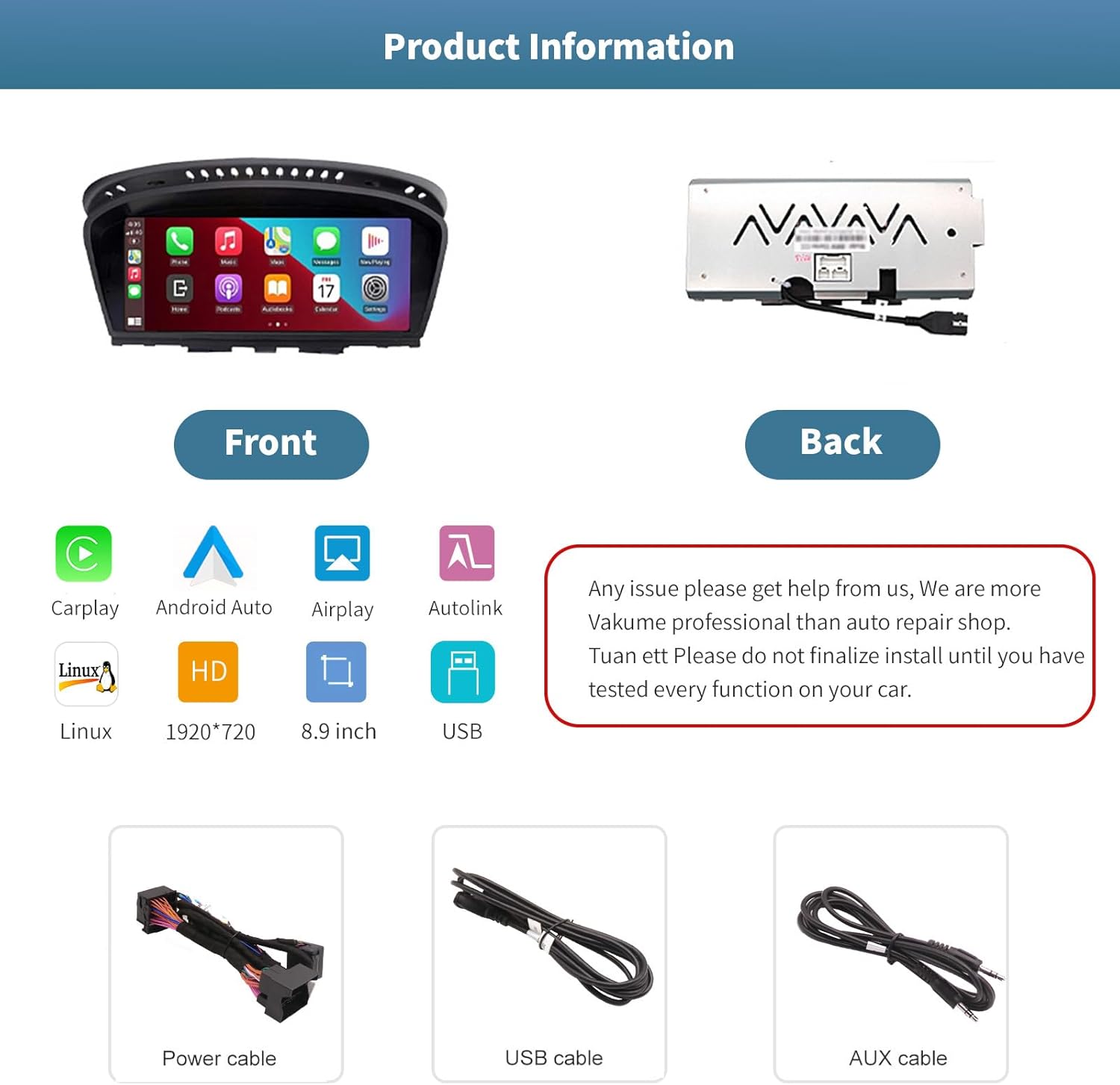
Зураг 3.1: Урд ба хойд views of the autoabc multimedia receiver, along with the included power, USB, and AUX cables.
Жич: Do not finalize the installation until you have tested every function on your car. For any installation issues, please contact autoabc support.
4. Үйл ажиллагаа
4.1. Системүүдийн хооронд шилжих
The unit allows for one-button switching between your original BMW iDrive system and the new Linux-based multimedia system. This ensures you can access all original car functions while enjoying the new features.

Image 4.1: Interface showing the option to switch between the original car system and the new Linux system.
4.2. Using CarPlay and Android Auto
Once connected wirelessly or via USB, CarPlay or Android Auto will launch, providing access to your phone's navigation, communication, and entertainment apps directly on the 8.9-inch touchscreen. Use voice commands or the touchscreen for safe operation while driving.

Image 4.2: The autoabc multimedia receiver installed in a BMW, showcasing the CarPlay/Android Auto interface.
4.3. Screen Mirroring (Airplay/Autolink)
Utilize Airplay for iOS devices or Autolink for Android devices to mirror your smartphone's screen onto the unit's display. This allows you to view photos, videos, and other content directly from your phone.
4.4. Customizing the Startup Screen
You can personalize the startup logo of your unit. Follow these steps:
- 1920 x 720 пикселийн нягтралтай PNG зураг үүсгэнэ үү.
- Зургийн нэрийг өөрчлөх file to 'updatelogo.png'.
- Place the 'updatelogo.png' file in the root directory of a USB drive.
- Insert the USB drive into the reserved USB port on the unit. A prompt will confirm the logo change is successful.
- Шинэ асаалтын логог ашиглахын тулд машинаа дахин асаана уу.

Image 4.3: Step-by-step guide for customizing the unit's startup logo.
5. Засвар үйлчилгээ
To ensure the longevity and optimal performance of your autoabc multimedia receiver, follow these general maintenance guidelines:
- Дэлгэц цэвэрлэх: Мэдрэгчтэй дэлгэцийг зөөлөн, хөвөнгүй даавуугаар арчих. Зөрүүд толбоны хувьд бага зэрэг dampдаавуугаар усаар эсвэл дэлгэцэнд аюулгүй цэвэрлэгчээр угаана. Хүчтэй химийн бодис, зүлгүүрийн материалаас зайлсхий.
- Хэт их температураас зайлсхийх: Төхөөрөмжийг хэт халуун эсвэл хүйтэнд удаан хугацаагаар бүү байлга, учир нь энэ нь түүний электрон эд ангиудад нөлөөлж болзошгүй юм.
- Кабелийн менежмент: Ensure all cables are securely connected and not pinched or strained, which could lead to damage or intermittent connectivity.
6. Алдаа засах
If you encounter issues with your autoabc multimedia receiver, refer to the following common problems and solutions:
- Аудио гаралт байхгүй:
- Ensure the AUX function in your car's original system is activated. This is a common requirement for audio output.
- Check all audio cable connections, especially the AUX cable.
- CarPlay/Android Auto холболтын асуудлууд:
- Verify your phone's Bluetooth and Wi-Fi are enabled and correctly paired with the unit.
- Утас болон машиныхаа мэдээллийн системийг дахин асаана уу.
- Таны утасны үйлдлийн систем шинэчлэгдсэн эсэхийг шалгаарай.
- Microphone Echo or Poor Call Quality:
- Check for any obstructions near the microphone.
- Adjust the microphone sensitivity settings if available in the unit's menu.
- Ensure your phone's volume is not excessively high, which can cause feedback.
- Screen Not Responding to Touch:
- Төхөөрөмжийг дахин асаана уу.
- Дэлгэц цэвэр, хог хаягдалгүй эсэхийг шалгаарай.
- AirPlay/Autolink Connection Failure:
- Ensure both the unit and your phone are connected to the same Wi-Fi network (if applicable for the mirroring method).
- Follow the specific connection steps for AirPlay or Autolink as detailed in the unit's on-screen instructions or a supplementary guide.
If these steps do not resolve the issue, please contact autoabc customer support for further assistance.
7. Техникийн үзүүлэлтүүд
| Онцлог | Тодорхойлолт |
|---|---|
| Дэлгэцийн хэмжээ | 8.9 инч |
| Дэлгэцийн нягтрал | 1920 x 720 |
| Үйлдлийн систем | Linux (supports Android Auto, CarPlay) |
| Холболтын технологи | Bluetooth, Wireless (for CarPlay/Android Auto) |
| Онцлог шинж чанар | Мэдрэгчтэй дэлгэц |
| Хяналтын арга | Touchscreen, Voice Command, Original Car Knob, Steering Wheel Buttons |
| Суурилуулах төрөл | Самбар самбар |
| Зүйлийн жин | 3.12 фунт (1.42 килограмм) |
| Багцын хэмжээ | 11.81 x 7.24 x 6.73 инч |
8. Баталгаат хугацаа ба дэмжлэг
autoabc нь танай бүтээгдэхүүнд маш сайн үйлчилгээ, дэмжлэг үзүүлэхэд чиглэгддэг.
8.1. Баталгаат хугацааны мэдээлэл
- One-Year Global Warranty: Your product is covered by a one-year global warranty from the date of purchase.
- 12 сар солих: Replacement is available within 12 months for eligible issues.
- 60 Days No Worry Return: Сэтгэл санаагаа тайван байлгах үүднээс 60 хоногийн буцах бодлогыг сайхан өнгөрүүлээрэй.
8.2. Техникийн дэмжлэг
- LIFETIME Technical Service Support: autoabc provides lifetime technical support for your product.
- 24 цагийн хурдан хариу: Expect a quick response to your inquiries within 24 hours.
- Бидэнтэй холбоо барина уу: For any questions, issues, or technical assistance, please contact us via Amazon Email. Our team is ready to provide reliable online technical support.

Зураг 8.1: Дууслааview of autoabc's customer support and warranty commitments.