Танилцуулга
Thank you for choosing the RAINPOINT 2-Outlet Water Timer. This digital sprinkler timer is designed to simplify your watering routine, offering precise control over your garden and lawn irrigation. With its dual-zone programming, rain delay, and manual watering options, you can ensure efficient and effective watering while conserving water.
This manual provides detailed instructions for installation, operation, maintenance, and troubleshooting to help you get the most out of your new water timer.
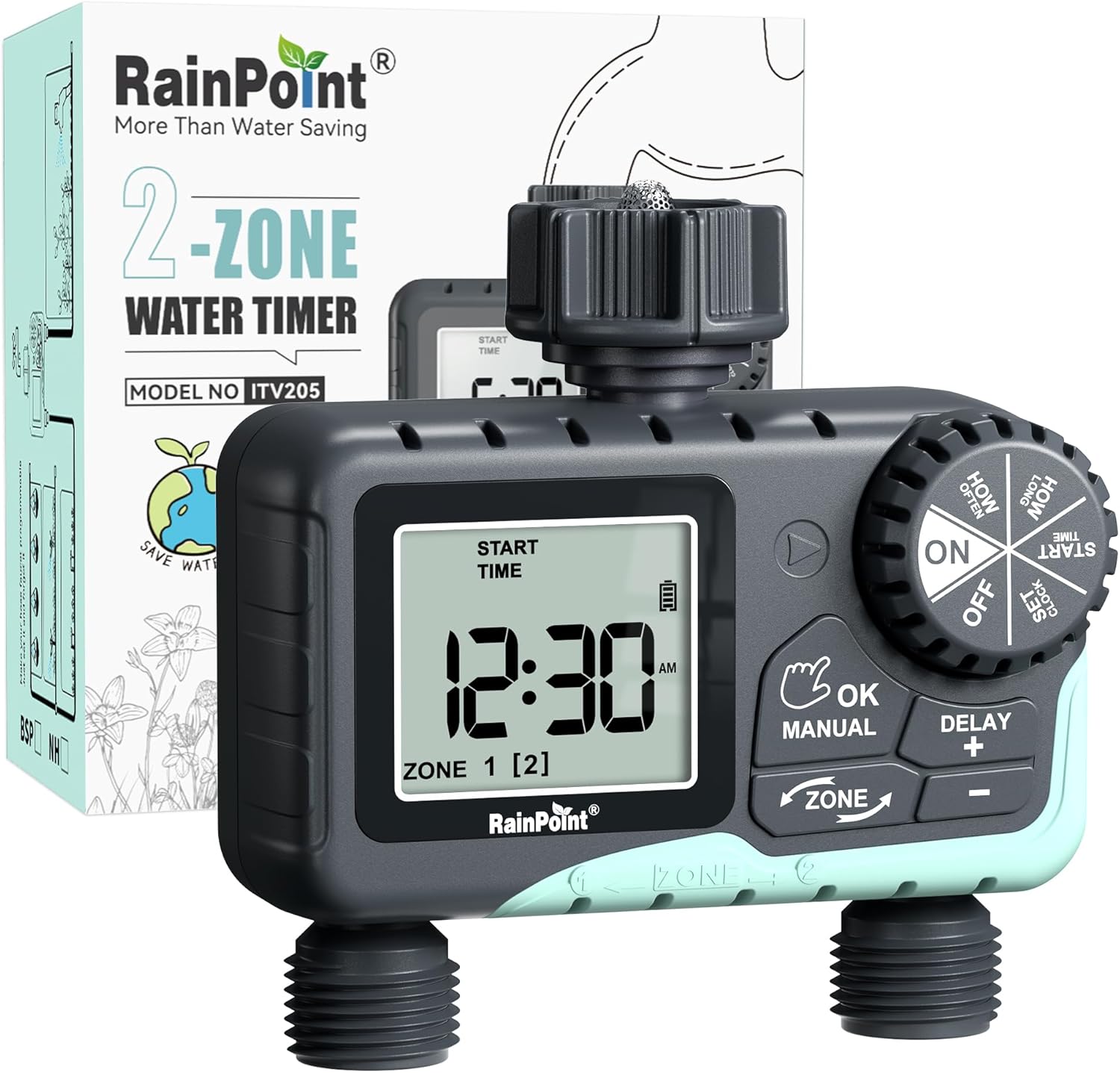
Image: The RAINPOINT 2-Outlet Water Timer, showing the device and its retail packaging. This timer features a digital display and intuitive controls for managing two separate watering zones.
Гол онцлогууд
- Хоёр бүсийн хяналт: Independently program two separate watering zones for customized irrigation.
- Уян хатан програмчлал: Set start times, watering duration (1 minute to 3 hours 59 minutes), and frequency (hourly to weekly).
- Гараар услах горим: Instantly water for a specified duration (1 minute to 8 hours) for Zone 1, Zone 2, or both.
- Бороо хойшлуулах функц: Skip watering for 24, 48, or 72 hours to conserve water during rainy periods.
- Том LCD дэлгэц: Easy-to-read 2.5-inch screen shows watering time, next irrigation plans, and power status.
- Low Power Auto Shutoff: Alerts when battery is below 5% and automatically closes the valve to prevent water wastage.
- Удаан эдэлгээтэй барилга: Made from IP54 high-impact plastic with a built-in metal filter and 2-generation valve diaphragm for longevity.
- 360° Rotatable Interface: Designed for easy installation and access.

Image: Illustration demonstrating the independent programming capabilities of Zone 1 and Zone 2, allowing for different start times and durations for each watering area.
Багцын агуулга
Бүх зүйл байгаа эсэхийг шалгахын тулд багцын агуулгыг шалгана уу:
- 1 x RAINPOINT 2-Outlet Water Timer (Model: G-ITV205NH)
- 1 х хэрэглэгчийн гарын авлага
- (Batteries not included - requires 2 x AA batteries)
Тохируулах гарын авлага
1. Зай суурилуулах
- Таймерын арын хэсэгт зайны тасалгааг ол.
- Зайны тагийг доош гулсуулж нээнэ үү.
- Insert two (2) new AA alkaline batteries, ensuring correct polarity (+/-).
- Close the battery cover securely. The added seal ring helps prevent water leaks.
Чухал: Replace batteries when the low battery indicator appears on the LCD screen. The valve will automatically close to prevent water wastage when power is critically low.

Image: The water timer display showing a low battery warning, indicating the need for battery replacement to ensure continuous operation.
2. Цоргонд холбох
- Ensure your outdoor faucet is turned off.
- Screw the timer's top connector (with the 3/4" internal thread and built-in filter) onto your standard outdoor faucet. Hand-tighten only. Do not overtighten.
- The 360° rotatable interface allows for easy positioning of the timer.
3. Холбох хоолой
- Attach your garden hoses to the two NH3/4" outlet fittings at the bottom of the timer.
- Ensure a tight connection to prevent leaks.

Image: The RAINPOINT 2-Outlet Water Timer installed on an outdoor faucet, with two hoses connected to its independent outlets, demonstrating its dual-zone capability.

Image: A detailed diagram labeling the various parts of the RAINPOINT water timer, including the 3/4" internal thread, 2.5" LCD screen, control dial, buttons, and outlet fittings.
Ашиглалтын заавар
The RAINPOINT water timer features a large dial for mode selection and several buttons for setting parameters. The dial has positions for ON, OFF, HOW OFTEN, HOW LONG, START TIME, and SET CLOCK.
1. Цагийг тохируулах
- Цонхыг эргүүлнэ үү ЦАГ ТОХИРУУЛАХ.
- -г ашиглана уу + болон - buttons to adjust the current time.
- дарна уу ЗА/ГАРЫН АВЛАГА to confirm and move to the next setting (e.g., AM/PM).
- Once the time is set, turn the dial to ON хадгалах, гарах.
2. Programming Watering Schedules (Automatic Mode)
You can program independent schedules for Zone 1 and Zone 2. Use the БҮС button to switch between zones.
a. Set Start Time
- Цонхыг эргүүлнэ үү ЭХЛЭХ ЦАГ.
- дээр дарна уу БҮС button to select either Zone 1 or Zone 2.
- Ашиглах + болон - to set the desired start time for the selected zone.
- дарна уу ЗА/ГАРЫН АВЛАГА баталгаажуулах.
b. Set How Long (Watering Duration)
- Цонхыг эргүүлнэ үү ХЭР УДААН.
- дээр дарна уу БҮС button to select either Zone 1 or Zone 2.
- Ашиглах + болон - to set the watering duration (from 1 minute to 3 hours 59 minutes).
- дарна уу ЗА/ГАРЫН АВЛАГА баталгаажуулах.
c. Set How Often (Watering Frequency)
- Цонхыг эргүүлнэ үү ХЭР БАЙХ.
- дээр дарна уу БҮС button to select either Zone 1 or Zone 2.
- Ашиглах + болон - to set the watering frequency (e.g., every 12 hours, every 2 days, etc.).
- дарна уу ЗА/ГАРЫН АВЛАГА баталгаажуулах.
Note: After setting all parameters, turn the dial to ON to activate the programmed schedule.

Image: The water timer display showing options for setting watering duration (1 min - 3h 59m) and frequency (1 hour - 7 days), illustrating the flexibility of automatic scheduling.
3. Manual Watering Mode
This mode allows for immediate, temporary watering without affecting your programmed schedule.
- Ensure the dial is in the ON байр суурь.
- дээр дарна уу ЗА/ГАРЫН АВЛАГА button. The display will show "MANUAL".
- дээр дарна уу БҮС button to cycle through watering options: Zone 1, Zone 2, or BOTH ZONE.
- Ашиглах + болон - to set the desired manual watering duration (from 1 minute to 8 hours).
- дарна уу ЗА/ГАРЫН АВЛАГА again to start watering. The timer will count down the duration.
- Гараар услах ажлыг эрт зогсоохын тулд дарна уу ЗА/ГАРЫН АВЛАГА дахин эсвэл залгуурыг эргүүлнэ үү OFF тэгээд буцаад ON.
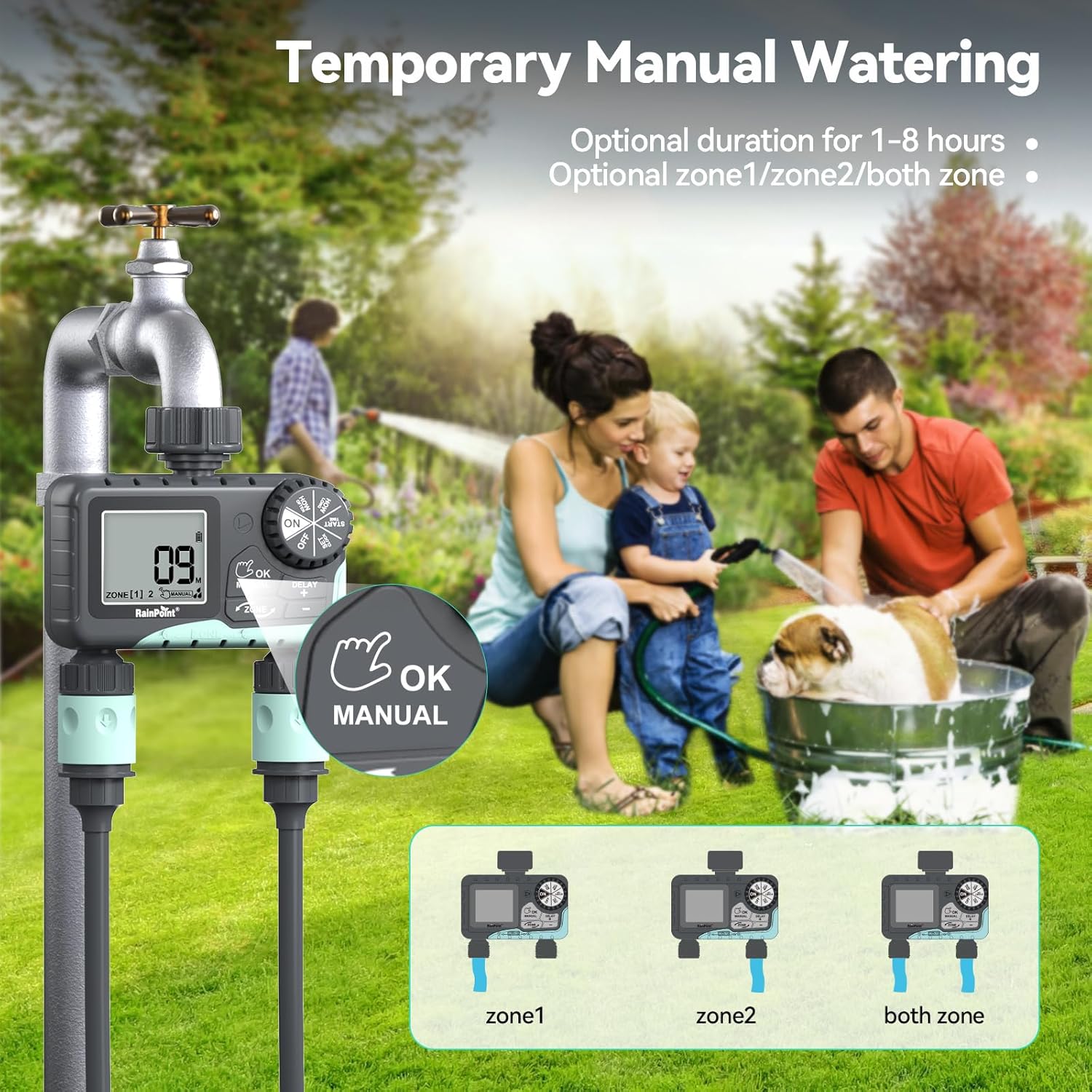
Image: The water timer display showing the manual watering mode, with options to select Zone 1, Zone 2, or both zones for immediate watering, and setting the duration.
4. Борооны саатлын функц
The rain delay function allows you to pause your watering schedule for a set period, preventing overwatering during rainfall.
- Ensure the dial is in the ON байр суурь.
- -г удаан дар DELAY + button for approximately 3 seconds until "DELAY" appears on the screen.
- -г ашиглана уу + болон - buttons to select the delay duration: 24 hours, 48 hours, or 72 hours.
- дарна уу ЗА/ГАРЫН АВЛАГА to confirm the rain delay. The timer will resume its schedule automatically after the delay period.
- To cancel the rain delay, press and hold the DELAY + 3 секундын турш дахин дарна уу.
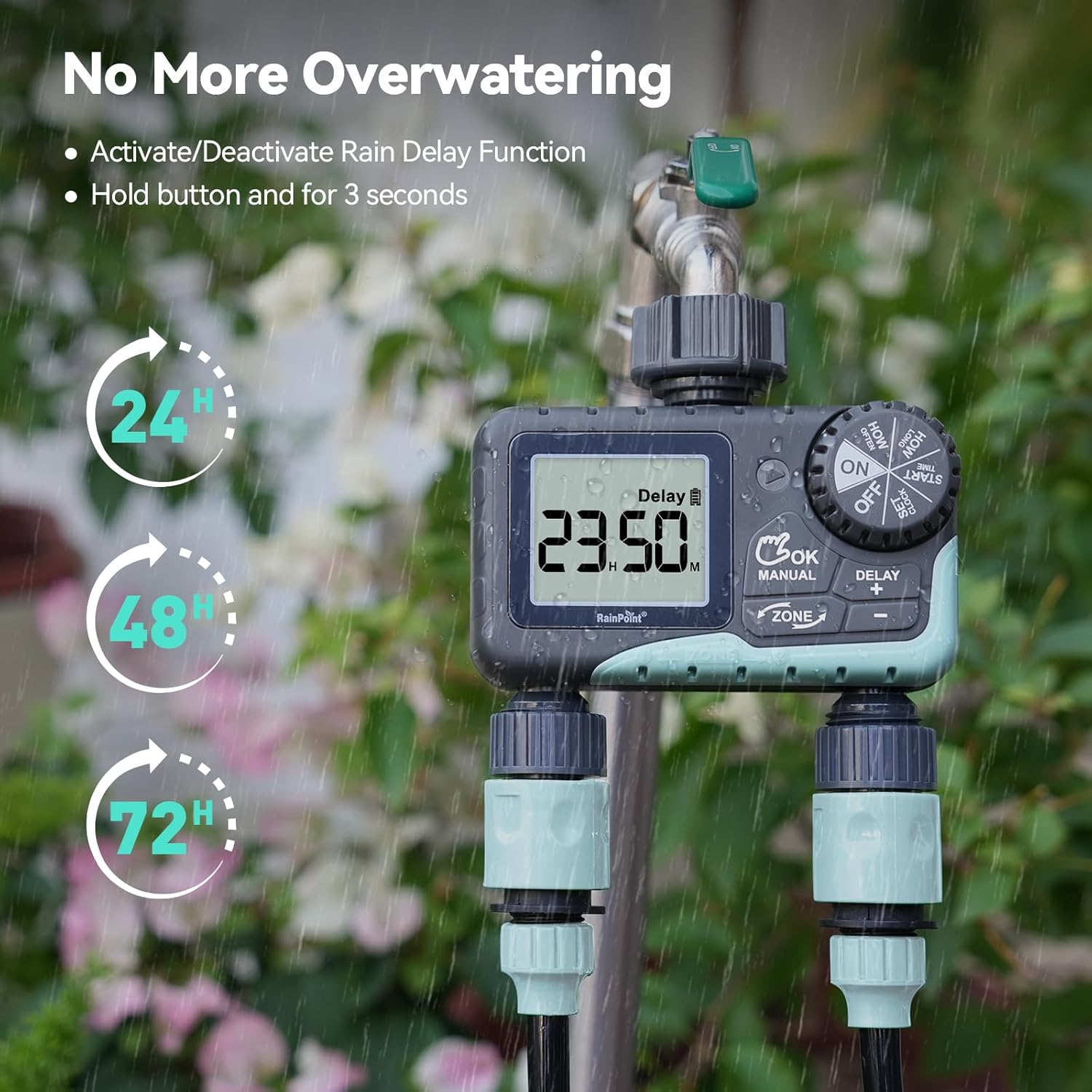
Image: The water timer display showing the rain delay function activated, with options for 24, 48, or 72-hour delays to prevent overwatering during rainy conditions.
5. Таймерыг унтраах
Бүх усалгаа болон програмчлалыг зогсоохын тулд тохируулагчийг эргүүлнэ үү OFF. All active programs will be paused.
Засвар үйлчилгээ
1. Шүүлтүүрийг цэвэрлэх
The timer has a built-in metal filter to prevent debris from entering the unit. Periodically check and clean this filter to ensure optimal water flow and prevent blockages.
- Unscrew the timer from the faucet.
- Remove the filter screen from the top connector.
- Хуримтлагдсан хог хаягдлыг зайлуулахын тулд шүүлтүүрийг урсгал усны дор зайлна.
- Reinsert the clean filter and reattach the timer to the faucet.
2. Зай солих
Replace batteries when the low battery indicator appears on the LCD screen. Always use new AA alkaline batteries.
- Цонхыг эргүүлнэ үү OFF.
- Зайны тасалгааг нээнэ үү.
- Remove old batteries and insert new ones, observing polarity.
- Зайны тасалгааг найдвартай хаа.
- The timer will retain your programming for a short period during battery replacement.
3. Өвөлжилт
To prevent damage from freezing temperatures, remove the water timer from the faucet before the first frost.
- Disconnect the timer from the faucet and hoses.
- Батерейг салга.
- Store the timer indoors in a dry, frost-free location.
Алдааг олж засварлах
| Асуудал | Боломжит шалтгаан | Шийдэл |
|---|---|---|
| Timer not turning on/display blank. | Дууссан эсвэл буруу суурилуулсан батерей. | Батерейг шинэ АА шүлтлэг батерейгаар сольж, зөв туйлшралыг баталгаажуулна уу. |
| Усны урсгал байхгүй. | Faucet is off; timer is in OFF mode; low battery; clogged filter; incorrect programming. | Turn on faucet; turn dial to ON; replace batteries; clean filter; check programming (start time, duration, frequency). |
| Холболтоос ус гоожиж байна. | Loose connections; worn washers. | Ensure all connections are hand-tight; check and replace rubber washers if damaged. |
| Таймер нь товлосон цагт услахгүй байна. | Incorrect clock setting; incorrect program settings; rain delay active. | Verify current time; re-check start time, duration, and frequency for each zone; check if rain delay is active. |
| Display shows "LOW BATT". | Батерей бага байна. | Replace batteries immediately to prevent valve closure and program loss. |
Үзүүлэлтүүд
| Загварын дугаар | G-ITV205NH |
| Бүтээгдэхүүний хэмжээс | 5.36"D x 5.92"W x 5.55"H |
| Материал | High-impact Plastic, Metal |
| Өнгө | Хар ба Цэнхэр |
| Эрчим хүчний эх үүсвэр | 2 х АА шүлтлэг батерей (оруулаагүй) |
| Усны даралтын хүрээ | Up to 35 kg (approx. 500 PSI) |
| Урсгалын хурд | 5-35 л/мин |
| Услах хугацаа | 1 минутаас 3 цаг 59 минут хүртэл |
| Услах давтамж | Hourly (up to 12 hours) or Daily (up to 7 days) |
| Гараар услах хугацаа | 1 минутаас 8 цаг хүртэл |
| Rain Delay Options | 24, 48, 72 цаг |
| Усны хамгаалалттай үнэлгээ | IP54 |
Баталгаат болон дэмжлэг
RAINPOINT products are designed for durability and performance. For warranty information and customer support, please refer to the official RAINPOINT webсайт эсвэл харилцагчийн үйлчилгээтэй шууд холбогдоно уу.
Нэмэлт тусламж авахыг хүсвэл зочилно уу: www.rainpointonline.com
Or contact customer support via email: support@rainpointonline.com


