1. Танилцуулга
This manual provides detailed instructions for the safe and efficient operation of your Xprinter XP-P323B Portable Thermal Printer. Please read this manual thoroughly before using the device to ensure proper functionality and to prevent damage. The XP-P323B is designed for printing receipts and labels, offering portability and high-speed capabilities for various business needs.
2. Аюулгүй байдлын мэдээлэл
- Do not expose the printer to water or excessive moisture.
- Принтерийг унагах эсвэл хүчтэй нөлөөнд оруулахаас зайлсхий.
- Зөвхөн заасан тэжээлийн адаптер болон дагалдах хэрэгслийг ашиглана уу.
- Принтерийг дулааны эх үүсвэр болон нарны шууд тусгалаас хол байлга.
- Принтерийг өөрөө задлах эсвэл засах гэж бүү оролдоорой. Мэргэшсэн үйлчилгээний ажилтантай холбогдоно уу.
- Ашиглалтын явцад агааржуулалтыг сайтар хангах.
3. Багцын агуулга
Бүх зүйл багцад байгаа эсэхийг шалгана уу:
- Xprinter XP-P323B Portable Thermal Printer
- Power Adapter (not explicitly listed but standard)
- USB Cable (not explicitly listed but standard)
- Sample Thermal Paper Roll (not explicitly listed but standard)
- Хэрэглэгчийн гарын авлага (энэ баримт бичиг)
4. Бүтээгдэхүүн дууссанview
The Xprinter XP-P323B is a compact and efficient thermal printer designed for various printing tasks. It supports NV logo download and picture printing (BMP format), along with concentration adjustment for print quality.
4.1. Хэвлэгчийн бүрэлдэхүүн хэсгүүд

Зураг 1: Урд view of the Xprinter XP-P323B Portable Thermal Printer, showing the power button, display, and a sample label being printed.
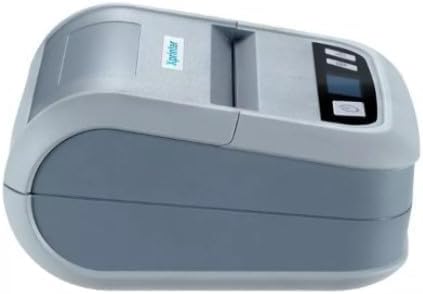
Зураг 2: Хажуу тал view of the Xprinter XP-P323B, highlighting its compact design and the Xprinter logo.
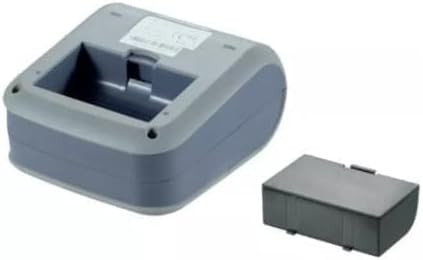
Зураг 3: Доод тал view of the Xprinter XP-P323B, showing the base and the removable battery compartment.
5. Тохиргоо
5.1. Батерейг цэнэглэж байна
- Connect the power adapter to the printer's charging port.
- Цахилгаан адаптерийг ханын залгуурт холбоно уу.
- The charging indicator light will illuminate. Allow the printer to charge fully before first use.
5.2. Loading Thermal Paper/Labels
- Open the paper compartment cover by gently pushing the release latch.
- Insert the thermal paper roll with the printing surface facing the print head. Ensure the roll is seated correctly.
- Хэвлэх толгойноос бага хэмжээний цаас татаж гарга.
- Цаасны тасалгааны тагийг байрандаа товших чимээ гартал сайтар хаа.
5.3. Төхөөрөмжид холбогдох
The XP-P323B supports USB and Bluetooth connectivity.
5.3.1. USB холболт
- Өгөгдсөн USB кабелийг ашиглан принтерээ компьютерт холбоно уу.
- Install the necessary printer drivers (available from the Xprinter website or included software).
5.3.2. Bluetooth Connection (for Smartphones/iOS)
- Принтер асаалттай байгаа эсэхийг шалгаарай.
- On your smartphone or iOS device, go to Bluetooth settings and enable Bluetooth.
- хайх available devices and select 'XP-P323B' (or similar name).
- Enter the pairing PIN if prompted (refer to printer documentation for default PIN, often '0000' or '1234').
- Once paired, you can use a compatible printing application to send print jobs.
6. Принтерийг ажиллуулах
6.1. Үндсэн хэвлэх
- Ensure the printer is connected to your device and has paper loaded.
- Open the document or image you wish to print on your connected device.
- Select the print option within your application.
- Choose 'XP-P323B' as the printer.
- Adjust print settings as needed (e.g., paper size, print quality).
- Хэвлэх ажлыг эхлүүлнэ үү.
6.2. NV Logo and Picture Printing
The printer supports downloading and printing NV (Non-Volatile) logos and BMP format pictures. This functionality typically requires specific software or commands. Refer to the advanced programming guide or software documentation for detailed instructions on how to upload and print custom logos or images.
6.3. Adjusting Print Concentration
Print concentration can be adjusted to optimize print quality. This setting is usually accessible through the printer driver software on a computer or within the settings of a compatible mobile printing application. Consult your software's help section for specific steps.
7. Засвар үйлчилгээ
7.1. Принтерийг цэвэрлэх
- Гадна: Принтерийн гадна талыг зөөлөн арчиж, damp даавуу. Хүчтэй химийн бодис, зүлгүүрийн цэвэрлэгч хэрэглэж болохгүй.
- Хэвлэх толгой: The thermal print head should be cleaned periodically to ensure optimal print quality. Use a cotton swab lightly dampИзопропилийн спиртээр арчина. Хэвлэх толгойн гадаргууг зөөлөн арчина. Тагийг хааж, үйл ажиллагааг үргэлжлүүлэхийн өмнө бүрэн хаттал хүлээнэ үү.
- Цаасан зам: Зөөлөн сойз эсвэл шахсан агаар ашиглан цаасны замаас цаасны тоос, хог хаягдлыг арилгана.
7.2. Хадгалах
When not in use for extended periods, store the printer in a cool, dry place, away from direct sunlight and extreme temperatures. Remove the paper roll if storing for a very long time to prevent dust accumulation.
8. Алдаа засах
| Асуудал | Боломжит шалтгаан | Шийдэл |
|---|---|---|
| Принтер асахгүй байна | Low battery; Power adapter not connected; Faulty power adapter | Charge the battery; Ensure power adapter is securely connected; Try a different power outlet or adapter |
| Хэвлэх гаралт байхгүй | No paper; Paper loaded incorrectly; Printer not connected; Driver issue | Load paper correctly; Re-establish connection; Reinstall printer drivers |
| Хэвлэх чанар муу | Dirty print head; Low print concentration; Low battery | Clean the print head; Adjust print concentration in software; Charge the battery |
| Bluetooth холболт амжилтгүй боллоо | Bluetooth off on device; Incorrect pairing PIN; Printer out of range | Enable Bluetooth; Re-enter correct PIN; Move device closer to printer |
9. Техникийн үзүүлэлтүүд
| Брэнд | Xprinter |
| Загварын дугаар | XP-P323B |
| Хэмжээ (D x W x H) | 15D x 7W x 10H сантиметр |
| Холболтын технологи | USB |
| Принтерийн технологи | Дулааны |
| Онцлог шинж чанарууд | Зөөврийн |
| Өнгө | Саарал |
| Тохиромжтой төхөөрөмжүүд | Ухаалаг утаснууд |
| Хянагчийн төрөл | iOS |
| Хамгийн их медиа хэмжээ | 4 x 6 инч |
| Хэвлэл мэдээллийн хэрэгсэл | Шошго |
| Цаасны хэмжээ | 4 x 6 инч |
| Принтерийн гаралт | Монохром |
| Хэвлэх хамгийн дээд хурд (Хар ба цагаан) | 40 mm/s (estimated from context) |
| Зүйлийн жин | 300 грамм |
10. Баталгаат хугацаа ба дэмжлэг
For warranty information and technical support, please refer to the warranty card included with your product or visit the official Xprinter webсайт. Худалдан авалтын баримтаа баталгаат нэхэмжлэлд зориулж худалдан авалтын баталгаа болгон хадгална уу.


