1. Танилцуулга
This manual provides detailed instructions for the operation and maintenance of your SWOFY M4 MP3 Player. Please read this manual thoroughly before using the device to ensure proper functionality and to maximize your user experience.
2. Бүтээгдэхүүн дууссанview
The SWOFY M4 is a versatile digital audio player featuring Bluetooth 5.3 connectivity, a 2.4-inch touch screen, and a range of functions including FM radio, e-book reader, video playback, and voice recording. It comes with 64GB of built-in storage, expandable up to 128GB with a Micro SD card.
2.1 Багцын агуулга
- 1x SWOFY 64GB Bluetooth MP3 Player
- 1x Wired Earbuds
- 1x USB Type-C кабель
- 1x Silicone Protective Case
- 1x хэрэглэгчийн гарын авлага
2.2 Төхөөрөмжийн зохион байгуулалт
Familiarize yourself with the physical components of your SWOFY M4 MP3 Player.
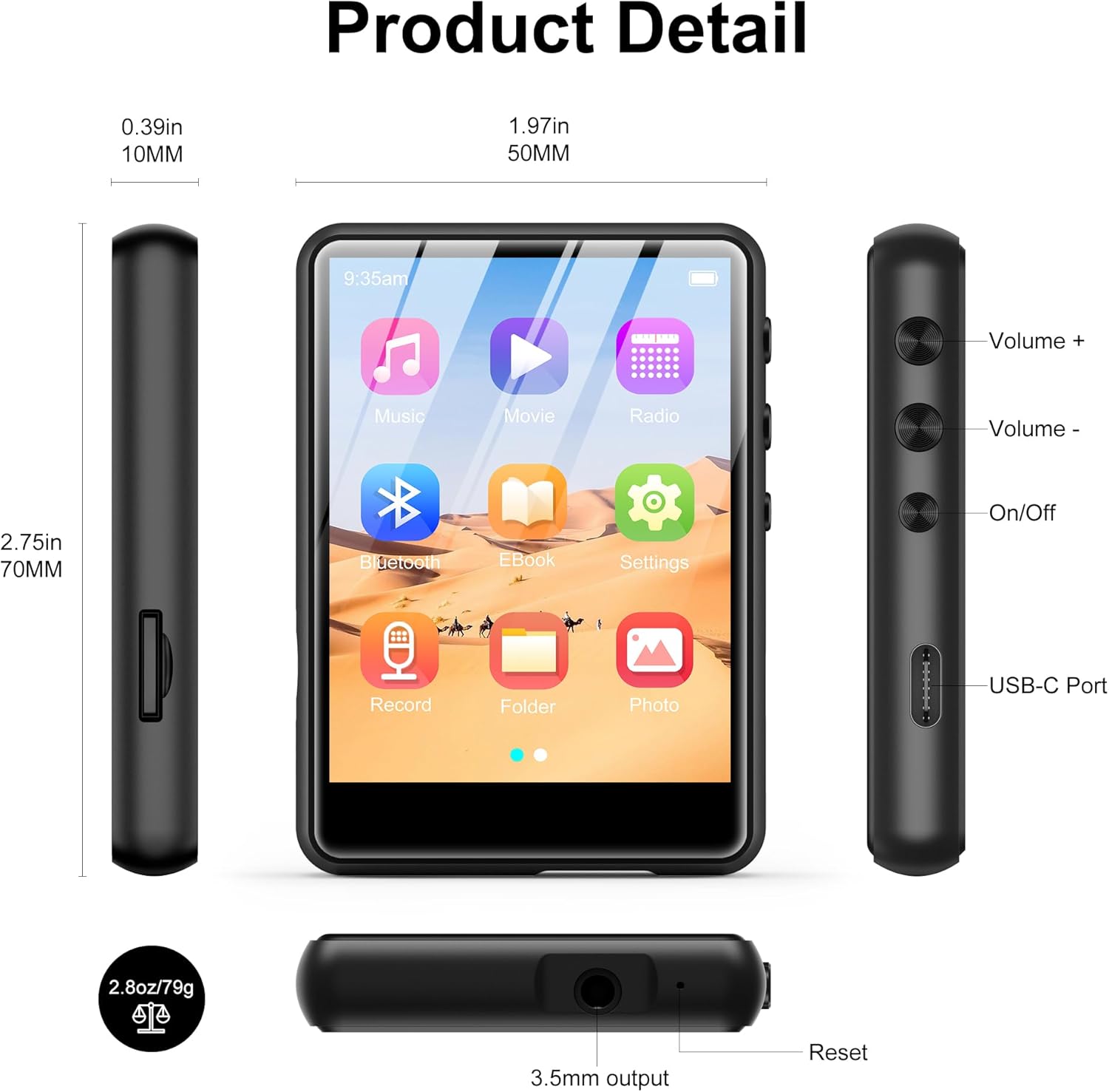
Зураг 2.2.1: Front, side, and top views of the SWOFY M4 MP3 Player, highlighting the 2.4-inch screen, Volume +/-, On/Off buttons, USB-C Port, 3.5mm output, Reset button, and Micro SD card slot.
- 2.4 инчийн IPS мэдрэгчтэй дэлгэц: For navigation and display.
- Дууны түвшин +/- Товчлуурууд: Аудио гаралтын түвшинг тохируулна уу.
- Асаах/унтраах товч: Төхөөрөмжийг асаах эсвэл унтраах.
- USB-C порт: Цэнэглэх, өгөгдөл дамжуулах зориулалттай.
- 3.5 мм стерео залгуур: Утастай чихэвч эсвэл гадаад чанга яригчийг холбоно уу.
- Бичил SD картны үүр: For storage expansion up to 128GB.
- Дахин тохируулах товч: To restart the device if it becomes unresponsive.
- HD чанга яригч: Аудио тоглуулах зориулалттай нэгдсэн чанга яригч.
3. Тохиргоо
3.1 Төхөөрөмжийг цэнэглэх
Before first use, fully charge the MP3 player. Connect the provided USB Type-C cable to the device's USB-C port and the other end to a USB power adapter (not included) or a computer's USB port. The battery indicator on the screen will show charging status.

Зураг 3.1.1: The SWOFY M4 MP3 Player connected via USB Type-C cable, illustrating its 300mAh battery capacity for long playback.
3.2 Асаах/унтраах
- Асаахын тулд: Press and hold the On/Off button located on the side of the device until the screen illuminates.
- Унтраахын тулд: Press and hold the On/Off button until a power-off prompt appears on the screen. Select "Power Off" or continue holding until the screen turns off.
3.3 Хөгжим ачаалж байна болон Files
Шилжүүлэхийн тулд files-г таны MP3 тоглуулагч руу:
- MP3 тоглуулагчаа дагалдах USB Type-C кабелиар компьютертээ холбоно уу.
- Төхөөрөмж таны компьютер дээр зөөврийн диск хэлбэрээр гарч ирнэ.
- Drag and drop your music, video, image, or e-book files into the appropriate folders on the MP3 player.
- Кабелийг салгахаасаа өмнө төхөөрөмжийг компьютерээсээ аюулгүй салга.

Зураг 3.3.1: Хөгжим шилжүүлж байна files (MP3, WMA, APE, FLAC, WAV, OGG, DRM, ACELP) from a computer to the SWOFY M4 MP3 Player via USB-C.
The device supports various audio formats including MP3, WMA, APE, FLAC, WAV, OGG, DRM, and ACELP. For video and image files, ensure they are in compatible formats to avoid "unsupported format" errors.
3.4 Хадгалах хэмжээг өргөжүүлэх
The SWOFY M4 has 64GB of internal storage. You can expand this by inserting a Micro SD card (up to 128GB) into the dedicated slot on the side of the device.
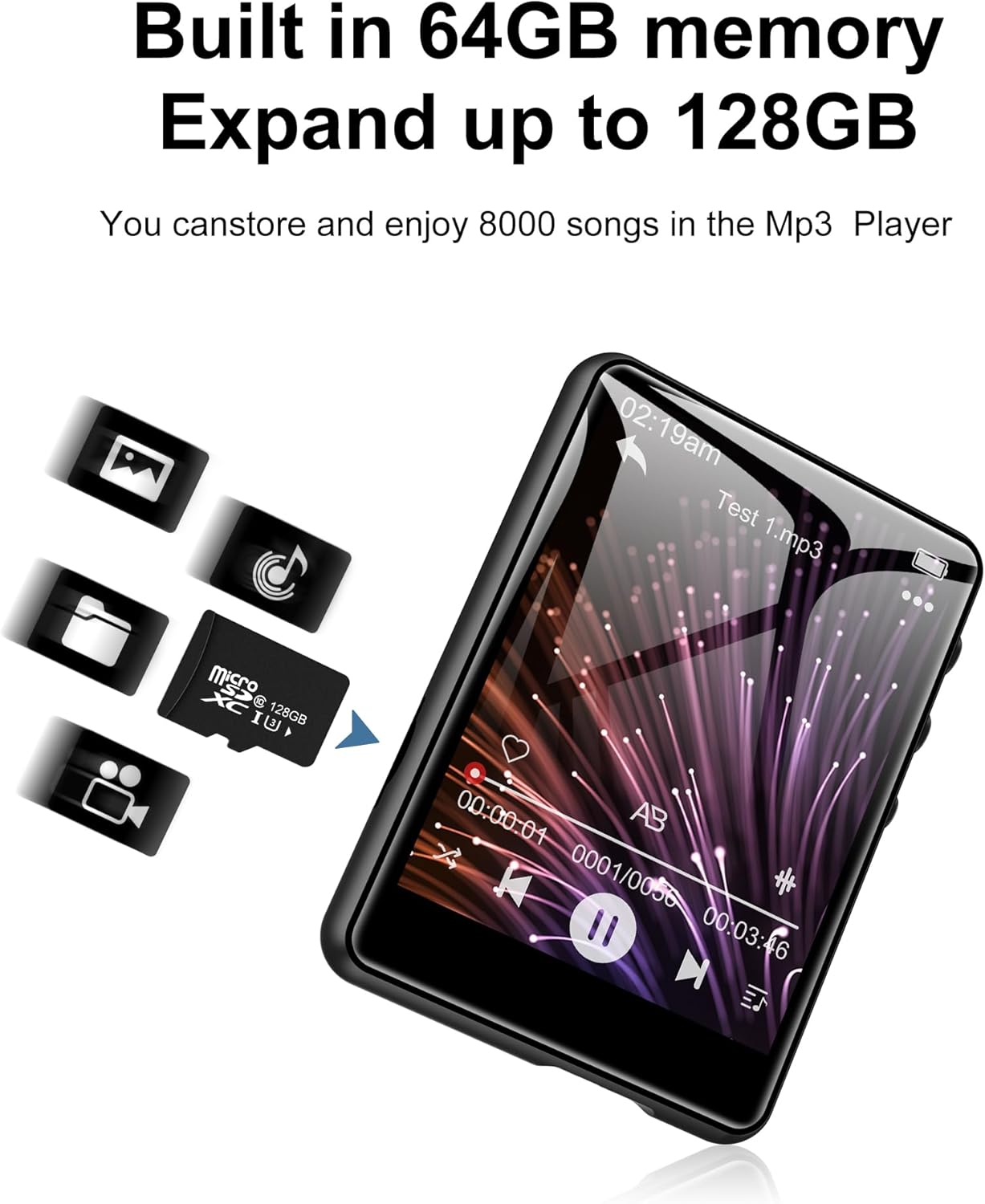
Зураг 3.4.1: The SWOFY M4 MP3 Player with a Micro SD card, illustrating the expandable storage capability up to 128GB.
4. Ашиглалтын заавар
4.1 Мэдрэгчтэй дэлгэц дээр навигаци хийх
The 2.4-inch touch screen allows for intuitive navigation. Tap icons to open applications, swipe to scroll, and use the back arrow icon to return to the previous screen.

Зураг 4.1.1: A finger interacting with the 2.4-inch IPS touch screen of the SWOFY M4 MP3 Player, demonstrating its convenient operation.
4.2 Хөгжим тоглуулах
- Үндсэн цэснээс "Хөгжим" дүрс дээр товшино уу.
- Хөгжмийн сангаа уран бүтээлч, цомог, төрөл эсвэл хавтасаар нь үзээрэй.
- Тоглуулж эхлэхийн тулд дууг товшино уу.
- Use the on-screen controls (play/pause, skip, volume) or physical volume buttons to manage playback.
- Access equalizer settings and playback modes (repeat, shuffle) from the music playback screen.

Зураг 4.2.1: The music playback interface of the SWOFY M4, showing options for AB Repeat, 8-speed playback, two playback modes, and equalizer settings.
4.3 Bluetooth холболт
The SWOFY M4 features Bluetooth 5.3 for wireless audio streaming.
- From the main menu, tap the "Bluetooth" icon or go to "Settings" and select "Bluetooth".
- Turn Bluetooth on. The device will scan for available Bluetooth devices.
- Bluetooth чихэвч эсвэл чанга яригчаа холбох горимд байгаа эсэхийг шалгаарай.
- Select your device from the list to pair. Once paired, audio will stream wirelessly.

Зураг 4.3.1: The SWOFY M4 MP3 Player demonstrating Bluetooth 5.3 connectivity with both Bluetooth earbuds and a Bluetooth speaker for wireless audio.
4.4 FM радио
FM радио функцийг ашиглахын тулд:
- Connect wired headphones to the 3.5mm jack; they act as the antenna.
- From the main menu, tap the "Radio" icon.
- Perform an auto-scan to find available stations or manually tune to a frequency.

Зураг 4.4.1: The SWOFY M4 MP3 Player showing the FM radio interface with wired headphones connected, which are necessary for antenna reception.
4.5 Цахим ном уншигч
To read e-books:
- Transfer compatible e-book files to the device (e.g., TXT format).
- Tap the "E-Book" icon from the main menu.
- Select an e-book to open it. Use the touch screen to turn pages.

Зураг 4.5.1: The SWOFY M4 MP3 Player displaying an e-book, with a hand demonstrating page-turning via the touch screen.
4.6 Видео тоглуулах
The device supports video playback. Ensure video files are in a compatible format for optimal performance.
- Transfer compatible video fileтөхөөрөмж рүү s.
- Tap the "Movie" icon from the main menu.
- Тоглуулах видеогоо сонгоно уу.

Зураг 4.6.1: The SWOFY M4 MP3 Player displaying a video in full-screen mode, demonstrating its video playback capability.
4.7 Дуу хураагч
Аудио бичихийн тулд:
- Tap the "Record" icon from the main menu.
- Бичлэг хийж эхлэхийн тулд бичлэг хийх товчийг дарна уу.
- Tap again to pause/resume, and tap the stop button to end and save the recording.

Зураг 4.7.1: The SWOFY M4 MP3 Player showing the voice recorder interface, indicating active recording with sound wave visualization.
4.8 зураг Viewer
руу view гэрэл зураг:
- Transfer compatible image files (e.g., JPEG) to the device.
- Tap the "Photo" icon from the main menu.
- Зургийг сонгоно уу view. Swipe left or right to navigate through photos.

Зураг 4.8.1: The SWOFY M4 MP3 Player displaying images, with a hand demonstrating swiping gestures to browse through photos.
5. Засвар үйлчилгээ
- Цэвэрлэгээ: Төхөөрөмжийг цэвэрлэхдээ зөөлөн, хуурай даавуу ашиглаарай. Шингэн цэвэрлэгч эсвэл зүлгүүрийн материалаас зайлсхий.
- Хадгалах: MP3 тоглуулагчийг сэрүүн, хуурай газар, нарны шууд тусгал болон хэт өндөр температураас хол хадгална уу.
- Батерейны арчилгаа: Зайны ашиглалтын хугацааг уртасгахын тулд зайгаа ойр ойрхон бүрэн цэнэггүй болгохоос зайлсхий. Төхөөрөмжийг удаан хугацаагаар ашиглаагүй байсан ч тогтмол цэнэглэ.
- Хамгаалалт: Use the provided silicone protective case to guard against scratches and minor impacts.
6. Алдаа засах
- Төхөөрөмж асахгүй байна:
- Ensure the device is fully charged. If the issue persists, try pressing the reset button with a thin object (like a paperclip) and then attempt to power on again.
- "Unsupported format" error for files:
- Таны байгаа эсэхийг шалгаарай files (music, video, image) are in compatible formats. For music, MP3, WMA, APE, FLAC, WAV, OGG, DRM, ACELP are supported. For videos and images, specific formats may be required; refer to the product specifications or try converting files to common formats like JPEG for images or MP4 for videos.
- Компьютерт холбогдох боломжгүй:
- Ensure the USB Type-C cable is securely connected to both the device and the computer. Try a different USB port or cable. Restart both the MP3 player and the computer. Ensure the device is powered on when connecting.
- Bluetooth төхөөрөмжийг холбохгүй байна:
- Ensure Bluetooth is enabled on both the MP3 player and the target device (headphones/speaker). Make sure the target device is in pairing mode and within range. Try turning Bluetooth off and on again on both devices.
- Дууны чанар муу:
- Аудиог шалгана уу file quality. Ensure headphones or speakers are properly connected and functioning. Adjust equalizer settings on the device. For wired connections, ensure the 3.5mm jack is fully inserted.
7. Техникийн үзүүлэлтүүд
| Онцлог | Дэлгэрэнгүй |
|---|---|
| Загварын дугаар | M4 |
| Хэмжээ | 2.75 x 1.97 x 0.4 инч |
| Зүйлийн жин | 7.4 унц |
| Дэлгэцийн хэмжээ | 2.4 инч |
| Дотоод санах ой | 64 ГБ |
| Өргөтгөх боломжтой хадгалах сан | 128 ГБ хүртэл (Micro SD карт) |
| Bluetooth хувилбар | 5.3 |
| Холболт | Bluetooth, USB Type-C |
| Батерей | 300 мАч лити полимер (оруулсан) |
| Playback Time (wired earbuds) | 50 цаг хүртэл |
| FM Radio Recording Time | Ойролцоогоор 7.5 цаг |
| Дэмжигдсэн аудио форматууд | MP3, WMA, FLAC, APE, OGG, DRM, ACELP, WAV |
| Онцлог шинж чанарууд | Equalizer, FM Radio, Touch Screen, Video Playback, Voice Recorder |
8. Бүтээгдэхүүний албан ёсны видео
Видео 8.1.1: An official product video from SWOFY Direct showcasing the features and design of the SWOFY M4 MP3 Player. This video demonstrates the device's multi-colored options, package contents, 2.4-inch touch screen, various ports, Bluetooth 5.3, and overall functionality.
9. Баталгаат хугацаа ба дэмжлэг
For warranty information and technical support, please refer to the contact details provided on the product packaging or visit the official SWOFY webсайт. Баталгаат зардлаа авахын тулд худалдан авалтын баримтаа хадгална уу.


