Танилцуулга
The NOYAFA NF-859G is a versatile network cable tester designed for comprehensive network cable testing. It integrates multiple functions including wire detection, alignment testing, crimping testing, PoE detection, visual fault location (VFL), and an LED flashlight. This manual provides detailed instructions for the proper setup, operation, maintenance, and troubleshooting of your device.
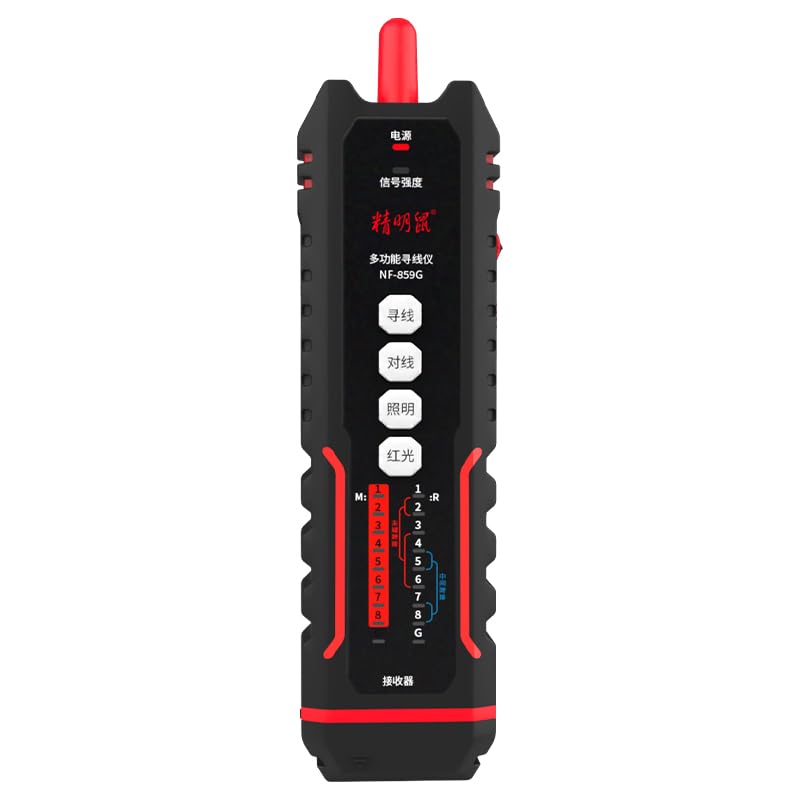
Image: The NOYAFA NF-859G Network Cable Tester, showing the main unit and the receiver.
Тохиргоо
Савлах, анхны үзлэг
Carefully unpack the NOYAFA NF-859G Network Cable Tester. Verify that all components are present and undamaged. The package should include:
- Туршилтын үндсэн нэгж
- Receiver (auxiliary machine)
- Хэрэглэгчийн гарын авлага (энэ баримт бичиг)
- Жич: Батерейг оруулаагүй тул тусад нь худалдаж авна.
Батерей суурилуулах
- Locate the battery compartment on the main tester unit and the receiver.
- Зайны тасалгааны тагийг нээ.
- Insert the required batteries, ensuring correct polarity (+/-). The device uses a 3.7V lithium polymer battery.
- Зайны тасалгааны тагийг сайтар хаа.
Ашиглалтын заавар
The NOYAFA NF-859G offers various testing modes. Familiarize yourself with the device's interface before operation.
Утас илрүүлэх функц
This function allows for tracing and locating cables. It supports both anti-interference mode and ordinary mode.
- Connect the cable to be traced to the main unit's appropriate port (RJ45/RJ11).
- Select the wire detection mode on the main unit.
- Use the receiver to trace the cable. The receiver will emit an audible signal when near the cable.
- Switch between anti-interference mode and ordinary mode as needed for optimal tracing in different environments.
Alignment Test (Cable Mapping)
Perform local and remote alignment tests to check for open circuits, short circuits, cross-overs, and split pairs in network cables.
- For local alignment test, connect both ends of the cable to the main unit.
- For remote alignment test, connect one end of the cable to the main unit and the other end to the receiver.
- Initiate the alignment test. The display will show the wiring status of the cable.
Crimping тест
Verify the proper crimping of RJ11 and RJ45 connectors.
- Insert the crimped RJ11 or RJ45 connector into the corresponding port on the main unit.
- Select the crimping test function. The device will indicate if the crimping is correct or if there are faults.
PoE (Power over Ethernet) Detection
Identify the power supply wire core and detect mid-span or end-span PoE configurations.
- Connect the network cable with PoE to the main unit.
- Activate the PoE detection function. The device will display information about the PoE type and power status.
Харааны алдаа илрүүлэгч (VFL)
The integrated 20mw red light function helps locate breaks and bends in fiber optic cables.
- Connect the fiber optic cable to the VFL port.
- Activate the VFL. A red laser light will be emitted.
- Observe the cable for light leakage, which indicates a fault.
- Caution: Avoid direct eye exposure to the laser light.
LED гар чийдэн
The built-in LED flashlight provides illumination in dark working environments.
- Press the dedicated flashlight button to turn it on or off.
Засвар үйлчилгээ
Proper maintenance ensures the longevity and accuracy of your NOYAFA NF-859G Network Cable Tester.
- Цэвэрлэгээ: Төхөөрөмжийг цэвэрлэхийн тулд зөөлөн, хуурай даавуу ашиглана уу. Зүлгүүрийн цэвэрлэгч, уусгагчийг бүү ашигла.
- Хадгалах: Төхөөрөмжийг нарны шууд тусгал, хэт температураас хол, сэрүүн, хуурай газар хадгална. Хэрэв удаан хугацаагаар хадгалах юм бол гоожихоос сэргийлж зайгаа салга.
- Зай солих: Replace batteries when the low battery indicator appears. Always use the specified battery type (3.7V lithium polymer).
- Харьцуулах: Төхөөрөмжийг унагах эсвэл хүчтэй цохилтод оруулахаас зайлсхий.
Алдааг олж засварлах
This section addresses common issues you might encounter with your NOYAFA NF-859G.
| Асуудал | Боломжит шалтгаан | Шийдэл |
|---|---|---|
| Төхөөрөмж асахгүй байна. | Батерей бага эсвэл үхсэн; зайны буруу суурилуулалт. | Check battery indicator. Replace batteries or ensure they are installed with correct polarity. |
| Кабелийн туршилтын үр дүн буруу байна. | Damaged test cable; incorrect test mode selected; dirty connectors. | Use a known good test cable. Ensure the correct test mode (e.g., alignment test) is selected. Clean connectors. |
| Wire tracing signal is weak or absent. | Cable is shielded; interference from other cables; low battery on receiver. | Switch to anti-interference mode. Ensure receiver batteries are charged. Try tracing in a less congested area. |
| VFL red light is dim or not working. | Low battery; VFL port obstruction; internal fault. | Check battery level. Ensure VFL port is clean and unobstructed. If problem persists, contact support. |
Үзүүлэлтүүд
Key technical specifications for the NOYAFA NF-859G Network Cable Tester:
- Загварын дугаар: NF-859G
- Брэнд: НОЯФА
- Ерөнхий нэр: Сүлжээний кабелийн шалгагч
- Холболтын технологи: Ethernet
- Эрчим хүчний эх үүсвэр: Battery Powered (3.7V lithium polymer battery)
- Оруулсан бүрэлдэхүүн хэсгүүд: Main Tester Unit, Receiver (auxiliary machine)
- VFL Output Power: 20mw (Red Light Function)
- Wire Detection Modes: Anti-interference mode, Ordinary mode
- Дэмжигдсэн холбогч: RJ45, RJ11
- Дэмжигдсэн кабелийн төрлүүд: CAT5, CAT6, CAT5E, CAT6A
- Барааны жин: 420 гр
- Багцын хэмжээ: 28.8 x 16.6 x 5.3 см
- Өнгө: Хар
- Үйлдвэрлэгч: НОЯФА
Баталгаат болон дэмжлэг
For warranty information or technical support, please refer to the official NOYAFA webсайт эсвэл орон нутгийн дистрибьютертэй холбогдоно уу. Худалдан авалтын баримтаа баталгаат нэхэмжлэлд зориулж худалдан авалтын баталгаа болгон хадгална уу.
Үйлдвэрлэгч: НОЯФА
Эхний боломжтой огноо: 22 оны 2024-р сарын XNUMX
Нэмэлт тусламж авахыг хүсвэл зочилно уу NOYAFA Brand Store on Amazon.


