Танилцуулга
This user manual provides essential information for setting up, operating, maintaining, and troubleshooting your VIBOX I-45 Gaming PC. Please read this manual thoroughly before using your new computer to ensure optimal performance and longevity.
1. Тохиргоо
1.1 Хайрцагнаас задлах ба багцын агуулга
Carefully remove all components from the packaging. Ensure all items listed below are present. Retain the packaging for future transport or service needs.
- VIBOX I-45 Gaming PC (VTX-4 Black Tower)
- Цахилгаан кабель
- Wi-Fi Network Adapter (300 Mbps)
- Баримт бичиг (энэ гарын авлага)
1.2 Захын төхөөрөмжүүдийг холбох
Компьютерээ асаахаасаа өмнө шаардлагатай бүх захын төхөөрөмжийг холбоно уу.
- Монитор: Connect your monitor to the graphics output port (HDMI or DisplayPort) on the rear of the PC. Ensure the monitor is also connected to a power source.
- Гар ба хулгана: Гар, хулганаа боломжтой USB портууд руу холбоно уу.
- Сүлжээ: For wired internet, connect an Ethernet cable to the LAN port. For wireless internet, ensure the included Wi-Fi adapter is installed or connected.
- Аудио: Connect speakers or a headset to the audio output jacks.
- Эрчим хүч: Connect the power cable to the PC's power input and then to a wall outlet.

Figure 1.2.1: Rear I/O Ports for connecting peripherals.
1.3 Анхны ачаалах болон Windows 11-ийн тохиргоо
After connecting all peripherals, press the power button on the front of the PC. The system will boot into Windows 11 Home. Follow the on-screen instructions to complete the initial setup, including language selection, network connection, and user account creation.

Figure 1.3.1: Windows 11 Home Operating System.
2. Ашиглалтын заавар
2.1 Асаах/унтраах ба дахин эхлүүлэх
- Асаах: Урд самбар дээр байрлах цахилгаан товчийг дарна уу.
- Унтраах: Windows дээр Start товчийг дараад Power > Shut down-ыг сонгоно уу.
- Дахин эхлүүлэх: Windows дээрх Start товчийг дараад Power > Restart-ыг сонгоно уу.
2.2 Windows 11 Home Features
Your VIBOX I-45 comes pre-installed with Windows 11 Home, offering several features designed to enhance your computing experience:
- Шууд хадгалах сан: Enables faster game loading times.
- AutoHDR: Automatically enhances visuals for improved graphics.
- Xbox Game Pass Integration: Seamless access to a library of games.
- Optimized CPU Performance: Enhanced performance for various tasks.
2.3 RGB гэрэлтүүлгийн удирдлага
The VTX-4 case features Hex RGB Infinity 120mm fans. You can customize the lighting effects and colors using the dedicated RGB change button on the top panel or through compatible software if available.

Figure 2.3.1: Customizable RGB Fans.
3. Засвар үйлчилгээ
3.1 Компьютерээ цэвэрлэх
Regular cleaning helps maintain performance and extends the lifespan of your computer.
- Гадна: Зөөлөн ашиглах, damp Гаднах гадаргууг арчих даавуу. Хүчтэй химийн бодисоос зайлсхий.
- Тоос арилгах: Periodically use compressed air to clear dust from fan vents and internal components. Ensure the PC is powered off and unplugged before cleaning.
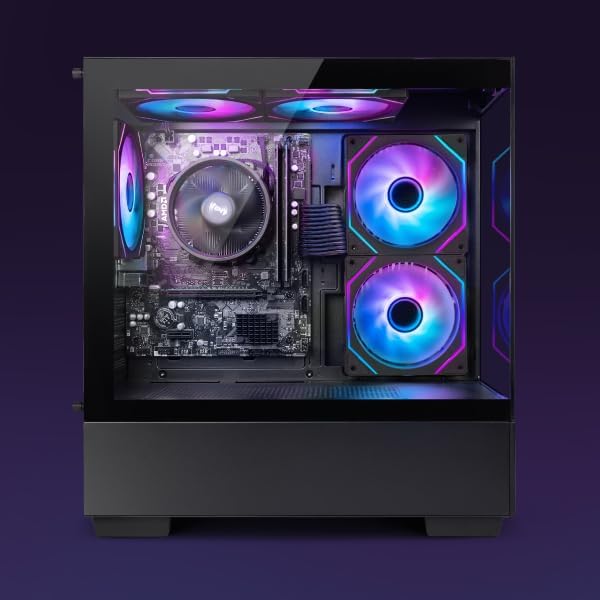
Figure 3.1.1: Internal components of the VIBOX I-45 PC.
3.2 Програм хангамжийн шинэчлэлтүүд
Keep your operating system and drivers updated to ensure security, stability, and optimal performance.
- Windows шинэчлэлтүүд: Windows 11 automatically checks for updates. You can manually check by going to Settings > Windows Update.
- Драйверын шинэчлэлтүүд: Regularly check the VIBOX support website or component manufacturers' websites (AMD for CPU/GPU) for the latest drivers.
3.3 Системийн нөөцлөлт
Өгөгдөл алдагдахаас сэргийлж чухал өгөгдлөө гадаад диск эсвэл үүлэн хадгалалт руу тогтмол нөөцөлж байгаарай.
4. Алдаа засах
This section addresses common issues you might encounter. For more complex problems, please contact VIBOX support.
4.1 Эрчим хүчгүй
- Цахилгааны кабелийг компьютер болон ханын залгуурт найдвартай холбосон эсэхийг шалгаарай.
- Өөр төхөөрөмжийг залгаж, залгуур ажиллаж байгаа эсэхийг шалгана уу.
- Check the power supply switch on the rear of the PC (if present) is in the 'On' position.
4.2 Дэлгэц дээр дэлгэц байхгүй
- Confirm the monitor is powered on and correctly connected to the PC's graphics output port.
- Дэлгэц дээрээ зөв оролтын эх үүсвэр сонгогдсон эсэхийг шалгаарай.
- Try a different display cable if available.
4.3 Удаан гүйцэтгэл
- Ар талд ажиллаж байгаа шаардлагагүй програмуудыг хаа.
- Хүлээгдэж буй Windows эсвэл драйверын шинэчлэлтүүдийг шалгаж, суулгана уу.
- Диск цэвэрлэх болон дефрагментацийг ажиллуул (хатуу дискний хувьд, SSD-д ихэвчлэн шаардлагагүй).
- Хортой програм хангамж эсвэл вирус байгаа эсэхийг сканнердах.
4.4 Сүлжээний холболтын асуудлууд
- Wi-Fi: Ensure the Wi-Fi adapter is properly installed and drivers are up to date. Check your router and internet connection.
- Ethernet: Verify the Ethernet cable is securely connected to both the PC and the router/modem. Check router status.
- Restart your router/modem and PC.
5. Техникийн үзүүлэлтүүд
| Онцлог | Тодорхойлолт |
|---|---|
| Брэнд | VIBOX |
| Загварын дугаар | I-45 |
| Өнгө | VTX-4 Black |
| Үйлдлийн систем | Windows 11 Нүүр хуудас |
| Процессор | AMD Ryzen 3 3200G (4 Cores, 3.6 GHz Base, up to 4.0 GHz Max) |
| График | Integrated Radeon Vega 8 Graphics (2GB Shared Memory) |
| RAM | 16 GB DDR4 (3200 MHz Dual Channel) |
| Хадгалах | 480 GB SSD |
| Max Memory Support | 128 ГБ |
| Wi-Fi | 802.11n (300 Mbps adapter included) |
| HDMI портууд | 1 |
| USB 2.0 портууд | 3 |
| USB 3.0 портууд | 3 |
| Хэмжээ (L x W x H) | 36 x 20 x 41 см |
| Тохиромжтой төхөөрөмжүүд | Headset, Keyboard, Printer, Monitor, Mouse |
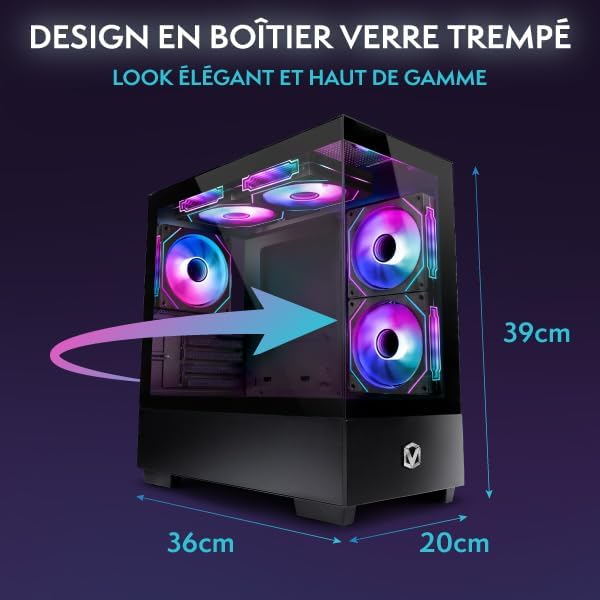
Figure 5.1.1: VIBOX I-45 PC Dimensions.
6. Баталгаат хугацааны мэдээлэл
Your VIBOX I-45 Gaming PC comes with a manufacturer's warranty covering:
- Хэсэг: 2 жил
- Хөдөлмөр: Насан туршдаа
Please retain your proof of purchase for warranty claims. For detailed terms and conditions, refer to the warranty card included with your product or visit the official VIBOX webсайт.
7. Дэмжлэг
For technical assistance, troubleshooting beyond this manual, or warranty inquiries, please contact VIBOX customer support. You can find contact information on the official VIBOX Gaming webсайт эсвэл жижиглэн худалдаалагчаар дамжуулан.
Онлайн нөөцүүд:
- -д зочилно уу VIBOX Gaming Store on Amazon бүтээгдэхүүний мэдээлэл, шинэчлэлтийг авах.


