1. Танилцуулга
The VTech VG131-11 DECT 6.0 Cordless Phone offers reliable and clear communication with advanced features. Enjoy hands-free conversations with Bluetooth connectivity, superior range with DECT 6.0 technology, and enhanced visibility with its backlit display and large buttons. This manual provides comprehensive instructions for setting up, operating, and maintaining your new cordless phone.

Image: The VTech VG131-11 DECT 6.0 Cordless Phone handset resting in its black base unit. The handset features a blue-white display and large, green-backlit buttons.
2. Хайрцагт юу байна
Таны багцад бүх зүйл байгаа эсэхийг шалгаарай:
- Үндсэн нэгж
- Утасгүй гар утас
- Хувьсах гүйдлийн адаптер
- Зайны багц
- Утасны шугамын утас
3. Тохиргоо
3.1. Анхны суурилуулалт
- Connect the AC adapter to the base unit and plug it into a power outlet.
- Connect the telephone line cord to the base unit and plug the other end into a telephone wall jack.
3.2. Зай суурилуулах
- Гар утасны арын хэсэгт байрлах зайны тасалгааны тагийг нээнэ үү.
- Connect the battery pack plug securely into the jack inside the compartment.
- Place the battery pack with the label UP and tuck the wires neatly inside the compartment.
- Зайны тасалгааны тагийг хаа.
3.3. Гар утсыг цэнэглэж байна
Place the handset face forward in the base unit. The CHARGE light on the base unit will illuminate, indicating proper charging. Allow the handset to charge for at least 16 hours before initial use for optimal battery performance.
4. Ашиглалтын заавар
4.1. Дуудлага хийх, хүлээн авах
- Дуудлага хийхийн тулд: товчийг дарна уу ЯРИА, дараа нь утасны дугаараа залгаарай.
- Дуудлага хүлээн авахын тулд: товчийг дарна уу ЯРИА эсвэл дурын залгах товчлуур (0-9, #, *).
- Дуудлага дуусгахын тулд: дарна уу OFF.
4.2. Чанга яригч ашиглах
The phone features a full-duplex speakerphone, allowing both parties to speak and be heard simultaneously for more natural conversations.
- Дуудлагын үеэр ИЛТГЭГЧ чанга яригчийг идэвхжүүлэх товчийг дарна уу.
- дээр дарна уу ИЛТГЭГЧ button again to switch back to handset mode.
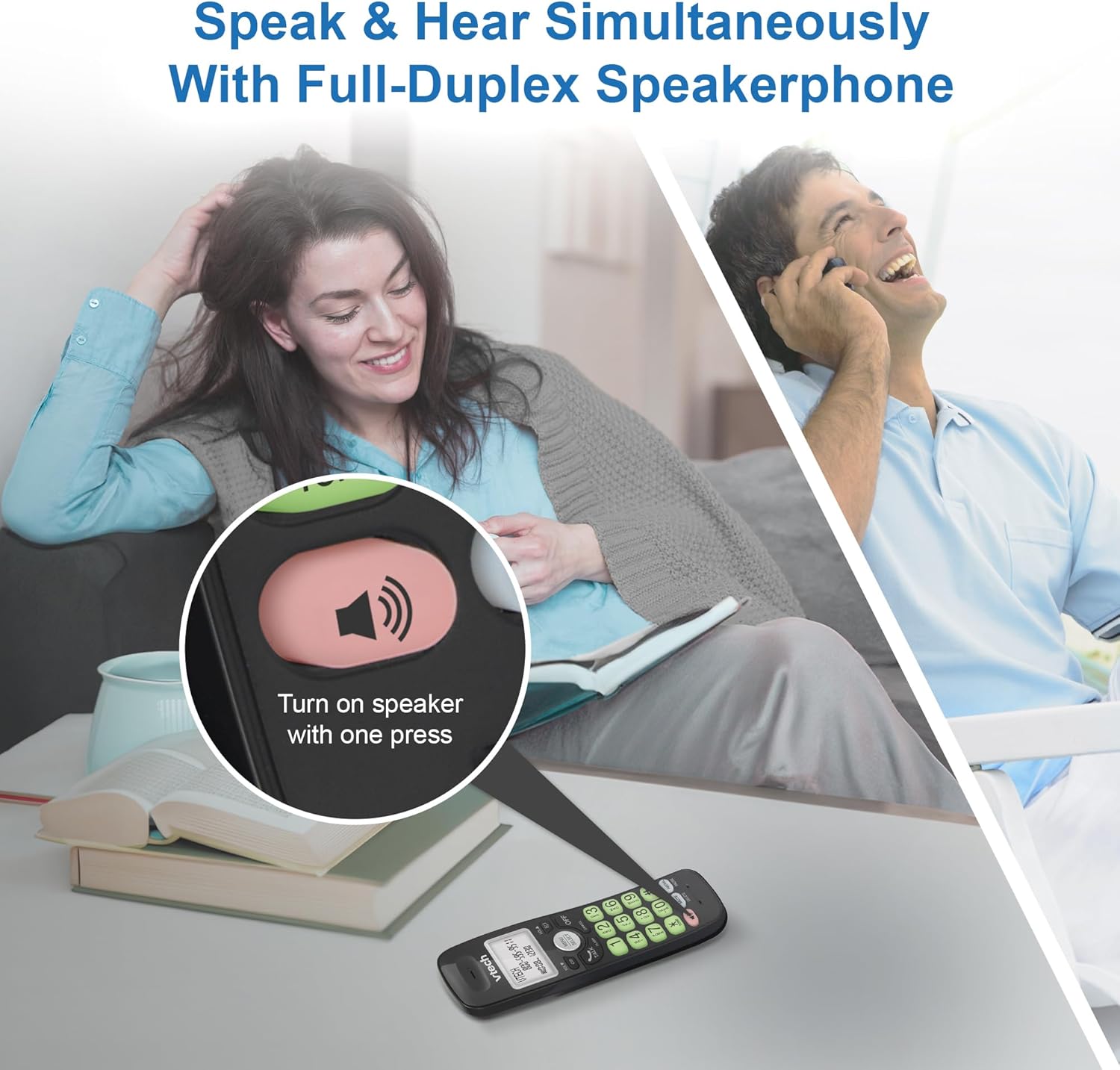
Image: A close-up of the VTech cordless phone handset showing the speakerphone button highlighted, with a person talking on the phone in the background, demonstrating the full-duplex speakerphone feature.
4.3. Дууны түвшинг хянах болон хаах
- To adjust earpiece or speakerphone volume during a call, press VOL ▼ or VOL ▲.
- To mute the microphone during a call, press ЗУРАГ. The other party cannot hear you, but you can still hear them. Press ЗУРАГ дууг нээхийн тулд дахин.

Зураг: Нарийвчилсан view of the VTech cordless phone handset, highlighting the 'MUTE' button, indicating its function for silencing the microphone during a call.
4.4. Caller ID and Phonebook
The handset displays the name, number, time, and date of incoming calls. The phone also includes a 30-name and number phonebook directory.
- Дахин хэлэхэдview Caller ID history, press CID.
- To access the phonebook, press ЦЭС/СОНГОХ, дараа нь Утасны дэвтрийн сонголт руу очно уу.

Image: A person smiling while holding the VTech cordless phone, with an overlay showing a digital phonebook display with contact names and icons, illustrating the Caller ID and phonebook features.
5. Онцлогууд
5.1. Bluetooth холболт
By pairing a Bluetooth headset, earbuds, or conference speakerphone to the system, you can enjoy a wireless calling experience. This feature is perfect for multitasking around your home or office.

Image: A woman in a kitchen pouring a drink while wearing wireless earbuds, with the VTech cordless phone and its base unit visible on the counter, demonstrating hands-free calling via Bluetooth connection.
Bluetooth төхөөрөмжийг холбох:
- Ensure your Bluetooth headset/earbuds are in pairing mode (refer to your device's manual).
- On the VTech phone, navigate to the Bluetooth menu (usually via ЦЭС/СОНГОХ).
- Select 'Pair Device' or similar option.
- The phone will search for available Bluetooth devices. Select your device from the list.
- Хослуулах үйл явцыг дуусгахын тулд дэлгэцэн дээрх дурын зааврыг дагана уу.
5.2. DECT 6.0 Technology
Trusted by families worldwide for decades, VTech's cordless telephone transmits secure signals via the DECT 6.0 channel. This ensures crystal clear sounds, interference-free communication, and a stable operation range of up to 1000 ft outdoors, allowing you to move freely while on a call.

Image: A woman working on a laptop at a table, with the VTech cordless phone and its base unit nearby, and a graphic indicating DECT 6.0 digital technology, highlighting its superior range and clarity.
5.3. Backlit Display and Big Buttons
The phone features a blue-white backlit display and green backlit keypad for easier viewing and dialing in dim light conditions. The large buttons enhance usability, especially for those with visual impairments.

Зураг: Ойрын зураг view of the VTech cordless phone handset, emphasizing its backlit LCD screen and large, clearly visible buttons, designed for better visibility and ease of use.
5.4. Easy Wall Mount
The base unit is designed for easy wall mounting, fitting all standard wall mount plates without the need for additional brackets. Simply slide the base unit into the mounting plate using the built-in mounting holes for convenient placement.

Image: The VTech cordless phone base unit shown mounted on a wall, highlighting its built-in mounting holes on the back of the base for easy installation.
5.5. Hearing Aid Compatible
This phone is designed to be compatible with hearing aids, providing a clearer audio experience for users with hearing devices.

Image: A woman with a hearing aid talking on the VTech cordless phone, illustrating the phone's hearing aid compatibility feature.
5.6. Бүтээгдэхүүн дууссанview Видео
Видео: Товчхон бүтээгдэхүүн дууслааview of the VTech VG131-11 DECT 6.0 Cordless Phone, showcasing its key features and ease of use.
6. Засвар үйлчилгээ
To ensure the longevity and optimal performance of your VTech cordless phone, follow these maintenance guidelines:
- Цэвэрлэгээ: Утас болон үндсэн хэсгийг зөөлөн арчиж, damp даавуу. Цэвэрлэгээний шүршигч эсвэл хүчтэй химийн бодис бүү хэрэглэ.
- Батерейны арчилгаа: Avoid exposing the battery to extreme temperatures. If the phone will not be used for an extended period, remove the battery from the handset.
- Байршил: Утсаа дулааны эх үүсвэр, нарны шууд тусгал, чийгнээс хол байлга.
7. Алдаа засах
If you experience any issues with your VTech cordless phone, please refer to the following common problems and solutions:
| Асуудал | Шийдэл |
|---|---|
| Залгах аялгуу алга. | Ensure the telephone line cord is securely plugged into both the base unit and the wall jack. Check if the AC adapter is properly connected to the base unit and a working power outlet. |
| Гар утас цэнэглэхгүй байна. | Make sure the handset is correctly placed in the base unit. Clean the charging contacts on both the handset and the base unit with a dry cloth. Verify the AC adapter is plugged in. |
| Дууны чанар муу эсвэл статик. | Move closer to the base unit. Other electronic devices (Wi-Fi routers, microwaves) may cause interference; try relocating the base unit. Ensure the handset battery is fully charged. |
| Cannot connect to Bluetooth headset. | Ensure both the phone and the Bluetooth headset are in pairing mode. Make sure the headset is within range of the phone's base unit. Try restarting both devices and attempting the pairing process again. Confirm the headset is compatible with the phone's Bluetooth version. |
| Дэлгэц хоосон эсвэл унших боломжгүй байна. | Ensure the handset battery is charged. If the display is dim, check if the backlight setting is enabled or adjust the contrast if available. |
8. Техникийн үзүүлэлтүүд
| Онцлог | Дэлгэрэнгүй |
|---|---|
| Загварын дугаар | VG131-11 |
| Бүтээгдэхүүний хэмжээс | 3.8 x 4.09 x 7.17 инч |
| Зүйлийн жин | 14.9 унц (0.42 килограмм) |
| Батерей | 1 Бүтээгдэхүүний тусгай зай (дагсан) |
| Утасны төрөл | Утасгүй |
| Материал | Хуванцар |
| Эрчим хүчний эх үүсвэр | Утастай цахилгаан |
| DECT технологи | DECT 6.0 |
| Bluetooth | Тиймээ |
| Caller ID / Call Waiting | Тиймээ |
| Бүрэн дуплекс чанга яригч | Тиймээ |
| Backlit Display & Keypad | Yes (Blue-white display, green keypad) |
| Хананд холбох боломжтой | Тиймээ |
| Утасны дэвтрийн багтаамж | 30 нэр, тоо |
| Хүрээ | Up to 1000 ft outdoor |
9. Баталгаат хугацаа ба дэмжлэг
For warranty information, technical support, or to purchase accessories, please visit the official VTech webсайт эсвэл харилцагчийн үйлчилгээний хэлтэстэй холбогдоно уу. Худалдан авалтын баримтаа баталгаат нэхэмжлэлд зориулж худалдан авалтын баталгаа болгон хадгална уу.
VTech Customer Service: www.vtechphones.com/support


