1. Танилцуулга
The Pronomic DX-50 USB MKII is a professional 4-channel DJ mixer designed for a wide range of applications, including discos, parties, restaurants, and presentations. Its user-friendly design ensures that both experienced and less experienced users can fully utilize its features. This manual provides detailed instructions for setting up, operating, and maintaining your mixer.
Key features include a recording function, integrated Bluetooth interface, USB player with transport controls, and multiple input channels.
2. Аюулгүй ажиллагааны чухал заавар
- Зааврыг уншина уу: Read all safety and operating instructions before using the product.
- Зааврыг хадгалах: Аюулгүй байдал, ашиглалтын зааврыг ирээдүйд лавлах зорилгоор хадгална уу.
- Анхааруулгад анхаарлаа хандуулаарай: Бүтээгдэхүүн болон ашиглалтын зааварт заасан бүх анхааруулгыг дагаж мөрдөөрэй.
- Зааврыг дагана уу: Ашиглалтын болон ашиглалтын бүх зааврыг дагаж мөрдөөрэй.
- Ус ба чийг: Do not use this apparatus near water (e.g., bathtub, washbowl, kitchen sink, laundry tub, wet basement, or swimming pool).
- Агааржуулалт: Агааржуулалтын нүхийг хааж болохгүй. Үйлдвэрлэгчийн зааврын дагуу суурилуулна.
- Дулаан: Радиатор, халаалтын төхөөрөмж, зуух болон бусад төхөөрөмж (үүнд ampөргөгч) дулаан үүсгэдэг.
- Эрчим хүчний эх үүсвэрүүд: Use only power sources specified by the manufacturer.
- Цахилгааны утас хамгаалах: Цахилгааны утсыг гишгэх, хавчихаас хамгаалаарай, ялангуяа залгуур, залгуур, төхөөрөмжөөс гарах цэг дээр.
- Цэвэрлэгээ: Зөвхөн хуурай даавуугаар цэвэрлэ.
- Үйлчилгээ: Бүрхүүлийг нээх эсвэл авах нь танд аюултай боть үүсэх магадлалтай тул энэ бүтээгдэхүүнийг өөрөө засварлах гэж бүү оролдооройtage эсвэл бусад аюул. Бүх үйлчилгээг мэргэшсэн үйлчилгээний ажилтнуудад шилжүүлээрэй.
3. Багцын агуулга
Please check that all items listed below are included in your package. If any items are missing or damaged, contact your dealer immediately.
- Pronomic DX-50 USB MKII DJ Mixer
- Цахилгаан адаптер (AC 12V)
- USB Stick (32 GB, if included in your specific bundle)
- Хэрэглэгчийн гарын авлага (энэ баримт бичиг)
4. Бүтээгдэхүүн дууссанview
Familiarize yourself with the various controls and connections on your DX-50 USB MKII mixer.
4.1 Урд самбарын удирдлага
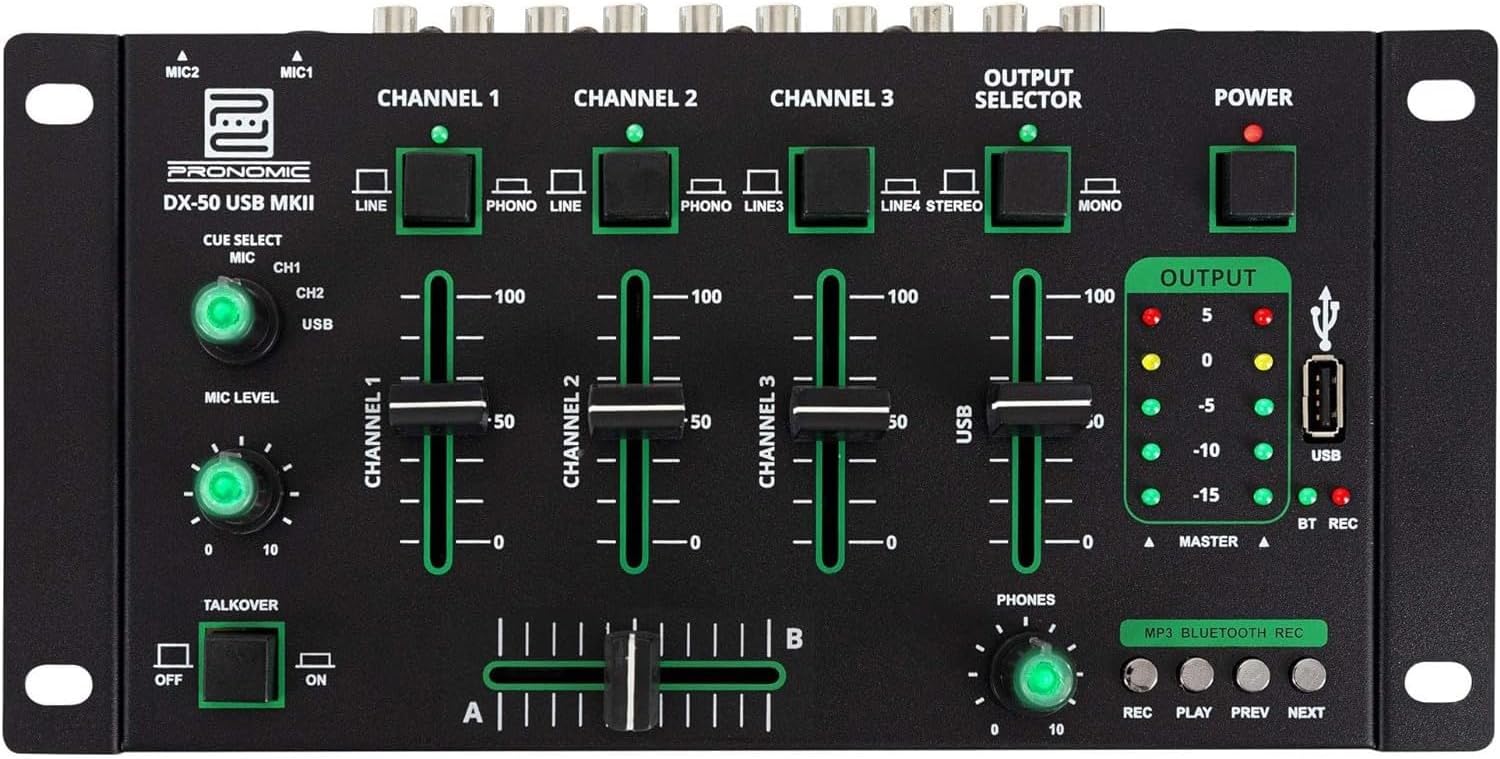
- MIC 1/2 оролт: Микрофонуудыг холбоно уу.
- Channel 1-4 Input Selectors: Switch between LINE, PHONO, or USB/Bluetooth inputs for each channel.
- Сувгийн сурталчилгаачид: Adjust the volume level for each channel.
- CUE Select Buttons: Route specific channels to the headphone output for monitoring.
- MIC Level Knob: Adjust the volume of the microphone inputs.
- Talkover Switch: Activates the talkover function, which automatically lowers music volume when speaking into the microphone.
- Output Selector: Choose between Stereo or Mono master output.
- Эрчим хүч солих: Turns the mixer on/off.
- Гаралтын түвшний тоолуур: LED indicators showing the master output level.
- USB порт: Connect a USB drive for MP3 playback and recording.
- MP3/Bluetooth/REC Player Controls: Buttons for Play/Pause, Previous, Next, and Record functions for the integrated player.
- Phones Level Knob: Чихэвчний гаралтын дууны хэмжээг тохируулна.
- Crossfader (A/B): Blends between channels assigned to A and B.
4.2 Арын самбарын холболтууд

- AC 12V Power Input: Өгөгдсөн тэжээлийн адаптерийг энд холбоно уу.
- УТАСНЫ ГАРАЛТ: Чихэвч холбох 6.3 мм залгуур.
- MASTER OUT L/R (RCA): Connect to your main ampөргөгч эсвэл цахилгаан чанга яригч.
- Channel 1 & 2 Inputs (RCA Line/Phono): Connect turntables (Phono) or other line-level devices (CD players, media players). Use the front panel selector to switch.
- Channel 3 & 4 Inputs (RCA Line): Connect line-level devices.
- MIC 1 & 2 Inputs (6.3mm Jack): Микрофонуудыг холбоно уу.
5. Тохиргоо
Follow these steps to set up your Pronomic DX-50 USB MKII mixer:
- Эрчим хүчний холболт: Ensure the mixer's power switch is in the OFF position. Connect the supplied AC 12V power adapter to the "AC 12V" input on the rear panel of the mixer. Plug the adapter into a suitable power outlet.
- Master Output Connection: Connect the "MASTER OUT L/R" RCA outputs on the rear panel to the inputs of your ampөргөгч эсвэл цахилгаан чанга яригч.
- Оролтын төхөөрөмжийн холболт:
- Эргэдэг ширээ: Connect turntables to the "CHANNEL 1" or "CHANNEL 2" RCA inputs. Set the corresponding input selector on the front panel to "PHONO".
- CD тоглуулагч/шугамын төхөөрөмж: Connect CD players, media players, or other line-level devices to "CHANNEL 1", "CHANNEL 2", "CHANNEL 3", or "CHANNEL 4" RCA inputs. Set the corresponding input selector on the front panel to "LINE".
- Микрофонууд: Connect microphones to the "MIC 1" or "MIC 2" 6.3mm jack inputs on the rear panel.
- Чихэвчний холболт: Connect your headphones to the "PHONES" 6.3mm jack on the rear panel.
- USB Drive (Optional): If using a USB drive for playback or recording, insert it into the "USB" port on the front panel.
- Асаах: Once all connections are made, switch the mixer's power switch to the ON position. The power indicator LED will illuminate.
6. Ашиглалтын заавар
6.1 Basic Mixing
- Оролтоо сонгоно уу: For each channel, use the input selector switch (LINE/PHONO/USB/BT) to choose the desired audio source.
- Adjust Channel Volume: Use the vertical faders for each channel to adjust its individual volume level.
- Мастер гаралт: Monitor the "OUTPUT" LED meters and adjust the master volume knob (if present, otherwise rely on channel faders and amplifier volume) to achieve a suitable overall output level without clipping.
- Кроссфэйдер: Use the crossfader to smoothly transition between channels assigned to A and B. Channels 1 and 2 are typically assigned to the crossfader.
6.2 Микрофоны хэрэглээ
- Connect your microphone to one of the MIC inputs on the rear panel.
- Adjust the "MIC LEVEL" knob on the front panel to control the microphone's volume.
- Talkover Function: Activate the "TALKOVER" switch to automatically reduce the volume of the music when you speak into the microphone. This is useful for announcements.
6.3 USB Playback and Recording
- USB тоглуулах: MP3 агуулсан USB дискийг оруулна уу files into the "USB" port. Select "USB" as the input source for the dedicated USB channel. Use the "PLAY/PAUSE", "PREV", and "NEXT" buttons to control playback.
- USB бичлэг: Press the "REC" button to start recording the master output to the connected USB drive. Press "REC" again to stop recording. Ensure your USB drive has sufficient free space and is formatted correctly (FAT32 is commonly supported).
6.4 Bluetooth холболт
- Bluetooth-г идэвхжүүлэх: Select "BT" as the input source for the dedicated Bluetooth channel. The mixer will enter pairing mode.
- Төхөөрөмжийг холбох: On your Bluetooth-enabled device (smartphone, tablet, etc.), search for available Bluetooth devices. Select "Pronomic DX-50 USB MKII" (or similar name) from the list to pair.
- Аудио тоглуулах: Once paired, you can play audio from your device through the mixer. Control playback from your device or using the mixer's transport controls (if supported by your device).
6.5 Monitoring with Headphones
- Connect headphones to the "PHONES" output.
- Use the "CUE SELECT" buttons to choose which channels you want to monitor in your headphones without affecting the main output.
- Adjust the "PHONES" level knob to set your desired headphone volume.
7. Засвар үйлчилгээ
- Цэвэрлэгээ: Disconnect the power before cleaning. Use a soft, dry cloth to wipe the surface of the mixer. Do not use liquid cleaners, aerosols, or solvents.
- Хадгалах: Холигчийг нарны шууд тусгал, хэт температураас хол, сэрүүн, хуурай газар хадгална.
- Fader and Knob Care: Avoid excessive force when operating faders and knobs. Periodically check for dust or debris accumulation around moving parts.
- Кабелийн менежмент: Ensure cables are not kinked or strained, which can lead to damage.
8. Алдаа засах
| Асуудал | Боломжит шалтгаан | Шийдэл |
|---|---|---|
| Хүч чадалгүй | Power adapter not connected; Power switch off; Faulty power outlet. | Check power adapter connection; Ensure power switch is ON; Try a different power outlet. |
| Үндсэн гаралтаас дуу алга | Master volume too low; Amplifier/speakers off or disconnected; Incorrect input selection; Channel faders down. | Increase master volume; Check amplifier/speaker connections and power; Verify correct input selected for channels; Raise channel faders. |
| Чихэвчнээс ямар ч дуу гарахгүй | Headphone volume too low; Headphones not connected; No CUE selected. | Increase PHONES level; Connect headphones properly; Press CUE button for desired channel. |
| Bluetooth-г холбохгүй байна | Mixer not in pairing mode; Device too far; Interference. | Ensure BT input is selected; Bring device closer; Restart mixer and device. |
| USB тоглуулах ажиллахгүй байна | USB драйвыг зөв оруулаагүй байна; Буруу байна file format; USB drive not formatted correctly. | Re-insert USB drive; Ensure files are MP3; Format USB drive to FAT32. |
9. Техникийн үзүүлэлтүүд
| Загвар | Pronomic DX-50 USB MKII |
| Сувгийн тоо | 4 |
| Холболтын технологи | Bluetooth, USB |
| Аудио оролт | RCA (line/phono), 6.3mm microphone, Bluetooth, USB |
| Гаралтын холболтын төрөл | RCA (Master Out), 6.3mm (Phones) |
| Эрчим хүчний эх үүсвэр | Electric Cable (AC 12V adapter) |
| Dimensions (without corner brackets and controls) | 222 x 129 x 28 мм (Өргөн x Гүн x Өндөр) |
| Total Dimensions (with corner brackets and controls) | 267 x 136 x 51 мм (Өргөн x Гүн x Өндөр) |
| Жин | 790 гр |
10. Баталгаат хугацаа ба дэмжлэг
Баталгаат мэдээлэл болон техникийн дэмжлэг авахыг хүсвэл худалдан авалтад өгөгдсөн бичиг баримтаас лавлана уу эсвэл худалдагчтайгаа холбоо барина уу. Аливаа баталгаат нэхэмжлэлийн хувьд худалдан авалтаа нотлох баримтаа хадгалаарай.
For further assistance, you may also visit the official Pronomic webсайт эсвэл харилцагчийн үйлчилгээний хэлтэстэй холбогдоно уу.


