COLBOR W60

COLBOR Wonder W60 LED Video Light User Manual

Загвар: W60 | Брэнд: КОЛБОР

Compact and powerful LED video light with wide color temperature range and APP control.

1. Танилцуулга

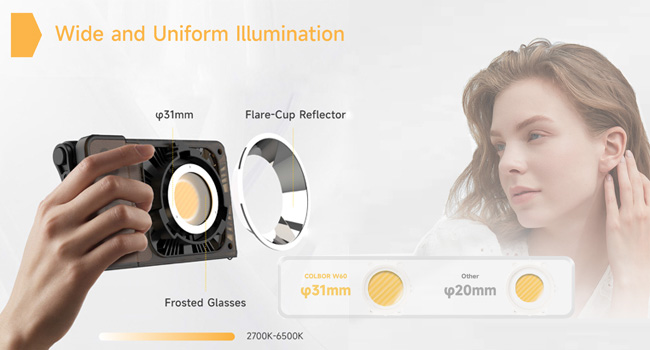
The COLBOR Wonder W60 is a compact and powerful LED video light designed for various photography and videography needs, including YouTube content creation and live streaming. It offers a wide color temperature range from 2700K to 6500K and boasts a high CRI of 97+ for accurate color rendition. Its lightweight and slim design make it highly portable, while multiple power options and APP control enhance its versatility and ease of use.

2. Хайрцагт юу байна

COLBOR Wonder W60 LED Video Light and included accessories

Image: The COLBOR Wonder W60 LED Video Light shown with its complete set of accessories.

  • COLBOR Wonder W60 Video Light x1
  • Кабель x1
  • Цахилгаан адаптер x1
  • COB Хавтас x1
  • Dome x1
  • Гэрэл тусгагч x1

3. Бүтээгдэхүүн дууссанview болон Тохиргоо

Familiarize yourself with the components and initial setup of your COLBOR Wonder W60 LED Video Light.

3.1 Бүтээгдэхүүний бүрэлдэхүүн хэсгүүд

Хажуу тал view of COLBOR Wonder W60 showing controls and ports

Зураг: хажуу тал view of the COLBOR Wonder W60, highlighting the control buttons and ports.

  • Цахилгаан товч: Used for turning the device on and off.
  • Wireless Control Setting Button: For switching between 2.4GHz remote and APP control modes, and initiating pairing.
  • Brightness Control Wheel: Adjusts the light's brightness.
  • Color Temperature Control Knob: Adjusts the color temperature.
  • NFC илрүүлэх бүс: Тохиромжтой төхөөрөмжүүдтэй хурдан хослуулахад зориулагдсан.
  • COLBOR Mount Lock & Mount: Securely attach accessories.
  • DC порт: Цахилгаан адаптерийг холбоход зориулагдсан.
  • Төрөл-C порт: For PD Type-C fast charging.
  • 1/4" Hole Screw: For mounting the light onto stands or grips.

3.2 Хөнгөн суурилуулалт

Follow these steps to prepare your light for use:

  1. Removal of COB protection cover: Hold the COB cover with the COLBOR Mount tenon and rotate it to remove it.
    Removing the COB protection cover from the COLBOR W60

    Image: Demonstrating the removal of the protective COB cover by rotating it from the mount.

  2. Гэрэл тусгагч суурилуулах, зайлуулах: Гэрэл ойлгогчийг l-ийн эргэн тойронд байгаа ховилтой зэрэгцүүлнэamp head and clip it in, then rotate it to fix it. Follow the instructions for "Removal of COB protection cover" to remove the reflector.
    Attaching a reflector to the COLBOR W60

    Image: A reflector being attached to the front of the COLBOR W60 light.

  3. Installation of stand: Align the 1/4" screw hole on the light's bottom or side with the 1/4" screw on the stand, and rotate it to fix it.
    COLBOR W60 mounted on a stand and with a power grip

    Image: The COLBOR W60 shown mounted on a light stand and also attached to a power grip, demonstrating versatile mounting options.

3.3 Төхөөрөмжийг тэжээх

The COLBOR Wonder W60 offers flexible powering options:

  • Power with power adapter: Тэжээлийн адаптерийг холбож, l-ийн DC тэжээлийн залгуурыг холбоноamp body, and then power on through the cable after stable connection.

    *Do not suspend the power adapter in the air. Use wire rings to hang it on the lamp зогсох.

    Connecting COLBOR W60 to power adapter

    Image: The COLBOR W60 being powered via its included power adapter.

  • Power with COLBOR Power Grip: Align the 1/4" screw hole on the light's bottom or side with the 1/4" screw on the stand. Rotate it to fix it. Connect the light to the Power Grip via the D-Tap to DC cable for powering.

    *Please do not use the Type-C to Type-C cable to power the light.

    Connecting COLBOR W60 to COLBOR Power Grip

    Image: The COLBOR W60 connected to a COLBOR Power Grip for portable power.

4. Ашиглалтын заавар

Learn how to operate your COLBOR Wonder W60 LED Video Light.

Video: Official instruction video for the COLBOR Wonder W60/W100 LED Video Light, covering setup, powering, and operation.

4.1 Асаах/унтраах

  • Асаах: Эрчим хүчний эх үүсвэрт холбогдоод асаах товчийг удаан дар.
  • Унтраах: Long-press the power button to turn it off.

4.2 Өнгөний температурын тохируулга

  • Rotate the color temperature control knob for continuous color temperature adjustment.
  • Short press the knob to select the preset color temperature: (2700K, 3200K, 4300K, 5600K, 6500K).

4.3 Гэрэлт байдлын тохируулга

  • Roll the brightness adjustment wheel for continuous brightness adjustment.
  • Short press the wheel side to select preset brightness: (0%, 25%, 50%, 75%, 100%).

4.4 Wireless Connection (APP Control)

The COLBOR Wonder W60 supports APP control for seamless and efficient lighting adjustments.

  • 2.4GHz (CTRL1 алсын удирдлага) болон APP (COLBOR Studio APP) удирдлагын горимуудын хооронд шилжихийн тулд алсын удирдлагын товчлуурыг богино хугацаанд дарна уу.
  • Long-press the button to start pairing with the APP.
  • Сэнсний тохиргоо болон EFF тохиргоог хийхийн тулд APP-д холбогдоно уу.
COLBOR W60 controlled via smartphone app

Image: The COLBOR W60 being controlled remotely via the COLBOR Studio APP on a smartphone.

5. Засвар үйлчилгээ

To ensure the longevity and optimal performance of your COLBOR Wonder W60 LED Video Light, follow these maintenance guidelines:

Diagram of COLBOR W60's smart cooling system

Зураг: Дотоод view highlighting the intelligent air duct and heat pipe cooling system of the COLBOR W60.

6. Алдаа засах

If you encounter issues with your COLBOR Wonder W60, refer to the following common problems and solutions:

АсуудалБоломжит шалтгаанШийдэл
Гэрэл асдаггүй.No power, loose connection, or power button not pressed correctly.Ensure power adapter is securely connected and plugged into a working outlet. If using a power grip, ensure it is charged and properly attached. Long-press the power button for 2-3 seconds.
Гэрэлтүүлэг эсвэл өнгөний температурыг тохируулах боломжгүй.Control knob/wheel malfunction or in locked mode.Check the display for any lock indicators. Try restarting the device. If using APP control, ensure the light is properly paired and the APP is functioning correctly.
APP control not working.Bluetooth/2.4GHz connection issue, APP not updated, or incorrect mode.Ensure the light is in APP control mode (short press wireless control button). Long-press the button to re-initiate pairing. Check your smartphone's Bluetooth settings. Update the COLBOR Studio APP to the latest version.
Гэрэл хэт халдаг.Obstructed ventilation or prolonged high-power use in hot environment.Ensure ventilation grilles are clear of obstructions. Reduce brightness or allow the light to cool down. Operate in a well-ventilated area.

If the problem persists after trying these solutions, please contact COLBOR customer support for further assistance.

7. Техникийн үзүүлэлтүүд

ОнцлогДэлгэрэнгүй
БрэндКОЛБОР
ЗагварW60
Бүтээгдэхүүний хэмжээс6.18 x 1.69 x 3.66 инч
Зүйлийн жин2.14 pounds (approx. 345g as per feature bullet)
Гэрэлтүүлэг2890Lux@1m (5600K)
Өнгөний температур (CCT)2700К-аас 6500К хүртэл
CRI97+
Холболтын технологиBluetooth (for APP control)
Эрчим хүчний сонголтуудCOLBOR Battery Grip, DC adapter, PD Type-C fast charging
Хөргөлтийн системIntelligent Air Duct and Heat Pipe Cooling System
Усны эсэргүүцлийн түвшинУсанд тэсвэртэй биш
Гарал үүслийн улсХятад

8. Баталгаат хугацаа ба дэмжлэг

COLBOR products are manufactured to the highest quality standards. For warranty information and technical support, please refer to the warranty card included with your product or visit the official COLBOR webсайт. Худалдан авалтын баримтаа баталгаат нэхэмжлэлд зориулж худалдан авалтын баталгаа болгон хадгална уу.

For further assistance, you may contact COLBOR customer service through their official channels. Please provide your product model (W60) and any relevant details when seeking support.

Холбогдох баримт бичиг - W60

Урьдчилсанview COLBOR PB74 Power Base хэрэглэгчийн гарын авлага
COLBOR W60 болон W100 цуврал гэрлүүдийг тэжээхэд зориулсан онцлог, ажиллагаа, цэнэглэлт, суурилуулалт, техникийн үзүүлэлтүүд болон баталгаат мэдээллийг агуулсан COLBOR PB74 цахилгаан баазын хэрэглэгчийн гарын авлага.
Урьдчилсанview Colbor CL60R RGB COB LED Monolight хэрэглэгчийн гарын авлага
Colbor CL60R RGB COB LED Monolight-ийн хэрэглэгчийн дэлгэрэнгүй гарын авлага нь аюулгүй байдлын зааварчилгаа, бүтээгдэхүүний бүрэлдэхүүн хэсэг, суурилуулалт, ажиллагаа, CCT, HSI, тусгай эффект зэрэг гэрэлтүүлгийн төрөл бүрийн горимуудыг дэлгэрэнгүй харуулсан.
Урьдчилсанview COLBOR CL220 COB Video Light User Manual
Comprehensive user manual for the COLBOR CL220 COB Video Light, detailing its features, operation, installation, specifications, and warranty information. Learn how to set up, control, and maintain your lighting equipment.
Урьдчилсанview COLBOR CL220M Video Light хэрэглэгчийн гарын авлага | Үйл ажиллагаа, техникийн үзүүлэлтүүд, баталгаат хугацаа
COLBOR CL220M Video Light-ийн хэрэглэгчийн дэлгэрэнгүй гарын авлага. Бүтээгдэхүүний онцлог, ашиглалтын заавар, тэжээлийн холболт, тохиргоо, програмын удирдлага, техникийн үзүүлэлтүүд, багцын агуулга, баталгаат мэдээллийн талаар мэдэж аваарай.
Урьдчилсанview COLBOR CL220R видео гэрлийн хэрэглэгчийн гарын авлага
COLBOR CL220R видео гэрлийн иж бүрэн гарын авлага, түүний онцлог, ажиллагаа, горим, програмын удирдлага, техникийн үзүүлэлтүүд болон баталгаат байдлын мэдээллийг дэлгэрэнгүй харуулсан.
Урьдчилсанview COLBOR WB60R Video Light User Manual - Features, Operation, Specifications
Comprehensive user manual for the COLBOR WB60R Video Light. Learn about its features, installation, operation modes (CCT, PRST, HSI, Effects), wireless and NFC connectivity, specifications, packing list, and warranty information.