BlitzWolf BW-VT2 мини проекторын хэрэглэгчийн гарын авлага
Your comprehensive guide to setting up, operating, and maintaining your BlitzWolf BW-VT2 Mini Projector.
1. Бүтээгдэхүүн дууссанview
1.1 Багцын агуулга
Таны багцад бүх зүйл байгаа эсэхийг шалгана уу:
- BlitzWolf BW-VT2 мини проектор
- Алсын удирдлага
- Эрчим хүчний адаптер
- HDMI кабель
- Хэрэглэгчийн гарын авлага (энэ баримт бичиг)
1.2 Төхөөрөмжийн зохион байгуулалт
Familiarize yourself with the various parts and ports of your projector.
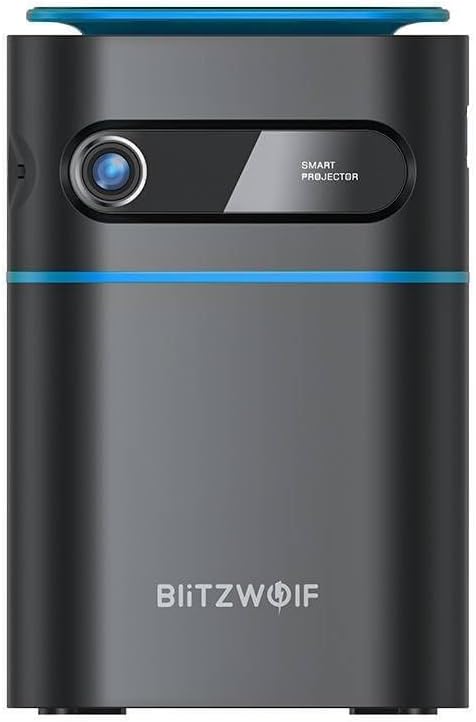
Зураг 1.1: Урд View. This image displays the front of the BlitzWolf BW-VT2 Mini Projector, highlighting the projection lens and the 'SMART PROJECTOR' branding.

Figure 1.2: Projector with Remote Control. This image shows the BlitzWolf BW-VT2 Mini Projector alongside its dedicated remote control, illustrating the compact size of both devices.
Зураг 1.3: Ар талд View. The rear of the projector is shown, featuring ventilation grilles and various input/output ports.

Зураг 1.4: Хажуу тал View. This image highlights the side of the projector where additional connectivity options such as USB and HDMI ports are located.

Зураг 1.5: Дээд тал View. The top surface of the projector is visible, featuring the integrated touch control panel for direct interaction.
1.3 Портууд болон удирдлага
- HDMI порт: Connect to laptops, game consoles, Blu-ray players, etc.
- USB порт: Медиа тоглуулахын тулд USB флаш дискийг холбоно уу.
- Audio Out (3.5mm) Port: Гадаад чанга яригч эсвэл чихэвчийг холбоно уу.
- DC IN порт: Цахилгаан адаптерийг холбоно уу.
- Цахилгаан товч: Проекторыг асаах/унтраах.
- Фокус дугуй: Зургийн тодорхой байдлыг тохируулна.
- Хяналтын самбарт хүрнэ үү: Navigate menus and control playback directly on the device.
2. Тохируулах гарын авлага
2.1 Асаах
- Цахилгаан адаптерийг проектор дээрх DC IN порт руу холбоно уу.
- Цахилгаан адаптерийг ханын залгуурт холбоно уу.
- Press and hold the Power Button on the projector or the remote control until the device powers on.
2.2 Анхны байршуулалт
Хамгийн оновчтой viewтуршлагатай бол дараахь зүйлийг анхаарч үзээрэй.
- Проекторыг тогтвортой, хавтгай гадаргуу дээр байрлуул.
- Ensure there is adequate ventilation around the projector to prevent overheating.
- Тэгш өнцөгт дүрс авахын тулд проекторыг проекцийн гадаргуу (хана эсвэл дэлгэц)-тэй перпендикуляр байрлуулна.
- Adjust the distance to achieve your desired screen size.
2.3 Фокусын тохируулга
After powering on, adjust the focus to ensure a clear image:
- Линзний ойролцоо байрлах фокусын дугуйг төсөөлж буй дүрс тод, тод харагдах хүртэл эргүүл.
2.4 Алсын удирдлагатай тохиргоо
Insert batteries into the remote control before first use:
- Алсын удирдлагын арын хэсэгт байрлах зай тасалгааны тагийг онгойлгоно уу.
- Зөв туйлшралыг (+/-) баталгаажуулж, хоёр AAA батерейг (оруулаагүй) оруулаарай.
- Зайны тасалгааны тагийг хаа.
3. Ашиглалтын заавар
3.1 Навигац
You can navigate the projector's interface using either the remote control or the touch control panel on top of the device.
- Алсын удирдлага: Use the directional buttons (up, down, left, right) to move through menus and the 'OK' button to select.
- Хяналтын самбарт хүрнэ үү: Swipe and tap on the touch-sensitive surface to navigate.
3.2 Төхөөрөмжүүдийг холбох
The BW-VT2 supports various input sources:
- HDMI оролт: Connect your laptop, game console, or other HDMI-enabled devices using an HDMI cable. Select the HDMI input source from the projector's menu.
- USB оруулах: Insert a USB flash drive into the USB port. The projector's media player will typically detect the drive automatically, allowing you to browse and play supported media files (видео, зураг, хөгжим).
- Wi-Fi холболт: Navigate to the 'Settings' menu, then 'Network' or 'Wi-Fi'. Select your Wi-Fi network and enter the password to connect the projector to the internet. This enables access to online streaming apps and updates.
3.3 Android OS Features
As an Android-powered projector, the BW-VT2 offers smart functionalities:
- Апп хандалт: Download and install various streaming apps (e.g., Netflix, YouTube) directly from the pre-installed app store or by sideloading APKs.
- Тохиргоо: Customize display settings, audio output, network configurations, and system preferences through the Android settings menu.
- Дэлгэц толин тусгал: Utilize built-in screen mirroring features (e.g., Miracast, AirPlay compatible apps) to project content from your smartphone or tablet wirelessly.
3.4 Аудио гаралт
The projector has built-in speakers, but you can also connect external audio devices:
- 3.5 мм аудио гаралт: Connect headphones or external speakers via the 3.5mm audio jack for enhanced sound.
4. Засвар үйлчилгээ
Тохиромжтой засвар үйлчилгээ нь таны проекторын урт наслалт, оновчтой ажиллагааг баталгаажуулдаг.
4.1 Линз цэвэрлэх
To maintain clear image quality, clean the projector lens regularly:
- Оптик линзэнд тусгайлан зориулсан зөөлөн, хөвөнгүй даавууг ашигла.
- Gently wipe the lens in a circular motion.
- Avoid using abrasive cleaners or excessive force, which can scratch the lens.
4.2 Агааржуулалт
Ensure proper airflow to prevent overheating:
- Do not block the ventilation vents on the projector.
- Проекторыг агааржуулалт сайтай газар ажиллуулна уу.
- Periodically clean dust from the vents using a soft brush or compressed air.
4.3 Хадгалалт
When not in use, store your projector properly:
- Store the projector in a cool, dry place, away from direct sunlight and extreme temperatures.
- Use the original packaging or a protective case to prevent dust accumulation and physical damage.
5. Алдаа засах
Нийтлэг асуудлууд болон тэдгээрийн шийдлүүдийг энэ хэсгээс харна уу.
| Асуудал | Боломжит шалтгаан | Шийдэл |
|---|---|---|
| Projector does not power on. | Цахилгаан холболт байхгүй; цахилгаан адаптер эвдэрсэн. | Ensure power adapter is securely connected to both projector and outlet. Try a different outlet. |
| Зураг төсөллөөгүй. | Incorrect input source selected; loose HDMI/USB cable. | Verify the correct input source is selected in the menu. Check cable connections. |
| Зураг бүдэг байна. | Focus not adjusted; projector too close/far. | Rotate the focus wheel until the image is clear. Adjust projection distance if necessary. |
| Дуу алга. | Volume too low; external audio device not connected properly. | Increase volume. Check connections to external speakers/headphones. Ensure audio output is set correctly in settings. |
| Wi-Fi холболтын асуудал. | Нууц үг буруу; чиглүүлэгчийн асуудал; дохионы хөндлөнгийн оролцоо. | Re-enter Wi-Fi password. Restart router. Move projector closer to router. |
| Алсын удирдлага ажиллахгүй байна. | Дууссан батерей; саад тотгор; алсын удирдлага хослогдоогүй. | Replace batteries. Ensure no obstruction between remote and projector. |
6. Техникийн үзүүлэлтүүд
Key specifications of the BlitzWolf BW-VT2 Mini Projector:
| Онцлог | Тодорхойлолт |
|---|---|
| Брэнд | Блиц Чоно |
| Загварын дугаар | BW-VT2EU |
| Өнгө | Хар |
| Холболтын технологи | HDMI, USB, VGA, Wi-Fi |
| Дэлгэцийн нягтрал | 1920 x 1080 (Full HD) |
| Дэлгэцийн төрөл | LCD, LED |
| Form Factor | Зөөврийн |
| Онцлог шинж чанарууд | Portable, Android OS, Wi-Fi, HDMI, USB, VGA |
| Тохиромжтой төхөөрөмжүүд | Laptops, Smartphones, Game Consoles, Blu-ray Players, Media Players, Wi-Fi enabled devices |
| Зөвлөмж болгож буй хэрэглээ | Гэрийн кино театр |
7. Баталгаат хугацаа ба дэмжлэг
7.1 Үйлдвэрлэгчийн баталгаа
The BlitzWolf BW-VT2 Mini Projector comes with a Үйлдвэрлэгчийн 2 жилийн баталгаат хугацаа. Энэхүү баталгаа нь ердийн ашиглалтын үед хийгдсэн материал, хийцийн согогийг хамарна. Баталгаат заргад зориулж худалдан авалтаа нотлох баримтаа үлдээнэ үү.
7.2 Хэрэглэгчийн дэмжлэг
If you encounter issues not covered in the troubleshooting section or require further assistance, please contact BlitzWolf customer support. Refer to the product packaging or the official BlitzWolf webхамгийн сүүлийн үеийн холбоо барих мэдээллийг авах сайт.


