1. Танилцуулга
This manual provides comprehensive instructions for the installation, operation, and maintenance of your Lloyd's Smart Full HD 1080P Video Intercom System. This system is designed to provide secure access control for your home or office, allowing you to monitor, communicate with, and grant access to visitors remotely.
Please read this manual thoroughly before using the product to ensure proper function and safety. Keep this manual for future reference.
2. Аюулгүй байдлын мэдээлэл
Бүтээгдэхүүнийг гэмтээх, өөрийгөө болон бусдыг гэмтээхээс сэргийлэхийн тулд дараах аюулгүй байдлын арга хэмжээг дагаж мөрдөнө үү.
- Суурилуулах эсвэл засвар үйлчилгээ хийхээс өмнө бүх цахилгааныг салгасан эсэхээ шалгаарай.
- Хэрэв та цахилгааны утсыг сайн мэдэхгүй бол угсралтын ажлыг мэргэшсэн цахилгаанчин гүйцэтгэнэ.
- Бүтээгдэхүүнийг хэт өндөр температур, чийгшил, нарны шууд тусгалд бүү тавь.
- Зөвхөн өгсөн тэжээлийн адаптер болон дагалдах хэрэгслийг ашиглана уу.
- Бүтээгдэхүүнийг ус болон бусад шингэнээс хол байлга.
- Төхөөрөмжийг өөрөө задлах, засах гэж бүү оролдоорой. Тусламж авахын тулд хэрэглэгчийн дэмжлэгтэй холбоо барина уу.
3. Багцын агуулга
Бүх зүйл багцад байгаа эсэхийг шалгана уу:
- 1 x Monitor (7'' Color LCD Touchscreen)
- 1 x Outdoor Unit (Doorbell with Camera and Keypad)
- 1 х хэрэглэгчийн гарын авлага
- 1 х орон сууц
- 1 x Rain Cover Bracket
- 1 x Recessed Box
- 1 х AC / DC адаптер
- 1 х угсрах хаалт
- Wall Plugs and Mounting Screws
- 3 х холбогч
- 1 x Allen Screwdriver
- 4 х Холболтын кабель

Зураг 3.1: Илүүview of the Lloyd's Smart Video Intercom System components and packaging.
4. Бүтээгдэхүүн дууссанview
4.1. Monitor (Indoor Unit)
- Дэлгэц: 7-inch color LCD touchscreen with 1020 x 600 px resolution.
- Тохируулах тохиргоо: Brightness, contrast, and volume.
- Чиг үүрэг: Hands-free intercom, call transfer (requires additional monitor), date, time, and weather display.
- Хадгалах: Integrated memory for up to 30 photos, supports up to 128 GB memory card (not included).
- Холболт: 2.4 GHz Wi-Fi for stable connection in large areas.
4.2. Outdoor Unit (Doorbell)
- Камер: 2MP Full HD (1920x1080) resolution.
- Шөнийн хараа: Yes, with LED numeric panel.
- Viewөнцөг 120 градус.
- Хөдөлгөөн илрүүлэх: Detection distance of less than or equal to 3 meters.
- Аудио: 2-way audio with adjustable microphone and speaker volume.
- Хандалтын хяналт: Works with a 12 VDC electric lock (not included), supports 4-6 digit password entry.
- Tamper Товчлуур: Sends alerts to your smartphone and triggers an alarm if the outdoor unit is forced.
- Бат бөх чанар: IP65 rating for indoor or outdoor use.
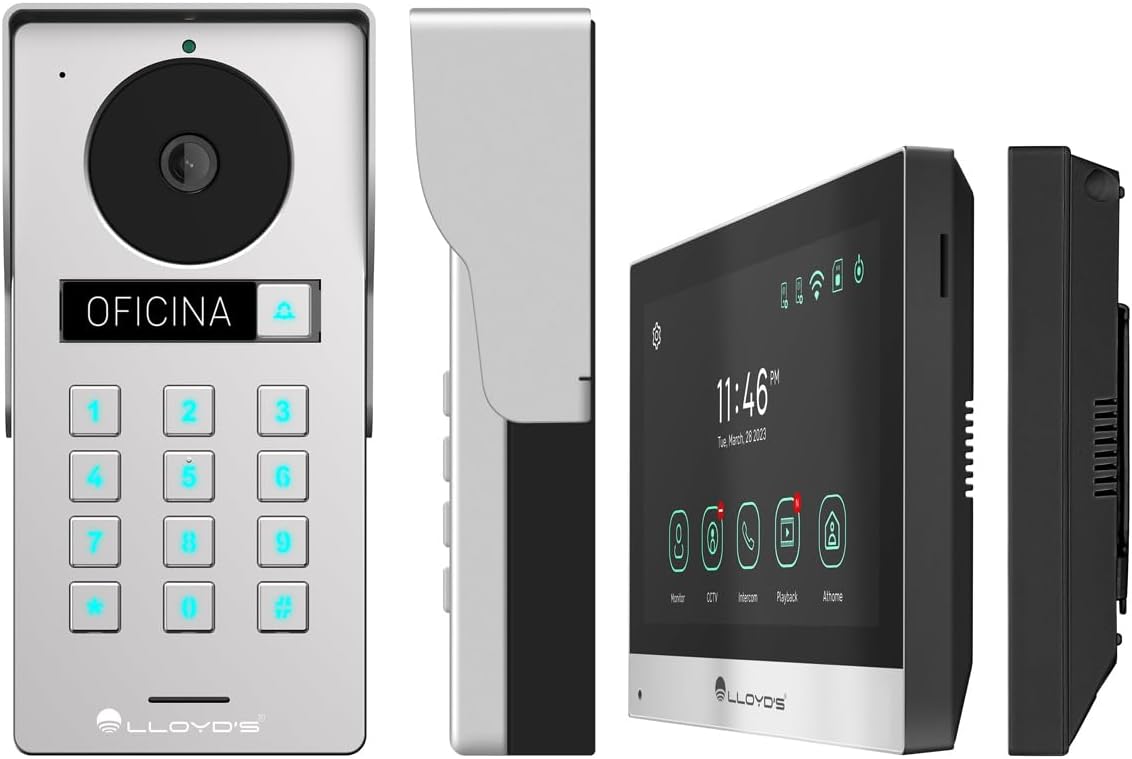
Зураг 4.1: Нарийвчилсан views of the outdoor unit and monitor.

Figure 4.2: Key features of the Lloyd's Smart Video Intercom System.
5. Тохиргоо ба суурилуулалт
5.1. Утас холболт ба угсралт
The system requires a wired connection between the monitor and the outdoor unit. The maximum operating distance is 50 meters using a 4-wire cable (0.5 mm² not included). Follow the wiring diagram provided in the quick start guide for correct connections.
- Гадна нэгжийг суурилуулах: Choose a suitable location near your entrance, ensuring clear camera view and easy access to the keypad. Use the provided mounting bracket, wall plugs, and screws. The unit is IP65 rated for outdoor use.
- Монитор суурилуулах: Install the monitor indoors at a convenient height for viewing and interaction. Use the mounting bracket and screws.
- Эрчим хүчний холболт: Connect the AC/DC adapter to the monitor and a power outlet.
- Electric Lock Connection (Optional): If using an electric lock (12 VDC, not included), connect it to the outdoor unit as per the wiring diagram.
5.2. Аппликейшн болон Wi-Fi холболт
To utilize smart features, download the Lloyd's smart home application on your smartphone (compatible with Android 5.0+ and iOS 11+).
- Power on the monitor and outdoor unit.
- On the monitor, navigate to the Wi-Fi settings and connect to your 2.4 GHz Wi-Fi network.
- Open the Lloyd's app on your smartphone and create an account or log in.
- Follow the in-app instructions to add your new video intercom system. This typically involves scanning a QR code displayed on the monitor or manually entering device details.
- Once connected, you will receive notifications and can control the system remotely via the app.
6. Ашиглалтын заавар
6.1. Answering Calls and Communication
- When a visitor presses the doorbell button, the monitor will ring, and you will receive a notification on your smartphone.
- On the monitor, tap the "Answer" icon to establish two-way audio and video communication.
- On your smartphone, open the app and tap the incoming call notification to answer.
- The intercom communication time is 60 seconds.

Figure 6.1: Communicate with visitors from anywhere using the app or monitor.

Figure 6.2: Receive instant notifications on your smartphone and monitor.
6.2. Door Opening
- Апп-аас: During a call, tap the "Unlock" icon in the app to open the connected electric lock.
- From the Monitor: During a call, tap the "Unlock" icon on the monitor's touchscreen.
- From the Outdoor Unit: Visitors can enter a pre-set 4-6 digit password on the numeric keypad to open the door.
6.3. Хөдөлгөөн илрүүлэх ба бичих
- The system automatically captures photos and videos when motion is detected within 3 meters of the outdoor unit or when someone rings the doorbell.
- You will receive real-time alerts on your smartphone via the app when motion is detected.
- Review recorded events and snapshots through the app or on the monitor.
- The monitoring time for motion detection is 30 seconds.

Figure 6.3: Receive motion detection alerts directly on your smartphone app.

Figure 6.4: Automatic photo and video capture for events.
6.4. Системийн өргөтгөл
The system supports expansion for enhanced security and convenience:
- Up to 2 additional Outdoor Units (Doorbell)
- Up to 3 additional Monitors
- Up to 2 additional Cameras
- Up to 2 additional Sensors
(Additional units and sensors are not included and must be purchased separately.)
You can also integrate the system with other Lloyd's smart home products to create customized routines and share device access with family members.
7. Засвар үйлчилгээ
- Цэвэрлэгээ: Use a soft, dry cloth to clean the monitor screen and outdoor unit. Do not use abrasive cleaners or solvents.
- Програм хангамжийн шинэчлэлтүүд: Periodically check the Lloyd's app for firmware updates to ensure optimal performance and security.
- Хадгалах менежмент: If using a memory card, regularly back up important recordings and delete old files зай гаргах.
8. Алдаа засах
| Асуудал | Боломжит шалтгаан | Шийдэл |
|---|---|---|
| No image or sound from outdoor unit. | Loose wiring, power issue, unit malfunction. | Check all cable connections. Ensure power adapter is properly connected. Restart the system. |
| Wi-Fi connection unstable or disconnected. | Weak Wi-Fi signal, incorrect password, router issues. | Ensure the monitor is within Wi-Fi range. Re-enter Wi-Fi password. Restart your router. |
| Cannot open door via app/monitor. | Electric lock not connected, lock malfunction, wiring issue. | Verify electric lock connection and functionality. Check wiring between outdoor unit and lock. |
| Хөдөлгөөн илрүүлэх сэрэмжлүүлэг байхгүй. | Motion detection disabled, incorrect sensitivity, app notification settings. | Enable motion detection in app settings. Adjust sensitivity. Check smartphone notification permissions for the app. |
| Видео чанар муу. | Dirty camera lens, poor lighting, network bandwidth. | Камерын линзийг цэвэрлэ. Хангалттай гэрэлтүүлэгтэй байгаа эсэхийг шалгаарай. Интернетийн хурдаа шалгаарай. |
9. Техникийн үзүүлэлтүүд
| Онцлог | Дэлгэрэнгүй |
|---|---|
| Загварын дугаар | LC-1373 |
| Дэлгэцийг хянах | 7-inch Color LCD Touchscreen |
| Хяналтын нарийвчлал | 1020 x 600 пиксел |
| Outdoor Unit Camera Resolution | 2MP Full HD (1920x1080) |
| Viewing өнцөг | 120 градус |
| Шөнийн харааны хүрээ | 10 метр хүртэл |
| Хөдөлгөөн илрүүлэх хүрээ | ≤ 3 метр |
| Утасгүй холболт | 2.4 GHz Wi-Fi |
| Хадгалах | Integrated (30 photos), supports up to 128 GB MicroSD (not included) |
| Эрчим хүчний хангамж | 12 VDC (via AC/DC adapter) |
| Эрчим хүчний хэрэглээ (зогсоол) | 4W |
| Эрчим хүчний хэрэглээ (ашиглалтын) | 10 Вт |
| Ашиглалтын зай (Утастай) | Up to 50m (with 0.5 mm² 4-wire cable) |
| Ingress Protection (Outdoor Unit) | IP65 |
| Monitor Dimensions (H x W x D) | 12.4 см х 18 см х 2.1 см |
| Гадна төхөөрөмжийн хэмжээс (Өндөр x Өргөн x Гүн) | 18 см х 8.7 см х 3.2 см |
| Тохиромжтой төхөөрөмжүүд | Android 5.0 буюу түүнээс дээш, iOS 11 буюу түүнээс дээш |

Figure 9.1: Dimensions of the Monitor and Outdoor Unit.
10. Баталгаат хугацаа ба дэмжлэг
For warranty information, please refer to the warranty card included with your product or visit the official Lloyd's website. If you encounter any issues or require technical assistance, please contact Lloyd's customer support.
Хэрэглэгчийн дэмжлэг: Refer to the contact information provided on the product packaging or the official Lloyd's webсайт.
Онлайн нөөцүүд: зочилно уу Lloyd's Official Store on Amazon нэмэлт бүтээгдэхүүний мэдээлэл, дэмжлэг авах.
11. Бүтээгдэхүүний албан ёсны видеонууд
No official seller videos were provided for this product in the available data.


