1. Танилцуулга
Welcome to the user manual for your new SENTRY BT Pro Sq Headset with Active Noise Canceling. This manual provides essential information on setting up, operating, maintaining, and troubleshooting your headset to ensure optimal performance and longevity. Please read this manual thoroughly before using the product.
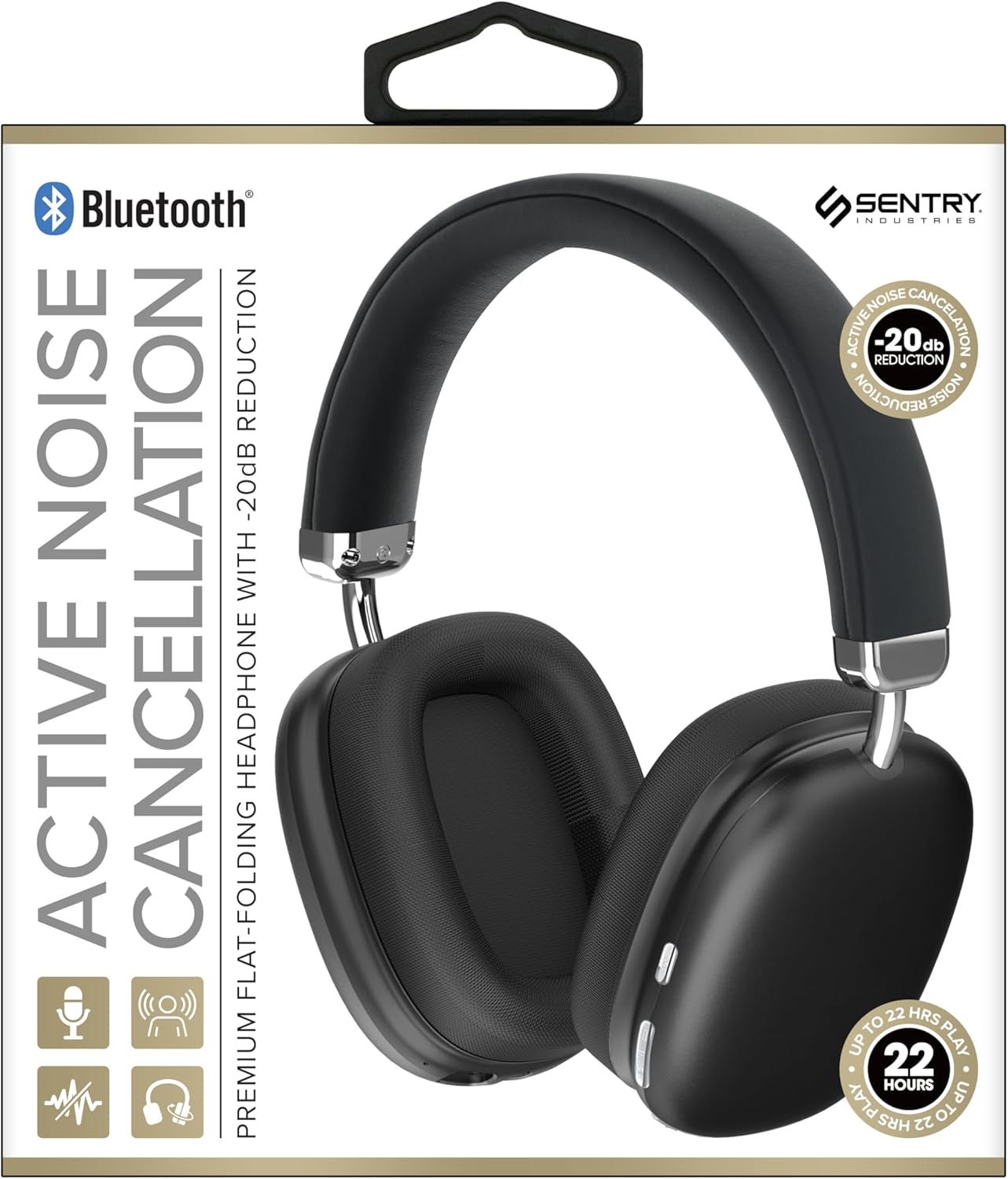
This image displays the SENTRY BT Pro Sq Headset in black, highlighting its over-ear design, adjustable headband, and the control buttons located on the earcups. The packaging indicates features such as Bluetooth connectivity, Active Noise Cancellation with -20dB reduction, and up to 22 hours of play time.
2. Аюулгүй байдлын чухал мэдээлэл
Аюулгүй, зөв ажиллуулахын тулд дараах удирдамжийг дагаж мөрдөнө үү:
- Чихэвчийг хэт өндөр температур, чийгшил, идэмхий бодист бүү тавь.
- Чихэвчийг унагах эсвэл хүчтэй цохилтонд оруулахаас зайлсхий.
- Чихэвчийг өөрөө задлах эсвэл засах гэж бүү оролдоорой. Энэ нь баталгааг хүчингүй болгоно.
- Clean the headset with a soft, dry cloth only. Do not use liquid cleaners.
- Өндөр дууны түвшинд удаан хугацаагаар сонсох нь сонсголын гэмтэл учруулж болзошгүй. Дууны түвшинг аюулгүй түвшинд тохируулна уу.
- Do not use the headset in situations where inability to hear ambient sounds could be dangerous (e.g., driving, cycling, walking in traffic).
3. Багцын агуулга
Дараах зүйлсийн багцад байгаа эсэхийг шалгана уу.
- SENTRY BT Pro Sq Headset
- USB цэнэглэгч кабель
- Хэрэглэгчийн гарын авлага
4. Бүтээгдэхүүн дууссанview
The SENTRY BT Pro Sq Headset features an over-ear design with soft ear pads for comfort and noise isolation. It includes an adjustable folding headband for portability. Key components include:
- Чихний чих: House the audio drivers and provide passive noise isolation.
- Толгойн тууз: Adjustable for a comfortable fit, designed to fold for compact storage.
- Хяналтын товчлуурууд: Located on the earcups for power, volume, track control, and Active Noise Cancellation (ANC).
- Микрофон: Гар ашиглахгүйгээр дуудлага хийх зориулалттай суурилуулсан.
- Цэнэглэх порт: USB цэнэглэгч кабелийг холбоход зориулагдсан.
Refer to the product image in the Introduction section for visual identification of these components.
5. Тохиргоо
5.1 Чихэвчийг цэнэглэх
- USB цэнэглэгч кабелийн жижиг үзүүрийг чихэвчний цэнэглэгч порт руу холбоно уу.
- USB цэнэглэгч кабелийн том үзүүрийг USB тэжээлийн адаптер (дагаагүй) эсвэл компьютерийн USB порт руу холбоно уу.
- The LED indicator on the headset will illuminate to show charging status. It will change color or turn off when fully charged.
- Бүрэн цэнэглэхэд ихэвчлэн 2-3 цаг зарцуулдаг.
5.2 Bluetooth төхөөрөмжтэй хослуулах
Before using the headset wirelessly, you must pair it with your Bluetooth-enabled device (smartphone, laptop, tablet, smart speaker, gaming console).
- Чихэвч бүрэн цэнэглэгдсэн эсэхийг шалгаарай.
- With the headset powered off, press and hold the Power button for approximately 5-7 seconds until the LED indicator flashes rapidly, indicating pairing mode.
- Bluetooth төхөөрөмж дээрээ Bluetooth-г идэвхжүүлээд шинэ төхөөрөмжүүдийг хайгаарай.
- Select "SENTRY BT Pro Sq" (or similar name) from the list of available devices.
- Once paired, the LED indicator on the headset will stop flashing and may turn solid blue or off, depending on the model.
- Чихэвчийг асаахад хамгийн сүүлд холбогдсон төхөөрөмжтэй автоматаар дахин холбогдохыг оролдох болно.
6. Ашиглалтын заавар
6.1 Асаах/унтраах
- Асаах: Press and hold the Power button for 2-3 seconds. The LED indicator will light up.
- Унтраах: Press and hold the Power button for 3-4 seconds. The LED indicator will turn off.
6.2 Идэвхтэй дуу чимээг арилгах (ANC)
The headset features Active Noise Cancellation to reduce ambient noise.
- ANC идэвхжүүлэх: Locate the ANC button (if separate) or press the designated control. The ANC indicator light will turn on.
- ANC идэвхгүй болгох: ANC товчийг дахин дарна уу. ANC заагч гэрэл унтарна.
6.3 Media Control (Touch Control)
Control your audio playback directly from the headset:
- Тоглуулах/түр зогсоох: Олон үйлдэлт товчлуур дээр ганцхан товшино уу.
- Дууг нэмэгдүүлэх: Tap the Volume Up button.
- Дууг багасгах: Tap the Volume Down button.
- Дараагийн дуу: Олон үйлдэлт товчлуур дээр хоёр удаа дарна уу.
- Өмнөх бичлэг: Олон үйлдэлт товчлуурыг гурван удаа дарна уу.
6.4 Дуудлагын удирдлага
Manage phone calls with the built-in microphone:
- Дуудлагад хариулах: Single tap the multi-function button when a call comes in.
- Дуудлага дуусгах: Single tap the multi-function button during a call.
- Дуудлагаас татгалзах: Press and hold the multi-function button for 2 seconds when a call comes in.
7. Засвар үйлчилгээ, арчилгаа
- Цэвэрлэгээ: Wipe the headset with a soft, dry, lint-free cloth. Do not use abrasive cleaners, alcohol, or chemical solvents.
- Хадгалах: When not in use, store the headset in a cool, dry place, away from direct sunlight and extreme temperatures. Utilize the folding headband feature for compact storage.
- Батерейны арчилгаа: To preserve battery life, charge the headset regularly, even if not used for extended periods. Avoid fully discharging the battery frequently.
- Уснаас зайлсхийх: The headset is not waterproof. Keep it away from water and moisture.
8. Алдаа засах
Хэрэв та чихэвчтэй холбоотой асуудалтай тулгарвал дараах нийтлэг асуудал, шийдлүүдийг үзнэ үү.
| Асуудал | Боломжит шийдэл |
|---|---|
| Чихэвч асахгүй байна. | Ensure the headset is fully charged. Connect to a power source and allow it to charge for at least 30 minutes before attempting to power on again. |
| Bluetooth төхөөрөмжтэй хослуулах боломжгүй. | Ensure the headset is in pairing mode (LED flashing rapidly). Make sure Bluetooth is enabled on your device and it is within range (10 meters). Try restarting both the headset and your device. |
| Чихэвчнээс дуу гарахгүй. | Check the volume level on both the headset and your connected device. Ensure the headset is properly paired and connected. Try playing audio from a different application or device. |
| Идэвхтэй дуу чимээг арилгах (ANC) нь үр дүнтэй биш юм. | Ensure ANC is activated. Make sure the earcups are properly sealed around your ears. ANC is most effective against low-frequency, constant noise. |
| Микрофон ажиллахгүй байна. | Ensure the headset is connected and selected as the input device on your computer or smartphone. Check privacy settings on your device that might restrict microphone access. |
9. Техникийн үзүүлэлтүүд
| Онцлог | Дэлгэрэнгүй |
|---|---|
| Загварын нэр | HPXBTA1000 |
| Холболтын технологи | Утасгүй (Bluetooth) |
| Дуу чимээний хяналт | Идэвхтэй дуу чимээг арилгах |
| Чихний байрлал | Чихний дээгүүр |
| Form Factor | Чихний дээгүүр |
| Хяналтын төрөл | Хэвлэл мэдээллийн хяналт, хүрнэ үү |
| Давтамжийн хүрээ | 20 Гц-ээс 20,000 Гц хүртэл |
| Аудио драйверын төрөл | Динамик драйвер |
| Тохиромжтой төхөөрөмжүүд | Smartphones, Laptops, Tablets, Smart Speakers, Gaming Consoles |
| Өнгө | Хар |
| Зүйлийн жин | 1.2 фунт |
| UPC | 080068501503 |
| Үйлдвэрлэгч | СЕНТРИ |
10. Баталгаат хугацаа ба дэмжлэг
SENTRY products are designed and manufactured to the highest quality standards. For information regarding warranty coverage, technical support, or service inquiries, please refer to the warranty card included with your product or visit the official SENTRY webсайт. Баталгаат заргад зориулж худалдан авалтаа нотлох баримтаа үлдээнэ үү.


