Танилцуулга
The BOSS ME-90B is an all-in-one bass processor designed to extend your creative range with professional performance tools. It features 61 effects optimized for bass and 10 bass preamps crafted with AIRD technology. This unit allows connection to stage amplifiers, house PA systems, and computers, offering superior sound quality with 24-bit AD and 32-bit DA conversion, 32-bit floating-point processing, and a 48 kHz sampling rate. This manual provides essential information for setup, operation, and maintenance of your ME-90B.
Гол онцлогууд
- All-in-one bass processor with premium BOSS ampс ба эффектүүд.
- Easy stompbox-style sound creation with an intuitive knob-based interface.
- Superior sound quality with 24-bit AD and 32-bit DA conversion, 32-bit floating-point processing, and 48 kHz sampлингийн түвшин.
- 61 effects from the BOSS bass effects library.
- Ten onboard AIRD preamp models including newly developed types.
- Eight multi-function footswitches and an expression pedal with toe switch.
- 36 ready-to-play preset memories and 36 user memories for storing custom setups.
- Powered via four AA batteries or optional AC adaptor.
Тохиргоо
1. Төхөөрөмжийг тэжээх
The ME-90B can be powered using four AA batteries or an optional AC adaptor (PSA-series, sold separately). Ensure the correct power source is connected before operation.

Image: The BOSS ME-90B unit displaying power options, including four AA batteries and an optional AC adaptor connection.
2. Холболтууд
Connect your bass guitar to the INPUT jack. Use the OUTPUT L/MONO and R jacks to connect to your amplifier, PA system, or audio interface. For direct recording or computer integration, utilize the USB-C port. An XLR DI output with ground lift is also available for professional stage and studio connections. A headphones jack is provided for silent practice.

Image: The rear panel of the BOSS ME-90B, highlighting the various input and output jacks for connecting instruments, amplifiers, and recording equipment.
Ашиглалтын заавар
1. Stompbox-Style Control
The ME-90B features an intuitive knob-based interface for easy sound creation, mimicking the feel of individual stompbox pedals. Each effect section has dedicated knobs for quick adjustments to parameters like gain, level, and tone. The unit includes eight multi-function footswitches and an expression pedal with a toe switch for dynamic control over your effects.

Зураг: Нарийвчилсан view of the BOSS ME-90B's control knobs and footswitches, illustrating the intuitive layout for effect adjustments.
2. Modes and Presets
The ME-90B offers 36 ready-to-play preset memories and 36 user memories. These can be accessed and stored using the footswitches. The unit's design allows for quick switching between different effect combinations, providing flexibility for live performance and practice.
3. Effects and Amp Загварууд
Explore 61 effects from the BOSS bass effects library and 10 onboard AIRD preamp models. These include newly developed types to shape your core tone. The effects are organized into six sections for simultaneous use, including compressors, pitch effects, filters, drive/synth, modulation, and delay/reverb.

Image: A visual representation of the BOSS ME-90B's effects chain, showing different effect modules like Preamp/EQ, Modulation, Comp/FX1, Filter/FX2, Drive/Synth, and Delay/Reverb.
4. BOSS Tone Studio Integration
Connect your ME-90B to a computer via USB-C to use BOSS Tone Studio for Windows and macOS. This software extends your creative range, allowing you to edit tones, change preamp and effect types, and manage your custom setups.
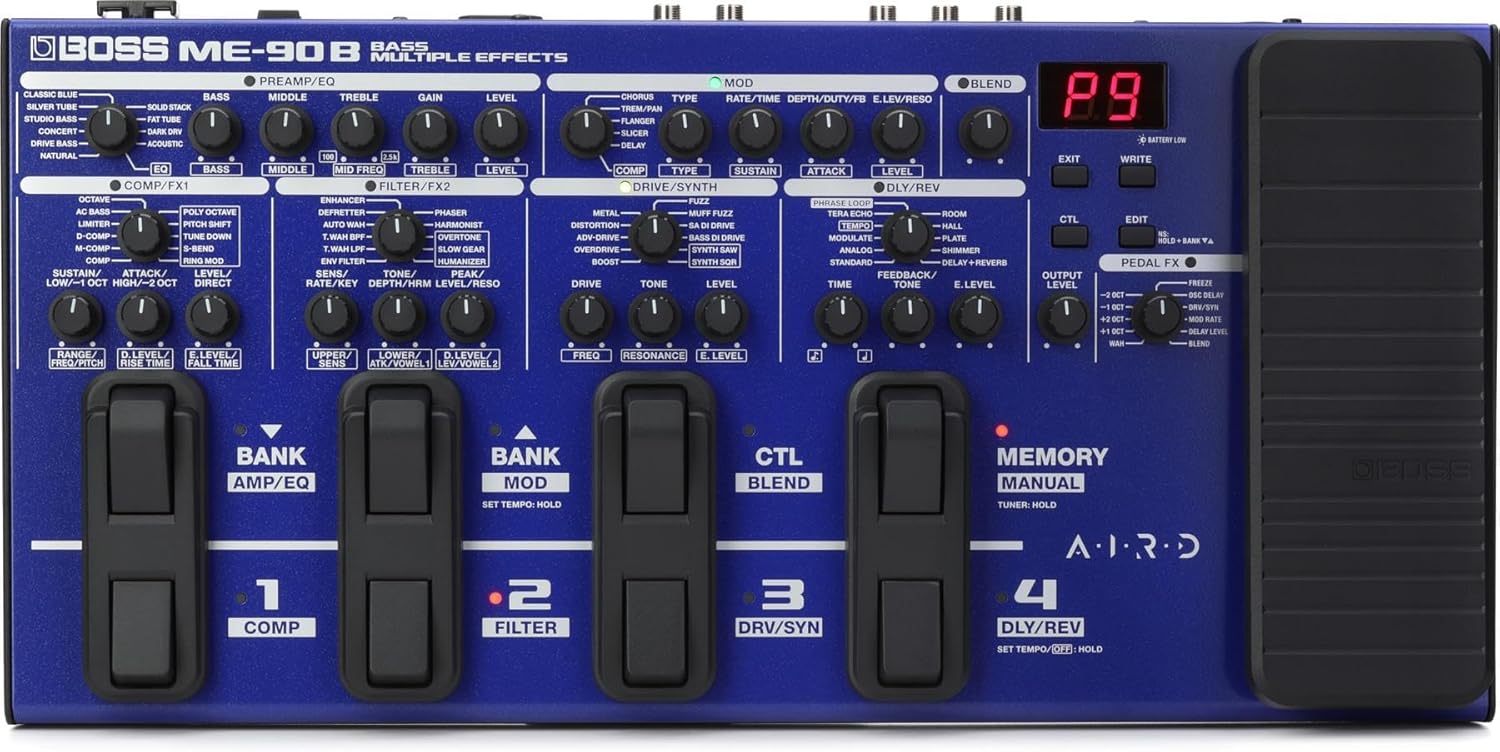
Image: A user is shown editing tones on a laptop using BOSS Tone Studio, with the ME-90B connected via USB-C, demonstrating the customization capabilities.
5. Бүтээгдэхүүн дууссанview Видео
Video: An official product video from BOSS showcasing the ME-90B Bass Multi-Effects processor, demonstrating its features and capabilities.
Засвар үйлчилгээ
To ensure the longevity and optimal performance of your BOSS ME-90B, keep the unit clean and free from dust. Use a soft, dry cloth for cleaning. Avoid using abrasive cleaners or solvents. When not in use for extended periods, remove the batteries to prevent leakage and store the unit in a cool, dry place away from direct sunlight and extreme temperatures.
Алдааг олж засварлах
- Эрчим хүчгүй: Check if the AC adaptor is securely connected or if the AA batteries are correctly inserted and have sufficient charge.
- Дуугүй: Verify all audio cables are properly connected to the input and output jacks. Ensure the volume levels on the ME-90B, your instrument, and your amplifier/PA system are turned up. Check that effects are not bypassed or muted.
- Unexpected Noise: Ensure all cables are in good condition and properly shielded. Try using a different power outlet or AC adaptor.
- Ажиллахгүй байгаа эффектүүд: Confirm that the desired effect modules are active within your patch. If using BOSS Tone Studio, ensure settings are correctly applied and saved.
- Төхөөрөмж хөлддөг/хариу өгөхгүй байна: Try turning the unit off and on again. If the issue persists, a factory reset might be necessary (refer to the full manual for instructions on performing a factory reset).
Үзүүлэлтүүд
| Атрибут | Үнэ цэнэ |
|---|---|
| Зүйлийн жин | 7.78 фунт |
| Бүтээгдэхүүний хэмжээс | 17.72 x 8.8 x 3.72 инч |
| Загварын дугаар | ME-90B |
| Холбогч төрөл | USB-C, 1/4 inch audio |
| Тоног төхөөрөмжийн интерфейс | 1/4 инчийн аудио |
| Дохионы формат | Аналог |
| Эрчим хүчний эх үүсвэр | Battery Powered and AC Adapter |
| Ботьtage | 9 вольт |
| Аудио гаралтын эффектүүд | Modulation, Distortion, Synth, Compression, Delay, Preamp, Pitch-Shifting, Overdrive, Chorus, Multi-Effect, Flanger, Reverb |
Хайрцагт юу байна
- Main Unit Only (BOSS ME-90B)
- Alkaline Batteries (AA, LR6) ×4
- Эзэмшигчийн гарын авлага (энэ баримт бичиг)
Баталгаат болон дэмжлэг
The BOSS ME-90B is covered by a manufacturer's warranty. For detailed warranty information, product registration, and technical support, please visit the official BOSS website or contact their customer service. You can find additional resources and software updates at www.boss.info/start.


