Танилцуулга
Thank you for choosing the Vormooi 64GB Professional Voice Recorder, Model NO6. This device is designed for high-quality audio recording with ease of use and portability. Please read this manual carefully to understand the features and proper operation of your new voice recorder.
Багцын агуулга
Таны багцад бүх зүйл байгаа эсэхийг шалгана уу:
- 1 x Vormooi Voice Recorder
- 1 x Normal Earphones
- 1 x USB-C кабель
- 1 х хэрэглэгчийн гарын авлага
- 1 x Wired Remote Control (for playback)
- 1 x Spiral Ring (keychain attachment)
Бүтээгдэхүүн дууссанview
The Vormooi NO6 voice recorder features a compact design with a durable metal casing. It is equipped with essential controls for easy operation.

Зураг: Урд ба хойд view of the Vormooi NO6 Voice Recorder, showing its compact design and keychain loop.

Зураг: Дууслааview of the Vormooi NO6 Voice Recorder highlighting its key features: 900 hours recording capacity, 17 hours continuous recording, and 1 hour charging time.

Image: Diagram illustrating the dimensions (7.6 cm length, 2.6 cm width, 0.8 cm thickness) and key components of the Vormooi NO6 Voice Recorder, including the indicator light, reset button, charging/connection port, and carabiner clip.
Гол бүрэлдэхүүн хэсгүүд:
- ON/OFF/Save Switch: Slide to ON to start recording, slide to OFF to save and stop recording.
- USB-C порт: For charging and connecting to a computer or Android phone.
- Заагч гэрэл: Статусын талаарх санал хүсэлтийг өгдөг (жишээ нь, бичлэг хийх, цэнэглэх).
- Дахин тохируулах товч: Төхөөрөмж хариу өгөхгүй болсон тохиолдолд дахин тохируулахад ашигладаг.
- Микрофон: Integrated for audio capture.
- Headphone Jack (on remote control): Аудио тоглуулах зориулалттай.
Тохиргоо
1. Төхөөрөмжийг цэнэглэж байна
Before first use, fully charge the voice recorder. Connect the supplied USB-C cable to the device and a power source (e.g., computer USB port, USB wall adapter). The indicator light will show charging status. A full charge takes approximately 1 hour and provides up to 17 hours of continuous recording.
2. Connecting to a Computer/Phone
Бичлэгт хандахын тулд files or configure settings, connect the recorder to a computer (Windows/Mac OS) or an Android phone using the provided USB-C cable. Ensure the recorder is in the OFF position before connecting. If connection issues occur:
- Ensure the recorder is OFF and placed flat after connecting to avoid unstable connections.
- Use the supplied data cable. Some cables only support charging.
- Try different USB ports or another computer to rule out driver issues.
- If your computer does not recognize the device, search online for "download computer drivers" for common solutions.
3. Огноо, цагийг тохируулах
When connected to a computer, locate the "Settime" folder on the device's storage. Run the settime.exe program to automatically synchronize the recorder's date and time with your computer's system time. This ensures accurate timestampТаны бичлэгүүдэд зориулсан s.
Ашиглалтын заавар
1. One-Touch Recording and Saving
The Vormooi NO6 features simple one-touch operation:
- руу бичлэг хийж эхлэх, slide the ON/OFF switch to the ON position. The indicator light will turn off, signifying that recording has begun.
- руу бичлэгийг хадгалах and stop, slide the ON/OFF switch to the OFF position. The recording will be saved automatically.

Image: Illustration showing the ON/OFF switch for one-touch recording and saving. Sliding to ON starts recording, sliding to OFF saves the recording.
Чухал: Do not connect headphones, data cables, or other accessories to the voice recorder during recording, as this will interrupt the recording process.
2. Дуугаар идэвхжүүлсэн бичлэг (VOR)
The Voice Activated Recording (VOR) function helps conserve battery life and storage space by only recording when sound is detected. This feature is disabled by default.
- To enable VOR, connect the device to a computer.
- Тохиргоог ол file (жишээ нь, 2159-RECSET.txt) on the device's storage.
- -г нээнэ үү file and modify the "Vor" parameter. Set "Vor:0" to "Vor:1" (or a value from 1-7 for sensitivity) to activate VOR.
- Тохиргооны өөрчлөлтийг хадгалах file and safely eject the device.
When VOR is active, the recorder will pause recording during silences and resume when sound is detected.
3. Дахин тоглуулах
The Vormooi NO6 does not have an internal speaker. To listen to recordings:
- Using the Wired Remote Control and Earphones: Connect the wired remote control to the USB-C port of the recorder, then plug the supplied earphones into the remote control's 3.5mm jack. Use the remote control buttons for playback functions (play/pause, next/previous track, volume, menu).
- Connecting to a Computer/Phone: Connect the recorder to a computer or Android phone. Navigate to the "RECORD" folder to access and play your audio files.
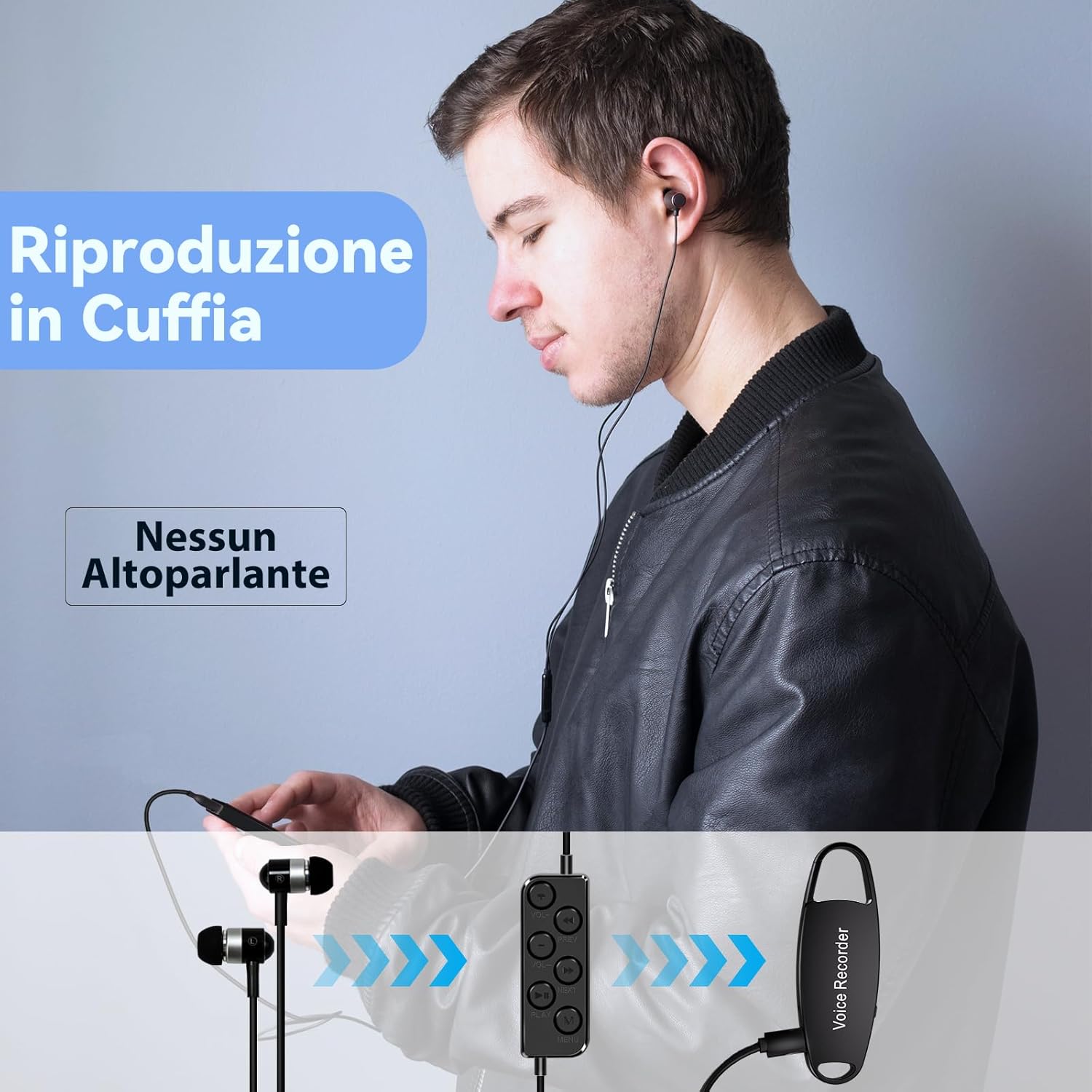
Image: A user listening to recordings using the wired remote control and earphones connected to the Vormooi NO6 Voice Recorder.
4. Удирдах Files and Advanced Settings
When connected to a computer, the recorder appears as a removable drive. You can drag and drop files to transfer them. The "RECORD" folder contains all your audio recordings.
Advanced settings like recording sensitivity (Gain), bit rate (Bit), and noise reduction (Noise reduction) can be adjusted by editing the configuration file (жишээ нь, 2159-RECSET.txt) found on the device's storage. Refer to the comments within the text file for specific parameter ranges and advice.
- Олз: Recording Sensitivity (1-7).
- Бит: Bit Rate Setting (0-9), corresponding to various kbps values (e.g., 0-32K, 3-160K, 9-1536K).
- Дуу чимээг бууруулах: Noise reduction setting (0-7), 0 is off.
- Хэсэг: Бичлэг хийж байна File Segmented Time (0-120 minutes), 0 means 2 hours by default.
Анхааруулга: Do not format the drive on a computer, as this may lead to incorrect memory formatting and prevent recording.
Засвар үйлчилгээ
- Цэвэрлэгээ: Төхөөрөмжийг цэвэрлэхдээ зөөлөн, хуурай даавуу ашиглаарай. Шингэн цэвэрлэгч эсвэл уусгагч хэрэглэхээс зайлсхий.
- Хадгалах: Дуу хураагуурыг нарны шууд тусгал, хэт температур, чийгшилээс хол, сэрүүн, хуурай газар хадгална.
- Батерейны арчилгаа: Зайны ашиглалтын хугацааг уртасгахын тулд зайгаа ойр ойрхон бүрэн цэнэггүй болгохоос зайлсхий. Төхөөрөмжийг удаан хугацаагаар ашиглаагүй байсан ч тогтмол цэнэглэ.
- Харьцуулах: The device features a robust zinc alloy casing. However, avoid dropping or subjecting it to strong impacts.
Алдааг олж засварлах
Device Not Connecting to Computer:
- Ensure the voice recorder is in the OFF холбохоос өмнө байрлал.
- Use the original USB-C cable. Some cables are charge-only.
- Try connecting to a different USB port or another computer.
- If computer drivers are an issue, search online for solutions specific to your operating system.
Excessive Noise in Recordings:
- Place the recorder on a stable, flat surface. Avoid rubbing it against hands, clothes, or other objects during recording.
- If placing on a desk, use a soft, non-conductive material underneath to minimize noise from the desk or computer.
- Avoid placing the recorder too close to your mouth, which can cause popping sounds.
- Adjust the "Noise reduction" setting in the configuration file (0-7). Note that high noise reduction settings might introduce artifacts. Setting it to 0 (off) might be preferable in some situations.
- Understand that very loud ambient noise cannot be entirely eliminated.
Pre-existing Recordings on New Device:
Occasionally, a worker during preparation might accidentally activate the recording function, saving a file. This does not indicate a used product; only new products are sold. You can safely delete any such files.
Recording Interrupted:
Ensure no headphones, data cables, or other accessories are connected to the recorder while it is actively recording.
Үзүүлэлтүүд
| Брэнд | Вормоо |
| Загвар | NO6 |
| Санах ойн багтаамж | 64 ГБ (ойролцоогоор 59 ГБ ашиглах боломжтой) |
| Бичлэг хийх чадвар | Up to 900 hours (at 160 kbps) |
| Тасралтгүй бичлэг хийх хугацаа | Approx. 17 hours (after 1 hour charge) |
| Цэнэглэх хугацаа | Ойролцоогоор 1 цаг |
| Хэмжээ | 7.6 x 2.6 x 0.8 см (2.99 x 1.02 x 0.31 инч) |
| Жин | 30 грамм (0.9 унц) |
| Casing Материал | Цайрын хайлш |
| Интерфэйс | USB-C |
| Тохиромжтой төхөөрөмжүүд | Windows/Mac OS Computers, Android Mobile Phones |
| Микрофоны хэлбэр хүчин зүйл | Нэгдсэн |
| Дэмжигдсэн аудио форматууд | MP3, WAV |
| Зайны төрөл | Лити-ион полимер |
Баталгаат болон дэмжлэг
For warranty information, technical support, or any questions not covered in this manual, please contact Vormooi customer service through the retailer where you purchased the product. Please retain your proof of purchase for warranty claims.