1. Танилцуулга
This manual provides instructions for the Varmilo Koi 73 JIS Keyboard with Sakura Switches (Model: VMMA73A039SAKURA). This keyboard features a unique design inspired by traditional Chinese Koi fish and water elements, combined with a modern aesthetic. It is a compact 65% size keyboard with a Japanese Industrial Standard (JIS) layout, designed for both functionality and portability. The keyboard is equipped with Cherry-style stabilizers for a stable typing experience.
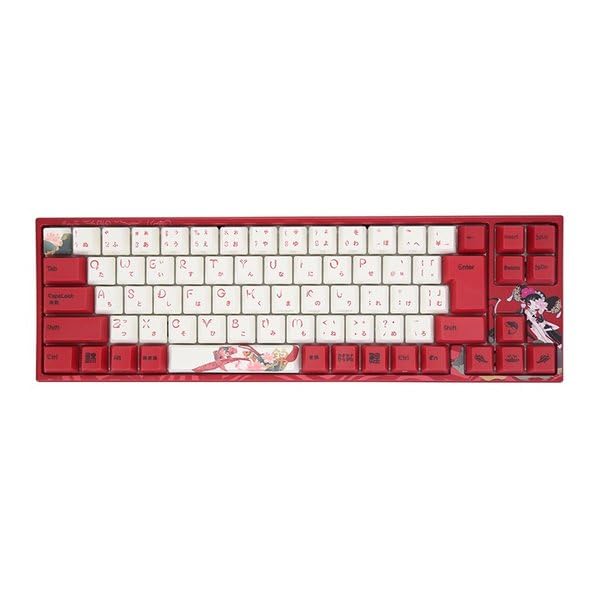
Image: Varmilo Koi 73 JIS Keyboard overview.
2. Үндсэн шинж чанарууд
- Unique Koi Design: Features vibrant koi fish illustrations and a red aesthetic, developed in collaboration with illustrator Li Huan.
- JIS Layout: 73-key Japanese Industrial Standard layout for specific regional input needs.
- Compact 65% Size: Optimizes desk space while retaining essential function and arrow keys.
- Тохируулж болох унтраалга: Offers a choice of Varmilo mechanical electrostatic capacity switches to suit individual typing preferences.
- Cherry-Style Stabilizers: Ensures consistent and stable key presses, especially for larger keys.
- USB холболт: Reliable wired connection for stable performance.
3. Тохируулах гарын авлага
3.1 Багцын агуулга
Эхлэхээсээ өмнө багцад байгаа бүх зүйл байгаа эсэхийг шалгана уу:
- Varmilo Koi 73 JIS Keyboard
- USB кабель
- Хэрэглэгчийн гарын авлага (энэ баримт бичиг)
3.2 Гарыг холбох
To connect your Varmilo Koi 73 keyboard to your computer, follow these steps:
- Гарны ард байгаа USB-C портыг ол.
- Connect one end of the provided USB cable to the keyboard's USB-C port.
- USB кабелийн нөгөө үзүүрийг компьютер дээрээ байгаа USB порт руу холбоно уу.
- Гарыг таны үйлдлийн систем автоматаар таних ёстой.
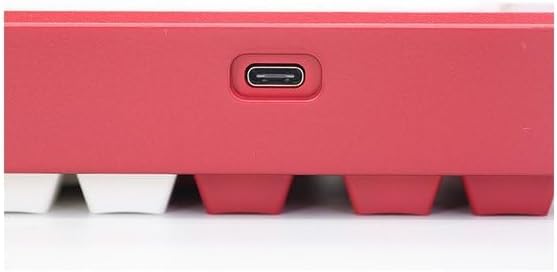
Image: USB-C port for keyboard connection.
3.3 Драйвер суурилуулах (заавал биш)
For advanced customization and optimal performance, it is recommended to install the Varmilo driver software. This software allows you to remap keys, adjust performance settings, and customize lighting effects.
Video: This video demonstrates the driver installation process and software usage for Varmilo keyboards. While it features the Muse65 model, the steps for driver installation and basic software navigation are generally applicable to other Varmilo keyboards like the Koi 73.
Please visit the official Varmilo website for the latest driver downloads specific to your keyboard model. Follow the on-screen instructions during installation.
4. Ашиглалтын заавар
4.1 Үндсэн түлхүүр функцууд
The Varmilo Koi 73 keyboard features a standard JIS layout. Most keys function as labeled. For special functions, refer to the combination keys below.
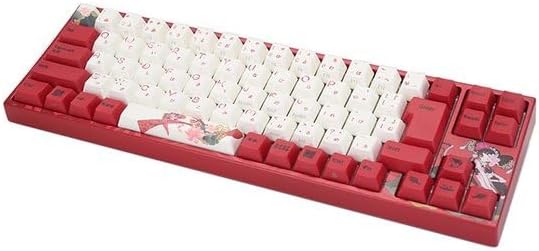
Зураг: Дууслааview of the Varmilo Koi 73 JIS Keyboard layout.
4.2 Функцийн (Fn) товчлуурын хослолууд
Since this is a 73-key layout, some functions are accessed via the Fn key. Hold down the Fn key and press the corresponding key to activate its secondary function. Common Fn combinations include:
- Fn + F1-F12: Multimedia controls (e.g., volume, play/pause).
- Fn + Сумны товчлуурууд: Page Up/Down, Home/End (specific to model, refer to keycap legends).
- Fn + Win Key: Windows түлхүүрийг түгждэг/тайлдаг.

Image: Left side keys, often used with Fn for additional functions.
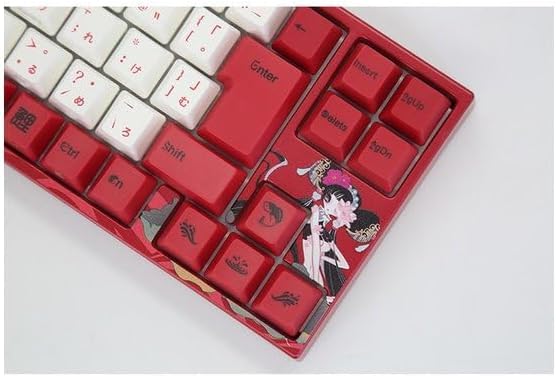
Image: Right side keys, including navigation and utility keys.
4.3 Гэрэлтүүлгийн эффектүүд
The Varmilo Koi 73 keyboard supports various RGB lighting effects. You can cycle through different modes and adjust brightness using specific key combinations. Refer to your keyboard's specific keycap legends or the driver software for detailed lighting controls.
Video: This video showcases various RGB lighting effects on a Varmilo keyboard. While the model shown is Muse65, it provides a general idea of the dynamic lighting capabilities available on Varmilo keyboards, including the Koi 73.
5. Засвар үйлчилгээ, арчилгаа
Proper maintenance ensures the longevity and optimal performance of your Varmilo Koi 73 keyboard.
- Товчлуурын хавтсыг цэвэрлэх: Gently remove keycaps using a keycap puller. Clean the keycaps with a soft cloth dampЗөөлөн савантай усаар арчина. Дахин бэхлэхийн өмнө бүрэн хуурай байгаа эсэхийг шалгаарай.
- Гарын их биеийг цэвэрлэх: Гарны их биеийг зөөлөн, хуурай даавуугаар арчина. Зөөлөн шороог бага зэрэг арчина.amp cloth with a small amount of isopropyl alcohol can be used. Avoid excessive moisture.
- Тоос арилгах: Товчлуурын хоорондох тоос, хог хаягдлыг арилгахын тулд шахсан агаарыг ашиглана.
- Шингэнээс зайлсхийх: Keep liquids away from the keyboard to prevent damage.
- Кабель арчилгаа: USB кабелийг хэт нугалж, хавчиж болохгүй.
6. Алдаа засах
If you encounter issues with your Varmilo Koi 73 keyboard, try the following solutions:
- Гар хариу өгөхгүй байна:
- USB кабель гар болон компьютерт найдвартай холбогдсон эсэхийг шалгаарай.
- Компьютер дээрээ гарыг өөр USB порт руу холбож үзнэ үү.
- Компьютерээ дахин эхлүүлнэ үү.
- Хэрэв USB төв ашиглаж байгаа бол компьютерт шууд холбогдож үзнэ үү.
- Бүртгүүлээгүй түлхүүрүүд:
- Check for any debris or foreign objects under the keycaps.
- If specific keys are not working, consider reinstalling the keyboard driver.
- Гэрэлтүүлгийн асуудал:
- Ensure the keyboard driver is installed and up to date.
- Use the Fn key combinations or driver software to adjust lighting modes and brightness.
- Windows түлхүүр түгжигдсэн:
- дарна уу Fn + Win товчлуур Windows түлхүүрийн түгжээг асаах/унтраахын тулд.
If the problem persists, please contact Varmilo customer support for further assistance.
7. Техникийн үзүүлэлтүүд
| Брэнд | Вармило |
| Загварын дугаар | VMMA73A039SAKURA |
| Гарны зохион байгуулалт | 73-key JIS (Japanese Industrial Standard) |
| Холболт | USB утастай |
| Шилжүүлэгчийн төрөл | Mechanical (Linear) |
| Тохиромжтой төхөөрөмжүүд | Зөөврийн компьютер |
| Бүтээгдэхүүний хэмжээс | 34.2 см (L) x 34.2 см (W) x 5.1 см (H) |
| Оруулсан бүрэлдэхүүн хэсгүүд | USB кабель |
8. Баталгаат хугацаа ба дэмжлэг
Varmilo products typically come with a manufacturer's warranty. Please refer to the warranty card included with your product or visit the official Varmilo webнарийвчилсан баталгаат нөхцөлийг сайтаас авна уу.
For technical support, driver downloads, or further inquiries, please visit the official Varmilo support page or contact their customer service.
Official Varmilo Webсайт: www.varmilo.com


