Танилцуулга
The Amazon Fire TV Soundbar Plus is a 3.1 channel all-in-one soundbar designed to enhance your home audio experience. It features integrated bass, clear dialogue, and supports advanced audio formats like Dolby Atmos and DTS:X, providing immersive sound for movies, music, and more. This manual provides detailed instructions for setting up, operating, maintaining, and troubleshooting your Fire TV Soundbar Plus.

Зураг 1: Урд view of the Fire TV Soundbar Plus, highlighting its key audio technologies.
Тохиргоо
Багцын агуулга
Эхлэхээсээ өмнө хайрцагт байгаа бүх зүйлс байгаа эсэхийг шалгаарай:
- Fire TV Soundbar Plus
- Алсын удирдлага
- HDMI 2.0 кабель
- АС тэжээлийн кабель
- 2 AAA батерей
- Ханан дээр суурилуулах хэрэгсэл
- Түргэн эхлүүлэх гарын авлага

Figure 2: Contents included in the Fire TV Soundbar Plus package and product dimensions.
Физик байрлал
The soundbar measures approximately 6.4 cm (height) x 94 cm (width) x 13.2 cm (depth) and weighs 4 kg. For optimal audio performance, place the soundbar centrally in front of your television. Ensure there are no obstructions in front of the soundbar. The included wall mount kit allows for wall installation if preferred.
Soundbar-г холбож байна
Fire TV Soundbar Plus-аа телевизтэйгээ холбохын тулд дараах алхмуудыг дагана уу:
- HDMI (eARC/ARC) Connection: Connect one end of the included HDMI 2.0 cable to the HDMI (eARC/ARC) port on the back of the soundbar. Connect the other end to the HDMI eARC/ARC port on your television. This connection ensures optimal audio quality and allows your TV remote to control the soundbar's volume.
- Эрчим хүчний холболт: Connect the AC power cable to the Power port on the soundbar and then plug it into a wall outlet.
- Optical Connection (Optional): Хэрэв таны зурагт HDMI eARC/ARC порт байхгүй бол та дууны самбарыг ТВ-ийн оптик аудио гаралттай холбохын тулд оптик кабель (оруулаагүй) ашиглаж болно.
- USB-A порт: The USB-A port is typically used for service or firmware updates and is not for general user connection.

Зураг 3: Ар талд view of the soundbar displaying available connection ports.
Анхдагч асаалттай
Once connected, the soundbar will typically power on automatically with your TV if using the HDMI eARC/ARC connection. If not, press the Power button on the included remote control.
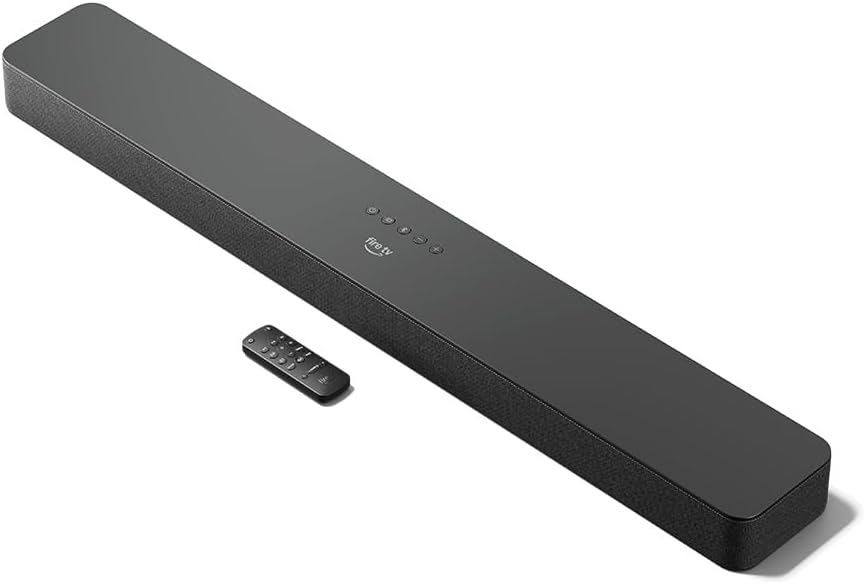
Figure 4: The Fire TV Soundbar Plus and its compact remote control.
Soundbar-г ажиллуулах
Үндсэн удирдлага
Use the included remote control to manage your soundbar's functions:
- Цахилгаан товч: Дууны самбарыг асаах эсвэл унтраана.
- Дууны хэмжээг нэмэгдүүлэх/доошруулах: Мастер дууны түвшинг тохируулна.
- Дууг хаах товч: Дууг хаадаг эсвэл нээдэг.
- Оролтын сонголт: Switches between HDMI, Optical, and Bluetooth inputs.
- Дууны горимууд: Cycles through optimized audio presets.
Дууны горимууд
The Fire TV Soundbar Plus offers several equalizer modes to optimize audio for different content types:
- Киноны горим: Enhances cinematic soundscapes with dynamic range and surround effects.
- Хөгжмийн горим: Provides balanced audio for music playback, emphasizing clarity and bass.
- Спортын горим: Optimizes audio for sports broadcasts, often enhancing commentary and crowd noise.
- Шөнийн горим: Гэнэтийн чанга дуу чимээнээс урьдчилан сэргийлэхийн тулд динамик хүрээг багасгадаг, шөнө оройтоход тохиромжтой viewing.
The soundbar features a dedicated central channel for dialogue, ensuring clear conversations in all modes, especially beneficial for movies and TV shows.

Figure 5: Internal components illustrating the integrated speakers, tweeters, and subwoofer for rich sound.

Figure 6: The soundbar delivering immersive audio with Dolby Atmos and DTS:X in a home environment.
Bluetooth дамжуулалт
You can stream audio from your phone or tablet to the Fire TV Soundbar Plus via Bluetooth. To connect:
- Press the Bluetooth button on the remote control or select Bluetooth input.
- Хөдөлгөөнт төхөөрөмж дээрээ Bluetooth тохиргоо руу орж, боломжтой төхөөрөмжүүдийн жагсаалтаас "Fire TV Soundbar Plus"-ыг сонгоно уу.
- Хосолсоны дараа таны төхөөрөмжийн аудио дууны самбараар тоглуулах болно.

Figure 7: Connecting a mobile device via Bluetooth to stream music or podcasts.
Fire TV Integration
For seamless integration with Fire TV devices (sold separately), you can control both your TV and the soundbar with a single remote. Audio settings can be customized directly within the Fire TV interface on selected models.
Засвар үйлчилгээ
To ensure the longevity and optimal performance of your Fire TV Soundbar Plus, follow these maintenance guidelines:
- Цэвэрлэгээ: Use a soft, dry cloth to clean the surface of the soundbar. Do not use liquid cleaners or abrasive materials, as they may damage the finish.
- Агааржуулалт: Хэт халалтаас урьдчилан сэргийлэхийн тулд дууны самбарын агааржуулалтын нүхнүүд бөглөрөөгүй эсэхийг шалгаарай.
- Програм хангамжийн шинэчлэлтүүд: Periodically check for firmware updates to ensure your soundbar has the latest features and performance improvements. Updates are typically delivered automatically when connected to a Fire TV device or can be performed via USB if available.
Алдааг олж засварлах
Хэрэв та Fire TV Soundbar Plus-тай холбоотой асуудалтай тулгарвал дараах нийтлэг асуудал болон шийдлүүдийг үзнэ үү.
| Асуудал | Боломжит шалтгаан | Шийдэл |
|---|---|---|
| Саундбараас ямар ч дуу алга. |
|
|
| Дуу гажиг эсвэл тодорхойгүй байна. |
|
|
| Алсын удирдлага ажиллахгүй байна. |
|
|
| Bluetooth холболттой холбоотой асуудлууд. |
|
|
Үзүүлэлтүүд
| Онцлог | Дэлгэрэнгүй |
|---|---|
| Soundbar Dimensions (LxWxH) | 94 см х 13.2 см х 6.4 см |
| Soundbar жин | 4 kg (Actual dimensions and weight may vary based on configuration and manufacturing process) |
| Чанга яригч сувгууд | 3.1 (integrated subwoofer) |
| Эквалайзер горимууд | Movie, Music, Sport, Night |
| Хүрээлэн буй орчны дууны дэмжлэг | Dolby Atmos, DTS:X |
| Портууд | HDMI (eARC/ARC), Optical, AC Power, USB-A |
| Bluetooth дэмжлэг | Тиймээ |
| Тохиромжтой байдал | Ухаалаг ТВ болон стриминг медиа тоглуулагчтай ТВ |
| Хайрцагт багтсан | Fire TV Soundbar Plus, remote control, HDMI 2.0 cable, 1 AC power cable, 2 AAA batteries, wall mount kit, Quick Start Guide |
Баталгаат болон дэмжлэг
The Fire TV Soundbar Plus comes with a one-year limited warranty provided by the manufacturer. This limited warranty is in addition to, and does not compromise, consumer rights. Consumers may have additional rights provided by law even after the limited warranty expires. Use of the Fire TV Soundbar Plus is subject to the terms indicated by Amazon.
For further assistance, please refer to the official Amazon support channels or the Quick Start Guide included with your product.


