Бүтээгдэхүүн дууссанview
The JTEMAN 360 Rotating Cell Phone Stand with Wireless Bluetooth Speaker with Light is a versatile device designed to enhance your mobile experience. It integrates a rotatable phone stand, a Bluetooth speaker, and an atmosphere light into a single unit. This manual provides detailed instructions for its setup, operation, and maintenance.
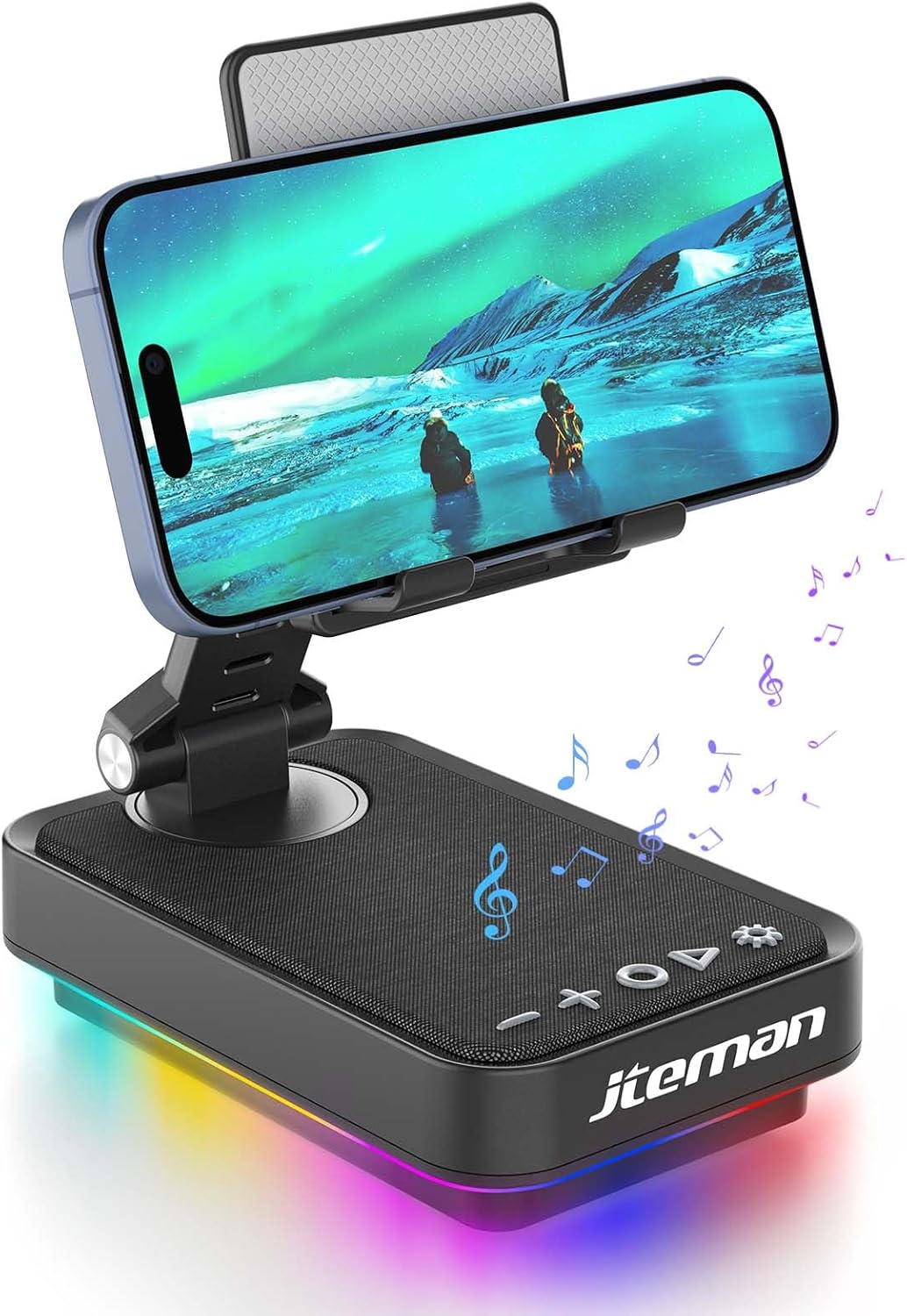
Figure 1: JTEMAN 360 Rotating Cell Phone Stand with Wireless Bluetooth Speaker with Light.
Оруулсан бүрэлдэхүүн хэсгүүд:
- Bluetooth Speaker (with integrated phone stand and light)
- Type-C кабель
- Зааварчилгааны гарын авлага
Тохируулах гарын авлага
1. Хайрцагнаас задлах, анхны үзлэг:
Carefully remove all components from the packaging. Inspect the device and accessories for any signs of damage. Ensure all listed components are present.
Video 1: Unboxing and initial setup of the JTEMAN phone stand and Bluetooth speaker.
2. Preparing the Phone Stand:
Before first use, locate and remove the silicone protective patch from the device's base. This patch protects the surface during shipping.
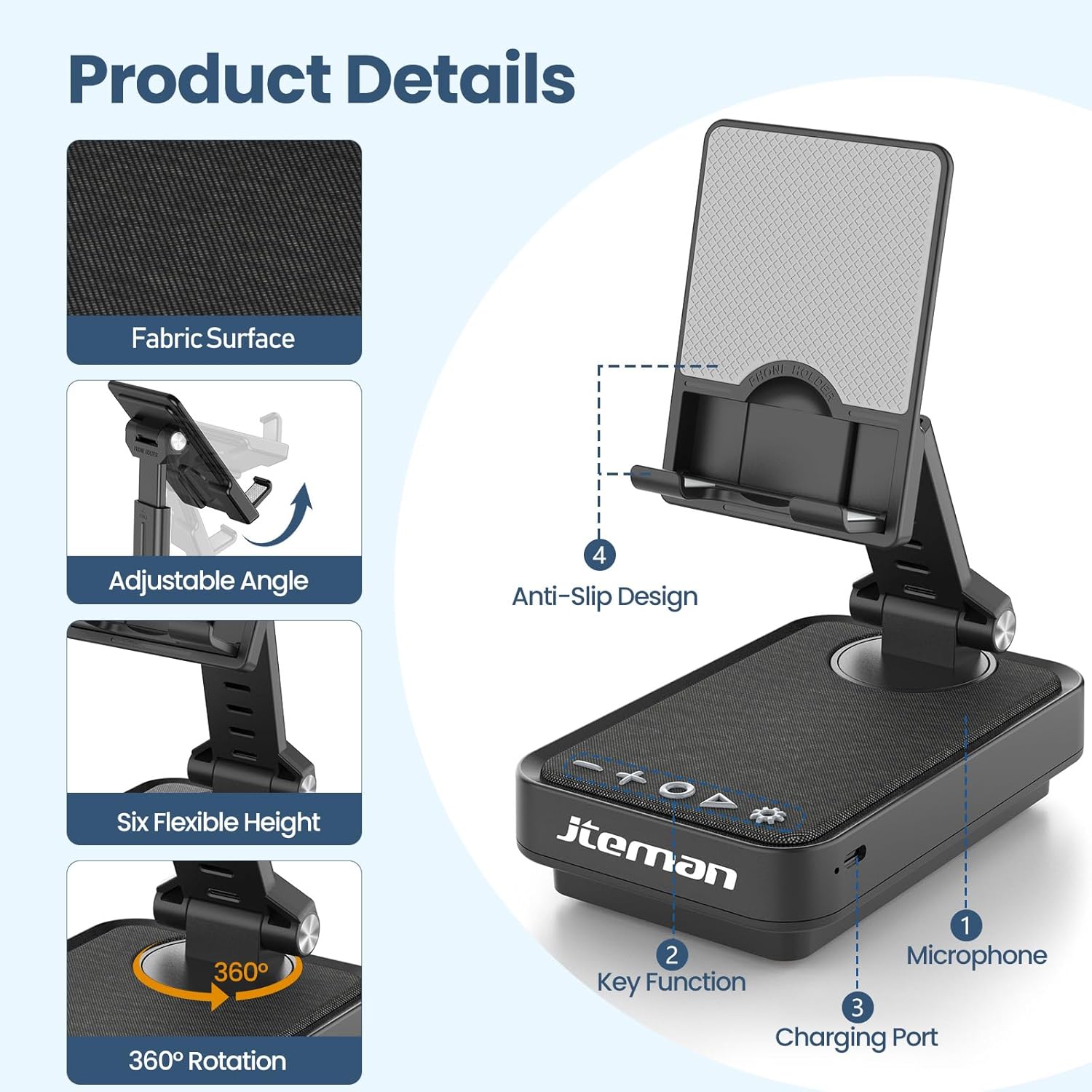
Figure 2: Product details and components. Note the anti-slip design and key functions.
3. Төхөөрөмжийг цэнэглэх:
Connect the provided Type-C cable to the charging port on the device and the other end to a compatible USB power adapter (not included). The power indicator light will show red during charging and turn green when fully charged.
- Улаан гэрэл: Батерейг цэнэглэж байна.
- Ногоон гэрэл: Батерей бүрэн цэнэглэгдсэн.

Figure 3: Battery capacity and estimated usage times.
4. Bluetooth -ийг хослуулах:
- Long press the Power ON/OFF button (3) for 3 seconds to turn on the speaker. The speaker will enter pairing mode, indicated by a flashing blue light.
- On your smartphone or tablet, navigate to Bluetooth settings.
- Select "L39-1" from the list of available devices.
- Once connected, the blue light will become solid.

Figure 4: Bluetooth connection with a laptop, demonstrating wireless audio playback.
Ашиглалтын заавар
Хяналтын самбар дууссанview:

Зураг 5: Нарийвчилсан view хяналтын самбар ба түүний функцууд.
- VOL- (1): Дууг багасгахын тулд дарна уу.
- VOL+ (2): Дууг нэмэгдүүлэхийн тулд дарна уу.
- Answer/Hang up/Play/Pause/Next (4):
- Хөгжим тоглуулах/түр зогсоохын тулд богино дарна уу.
- Short press to answer/hang up calls.
- Дараагийн дуу руу шилжихийн тулд удаан дарна уу.
- Power ON/OFF (3):
- Чанга яригчийг асаах/унтраахын тулд 3 секундын турш удаан дарна уу.
- Double press to switch between Bluetooth and AUX modes.
- Short press to adjust the brightness of the atmosphere lights (4 levels).
- Atmosphere Light (5):
- Long press for 3 seconds to turn on/off the light.
- Short press to switch lighting mode (11 modes available, 3 modes sync with music).
- Микрофон (6): Гар ашиглахгүй дуудлага хийх зориулалттай.
- Цэнэглэх порт (7): Type-C input for charging.
- Power Indicator Light (8): Shows charging status and Bluetooth connection status.
Phone Stand Adjustment:
The phone stand features 360° rotation and adjustable height and angle to suit various viewing needs. The anti-slip silicone pads ensure device stability.

Figure 6: The phone stand supports a wide range of devices, including smartphones and tablets (4-13 inches).
The stand is foldable for easy portability.

Figure 7: The foldable design allows for easy storage and transport.
Засвар үйлчилгээ
Цэвэрлэгээ:
Wipe the device with a soft, dry cloth. Do not use abrasive cleaners, solvents, or harsh chemicals, as these may damage the surface or internal components. Avoid exposing the device to excessive moisture.
Хадгалах:
When not in use for extended periods, store the device in a cool, dry place away from direct sunlight and extreme temperatures. Ensure the device is fully charged before storing to prolong battery life.
Батерейны арчилгаа:
To maximize battery lifespan, avoid fully discharging the battery frequently. Charge the device regularly, even if not in constant use. Do not expose the battery to high temperatures.
Алдааг олж засварлах
| Асуудал | Боломжит шалтгаан | Шийдэл |
|---|---|---|
| Төхөөрөмж асахгүй байна. | Батерей бага. | Төхөөрөмжийг өгөгдсөн Type-C кабелиар цэнэглэнэ үү. |
| Bluetooth-ээр холбогдож чадахгүй байна. | Төхөөрөмж дээр Bluetooth идэвхжээгүй; чанга яригчийг холбох горимд оруулаагүй; чанга яригчаас хэтэрхий хол байна. | Ensure Bluetooth is enabled on your phone/tablet. Long press Power ON/OFF button to enter pairing mode (flashing blue light). Move device closer to the speaker. |
| Чанга яригчаас дуу гарахгүй. | Volume too low; device not connected; AUX mode active. | Increase volume on both the speaker and your connected device. Verify Bluetooth connection. Double press Power ON/OFF button to switch to Bluetooth mode if in AUX mode. |
| Atmosphere lights not working. | Гэрэл унтраалттай байна; цэнэг бага байна. | Long press the Atmosphere Light button (5) to turn on. Charge the device. |
Үзүүлэлтүүд
| Онцлог | Дэлгэрэнгүй |
|---|---|
| Загварын нэр | L39-1 |
| Суурилуулах төрөл | Ширээний тавиур |
| Чанга яригчийн төрөл | Хүрээлэн буй орчны дуу чимээ |
| Онцлог шинж чанар | LED гэрэл |
| Зөвлөмж болгож буй хэрэглээ | Ухаалаг утас эсвэл таблетад зориулагдсан |
| Тохиромжтой төхөөрөмжүүд | Smartphone, Tablet (4-13 inches) |
| Хянагчийн төрөл | Товч, хүрнэ үү |
| Хүрээлэн буй орчны дууны суваг | 2.0 |
| Бүтээгдэхүүний хэмжээс | 5.3"D x 3.5"W x 2.3"H |
| Усны хамгаалалттай | ХУДАЛ |
| Эрчим хүчний эх үүсвэр | Батерейгаар ажилладаг |
| Зайны төрөл | 1 литийн ион (оруулсан) |
| Аудио драйверын төрөл | Динамик драйвер |
| Утасгүй холболт | Bluetooth 5.3 |
| Чанга яригчийн хамгийн их гаралтын чадал | 5 ватт |
| Давтамжийн хариу үйлдэл | 1 кГц |
| Зүйлийн жин | 15.5 унц |
Баталгаат хугацааны мэдээлэл
This JTEMAN product comes with a Нэг жилийн баталгаат хугацаа худалдан авсан өдрөөс эхлэн. Энэхүү баталгаа нь хэвийн ашиглалтын үед гарсан үйлдвэрлэлийн согог болон эвдрэлийг хамарна. Энэ нь буруу ашиглалт, осол, зөвшөөрөлгүй өөрчлөлт, эсвэл хэвийн элэгдэл, урагдалтаас үүдэлтэй хохирлыг хамрахгүй.
Please retain your proof of purchase for warranty claims. For detailed warranty terms and conditions, refer to the official JTEMAN webсайт эсвэл хэрэглэгчийн дэмжлэгтэй холбоо барина уу.
Хэрэглэгчийн дэмжлэг
If you encounter any issues or have questions not covered in this manual, please contact JTEMAN customer support. Provide your product model number (L39-1) and a detailed description of the issue to assist our support team.
For the most up-to-date contact information, please visit the official JTEMAN webсайт: JTEMAN Store on Amazon


