Танилцуулга
This manual provides detailed instructions for the safe and efficient operation of your DEWENWILS 24 Hour Programmable Digital Timer Outlet. This device is designed to automate the on/off cycles of your indoor electrical appliances, enhancing convenience and energy efficiency. Please read this manual thoroughly before use and retain it for future reference.
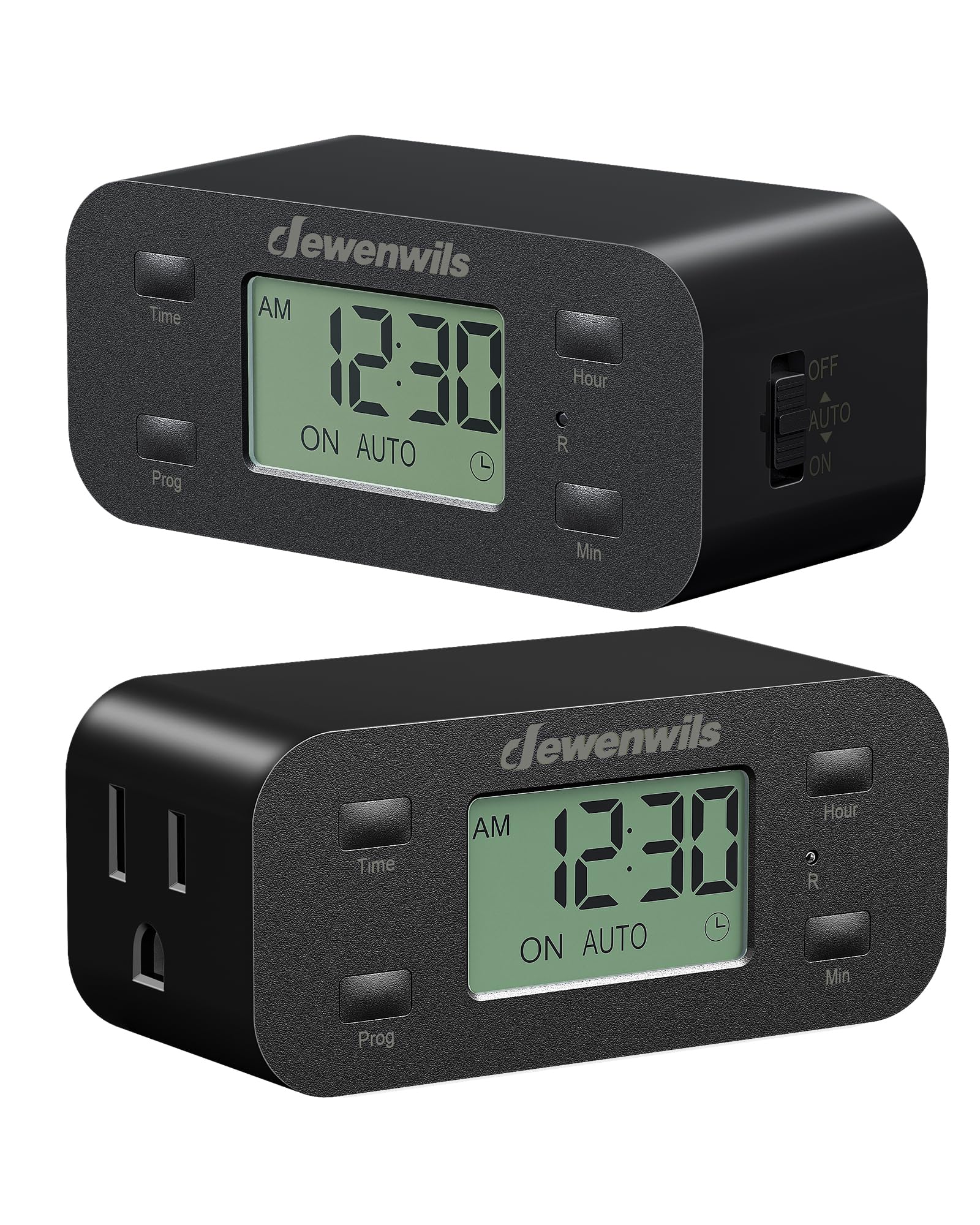
Зураг: Урд view of the DEWENWILS Digital Timer Outlet.
Аюулгүй байдлын мэдээлэл
- For indoor use only. Do not expose to rain or moisture.
- Do not exceed the maximum load rating of 125V/15A/1000W.
- Ensure the timer is fully inserted into a grounded outlet.
- Do not use with devices that require continuous supervision, such as power tools or heating appliances without safety cut-offs.
- Хүүхдийн гар хүрэхгүй газар хадгална.
- Do not disassemble or attempt to repair the device. Contact customer support if service is required.
Бүтээгдэхүүний онцлог
- 3 Group Daily Repeat Program: Set up to three daily on/off schedules.
- Minimalist & Functional Design: Гоолиг мэргэжлийнfile ensures other outlets remain accessible.
- Нөөц батерей: Retains programmed settings for up to 3 months during power interruptions.
- Чимээгүй гүйцэтгэл: Operates silently, suitable for bedrooms and quiet environments.
- Эрчим хүчний хэмнэлттэй: Automates device operation to save time and energy.
- Өргөн хэрэглээний програм: l-д тохиромжтойamps, fans, aquariums, plant lights, and holiday decorations.
Багцын агуулга
- 2 x DEWENWILS 24 Hour Programmable Digital Timer Outlets
- 1 х хэрэглэгчийн гарын авлага
Бүтээгдэхүүн дууссанview
Familiarize yourself with the components of your DEWENWILS Digital Timer Outlet.

Image: The large LCD screen display for easy reading of time and settings.

Image: Side switch for manual control (OFF, AUTO, ON).

Image: Space-saving design allows access to the second wall outlet.
Тохиргоо
Follow these steps to set up your DEWENWILS Digital Timer Outlet:
- Анхны тохиргоо: Before first use or after a long period of inactivity, use a small pin or paperclip to press the 'R' (Reset) button located on the front of the timer. This clears all previous settings.
- Одоогийн цагийг тохируулах:
- Press and hold the 'Time' button.
- While holding 'Time', press 'Hour' to adjust the hour.
- While holding 'Time', press 'Min' to adjust the minute.
- Release 'Time' when the correct time is set.
- Set a Program: The timer allows for up to 3 ON/OFF programs daily.
- Press the 'Prog' button once to enter Program 1 ON setting. The display will show '1 ON'.
- Use 'Hour' and 'Min' buttons to set the desired ON time for Program 1.
- Press 'Prog' again to enter Program 1 OFF setting. The display will show '1 OFF'.
- Use 'Hour' and 'Min' buttons to set the desired OFF time for Program 1.
- Repeat for Program 2 and Program 3 if needed.
- After setting all desired programs, press the 'Time' button to exit programming mode.

Image: Visual guide for resetting, setting the current time, and programming schedules.
Ашиглалтын заавар
Once programmed, select the desired operating mode using the side switch:
- AUTO горим: Slide the side switch to 'AUTO'. In this mode, the timer will automatically turn the connected device ON and OFF according to your programmed schedules. The display will show 'ON AUTO' or 'OFF AUTO'.
- Асаах горим: Slide the side switch to 'ON'. The connected device will remain continuously ON, overriding any programmed schedules. The display will show 'ON'.
- OFF горим: Slide the side switch to 'OFF'. The connected device will remain continuously OFF, overriding any programmed schedules. The display will show 'OFF'.

Зураг: Жишээ ньample of three daily repeat programs set on the timer.
Video Guide: Setup and Operation
Видео: Дууслааview of the DEWENWILS 24 Hour Programmable Digital Timer Outlet, including unboxing, setting the time, programming schedules, and using the manual switch.
Засвар үйлчилгээ
- Clean the timer with a dry, soft cloth. Do not use liquid cleaners or sprays.
- Ашиглаагүй үед сэрүүн, хуурай газар хадгална.
- Periodically check the timer and connected devices for any signs of damage or wear.
Алдааг олж засварлах
- Төхөөрөмж програмчлагдсаны дагуу асаалттай/унтраагдаагүй байна:
- Ensure the side switch is set to 'AUTO'.
- Verify that the current time is set correctly.
- Check that the ON and OFF times for your programs are correctly entered and do not overlap unintentionally.
- Confirm the connected device is functioning properly when plugged directly into a wall outlet.
- Дэлгэц хоосон эсвэл бүдэг байна:
- Таймерыг хүчдэлтэй цахилгаан залгуурт найдвартай залгасан эсэхийг шалгаарай.
- The backup battery may be low. Plug the timer into an outlet for several hours to charge the internal battery.
- Цахилгаан унтраасны дараа тохиргоо алдагдсанtage:
- The internal backup battery may be depleted. The battery retains settings for up to 3 months. If the outage exceeds this, settings may need to be re-entered.
Үзүүлэлтүүд
- Ботьtage: 125V хувьсах гүйдэл
- Давтамж: 60 Гц
- Хамгийн их ачаалал: 15А / 1000Вт
- Материал: Хуванцар
- Бүтээгдэхүүний хэмжээ: 4.21"D x 1.85"W x 3.62"H
- Барааны жин: 7.4 унц
- Тохиргооны тоо: 3 daily ON/OFF programs
- Өнгө: Хар
Баталгаат болон дэмжлэг
DEWENWILS products are designed for reliability and performance. For warranty information, technical support, or assistance with your product, please refer to the contact details provided on the product packaging or visit the official DEWENWILS website. Please have your model number (B0D2RM248G) ready when contacting support.


