1. Танилцуулга
Thank you for choosing the llano NP-W235 Battery Charger Set. This manual provides essential information for the safe and efficient use of your new battery charger and batteries. This set is designed to provide reliable power for your Fujifilm cameras, including models such as the X-T5, X-T4, X-H2, X-H2S, GFX100 II, GFX100S, and GFX50S II.
Бүтээгдэхүүнийг ажиллуулахын өмнө энэ гарын авлагыг сайтар уншиж, цаашид лавлах зорилгоор хадгална уу.
2. Бүтээгдэхүүн дууссанview
Багцын агуулга
- 1 x llano Dual Slot NP-W235 Battery Charger
- 2 x llano 2400mAh NP-W235 Batteries
- 1 х USB-C цэнэглэх кабель
- 1 х хадгалах уут
- 1 x оосор
- 1 х хэрэглэгчийн гарын авлага
Гол онцлогууд
- Dual Slot Charging: Simultaneously charge two NP-W235 batteries.
- Өндөр хүчин чадалтай батерей: Two 2400mAh batteries provide extended shooting time.
- Хурдан цэнэглэх: Supports QC3.0 & PD3.0 for rapid charging (up to 18W PD output).
- Дижитал дэлгэц: Real-time battery level and charging status indication.
- Нэгдсэн хадгалах сан: Doubles as a storage box for two batteries and one SD card.
- Олон хамгаалалтын систем: 10-layer safety protection against overcharge, overheating, short circuits, and more.
- Олон талт цахилгаан оролт: Charge via wall outlet, car adapter, power bank, or laptop.

Image 2.1: The llano NP-W235 Dual Battery Charger Set, including the charger and two batteries.
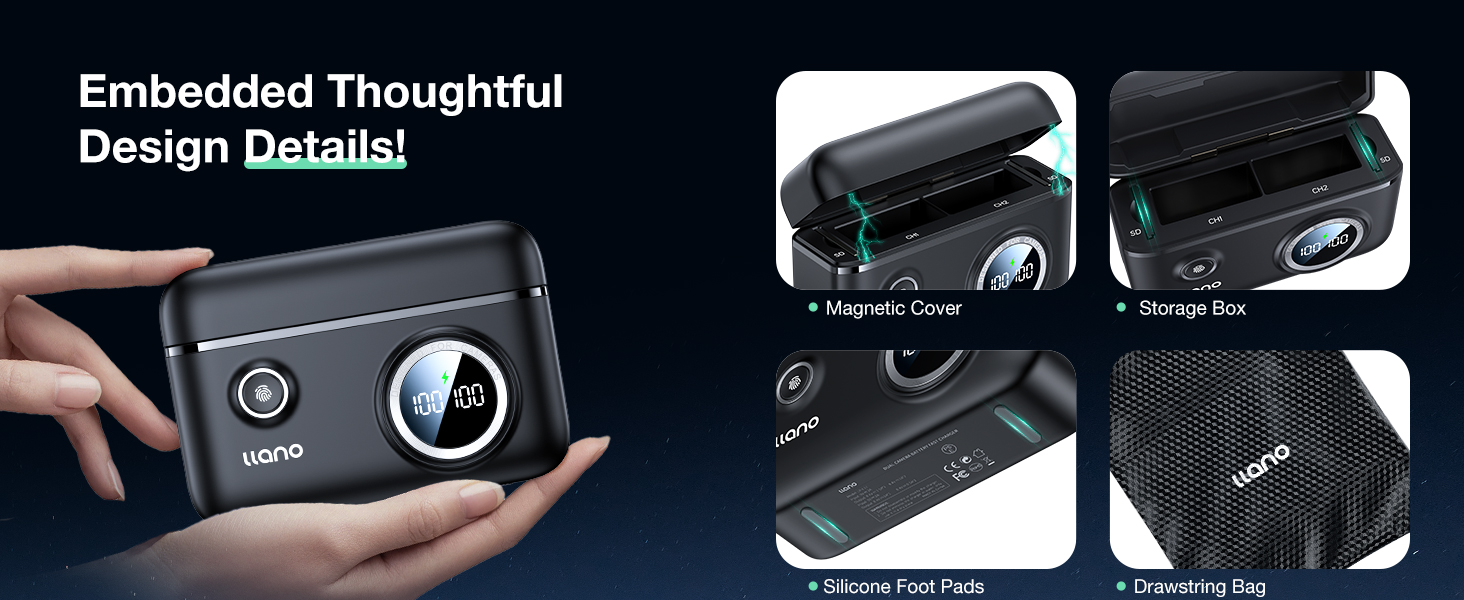
Image 2.2: The compact and portable design of the llano NP-W235 charger.

Image 2.3: Compatibility of the llano NP-W235 charger with Fujifilm cameras.
3. Тохиргоо
Батерейг оруулах
- Open the magnetic cover of the llano charger.
- Align the metal contacts of the NP-W235 battery with the contacts inside the charging slot (CH1 or CH2).
- Gently push the battery into the slot until it is securely seated. You can insert one or two batteries.
- Close the magnetic cover to protect the batteries and contacts.
Цэнэглэгчийг холбох
- Connect the provided USB-C charging cable to the USB-C port on the side of the llano charger.
- Connect the other end of the USB-C cable to a compatible power source (e.g., a USB wall adapter, power bank, or laptop). For optimal fast charging, use an 18W or higher PD (Power Delivery) or QC (Quick Charge) compatible adapter.

Image 3.1: Connecting the llano charger for fast charging.
4. Ашиглалтын заавар
Цэнэглэх үйл явц
- Once connected to a power source, the digital display on the charger will activate, showing the current charge level of each inserted battery.
- A lightning bolt icon will appear on the display to indicate that fast charging mode is active.
- The display will show '100 100' when both batteries are fully charged.
- Charging time for two 2400mAh batteries is approximately 2.8 hours with an 18W PD charger.
Батерейны түвшинг шалгаж байна
Even when not connected to a power source, you can check the battery levels. Simply press the small button located next to the 'llano' logo on the charger. The digital display will briefly show the charge percentage of each inserted battery.

Image 4.1: Digital display for instant battery level recognition and charging status.
Цэнэглэх олон сонголт
The charger offers flexibility in power sources:
- Ханын цэнэглэгч: Use with a compatible USB wall adapter.
- Машины цэнэглэгч: Connect to a USB car adapter for on-the-go charging.
- Цахилгаан банк: Ideal for outdoor or remote charging.
- Зөөврийн компьютер: Connect to your laptop's USB port.

Image 4.2: Various power sources for the llano NP-W235 charger.
Видео 4.1: Дууслааview of the llano 2-Pack NP-W235 Batteries & Charger for Fujifilm XT5 XT4, demonstrating its features and use.
5. Засвар үйлчилгээ
Арчилгаа, цэвэрлэгээ
- Keep the charger and batteries dry. Do not expose them to moisture or extreme temperatures.
- Clean the charger and battery contacts with a soft, dry cloth. Avoid using harsh chemicals or abrasive materials.
- Ensure the magnetic cover is closed when not in use to protect the charging slots and any stored SD cards.
Хадгалах
- Store the charger and batteries in a cool, dry place away from direct sunlight.
- For long-term storage, it is recommended to charge the batteries to about 50-70% capacity.
- The charger's integrated storage box helps keep batteries and an SD card organized and protected.

Image 5.1: Thoughtful design details including magnetic cover and storage.
Аюулгүй байдлын онцлогууд
The llano NP-W235 charger incorporates a 10-layer safety protection system to ensure safe operation and prolong battery life:
- Хэт халалтаас хамгаалах
- Хэт ихtage Хамгаалалт
- Хэт цэнэгийн хамгаалалт
- Хэт гүйдлийн хамгаалалт
- Богино залгааны хамгаалалт
- Battery PTC Protection
- Хэт цэнэгийн хамгаалалт
- Recovery Protection
- Хэт хүчнээс хамгаалах
- Trickle Charging Protection

Image 5.2: The 10-layer safety protection system of the llano charger.
6. Алдаа засах
If you encounter issues with your llano NP-W235 Battery Charger Set, please refer to the following common solutions:
- Цэнэглэгч асахгүй байна: Ensure the USB-C cable is securely connected to both the charger and a functional power source. Try a different USB-C cable or power adapter.
- Батерейнууд цэнэглэгдэхгүй байна: Verify that the batteries are correctly inserted into the charging slots with contacts aligned. Check if the digital display shows a charging indicator. If not, try re-inserting the batteries or using a different slot.
- Удаан цэнэглэх: Ensure your power adapter supports PD3.0 or QC3.0 and provides at least 18W output for optimal fast charging. Lower wattage adapters will result in slower charging times.
- Inaccurate battery level display: This can sometimes occur due to minor fluctuations. Remove and re-insert the battery, then press the check button. If the issue persists, fully charge and discharge the battery once to recalibrate.
- Overheating during charging: The charger has built-in overheating protection. If it feels excessively hot, disconnect it from the power source and allow it to cool down in a well-ventilated area. Ensure there is no obstruction around the charger.
If the problem persists after trying these steps, please contact llano customer support for further assistance.
Video 6.1: A brief demonstration of the llano NP-W235 charger, showing its functionality and components.
7. Техникийн үзүүлэлтүүд
| Онцлог | Тодорхойлолт |
|---|---|
| Загварын дугаар | NP-W235 |
| Зайны багтаамж | 2400 мАч (батерей тус бүр) |
| Гаралтын ботьtage | 8.4 вольт |
| Цэнэглэх оролт | USB-C (PD3.0 & QC3.0 compatible, up to 18W) |
| Бүтээгдэхүүний хэмжээс | 4.25 x 1.73 x 3.27 inches (charger) |
| Зүйлийн жин | 14.4 унц (нийт багц) |
| Тохиромжтой байдал | Fujifilm X-T5, X-T4, X-H2, X-H2S, GFX100 II, GFX100S, GFX50S II |
| Аюулгүй байдлын хамгаалалт | Overcharge, Overheating, Short Circuit, Overvoltage, Overcurrent, Overdischarge, Battery PTC, Recovery, Overpower, Trickle Charging |
8. Баталгаат хугацаа ба дэмжлэг
Баталгаат хугацааны мэдээлэл
llano products are manufactured to high-quality standards and come with a limited warranty. Please refer to the product packaging or the official llano webТанай бүс нутагт хамаарах баталгаат нөхцөл, нөхцөлийг сайтаас авна уу.
Хэрэглэгчийн дэмжлэг
For any questions, technical assistance, or warranty claims, please contact llano customer support through the following channels:
- Имэйл: support@llano.com (exampлэ)
- Webсайт: www.llano.com (жишээ ньampлэ)
- Утас: +1-800-XXX-XXXX (exampлэ)
Please have your product model number (NP-W235) and purchase details ready when contacting support.


