Танилцуулга
The PeriPage P40 is a sleek, portable mini thermal printer designed for mobile and wireless printing. It utilizes Bluetooth connectivity and requires no ink, making it suitable for printing documents, photos, and even tattoo stencils directly from your Android or iOS device. This manual provides comprehensive instructions for setting up, operating, and maintaining your P40 printer.

Image: The PeriPage P40 Mini Thermal Printer, a compact white device.
Аюулгүй байдлын мэдээлэл
- Do not disassemble, repair, or modify the printer.
- Keep the printer away from water, moisture, and direct sunlight.
- Зөвхөн заасан цэнэглэгч кабель болон тэжээлийн адаптерийг ашиглана уу.
- Хэвлэсний дараа хэвлэх толгойд хүрэхээс зайлсхий, учир нь энэ нь халуун байж магадгүй.
- Store the printer and thermal paper in a cool, dry place.
- Хүүхдийн гар хүрэхгүй газар хадгална.
Багцын агуулга
Хайрцагнаас задлахдаа багцын агуулгыг шалгана уу:
- PeriPage P40 Mini Thermal Printer
- Thermal Paper Roll (Included Components: Paper)
- USB Type-C цэнэглэх кабель
- Хэрэглэгчийн гарын авлага (энэ баримт бичиг)
Бүтээгдэхүүн дууссанview
Familiarize yourself with the various parts of your PeriPage P40 printer.

Зураг: Нарийвчилсан view of the PeriPage P40 printer showing the Power Button with Indicator Light, Cover-open Button, Type-C Interface for charging/connection, and the internal mechanism for easy paper replacement.
- Power Button / Indicator Light: Принтерийг асаах/унтраахад ашигладаг бөгөөд төлөвийг заана.
- Cover-open Button: Releases the top cover for paper loading.
- Type-C интерфейс: For charging the printer and connecting to a computer (if applicable, though primarily Bluetooth).
- Цаасны гаралтын үүр: Where printed paper emerges.
- Цаасан тасалгаа: Holds the thermal paper.
Тохиргоо
1. Принтерийг цэнэглэж байна
Before first use, fully charge the printer. Connect the provided USB Type-C cable to the printer's Type-C interface and the other end to a USB power adapter (not included) or a computer's USB port. The indicator light will show charging status (e.g., red while charging, green when fully charged).
The printer features a 2600mAh battery, offering approximately 3 hours of continuous printing or up to 90 days of standby time on a full charge, capable of printing around 360 papers.
Image: Information graphic detailing the PeriPage P40's battery performance: 90 days standby, 2600mAh battery, 3 hours continuous print, and 360 papers print per full charge.
2. Installing Thermal Paper
The PeriPage P40 supports two types of thermal paper: folding paper and inner roll paper.

Image: Illustration showing the two supported paper types for the PeriPage P40: Folding Paper for automatic paging and multiple paper printing, and Inner Roll Paper for portability, free space, and customized paper length.
- Press the Cover-open Button to open the printer's top cover.
- Insert the thermal paper into the paper compartment, ensuring the printing side faces the print head. For roll paper, ensure it unwinds from the bottom. For folding paper, align it correctly.
- Pull a small amount of paper out of the paper exit slot.
- Дээд тагийг байрандаа товших чимээ гартал сайтар хаа.
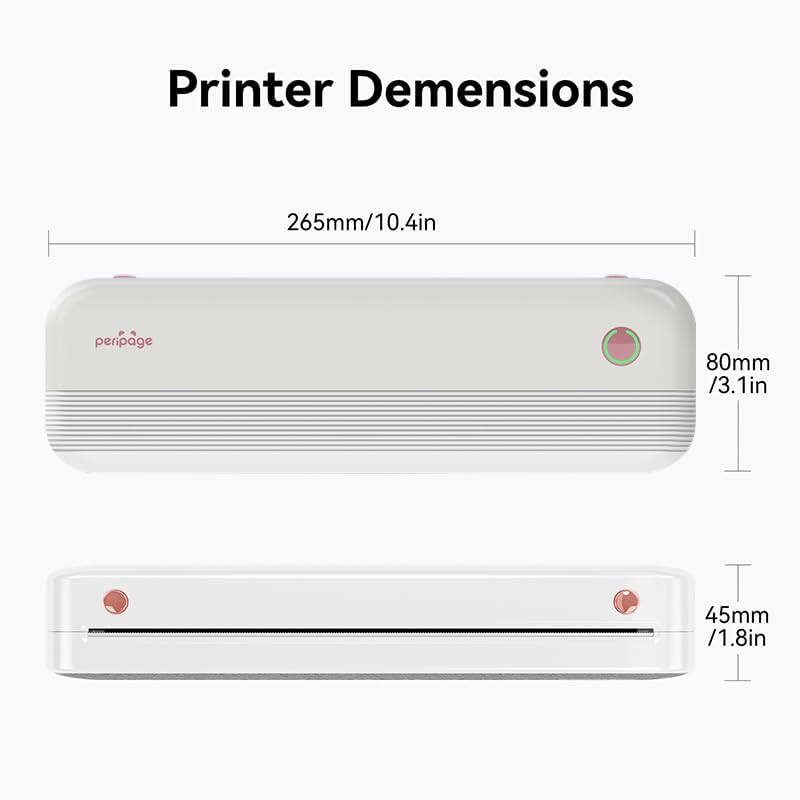
Image: The PeriPage P40 printer actively printing a document, with paper emerging from the front slot.
3. App Download and Bluetooth Connection
The PeriPage P40 printer operates via the dedicated "PeriPage" mobile application.
- хайх "PeriPage" in your device's APP store (Google Play Store for Android, Apple App Store for iOS) and download the official application. Alternatively, scan the QR code provided in the physical instruction manual to download the app.
- Ensure your printer is turned on and fully charged.
- Мобайл төхөөрөмж дээрээ Bluetooth-г идэвхжүүлнэ үү.
- Open the "PeriPage" app. The app will guide you through connecting to your printer via Bluetooth. Select "P40" from the list of available devices.
- Once connected, the indicator light on the printer may change color or status to confirm the connection.
Ашиглалтын заавар
Асаах/унтраах
- Асаахын тулд: Press and hold the Power Button until the indicator light illuminates.
- Унтраахын тулд: Press and hold the Power Button until the indicator light turns off.
Printing from the App
Once your printer is connected to the PeriPage app:
- Open the PeriPage app on your smartphone.
- Select the type of content you wish to print (e.g., document, photo, web page, note).
- Adjust print settings such as density, size, and orientation within the app as needed.
- Confirm your selection and tap the print icon. The printer will begin printing.
Засвар үйлчилгээ
- Хэвлэх толгойг цэвэрлэх: If print quality degrades, gently wipe the print head with a cotton swab lightly dampened with isopropyl alcohol. Ensure the printer is off and cool before cleaning. Allow it to dry completely before use.
- Гадна цэвэрлэгээ: Use a soft, dry cloth to wipe the printer's exterior. Do not use abrasive cleaners or solvents.
- Хадгалах: When not in use for extended periods, turn off the printer and store it in a cool, dry place away from direct sunlight and extreme temperatures. Remove any paper if storing for very long durations to prevent dust accumulation.
Алдааг олж засварлах
| Асуудал | Боломжит шалтгаан | Шийдэл |
|---|---|---|
| Принтер асахгүй байна. | Батерей бага эсвэл цэнэггүй. | Connect the printer to a power source and charge it fully. |
| Bluetooth-ээр холбогдож чадахгүй байна. | Bluetooth is off on device; printer not in pairing mode; app issue. | Ensure Bluetooth is enabled on your phone. Restart the printer and the app. Try pairing again within the PeriPage app. |
| Poor print quality / Blank prints. | Incorrect paper loading; low battery; dirty print head; non-thermal paper. | Ensure thermal paper is loaded correctly with the print side facing up. Charge the printer. Clean the print head. Use only thermal paper. |
| Цаасан саатал. | Буруу цаас ачаалах; гадны биет. | Turn off the printer. Open the cover and carefully remove any jammed paper. Ensure paper is loaded straight. |
Үзүүлэлтүүд

Image: Diagram illustrating the dimensions of the PeriPage P40 printer: 265mm/10.4in (length), 80mm/3.1in (width), and 45mm/1.8in (height).
| Онцлог | Дэлгэрэнгүй |
|---|---|
| Загварын нэр | PeriPage-P40 |
| Хэвлэлийн технологи | Дулааны |
| Холболтын технологи | Bluetooth |
| Тохиромжтой төхөөрөмжүүд | Ухаалаг утаснууд (Андройд, iOS) |
| Шийдвэр | 300 x 300 dpi (Max Black and White Print Resolution, Max Color Print Resolution) |
| Хамгийн их медиа хэмжээ | 210mm (8.26"x11.69" Sheet Size) |
| Хэвлэл мэдээллийн хэрэгсэл | Thermal Paper (Folding Paper, Inner Roll Paper) |
| Хамгийн их оролтын хуудасны багтаамж | 10 |
| Принтерийн гаралт | Монохром |
| Батерей | 2600mAh (approx. 3 hours continuous print, 90 days standby) |
| Бүтээгдэхүүний хэмжээс | 2.5"D x 11"W x 4.1"H (ойролцоогоор 265мм x 80мм x 45мм) |
| Зүйлийн жин | 2.18 фунт |
| Өнгө | Цагаан |
Баталгаат болон дэмжлэг
For warranty information and technical support, please refer to the warranty card included with your product or visit the official PeriPage webсайт. Худалдан авалтын баримтаа баталгаат нэхэмжлэлд зориулж худалдан авалтын баталгаа болгон хадгална уу.
For further assistance, you may contact PeriPage customer service through the contact information provided on their official website or within the PeriPage mobile application.


