1. Танилцуулга
Thank you for choosing the ZEEHOO CT-X 3-in-1 Qi2 Wireless Charging Station. This device is designed to efficiently charge your iPhone (12 series and newer), Apple Watch (all series), and AirPods (with wireless charging case) simultaneously. Featuring Qi2 certification and a rotating MagSafe stand, it offers a convenient and clutter-free charging experience.
2. Бүтээгдэхүүн дууссанview
The ZEEHOO CT-X is a compact and versatile charging solution. It integrates three charging areas into a single unit:
- 15W Qi2 Certified MagSafe Charger: Provides fast and secure magnetic wireless charging for compatible iPhones.
- Apple Watch цэнэглэгч: Dedicated charging module for all Apple Watch models.
- AirPods Wireless Charging Pad: Conveniently charges AirPods with a wireless charging case.
A unique feature is the auto-rotating MagSafe stand, allowing for flexible viewing angles for your iPhone, ideal for Nightstand Mode or media consumption.
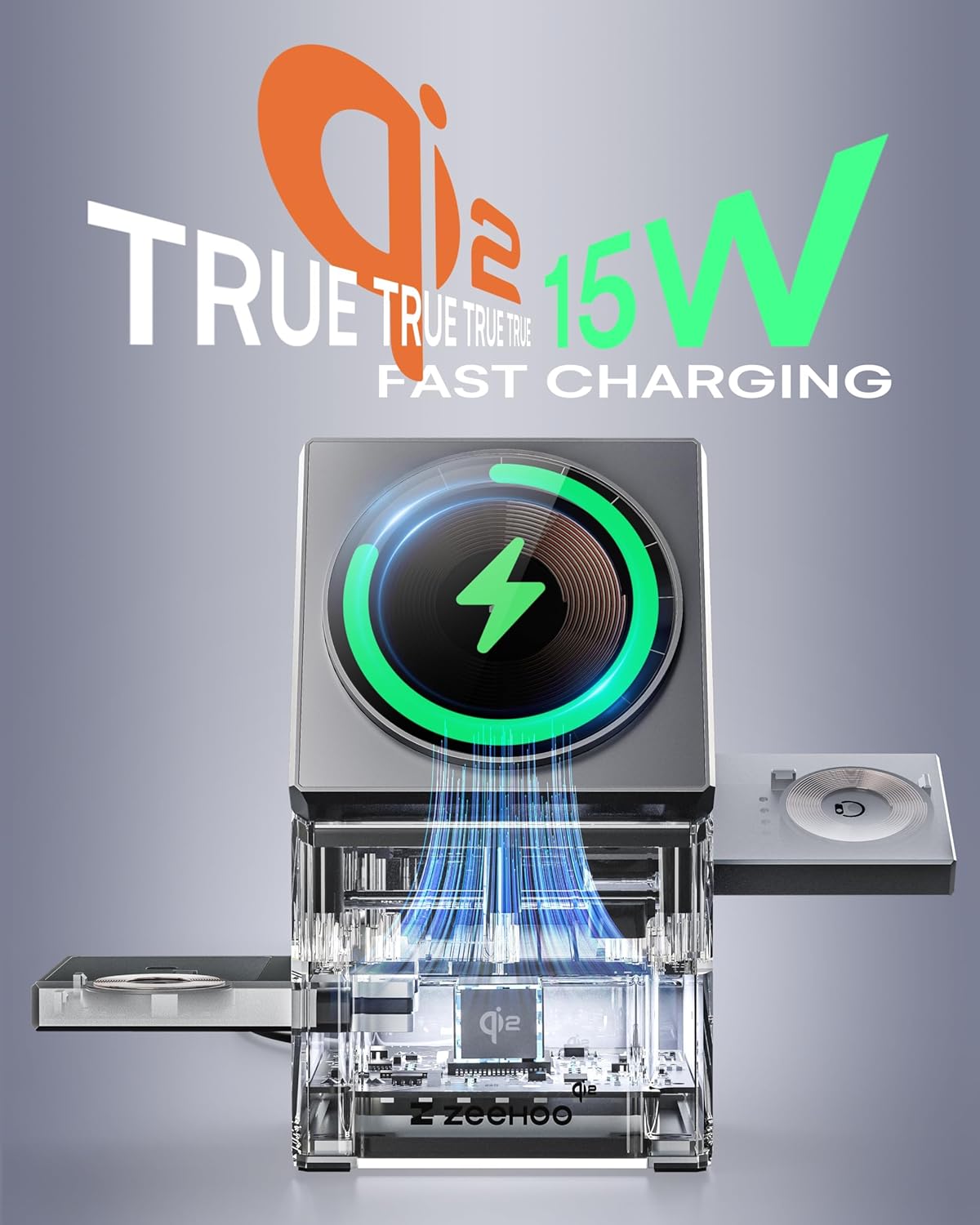
Image: The ZEEHOO CT-X charging station highlighting its 15W Qi2 fast charging capability for iPhones.

Image: The ZEEHOO CT-X charging station powering an iPhone, Apple Watch, and AirPods simultaneously.
3. Хайрцагт юу байна
Your ZEEHOO CT-X package includes:
- 1 x ZEEHOO CT-X Qi2 15W Fast Wireless Charging Station
- 1 x 30W Fast Charger Adapter
- 1 х 1.5м USB-C-аас USB-C кабель
4. Тохируулах заавар
- Цахилгаан хувиргагчийг холбоно уу: Plug the provided 1.5m USB-C to USB-C cable into the USB-C port on the back of the charging station. Connect the other end of the cable to the 30W fast charger adapter, then plug the adapter into a wall outlet.
- Асаах: The charging station will illuminate, indicating it is powered on and ready for use.
- Extend Charging Modules: Gently press the designated buttons or areas to extend the Apple Watch charging module and the AirPods charging pad. Refer to the diagram below for specific locations.
Image: Visual guide for extending the charging modules and utilizing the touch rotation feature.
5. Ашиглалтын заавар
iPhone-оо цэнэглэж байна
- Ensure your iPhone is MagSafe compatible (iPhone 12 series or newer) and, if using a case, it is a magnetic phone case.
- Place your iPhone onto the central magnetic charging pad. It will snap into place securely.
- тохируулахын тулд viewing angle, gently touch the button on the side of the main charging module. The iPhone charging pad will auto-rotate between vertical and angled positions.
Apple цагаа цэнэглэж байна
- Extend the Apple Watch charging module from the side of the station.
- Place your Apple Watch onto the charging puck. Ensure it is properly aligned and begins charging.
AirPod-оо цэнэглэж байна
- Extend the AirPods wireless charging pad from the other side of the station.
- Place your AirPods case (with wireless charging capability) onto the pad. Ensure the charging indicator on your AirPods case illuminates.

Image: The charging station in use on a nightstand, displaying an iPhone in Nightstand Mode, an Apple Watch, and AirPods charging.
6. Тохиромжтой байдал
The ZEEHOO CT-X is designed for a wide range of Apple devices:
- iPhone: iPhone 12, 13, 14, 15, 16, 17 Series (including Pro, Pro Max, Mini, Plus, Air models). Only compatible with magnetic phone cases.
- Apple цагнууд: All Apple Watch series.
- AirPods: AirPods Pro (1-3), AirPods (3&4), AirPods 2 (with Wireless Charging Case).

Image: A visual representation of the charging station's compatibility with various Apple devices.
7. Аюулгүй байдлын мэдээлэл
- Use only the provided 30W fast adapter and USB-C cable for optimal performance and safety.
- Төхөөрөмжийг ус, чийг, хэт өндөр температурт бүү тавь.
- Avoid disassembling or modifying the charging station.
- Хүүхдийн гар хүрэхгүй газар хадгална.
- Ensure proper ventilation around the charging station during use.
8. Засвар үйлчилгээ
- Clean the charging station with a soft, dry cloth. Do not use abrasive cleaners or solvents.
- Regularly check the USB-C cable for any signs of wear or damage. Replace if necessary.
- Ensure the charging surfaces are free from dust and debris to maintain efficient charging.
9. Алдаа засах
| Асуудал | Боломжит шалтгаан | Шийдэл |
|---|---|---|
| Төхөөрөмжийг цэнэглэхгүй байна | Incorrect placement, incompatible case, power issue, foreign object. | Ensure device is centered on the charging area. Remove non-magnetic cases. Check power connection. Remove any metal objects between device and charger. |
| Удаан цэнэглэж байна | Using a non-30W adapter, background apps, device overheating. | Use the provided 30W adapter. Close unnecessary apps. Ensure proper ventilation. |
| iPhone MagSafe not rotating | Not powered on, touch button not activated. | Ensure the station is powered on. Gently touch the designated button for rotation. |
| Apple Watch/AirPods not charging | Module not fully extended, improper alignment. | Ensure the respective charging module is fully extended. Align the device correctly on the charging puck/pad. |
10. Техникийн үзүүлэлтүүд
- Бүтээгдэхүүний хэмжээ: 2.5 x 2.5 x 4 инч
- Барааны жин: 11.5 унц
- Оролтын хэмжээtage: 120 вольт
- Ampарилгах: 3 Amps
- Нийт USB портууд: 1 (USB Type C for power input)
- Утасгүй цэнэглэх гаралт: 15W (iPhone), 2.5W (Apple Watch), 5W (AirPods)
- Онцлог шинж чанарууд: Fast Charging Station, Magnetic Charger Stand, MagSafe Compatible, Rotating Charging for iPhone, Qi2 Certified.
11. Баталгаат хугацаа ба дэмжлэг
The ZEEHOO CT-X 3-in-1 Qi2 Wireless Charging Station comes with a 12 сарын баталгаат хугацаа. For any product inquiries, technical support, or warranty claims, please contact ZEEHOO customer service through the retailer where you purchased the product or visit the official ZEEHOO webсайт.
Жич: A 2-Year and 3-Year Protection Plan may be available for purchase separately from your retailer.


