1. Танилцуулга
Thank you for choosing the Ebitcam Security Camera. This manual provides detailed instructions on how to set up, operate, and maintain your camera. This 3-megapixel camera offers robust security features, including IP66 weather resistance for both indoor and outdoor environments, two-way audio, and advanced AI-powered detection capabilities. Enjoy peace of mind with 24-hour monitoring and remote access from your smartphone.

The Ebitcam security camera provides high-resolution monitoring for various environments.
2. Багцын агуулга
Дараах зүйлсийн багцад байгаа эсэхийг шалгана уу.
- Ebitcam Security Camera (Model 8311)
- Эрчим хүчний адаптер
- Суурилуулах эрэг ба ханын залгуур
- Хэрэглэгчийн гарын авлага
3. Бүтээгдэхүүн дууссанview
Familiarize yourself with the components of your Ebitcam security camera:

The camera features a lens, status LED, microphone, and a durable IP66-rated casing.
- Линз: Foo видеог авдагtage.
- Статус LED: Indicates camera status (e.g., power, connection).
- Микрофон: Аудио оролт болон хоёр талын харилцаа холбооны зориулалттай.
- Илтгэгч: Аудио гаралт болон хоёр талын холбооны зориулалттай.
- SD картны үүр: Supports up to 512GB microSD card for local storage. Located under the lens.
- Дахин тохируулах товч: Used to reset the camera to factory settings. Located under the lens.
- Эрчим хүчний порт: Цахилгаан адаптерт холбогдоно.
- Суурилуулах суурь: Integrated base for various installation options.
4. Тохиргоо
4.1 Анхдагч асаалт
- Connect the power adapter to the camera's power port and plug it into a power outlet.
- Wait for the camera's status LED to indicate it is ready for setup (refer to app instructions for specific LED behavior).
4.2 Апп татаж авах, дансны бүртгэл
- Download the "Ebitcam" app from your smartphone's app store (available for iPhone and Android).
- Аппликешныг нээгээд дэлгэцэн дээрх зааврыг дагаж шинэ бүртгэл бүртгүүлэх эсвэл хэрэв танд бүртгэл байгаа бол нэвтэрнэ үү.
- Add your camera by scanning the QR code located on the camera body using the app.
4.3 Wi-Fi холболт
- The camera supports 2.4GHz Wi-Fi networks only. Ensure your smartphone is connected to a 2.4GHz Wi-Fi network during setup.
- Follow the app's prompts to connect the camera to your Wi-Fi network.
- For optimal performance, choose an installation location with a strong Wi-Fi signal.
4.4 Физик суурилуулалт
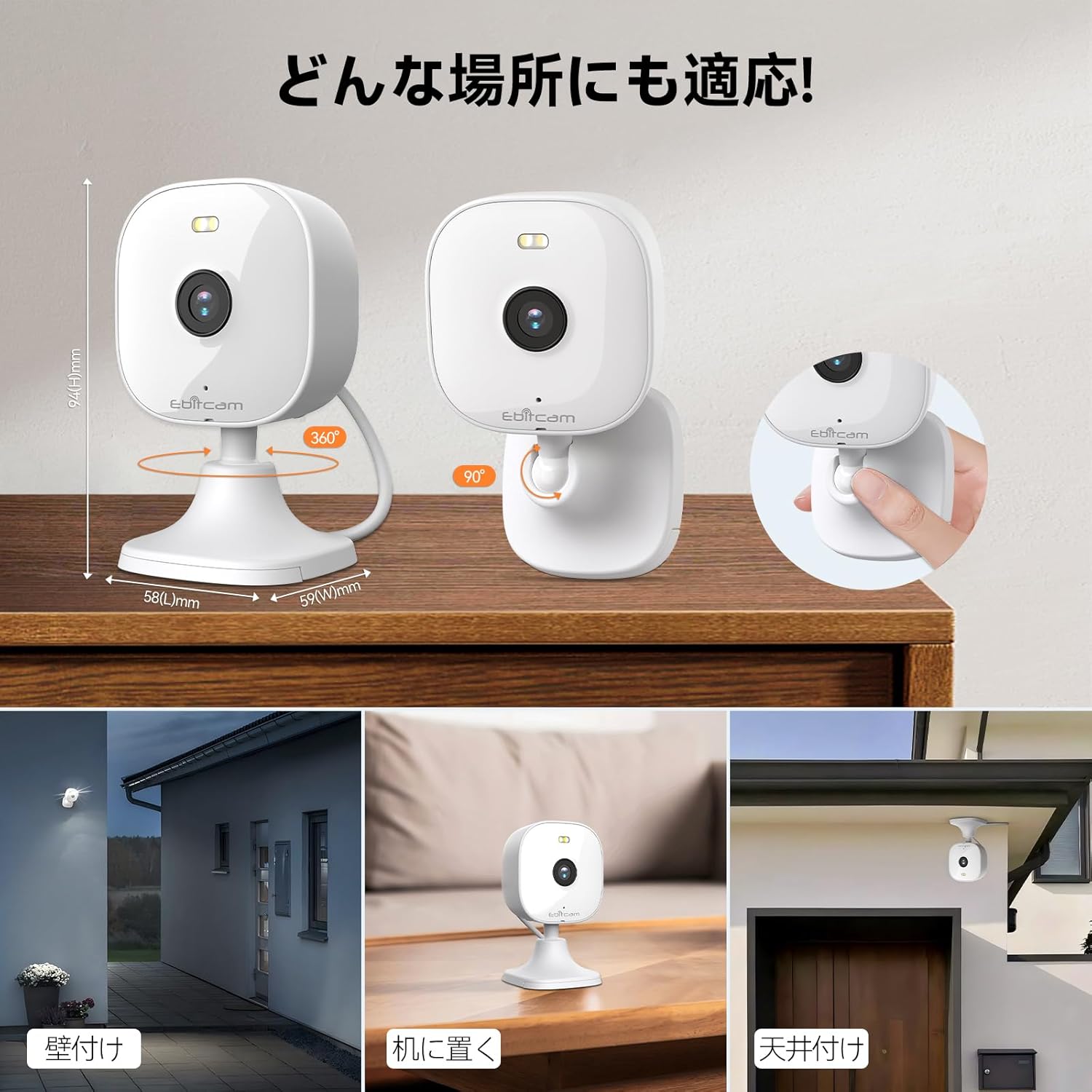
Камер нь олон талын холбох сонголтыг санал болгодог:

The camera can be mounted on walls, ceilings, or placed on a tabletop.
- Ширээний тавцангийн байршил: Simply place the camera on a flat surface. The integrated base allows for stable positioning.
- Хананд/таазны бэхэлгээ: The camera's base can be detached by gently pulling the camera from its base. Use the included mounting screws and wall plugs to secure the base to your desired wall or ceiling location. Then, reattach the camera to the mounted base.
Note: The product package includes matching screw mounting tools for installation.
5. Ашиглалтын заавар
5.1 Амьд View болон Бичлэг
Access the live video feed and manage recordings through the Ebitcam app.

The camera supports 2K (1296p) resolution for clear video capture.
- Шууд хангамж: Програмаа нээгээд камераа сонгоно уу view the real-time video stream.
- Үргэлжлүүлэн бичлэг хийх: If an SD card is inserted or cloud storage is active, the camera can record continuously 24/7.
- Үйл явдлаас үүдэлтэй бичлэг: Configure settings to automatically start recording when motion, sound, or human presence is detected.
5.2 Хоёр талын аудио
Communicate with people or pets on the camera's side using the built-in microphone and speaker.
Engage in real-time conversations through the camera's two-way audio feature.
- Tap the microphone icon in the app to speak. Your voice will be transmitted through the camera's speaker.
- The camera's high-sensitivity microphone captures audio from the environment.
5.3 Motion, Sound, and Human Detection & Alerts
The camera utilizes advanced AI to detect specific events and notify you.

AI detection accurately distinguishes between humans and other moving objects.
- AI илрүүлэх: The camera can differentiate between human movement, general motion, and sound events.
- Mobile Alerts: Үйл явдал илэрсэн үед ухаалаг гар утсан дээрээ шуурхай мэдэгдэл хүлээн аваарай.
- Automatic Lighting/Alarm: Configure settings to trigger automatic white light illumination or an audible alarm to deter unwanted visitors upon detection.
5.4 Шөнийн харааны горимууд
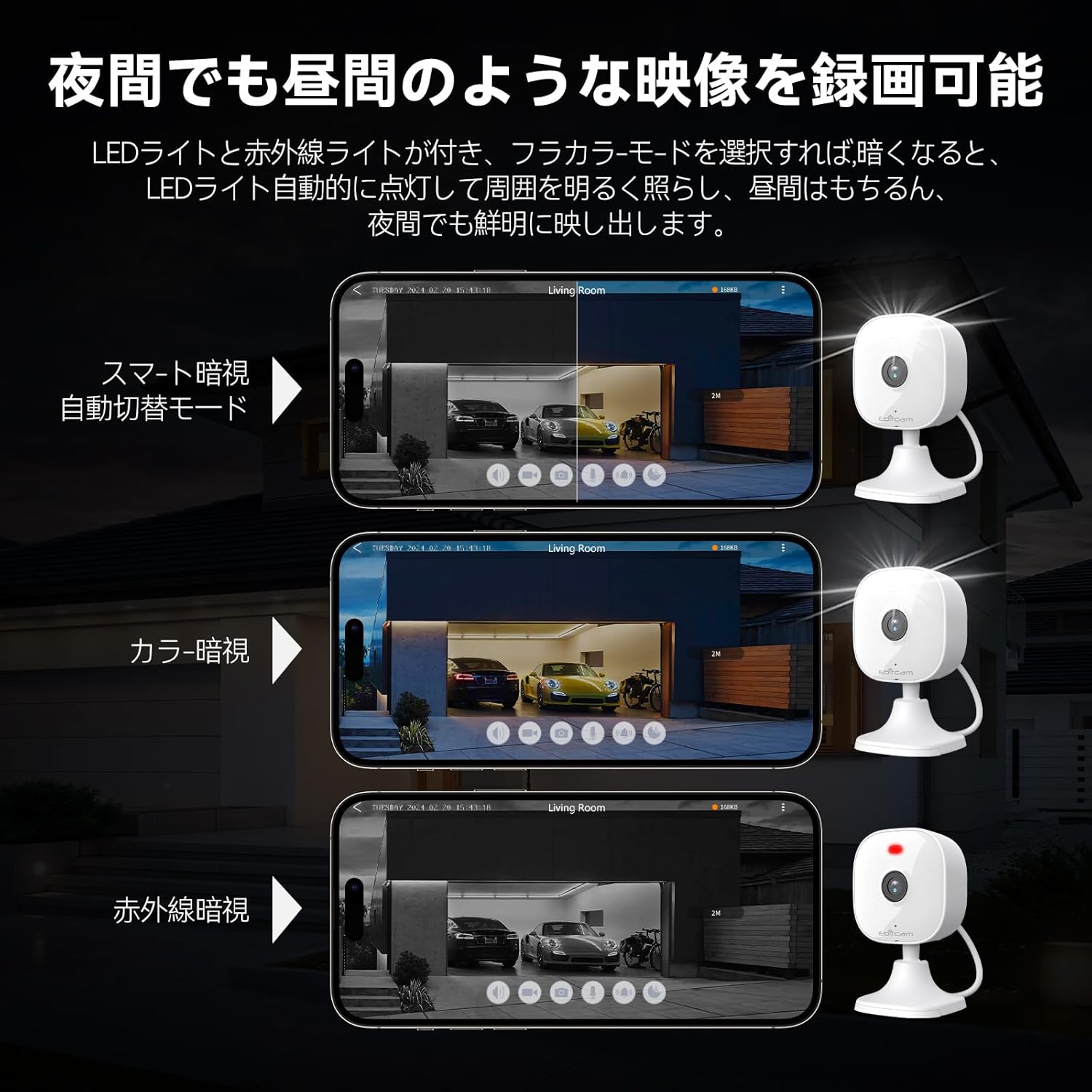
The camera provides clear visibility even in low-light or dark conditions.

Choose from various night vision modes for optimal clarity.
- Бүрэн өнгөт шөнийн хараа: Utilizes built-in white lights to provide color video footage in darkness (requires settings).
- Хэт улаан туяаны шөнийн хараа: Хэт улаан туяаны LED ашиглан бүрэн харанхуйд тод хар цагаан видео бичлэг хийдэг.
- Автомат шилжих: The camera can automatically switch between day and night modes based on ambient light.
5.5 Дижитал томруулалт
Zoom in on details within the live view эсвэл бичигдсэн хоолtage.

The camera supports up to 8x digital zoom.
- Use the pinch-to-zoom gesture on your smartphone screen within the app to digitally zoom in or out.
5.6 Alexa интеграци
Control your Ebitcam camera using voice commands with Amazon Alexa.
Integrate your camera with Alexa for convenient voice control.
- Enable the Ebitcam skill in your Alexa app.
- "Alexa, надад [камерын нэрийг] харуул" гэх мэт командуудыг ашиглана уу view the live feed on compatible Alexa devices.
5.7 Гэр бүлийн хуваалцах
Share access to your camera with family members or trusted friends.
- Within the Ebitcam app, navigate to the sharing settings for your camera.
- You can share access by generating a QR code for others to scan, allowing them to view камерын тэжээл.
6. Засвар үйлчилгээ
6.1 SD картын удирдлага
The camera supports up to a 512GB microSD card for local video storage.

Insert a microSD card for local video storage.
- Оруулах: Gently insert the microSD card into the slot located under the camera lens until it clicks into place.
- Форматлах: It is recommended to format the SD card through the camera settings in the app before first use.
- Устгах: Push the SD card gently to release it, then pull it out.
6.2 Цэвэрлэгээ
- Wipe the camera lens with a soft, clean cloth to ensure clear image quality.
- Камерын их биеийг зар сурталчилгаагаар цэвэрлэamp даавуу. Хүчтэй химийн бодис, зүлгүүрийн цэвэрлэгч хэрэглэж болохгүй.
6.3 Програм хангамжийн шинэчлэлтүүд
- Periodically check for firmware updates through the Ebitcam app. Updates can improve performance, add new features, and enhance security.
- Follow the app's instructions carefully when performing a firmware update.
7. Алдаа засах
Танд тулгарч болох нийтлэг асуудлуудын шийдлүүд энд байна:
- Unstable SD Card Performance: If you experience issues with recording or playback, an unstable SD card may be the cause. Please replace your SD card with a reliable, high-quality one and try again.
- App Not Functioning Correctly / Unstable Network: If the app does not function correctly, it might be due to an unstable network environment. Please ensure you have a stable 2.4GHz Wi-Fi connection.
- Camera Offline / Connection Issues: Ensure the camera is powered on and within range of your 2.4GHz Wi-Fi router. Check your Wi-Fi password in the app.
- Forgetting Login Password / Changing Network Environment: If you change your network environment or forget your login password, you can reset the camera. The camera's restart button is located under the lens. Press and hold it for a few seconds until the camera resets.
- False Alarms from Motion Detection: Adjust the motion detection sensitivity settings within the app. Consider setting specific detection zones to reduce unwanted alerts from areas like busy streets or swaying trees.
8. Техникийн үзүүлэлтүүд
| Онцлог | Тодорхойлолт |
|---|---|
| Бүтээгдэхүүний загварын дугаар | 8311 |
| Зүйлүүдийн тоо | 1 |
| Утасгүй холбооны технологи | Wi-Fi |
| Суурилуулах төрөл | Freestanding, Wall Mount, Ceiling Mount, Tabletop Mount, Door Mount |
| Шөнийн харааны хүрээ | 10 метр |
| Frame Rate | 25 fps |
| Бүтээгдэхүүний хэмжээ (LxWxH) | 10 x 5 x 5 см |
| Ус үл нэвтрэх түвшин | IP66 Усны хамгаалалттай |
| Бүтээгдэхүүний жин | 190 гр |
| Зөвлөмж болгож буй хэрэглээ | Interior, Home, Living Room, Bedroom, Pet, Shop |
| Холболтын технологи | WiFi |
| Дотор/гадаа ашиглах | Дотор, гадаа |
| Тохиромжтой төхөөрөмжүүд | iPhone, TV, Tablet, Desktop, Smartphone |
| Эрчим хүчний эх үүсвэр | Утастай цахилгаан |
| Холболтын протокол | Wi-Fi |
| Видео бичлэгийн нягтрал | 1296p (2К) |
9. Баталгаат хугацаа ба дэмжлэг
Ebitcam provides the following warranty and support for your product:
- Баталгаат хугацаа: A 2-year warranty is provided from the original purchase date.
- Онлайн дэмжлэг: Online support is available Monday to Friday, from 8 AM to 5 PM (local time). Please refer to the Ebitcam app or official webхолбоо барих мэдээллийг авах сайт.


